

For nearly a decade, the mobile development world was split into two deeply entrenched camps: the pure native purists writing Swift and Kotlin, and the cross-platform pragmatists relying on React Native. But if you look at the mobile landscape in 2026, that dividing line has nearly vanished.
React Native is no longer just a “framework” for spinning up quick MVPs. It is the enterprise standard, heavily adopted by tech giants like Meta, Microsoft, and Shopify. At the absolute center of this revolution is Expo.
Once considered just a beginner-friendly wrapper, Expo has matured into the definitive toolchain for React Native development. Think of it as the Next.js of mobile app development. With the rollout of Expo SDK 54 and the highly anticipated SDK 55, the ecosystem is undergoing a massive architectural shift.
If you are building mobile apps this year, here are the five major Expo trends and features you need to know about.
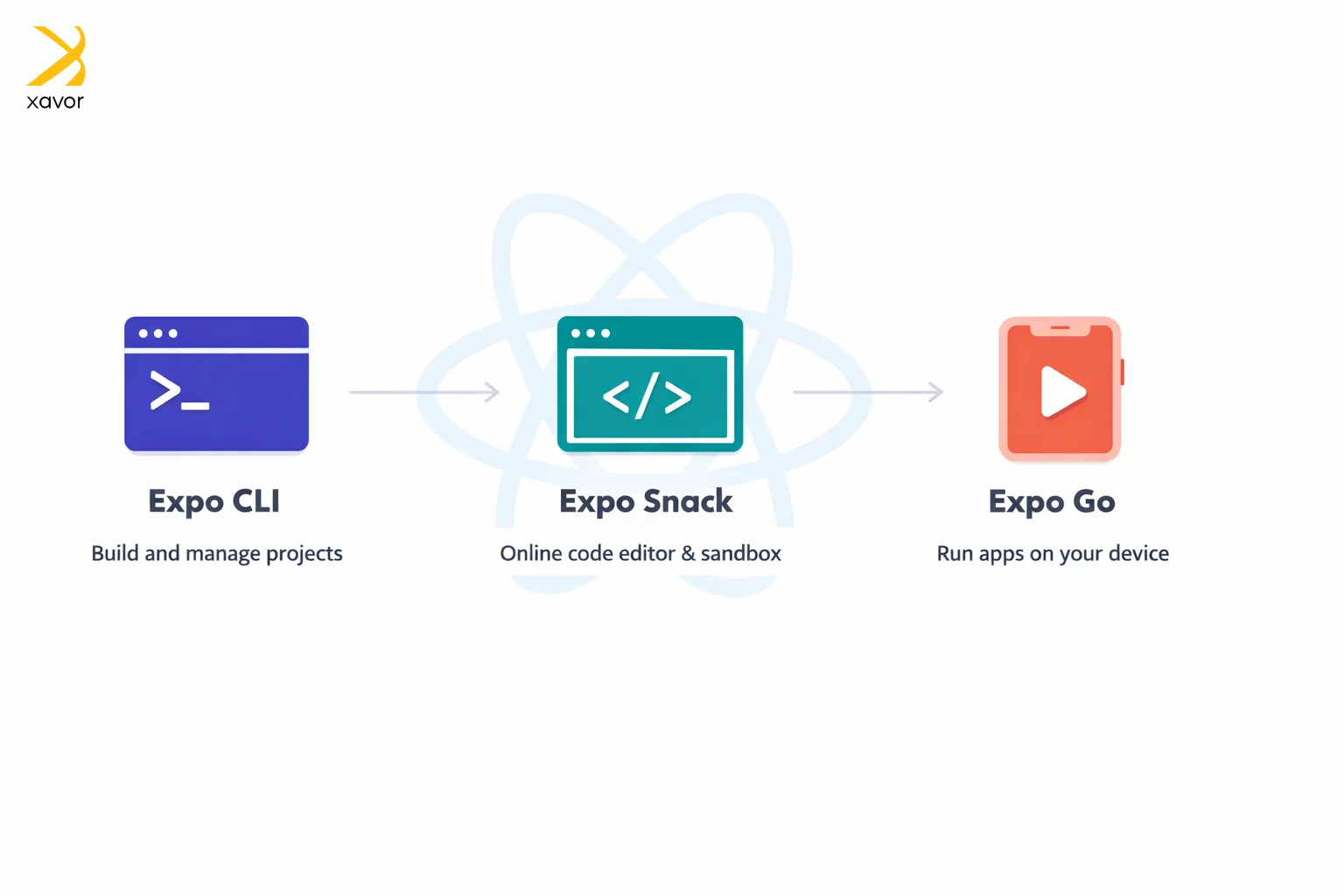
What is the Expo framework?
Expo is an open-source framework for React Native. It is designed to simplify the development of React Native apps. Expo is a complete development environment where you can fast track creating React Native apps with its own set of tools for development and testing.
Apart from libraries and services, Expo provides you platform features such as:
- Expo CLI to create projects using command line
- Expo Snack to run applications virtually
- Expo Go to quickly implement and test changes
The developer experience using Expo is also significantly better, React developers prefer Expo because it can handle many mobile development tasks without requiring native code.
1. The death of the bridge: The new architecture is mandatory
If you have been hovering around the React Native ecosystem for a while, you have undoubtedly heard about the “New Architecture.” For years, it was an experimental opt-in feature. In 2026, with Expo SDK 55 and React Native 0.83, the Legacy Architecture is officially dead and removed from the codebase. The ‘New Architecture’ is now mandatory.
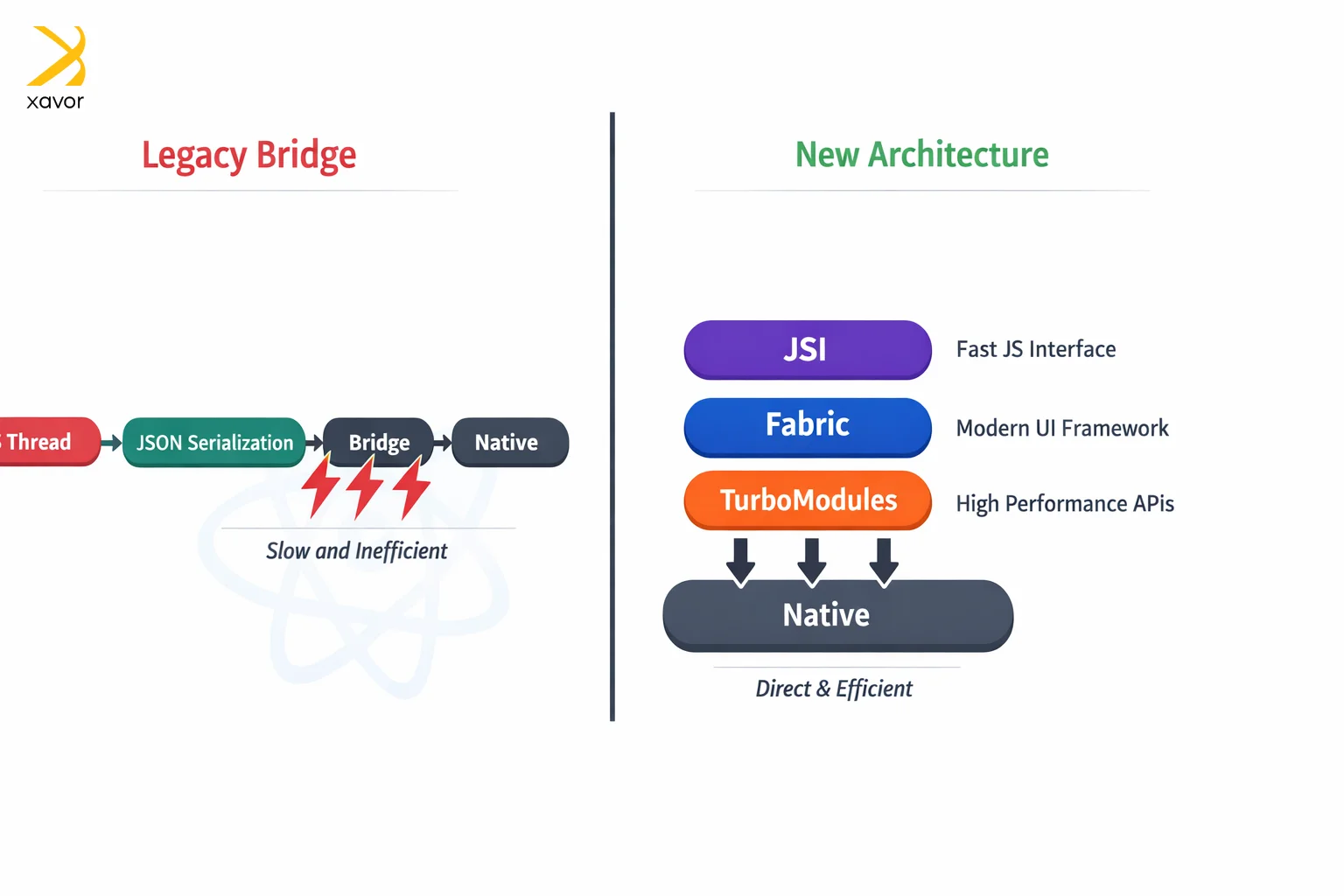
Why is this such a massive deal for Expo developers?
Historically, React Native relied on a “Bridge” to communicate between the JavaScript thread and the native device hardware. This communication required data to be serialized into JSON, sent across the bridge, and deserialized. For heavy animations or complex lists, this caused a notorious UI stutter known as “jank.”
The New Architecture fixes this completely through three core upgrades:
- JSI (JavaScript Interface): Allows JavaScript to hold direct references to C++ native objects. No more JSON serialization.
- Fabric Renderer: A rewritten UI layer that updates synchronously with the host platform (iOS/Android), prioritizing urgent UI interactions like swipe gestures over background tasks.
- TurboModules: Native modules are now lazy-loaded, meaning your app only initializes the specific device features (like the camera or GPS) exactly when the user needs them, slashing startup times.
By forcing the New Architecture as the default, Expo ensures that every new app built in 2026 starts with baseline performance that is virtually indistinguishable from a pure native app.
2. Hermes v1 and the magic of Bytecode Diffing
Over-the-Air (OTA) updates are arguably Expo’s superpower. Through Expo Application Services (EAS), developers can push bug fixes and minor feature updates directly to users’ devices without waiting for Apple or Google to review the app in their respective stores.
With the latest SDKs, Expo has supercharged this process by fully embracing Hermes v1, Meta’s mobile-optimized JavaScript engine. But the real game-changer in 2026 is Hermes Bytecode Diffing.
Previously, when you pushed an OTA update, the user’s device had to download the entire new JavaScript bundle. While small, this could still eat up bandwidth and slow down the update process on poor cellular connections.
Bytecode diffing changes the math entirely. Now, EAS Update only sends the binary patches—the literal differences between the old code and the new code.
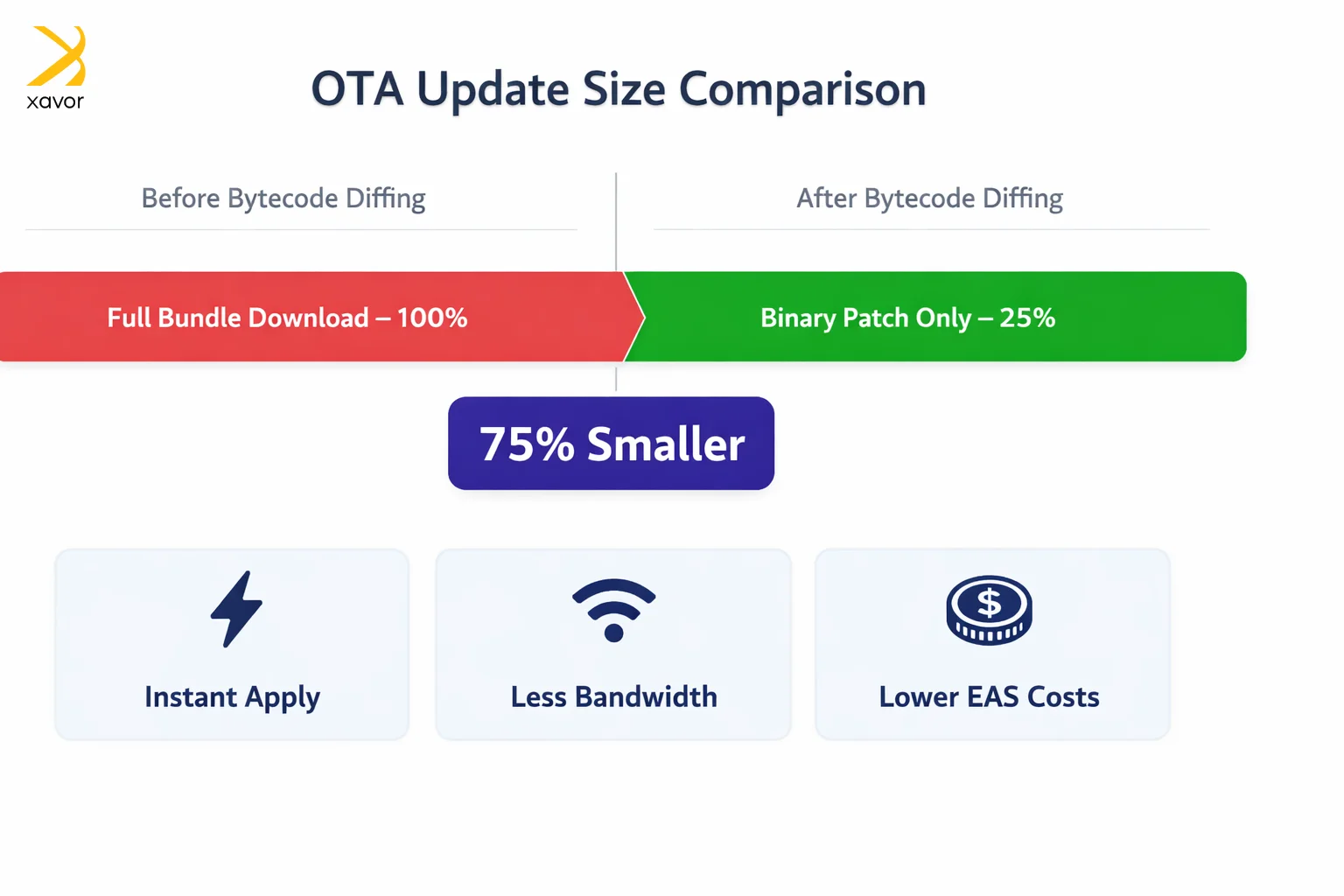
- 75% smaller updates: Update sizes are now a fraction of their previous weight.
- Instant application: Smaller files mean lightning-fast downloads, allowing updates to apply almost instantly in the background.
- Cost efficiency: For developers, this drastically reduces the bandwidth consumed on EAS plans, saving money at scale.
3. Expo router and the Next.js-ification of mobile
Routing in React Native used to be a nightmare of nested navigators and highly manual deep-linking configurations. Then came Expo Router, which brought the file-based routing paradigm of web frameworks (like Next.js) directly to mobile.
In 2026, Expo Router is not just a routing library; it is a full-fledged application framework. The latest updates have introduced features that fundamentally change how we structure apps:
- Experimental SplitView support: A long-awaited feature that makes building responsive, tablet-optimized, two-pane layouts incredibly simple.
- Guarded groups: Client-side routes can now be grouped and protected by authentication guards right at the folder level. If a user isn’t logged in, the router instantly redirects them to an anchor route without flashing protected screens.
- Synchronous layouts: Screens now update synchronously by default, eliminating those awkward visual flickers during tab transitions.
Furthermore, Expo is aggressively pushing toward the future by laying the groundwork for React Server Components (RSC) on mobile. While still in its early stages, RSC support means we will soon be able to offload heavy data-fetching and UI rendering logic to the server, resulting in drastically smaller app bundle sizes.
4. The “Brownfield” revolution
A massive hurdle for enterprise companies has always been the “all-or-nothing” nature of custom mobile app frameworks. If a bank had a massive iOS app written in Swift and wanted to adopt React Native, they had to painstakingly integrate it, often managing messy Node.js environments alongside Xcode.
Expo has solved this in 2026 with the introduction of the expo-brownfield package.
“Brownfield” development refers to adding new code to an existing project. With this new package, Expo introduces an Isolated approach to integration. You can now package your entire React Native/Expo app as a standalone native library (an AAR for Android or an XCFramework for iOS).
Native developers can then drop this library directly into their existing Swift or Kotlin codebases. They don’t need to install Node.js, they don’t need to run Metro bundlers, and they don’t need to understand React. They just consume your Expo features like any other native dependency. This is a massive trojan horse for getting Expo into legacy enterprise apps.
5. EAS workflows: The ultimate mobile CI/CD
Finally, we cannot talk about Expo in 2026 without mentioning the evolution of EAS (Expo Application Services). Building mobile apps locally is notoriously frustrating due to Xcode and Android Studio dependencies. EAS moved the build process to the cloud, but the newest trend is the shift toward EAS workflows.
EAS Workflows have effectively replaced traditional GitHub build triggers with a hyper-tailored mobile CI/CD pipeline.
- Scheduled cron jobs: You can now automate routine tasks. Want to automatically trigger a production build and submit it to Apple’s TestFlight every Friday at 2:00 AM? You can do that natively in EAS.
- Compiler caching: EAS now supports advanced build caching, speeding up subsequent Android and iOS builds by up to 30%.
- GitHub comment jobs: When a workflow finishes, EAS can automatically post a report (with QR codes for instant testing) directly into your GitHub Pull Requests, making QA testing entirely frictionless.
Is it wise to use Expo for every React Native project?
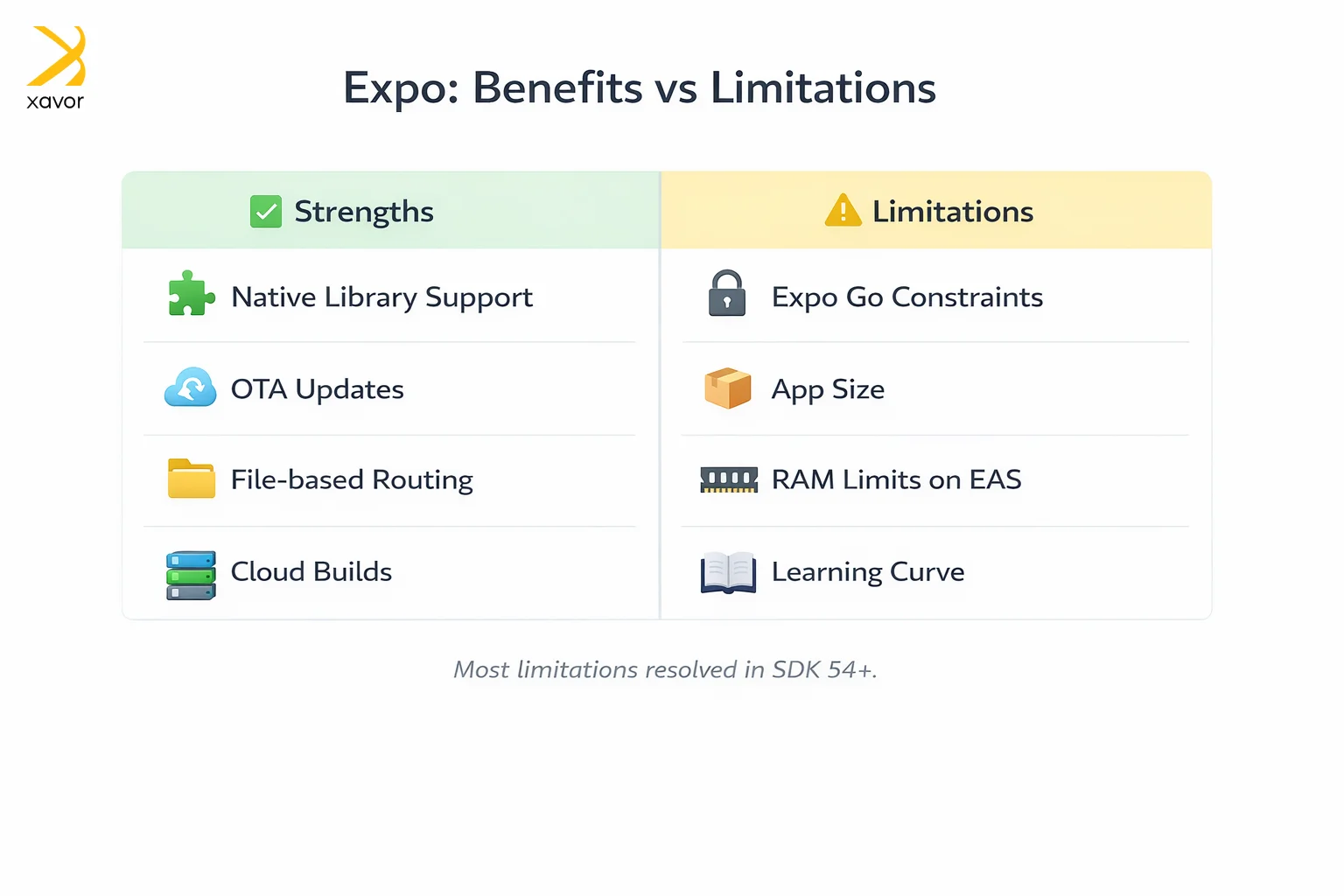
Expo has tremendous benefits in React development as you have read so far. But that said, it has limitations as well. Some developers raise some common objections against using Expo that you should be aware of.
1. Compatibility issues with native libraries
Expo may or may not work with native React libraries. In the past, this was basically true. Expo was mainly built for apps written only in regular React Native JavaScript, so using custom native libraries was not really an option. If you needed something that depended on native iOS or Android code, the usual React Native CLI gave you more freedom.
That’s why Expo got a reputation for being limited. However, that has now changed. Today, Expo itself can work with native libraries.
The confusion usually comes from Expo Go, which is just one part of the Expo ecosystem. Expo Go still has limits because it only supports the native modules that are already built into it. So, if your app depends on a custom native library, Expo Go usually won’t run it.
2. Large app sizes
Many developers complain that Expo apps can be larger in size because they often include extra stuff by default. There are many built-in APIs, so your app carries extra code you might not need.
Expo has improved in this regard as well though. Newer tools like EAS Build optimize production to reduce file size than it used to be.
3. Limited RAM access
EAS Build runs your app on Expo’s cloud servers. That creates a problem for developers since they were limited to the amount of memory Expo provided. At one point, that meant a build could run into trouble if the project needed more than the default 12 GB of RAM.
This concern is based on a real limitation. But that limitation is now mostly a thing of the pastE. xpo now supports custom build resources, which means developers can choose more powerful build machines when their project needs it.
Conclusion
The debate over whether to use cross-platform or pure native tools is over. In 2026, choosing Swift or Kotlin for a standard, data-driven application is increasingly seen as a premature optimization.
With the mandatory enforcement of the New Architecture, the Next.js-style development experience of Expo Router, and the enterprise-grade deployment tools of EAS, the Expo framework has moved up the abstraction ladder. It allows developers to ship features at web-speed, without sacrificing a single drop of native mobile performance. If you aren’t building with Expo today, you are already falling behind.
Xavor’s mobile app developers use a wide range of tools to create modern, high-performing apps. We create apps for web and mobile, iOS and Android, using React Native, Flutter, and a ton of other frameworks.
If you need help creating your app using Expo, contact us at [email protected] to talk to our development experts.

FAQs
Expo is a toolset that makes building React Native apps easier by handling setup, configuration, and access to device features for you. It lets you create and run apps quickly without writing native code, using ready-made APIs and tools.
Yes, React Native recommends Expo and fully supports using it. Expo is widely used and even mentioned in React Native docs as an easier way to get started. Many developers choose Expo for simplicity, especially for new projects.
Yes, Expo is actually one of the best choices for beginners. It simplifies React Native development by handling setup, configuration, and many complex tasks for you, so you can focus on learning and building apps instead of dealing with native code.