

In 2006, Netflix launched a famous contest. They offered a $1 million prize to anyone who could improve their movie recommendation algorithm by 10%. A team of engineers won the prize in 2009 but surprisingly, Netflix never actually used the winning code. Because by the time the contest ended, the company had to shift from DVDs to instant video streaming. This change required their system to process huge amounts of live data in real time. So how did they tackle this challenge? They moved their operations to the cloud.
Netflix’s decision highlights a reality that modern enterprises face every day. Businesses can no longer rely on static reports generated from old data. They need systems that can process and analyse information as it is created. Cloud BI services address this challenge by bringing business intelligence to the cloud, enabling organizations to access real-time insights, scale analytics as demand grows, and make data-driven decisions. That’s why cloud BI has become a key capability for modern enterprises, and why it’s worth understanding how it works.
This article explains what cloud BI is, how it works, why it matters now, and how your organization can start using it without rebuilding everything from scratch.
What Is Cloud BI?
Cloud Business Intelligence (Cloud BI) is a modern approach to business intelligence where data storage, processing, analytics, and reporting are hosted on cloud infrastructure instead of on-premises servers. It enables organizations to collect data from multiple sources, analyze it in real time, and access interactive dashboards and reports from anywhere with an internet connection.
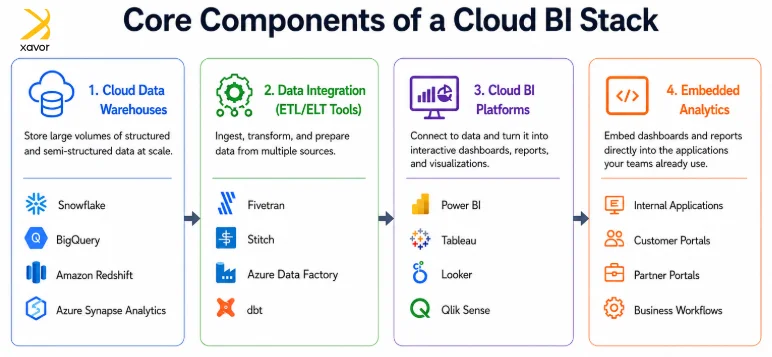
Unlike traditional BI systems that require organizations to manage their own hardware, software, and maintenance, cloud BI platforms are delivered as cloud-based services. These business intelligence platforms combine cloud analytics, data visualization, reporting, and dashboard capabilities into a single solution. This makes them easier to deploy, more scalable, and more cost-effective, allowing businesses to expand their analytics capabilities without investing heavily in infrastructure.
Cloud BI vs. Traditional BI
While both traditional BI and cloud BI help organizations analyze data and generate insights, they differ significantly in how they’re deployed, managed, and scaled. Here’s a quick comparison:
| Feature | Traditional BI | Cloud BI |
| Deployment | Installed on on-premises servers | Hosted and managed in the cloud |
| Infrastructure | Requires dedicated hardware and IT maintenance | No on-premises infrastructure required |
| Scalability | Limited by available hardware; scaling requires upgrades | Scales on demand with cloud resources |
| Implementation Time | Weeks or months to deploy | Can be deployed in days or weeks |
| Cost Model | High upfront capital investment | Subscription-based (pay-as-you-go or SaaS) |
| Data Access | Typically restricted to internal networks | Accessible securely from anywhere with internet access |
| Data Processing | Often relies on scheduled batch processing | Supports real-time or near-real-time analytics* |
| Maintenance | Managed by internal IT teams | Updates, patches, and maintenance handled by the provider |
| Collaboration | Limited sharing and collaboration | Easy sharing of dashboards and reports across teams |
| Best Suited For | Organizations with strict on-premises requirements or legacy systems | Businesses that need agility, scalability, and faster decision-making |
How Cloud BI Works
You do not need to be an engineer to understand cloud BI. But you should know what is happening under the hood so you can ask the right questions when evaluating vendors.
Data Ingestion
Your data lives in a lot of places. Salesforce. Your ERP. Your website. Your accounting software. Cloud BI starts by pulling that data into one place. Tools like Fivetran, Airbyte, or Azure Data Factory connect to these sources automatically and move the data on a schedule you set, hourly, daily, or in real time.
Data Storage
Once the data is in the cloud, it goes into a data warehouse. Think of this as a massive spreadsheet that never crashes. Snowflake, Google BigQuery, and Amazon Redshift are the big names. They separate storage from compute, which means you can keep years of historical data cheaply and only pay for processing power when you are actually running queries.
Data Modeling
Raw data is messy. A data model cleans it up and defines how tables relate to each other, customers to orders, orders to products, products to inventory. This is usually done in SQL or with tools like dbt (data build tool). A good model means your dashboard shows revenue the same way your CFO calculates it.
Visualization and Distribution
Finally, the BI platform takes that clean data and turns it into charts, tables, and dashboards. Power BI, Tableau, and Looker are the most common. These dashboards refresh automatically. You can set alerts so a manager gets a text when inventory drops below a threshold. You can embed a dashboard into your CRM so a salesperson sees customer health scores without leaving Salesforce.
Security and Governance
This is where IT teams usually ask hard questions. Cloud BI platforms handle encryption, access controls, and compliance certifications at the infrastructure level. You define who sees what. A regional manager sees her region, a VP sees all regions, an analyst sees anonymized data. Everything is logged. Everything is auditable.
Benefits of Cloud BI
Cloud BI offers more than just easier access to dashboards. It helps organizations make better use of their data while reducing the effort required to manage analytics infrastructure.
- Faster decision-making: Teams can access up-to-date information instead of waiting for scheduled reports. This allows businesses to respond quickly to changing customer needs, operational issues, and market trends.
- Better scalability: As data volumes grow, cloud BI platforms can scale without requiring new hardware. Organizations can increase storage and computing resources as needed while paying only for what they use.
- Self-service analytics: Business users no longer need to depend on IT teams for every report. Modern cloud BI platforms allow users to explore data, build dashboards, and answer business questions on their own, improving productivity and reducing reporting delays.
- Improved collaboration: Dashboards and reports can be shared securely across departments, offices, and remote teams. Everyone works from the same data, making collaboration easier and ensuring a single source of truth across the organization.
- Lower infrastructure costs: Since cloud providers manage servers, updates, and maintenance, organizations spend less on infrastructure and ongoing administration. This allows IT teams to focus on more strategic initiatives.
Industries Using Cloud BI
Cloud BI is not theoretical. It is already running in companies you interact with every day. Here is where it shows up across industries
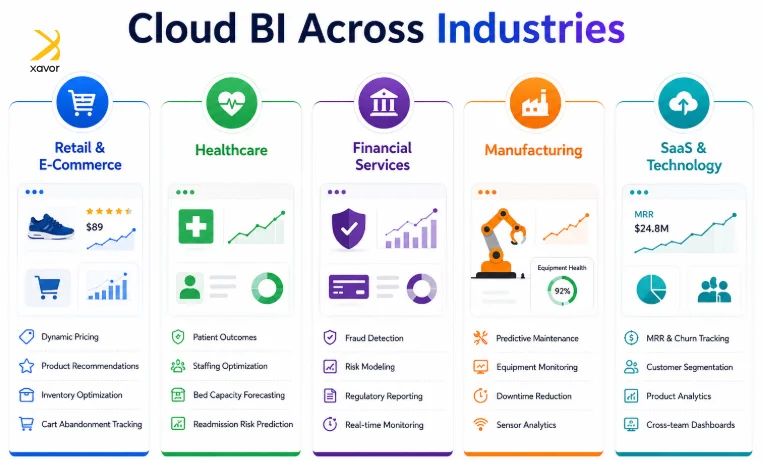
- Retail and E-Commerce: Amazon processes customer behavior data in real time to adjust pricing, recommend products, and manage supply chains. Smaller retailers use the same principles at a smaller scale, monitoring cart abandonment, optimizing inventory across warehouses, and personalizing email campaigns based on purchase history.
- Healthcare: Hospitals use cloud BI to track patient outcomes, manage staffing levels, and predict readmission risk. During COVID-19, health systems that had cloud analytics in place could model bed capacity and supply needs daily. Those running on spreadsheets could not.
- Financial Services: Banks and insurers use cloud BI for fraud detection, risk modeling, and regulatory reporting. A credit card company can flag a fraudulent transaction in milliseconds because its analytics pipeline processes millions of events per second in the cloud.
- Manufacturing: Factories use sensors on equipment to predict failures before they happen. Cloud BI dashboards show maintenance teams which machines are likely to break down in the next 30 days, based on vibration, temperature, and performance data. This is called predictive maintenance, and it saves millions in unplanned downtime.
- SaaS and Technology: Software companies live or die by metrics, monthly recurring revenue, churn rate, customer acquisition cost, lifetime value. Cloud BI lets them track these in real time, segment by customer tier, and share dashboards across sales, marketing, and product teams without exporting CSVs.
Challenges to Consider
While cloud BI offers significant benefits, organizations should plan for a few common implementation challenges:
- Data migration: Consolidating data from multiple legacy systems can be complex and may require careful planning to avoid disruptions.
- Data quality: Inaccurate, incomplete, or inconsistent data can lead to unreliable insights. Cleaning and standardizing data is essential before analysis.
- Security and compliance: Organizations handling sensitive customer, financial, or healthcare data must implement strong access controls, governance policies, and ensure compliance with regulations such as GDPR, HIPAA, or SOC 2.
- Integration with existing systems: Connecting cloud BI platforms with ERPs, CRMs, and other business applications may require custom integrations or modern ETL/ELT pipelines.
- User adoption and training: Even the best BI platform delivers limited value if employees don’t use it. Providing intuitive dashboards, user training, and change management is critical to successful adoption.
- Cost management: Although cloud BI reduces upfront infrastructure costs, organizations should monitor storage, compute, and data transfer usage to prevent unexpected cloud expenses.
How Xavor Corporation Can Help
Adopting cloud BI doesn’t have to mean replacing your entire analytics ecosystem. The right approach starts with understanding your existing data landscape and building a solution that aligns with your business goals.
At Xavor Corporation, we help organizations modernize their business intelligence by providing scalable cloud BI solutions in accordance to their needs. Whether you’re migrating from legacy BI systems, building a modern data platform, or embedding analytics into customer-facing applications, our team helps you move forward with minimal disruption.
Our cloud BI services include:
- Cloud BI strategy and consulting
- Data warehouse modernization (Snowflake, BigQuery, Azure Synapse, Amazon Redshift)
- ETL/ELT pipeline development and data integration
- Interactive dashboards and reporting using Power BI, Tableau, Looker, and Qlik
- Embedded analytics for web and enterprise applications
- Performance optimization, governance, and security
From strategy to implementation and ongoing optimization, Xavor helps organizations transform raw data into actionable insights that drive faster, smarter business decisions.
Conclusion
Data is no longer something organizations review at the end of the day. It shapes decisions as they happen. Businesses that can turn information into action faster are better equipped to adapt, compete, and grow. Cloud BI provides the flexibility and accessibility needed to support that shift, making it an important investment for organizations that want to build a more data-driven future.
If you are planning to modernize your analytics or move from traditional BI systems, Xavor Corporation can help. Our experts can design and implement a cloud BI solution that fits your business goals and existing technology. To learn more or discuss your requirements, contact us at [email protected].

FAQs
Traditional BI relies on on-premises infrastructure, while Cloud BI is hosted in the cloud and offers better scalability, accessibility, and lower infrastructure costs. Many organizations use a hybrid approach, keeping sensitive workloads on-premises while using cloud BI for broader analytics.
Implementation timelines vary based on complexity, but cloud BI deploys significantly more quickly than traditional on-premises solutions. Simple implementations connecting a few data sources can be operational within days. More complex deployments involving multiple data sources, custom data models, governance frameworks, and training for people typically take weeks to a few months.
Popular platforms include Microsoft Power BI, Tableau, Looker, Qlik Sense, and Amazon QuickSight.