

Customers today expect a seamless experience across every touchpoint. They don’t think in channels, and neither should your customer service operation.
Salesforce Omni-Channel services help organizations implement intelligent routing within Salesforce Service Cloud, ensuring customer work is assigned to the right agent based on skills, availability, workload, and business rules. It helps organizations deliver consistent support across multiple channels while giving agents a complete view of every customer interaction.
But technology alone doesn’t create an omni-channel experience. It also requires the right routing strategy with unified customer data and well-designed service processes.
This blog explores what Salesforce Omni-Channel is, how it works under the hood, how to use it to build a genuine omni-channel customer experience, and the real business outcomes you can expect when you get it right.
Multi-channel vs. omni-channel: Why the distinction matters
These two terms are often used interchangeably, but they describe fundamentally different realities.
A multi-channel business is present on many channels, but each channel operates independently. There is no shared customer record, no unified agent view, and no consistent experience. The customer’s history on one channel is invisible on another.
| Feature | Multi-channel | Omni-channel |
| Customer experience | Customers can contact your business through multiple channels, but each interaction is disconnected | Customers enjoy a continuous experience across every channel without losing context |
| Customer history | Each channel maintains its own interaction history | Every interaction is consolidated into a single customer record |
| Agent visibility | Agents only see conversations from the channel they’re handling | Agents have a complete view of the customer’s history across all channels |
| Channel switching | Customers often have to repeat information when moving between channels | Conversations and context follow the customer across channels, eliminating repetition |
| Reporting | Performance is measured separately for each channel | Analytics provide a unified view of the entire customer journey |
| Operational efficiency | Teams work in silos with limited coordination | Work is routed intelligently across teams based on skills, availability, and business rules |
| Business impact | Increases customer reach but often creates fragmented experiences | Improves customer satisfaction, loyalty, operational efficiency, and long-term retention |
An omni-channel business connects every channel into a single, coherent experience. The customer’s full history travels with them. Agents see the whole picture. Interactions can be transferred or escalated without the customer starting over. The experience feels continuous because it is.
The distinction also matters operationally. Multi-channel creates reporting blind spots: you can see how each channel performs in isolation, but you cannot see the full customer journey. Omni-channel gives you that unified view, which is foundational to measuring what actually matters.
What Is Salesforce Omni-Channel?
Salesforce Omni-Channel is a native Service Cloud feature that automatically routes incoming work to the most appropriate available agent in real time, such as:
- Cases
- Chat sessions
- Messaging conversations
- Voice calls and leads
Companies can use it to remove the need for agents to manually pick up work from queues and eliminate the inefficiency of supervisors manually assigning tasks.
At its core, Omni-Channel operates on three key concepts:
1. Presence and availability
Agents set their availability status through the Omni-Channel widget embedded in the Salesforce utility bar. Presence configurations allow admins to define which work types an agent can receive in each status, and capacity limits ensure no agent is overloaded. When an agent is available, work routes to them automatically based on the routing logic configured by your admin.
2. Routing models
Salesforce Omni-Channel supports three core routing approaches:
- Queue-based routing: Work items are assigned to a queue and routed to the next available agent with matching skills and capacity. This is the most straightforward model and ideal for teams handling uniform work types.
- Skills-based routing: Work is matched to agents based on specific skill sets — language, product expertise, tier level, or certification. This ensures complex or specialized cases reach the right person, not just the next available one.
- Einstein routing (AI-enhanced): Salesforce’s AI layer analyses historical case data, agent performance, and real-time availability to predict the best agent for each piece of work. Einstein Routing improves continuously over time as it processes more interactions.
3. Capacity and work item priority
Omni-Channel uses a capacity model that assigns a ‘size’ to each work type. A live chat might consume 30% of an agent’s capacity, a standard email case 20%, and a voice call 100%.
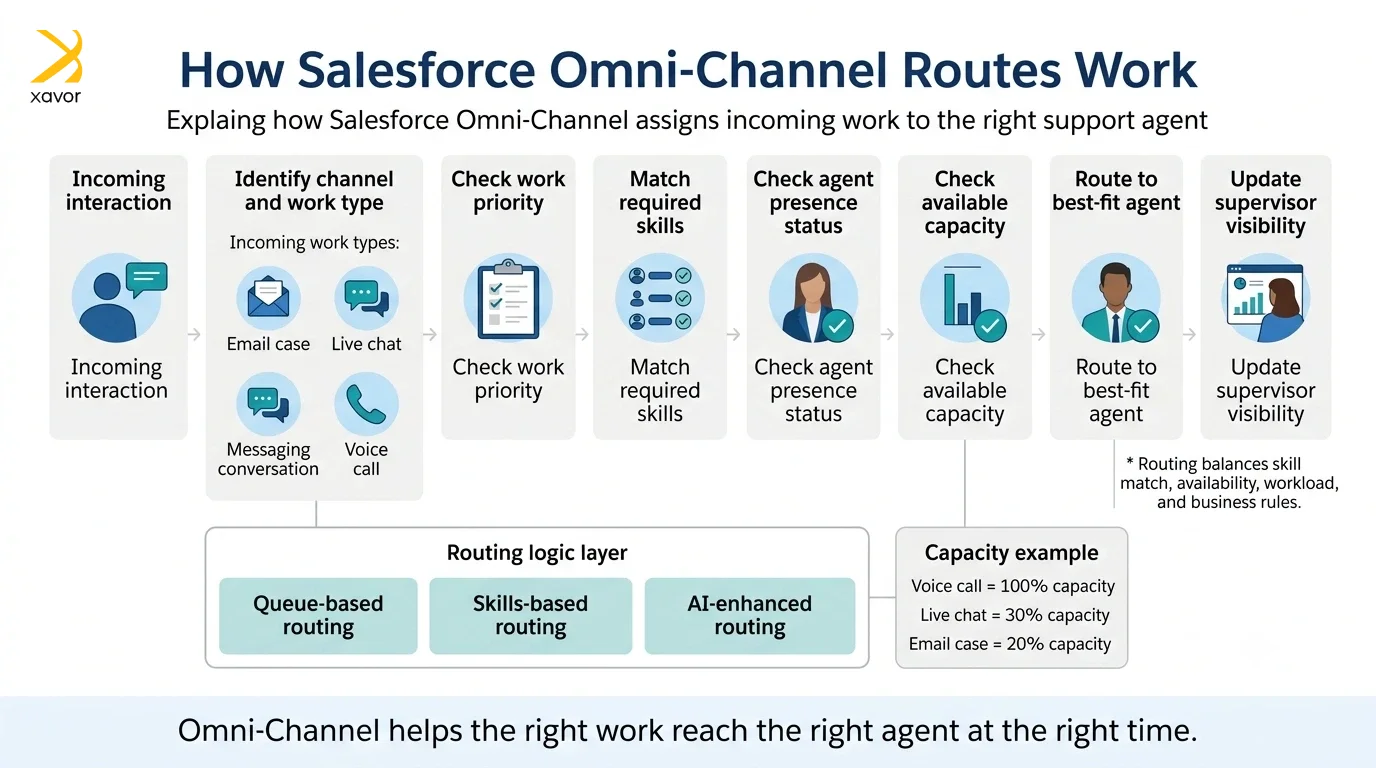
This prevents agents from being simultaneously assigned work that would overwhelm them while ensuring maximum utilization across the team. Priority settings within queues determine which work items are distributed first when multiple items are waiting.
The channels you can connect through Salesforce
One of the most important things to understand about Salesforce Omni-Channel is that it is not a channel itself. Rather, it is the routing and distribution layer that sits beneath every channel.
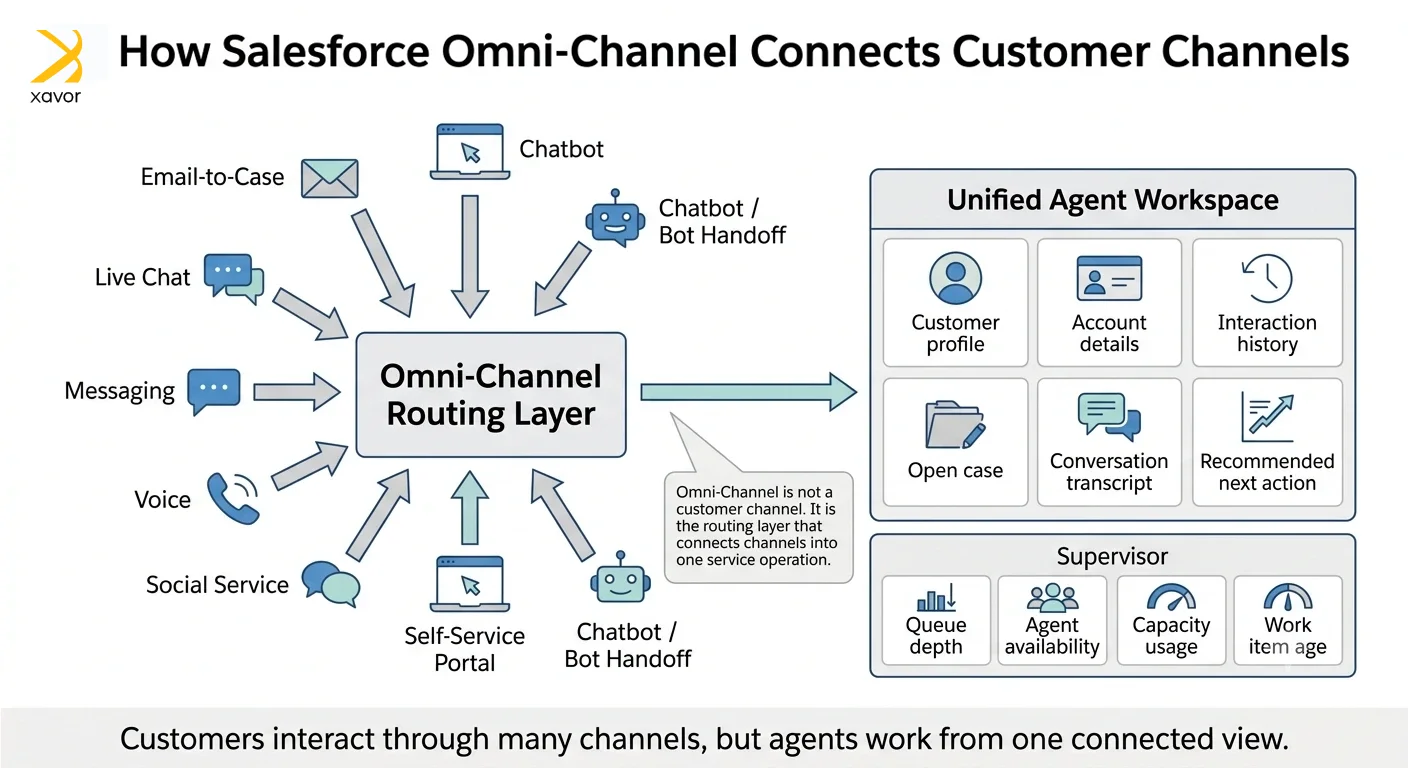
The channels your customers interact with are configured separately and then connected to Omni-Channel to become part of your unified workspace.
Here are the primary channels B2B organizations integrate:
- Email-to-case: The foundational channel for most B2B service teams. Incoming emails to a support address automatically create cases in Salesforce, which are then routed through Omni-Channel to the appropriate queue or agent. Email-to-Case supports threading, attachment handling, and auto-response rules.
- Live chat (Embedded Service): Web-based live chat sessions initiated from your website, customer portal, or help center are routed directly to available agents via Omni-Channel. AI agents see the full chat transcript alongside the customer’s CRM record and case history.
- Messaging channels: Through Salesforce’s Digital Engagement add-on, organizations can route asynchronous messaging conversations from WhatsApp, SMS, and social messaging platforms directly into the Omni-Channel workspace. Similarly, businesses using Zoho CRM can use WhatsApp integration with Zoho CRM to connect WhatsApp conversations with CRM workflows and keep customer interactions organized in one place. Agents handle these alongside other work types with full context.
- Voice (Service Cloud Voice): Inbound and outbound phone calls handled through Service Cloud Voice are integrated into the same Omni-Channel framework. Real-time call transcription, Einstein-powered next-best-action prompts, and automatic after-call work routing are available natively.
- Social customer service: Mentions, direct messages, and comments on LinkedIn, Twitter/X, and Facebook can be monitored and routed as cases through Social Studio or third-party integrations, giving social interactions the same structured case management as any other channel.
- Self-service portals and chatbots: Experience Cloud portals and Einstein Bots provide customers with self-service resolution pathways. When a bot cannot resolve an issue, it performs a warm handoff to a live agent via Omni-Channel — passing the full conversation history so the agent never starts from scratch.
Real-world use cases
Use Case 1: Unifying a fragmented service operation
A B2B technology distributor was managing inbound support across three separate tools: a legacy ticketing system for email, a standalone live chat platform, and phone support logged manually in spreadsheets. Agents had no visibility into a customer’s channel history, leading to repeated escalations and duplicated effort.
After migrating to Salesforce Service Cloud with Omni-Channel, all three channels were unified under a single agent workspace. Every customer interaction — regardless of channel — appeared in one place alongside the full account and contact history. Average handle time dropped by 22%, first contact resolution improved by 31%, and supervisor visibility across the entire operation went from near-zero to real-time.
Use Case 2: Skills-based routing for a multi-tier support model
A global SaaS company ran a three-tier support model: tier-1 for general queries, tier-2 for technical issues, and tier-3 for enterprise accounts. Previously, triage was done manually by a team of coordinators who read each case and assigned it to the right queue.
Configuring Omni-Channel with skills-based routing allowed cases to route automatically in under 30 seconds. The coordinators were redeployed as senior support agents, adding capacity to the team rather than overhead.
Use Case 3: bot-to-human handoff that actually works
A financial services firm deployed an Einstein Bot on their customer portal to handle common account queries. The challenge was the handoff: when customers needed a human agent, they were transferred into a generic queue with no context, forcing them to re-explain their issue.
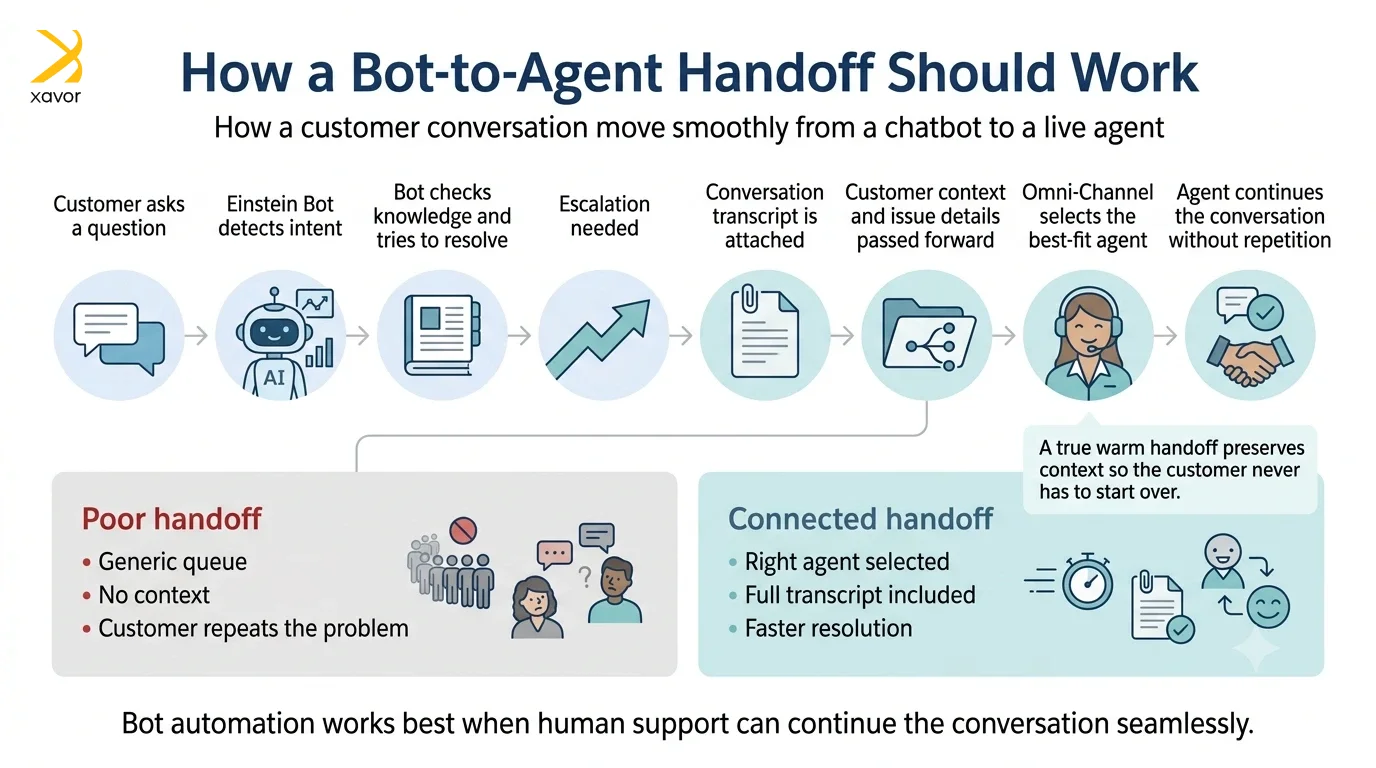
Customer satisfaction scores on transferred interactions increased by 38% with the above approach, and average handle time for post-bot escalations fell by 27%.
Benefits and ROI: What omni-channel delivers
When Salesforce Omni-Channel is properly configured and your channel strategy is aligned, the business outcomes are measurable and significant:
- Faster resolution times: Intelligent routing eliminates queue-browsing and manual assignment, getting the right work to the right agent faster. Organizations typically see a 20–35% reduction in average handle time within the first quarter of deployment.
- Higher first-contact resolution rates: Agents with full context — case history, channel history, account details — resolve issues faster and more completely on the first interaction. This directly reduces repeat contact rates and the cost per case.
- Improved agent experience and reduced burnout: Capacity management prevents agents from being overwhelmed. Presence controls give agents autonomy over their workload. Studies show that structured workload distribution reduces agent burnout and improves retention — a significant cost saving given the cost of agent turnover in service organisations.
- Real-time operational visibility for supervisors: The Omni-Channel Supervisor panel provides a live view of queue depth, agent availability, work item age, and capacity utilisation. Supervisors can reassign work, adjust capacity, and intervene on at-risk interactions without leaving Salesforce.
- Consistent customer experience across channels: Customers receive the same quality of service whether they contact you via email, chat, phone, or messaging. This consistency builds trust and directly correlates with customer satisfaction and loyalty scores.
- Scalable operations: As interaction volumes grow, Omni-Channel scales without requiring proportional increases in coordination overhead. New channels can be added to the same routing framework without rebuilding your operational model.
How to set up Salesforce Omni-Channel: A practical framework
For Salesforce admins and CRM managers, here is a structured approach to implementing Omni-Channel effectively:
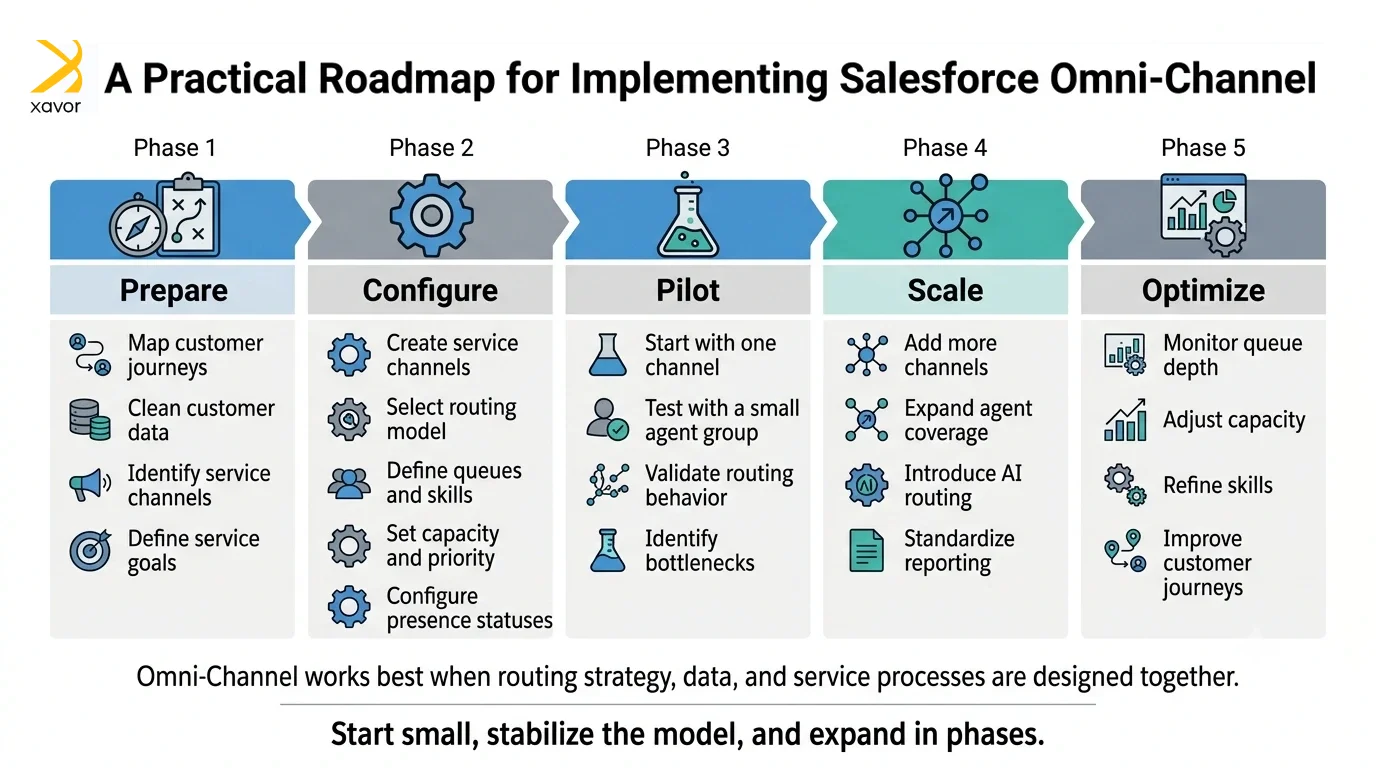
- Enable Omni-Channel in Setup. Navigate to Setup → Omni-Channel Settings and enable the feature. This also activates Presence, Routing Configurations, and the Supervisor panel.
- Define your Service Channels. Create a Service Channel for each work type you want to route: Cases, Chats, Messaging Sessions, Voice Calls, and any custom objects. Each channel is mapped to a Salesforce object.
- Configure Routing Configurations. Set routing priority and capacity model per channel. Decide between queue-based, skills-based, or Einstein routing based on your team structure.
- Build Presence Configurations and Statuses. Define which work types agents can receive in each presence status. Create statuses that reflect real-world working states: Available, On Break, In Training, On Call.
- Assign agents to queues with appropriate skills. If using skills-based routing, define your skill taxonomy carefully. Skills should reflect genuine differentiators in your team’s capabilities, not overly granular tags that create routing bottlenecks.
- Add the Omni-Channel utility to the Lightning App. Deploy the Omni-Channel widget to your agents’ Lightning App utility bar so they can manage their presence status and accept work directly from their workspace.
- Test, monitor, and iterate. Run controlled pilots with a subset of agents before full rollout. Use the Supervisor panel and Omni-Channel reporting to identify routing gaps, capacity imbalances, and queue bottlenecks in the first 30 days.
Best practices for a successful omni-channel strategy
- Unify your data before your channels: Omni-Channel is most powerful when agents see a complete customer record. Ensure your contact, account, and case data is clean and consolidated before routing work through the system. Fragmented data undermines the connected experience you are trying to create.
- Design for the customer journey, not the org chart: Routing configurations should reflect how customers move through their experience, not how your internal teams are structured. Map common customer journeys first, then design your queues and skill sets around them.
- Set realistic capacity limits and revisit them: Initial capacity configurations are estimates. Monitor actual agent utilization in the first 60 days and adjust limits based on real data. Overloaded agents slow everything down; underutilized agents represent wasted capacity.
- Train agents on the Omni-Channel widget and presence discipline: The effectiveness of your routing model depends on agents keeping their presence status accurate. Invest time in training agents on the widget and create clear team norms around status hygiene.
- Use Omni Supervisor as a daily operational tool: The Supervisor panel is an operational dashboard. Encourage supervisors to use it actively throughout the day to catch queue spikes, identify stuck work items, and monitor agent availability in real time.
- Plan your channel expansion sequentially: If you are rolling out multiple channels, do not launch everything simultaneously. Start with your highest-volume channel, stabilize the routing, and add channels progressively. This approach isolates issues and allows your team to adapt incrementally.
Conclusion
Salesforce Omni-Channel gives your company the infrastructure to deliver a genuinely connected customer experience. But the technology is only half the equation. The organizations that get the most from Omni-Channel are those that pair the platform’s capabilities with a clear strategy.
The customers you serve are already living across multiple channels. The question is whether your organization is meeting them there with context, consistency, and speed.
Salesforce Omni-Channel makes that possible. The right implementation partner makes it happen. Our certified Salesforce consultants specialize in Service Cloud implementation, Omni-Channel configuration, and end-to-end omni-channel CX strategy.
Get in touch today with Xavor at [email protected] for a free omni-channel readiness review and find out how quickly your organization could be operating at full omni-channel capability.

FAQs
First, enable enhanced Omni-Channel. Then create service channels followed by queues, routing configurations, presence statuses, skills, and agent capacity rules. Salesforce then routes cases, chats, messages, and other work to the best available agent.
There is no single limit. Enhanced Omni-Channel supports up to 300,000 pending routing requests, while an agent can have up to 100 open work items; org-wide queued work is also limited to 45,000 items per hour.
Core Omni-Channel routing is available with supported Agentforce Service licenses. Digital messaging channels may require Agentforce Contact Center Digital, currently listed at $75 per user/month, while voice and broader contact-center packages have separate pricing.