

Customer data is rarely stored in one place. Sales activity lives in CRM, product usage sits in application logs, transactions sit in commerce and ERP systems, service history sits in contact center tools, and consent records sit somewhere else again. When leaders ask simple questions like “Which customer segments are driving margin this quarter?” or “Which accounts need proactive service coverage this month?”, teams often answer with partial data and inconsistent definitions.
That gap shows up in external benchmarks. IBM’s State of Salesforce 2024 research reports that 97% of surveyed Salesforce customers collect diverse types of data, while only 24% are using it in ways tied to customer experience outcomes. In parallel, Salesforce research highlights rising expectations for individualized engagement and higher caution around personal data use.
Salesforce Customer 360 is designed for this exact situation: unify customer data across systems, reconcile identities, apply governance, and place trusted context directly inside the workflows where decisions happen. For teams implementing this approach, custom salesforce development services can help operationalize integrations, data modeling, and automation so the unified profile is actually usable across sales, service, and marketing.
What is Salesforce Customer 360?
Salesforce Customer 360 is a framework for connecting teams across a business by bringing customer data together from multiple sources. Instead of limiting customer context to sales activity, it aligns marketing, sales, service, commerce, and IT around a shared view of the customer, so each team works from the same current information.
Customer 360 is not a single standalone product. It is a combined approach that uses Salesforce clouds such as Sales Cloud and Service Cloud, Marketing Cloud, Commerce Cloud, and related capabilities to build a centralized record of customer interactions and activity.
How does Salesforce Customer 360 work?
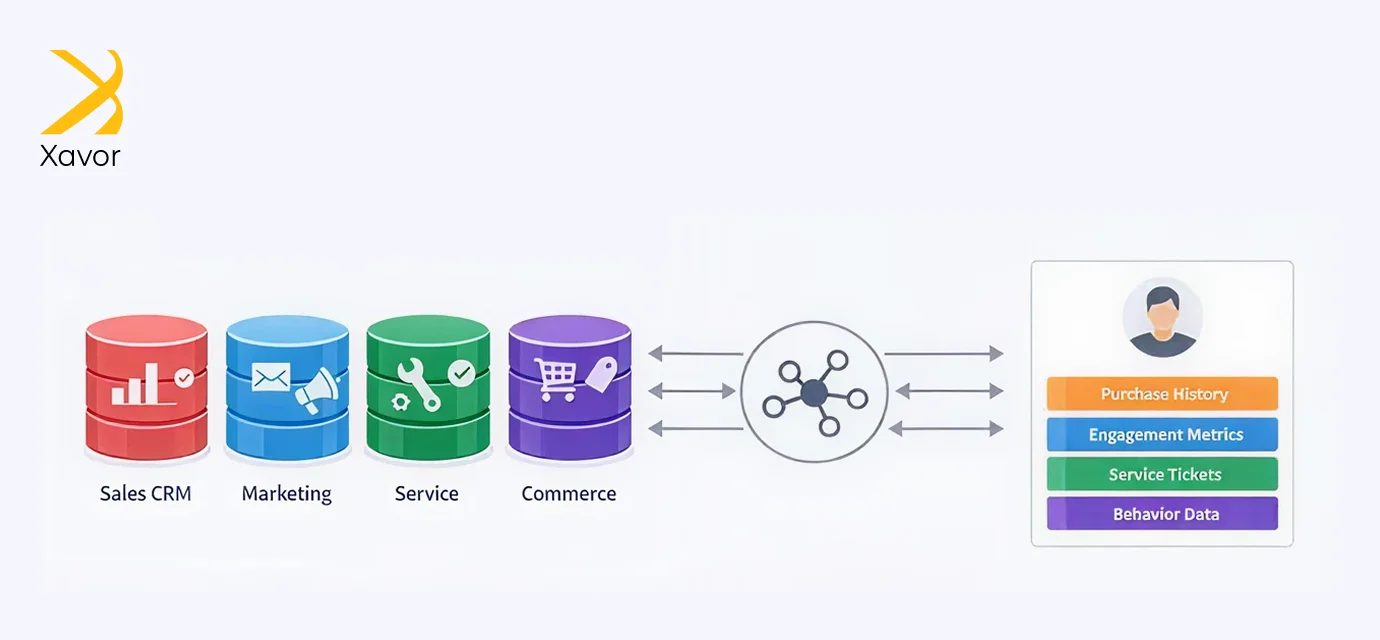
In many organizations, customer information is spread across separate tools. Marketing tracks engagement in one place, sales records activity in another, and service teams rely on their own systems. When these systems are not connected, teams operate with different versions of the truth, and customer interactions become inconsistent.
Salesforce Customer 360 addresses this by bringing data from these sources into a unified customer profile. That profile can include:
- Purchase history: what the customer purchased and the timing of those transactions
- Marketing engagement: email responses, campaign interactions, and advertising clicks
- Service history: past cases, inquiries, outcomes, and resolutions
- Digital behavior: website and app activity, browsing patterns, and product interest signals
With this information centralized, teams can use shared context to coordinate actions and make better decisions during customer interactions.
For example: An ecommerce team can tailor recommendations using both purchase history and browsing behavior, which improves relevance and reduces generic outreach.
When these signals are connected, teams spend less time searching across systems; coordination improves, and interactions become more relevant and consistent.
Key elements of Customer 360

Data integration
Customer data is usually spread across systems such as CRM and ERP, marketing automation, and ecommerce. Customer 360 connects these sources and consolidates the information into a single, consistent dataset that teams can reference when making decisions.
Identity resolution
A unified view depends on knowing which records belong to the same person or account. Salesforce applies matching and reconciliation rules to link related records, reduce duplicates, and improve data accuracy.
Unified customer profile
After customer 360 integration and identity resolution, Customer 360 assembles key details into one profile. This profile can include demographics, purchase and service history, interaction timelines, preferences, and other relevant attributes, providing a complete and usable customer snapshot.
AI driven insights:
Salesforce applies AI and machine learning solutions to analyze customer data and generate actionable insights. By identifying trends, patterns, and predictive signals, businesses can anticipate needs, personalize experiences, and improve marketing performance.
Why scattered customer data leads to weak decisions
Scattered data creates predictable problems. Even strong teams run into the same issues because the system setup makes them likely.
Common issues
- Duplicate customers in reporting because systems use different identifiers
- Conflicting numbers because teams define “active customer” differently
- Delayed signals because some tools refresh daily while others refresh instantly
- Inconsistent suppression because opt-outs and complaint history are not applied everywhere
- Extra manual work because people copy data across tools to fill gaps
A widely cited benchmark illustrates the scale of the problem. Dataversity references an IDC finding that data silos cost the global economy $3.1 trillion annually. The exact number depends on how it is calculated, but the underlying pattern is consistent: silos increase cost and reduce decision speed.
How Salesforce Customer 360 unifies customer data
Connect data from multiple systems
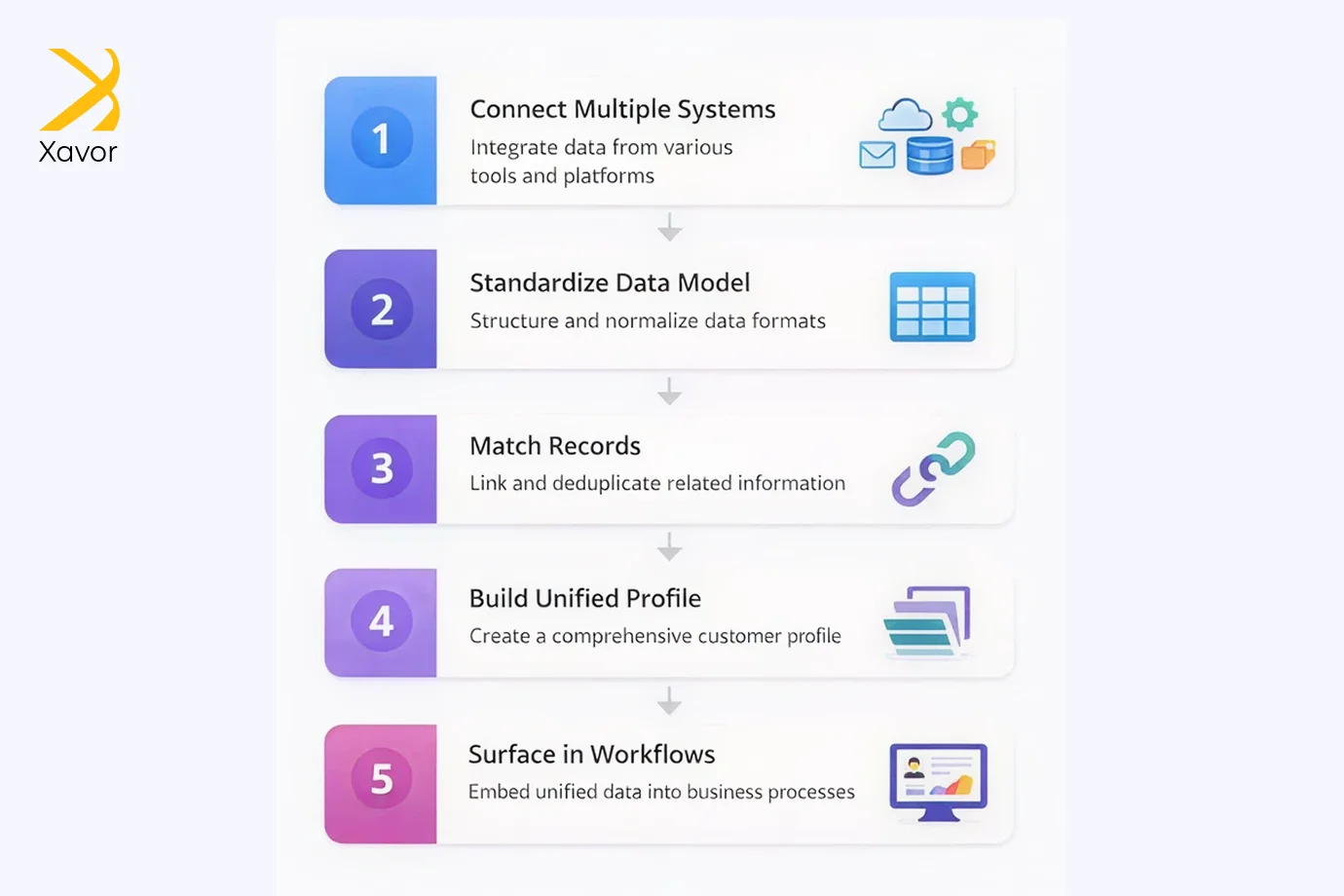
Customer 360 starts by bringing data together from the systems a company already uses. Data can come from Salesforce apps and from external platforms. Salesforce describes Data 360 as supporting data ingestion and modeling through standard objects and mappings.
A practical starting set of sources often includes:
- CRM objects such as accounts, contacts, leads, opportunities, and cases
- Orders, subscriptions, invoices, returns, and shipments
- Marketing engagement such as email opens, clicks, and form submissions
- Web and app events such as page views, searches, cart activity, and feature usage
- Support channel activity such as chat transcripts and call summaries
Why this step helps decisions
When customer data remains spread across systems, the decision rules that depend on it also become fragmented. A retention workflow may read purchase history from one source while complaint signals live in another, so the model or rule set runs on incomplete inputs. The same issue shows up in service routing when entitlement data exists in a separate system that the agent console cannot reference at runtime. A unified data pipeline brings these inputs into a shared layer, so segmentation, routing, and prioritization logic can run against the same governed, up-to-date signals. This is where data engineering solutions that support AI deployment become critical, ensuring ingestion, transformation, and orchestration are reliable enough for models and automation to operate inside real business workflows.
Standardize meaning using the Customer 360 Data Model
Connecting data is not enough. The data also needs consistency. Salesforce help documentation explains that when using the Customer 360 Data Model, Data 360 prepares a list of Salesforce-published objects, fields, metadata, and relationships to help ensure consistency across applications and business processes.
Salesforce developer documentation adds that the Customer 360 Data Model is the standard model used by Data 360 to support data modeling and extensibility through Data Model Objects (DMOs). This step reduces friction because new sources map into known structures, rather than creating a new custom structure every time.
A simple way to explain it
A shared data model gives teams a common language. When “customer,” “order,” and “interaction” follow the same structure across systems, reporting and workflow rules stop drifting apart.
Match records using identity resolution
A single customer often appears in several systems, sometimes with small differences in spelling, email, phone, or address. Identity resolution is the part that links those records into one customer view.
Salesforce help documentation explains that identity resolution uses matching and reconciliation rules to link data about people or accounts into unified profiles.
Trailhead explains the difference in plain terms:
- Match rules link records into one profile
- Reconciliation rules decide which values are used when sources disagree
Why this step helps decisions
Identity mismatches create silent errors. A “high-value segment” can include duplicates. A suppression list might fail because the opt-out is attached to a different record. A service agent might not see past issues because they are attached to another profile. Identity resolution reduces these problems by making the profile more complete and less duplicated.
Build a unified customer profile
After sources are connected and records are matched, the Salesforce customer 360 platform provides a unified customer view. That view can include customer details, transaction history, engagement history, service interactions, and digital behavior, all linked to the same profile.
To keep this useful, the first version of the profile should focus on fields that support decisions. A profile with 200 fields often gets ignored. A profile with the right 20 fields gets used daily.
Example profile fields that often support decisions
- Customer status, lifecycle stage, and key dates
- Order history and recent purchase signals
- Open cases, case severity, and recent resolution outcomes
- Recent marketing engagement, opt-outs, and exclusions
- Website or product usage signals tied to intent or risk
Show unified data on Salesforce records without duplicating it into CRM
A common failure of customer data programs is that the unified data stays in a separate dashboard or warehouse. People return to old habits because the data is not visible in the tools they use for daily work.
Salesforce help documentation explains that the main purpose of using Data 360 related lists is to surface unified, real-time customer data management directly on standard or custom Salesforce records such as Contacts, Accounts, or Cases, without duplicating or storing that data in core CRM.
This approach keeps the Salesforce workflow simple:
- Agents and sales teams stay in the same screen
- Data remains connected to the record they are working on
- Updates can appear without large manual data duplication
Use zero copy data federation when copying data is not preferred
Some companies want unified access to external data without copying it into another storage layer. Reasons include cost, data residency, strict policy constraints, and large data volumes.
Salesforce help documentation defines Data 360 zero copy data federation as querying data from multiple physically distinct sources so they can be treated as a single logical system, while avoiding duplication across system boundaries.
This helps when decisions require the freshest warehouse data or when copying data creates friction.
Apply governance and controlled collaboration
Unifying customer data increases the need for controls. Data should be accurate, accessible to the right roles, and restricted where required.
Salesforce’s September 17, 2024 press release reported that Data Cloud processed over 2 quadrillion records per quarter, had 130% year-over-year growth in paid customers, and added capabilities that include insights from unstructured audio and video content, policy-based governance, AI tagging and classification, and Private Connect for secure sharing with external public clouds.
For controlled collaboration with partners, Salesforce describes Data 360 Clean Rooms (beta) as a secure environment where parties collaborate on data without exposing personal information, with encryption and a rule that data never leaves the clean room.
Benefits of using Salesforce Customer 360
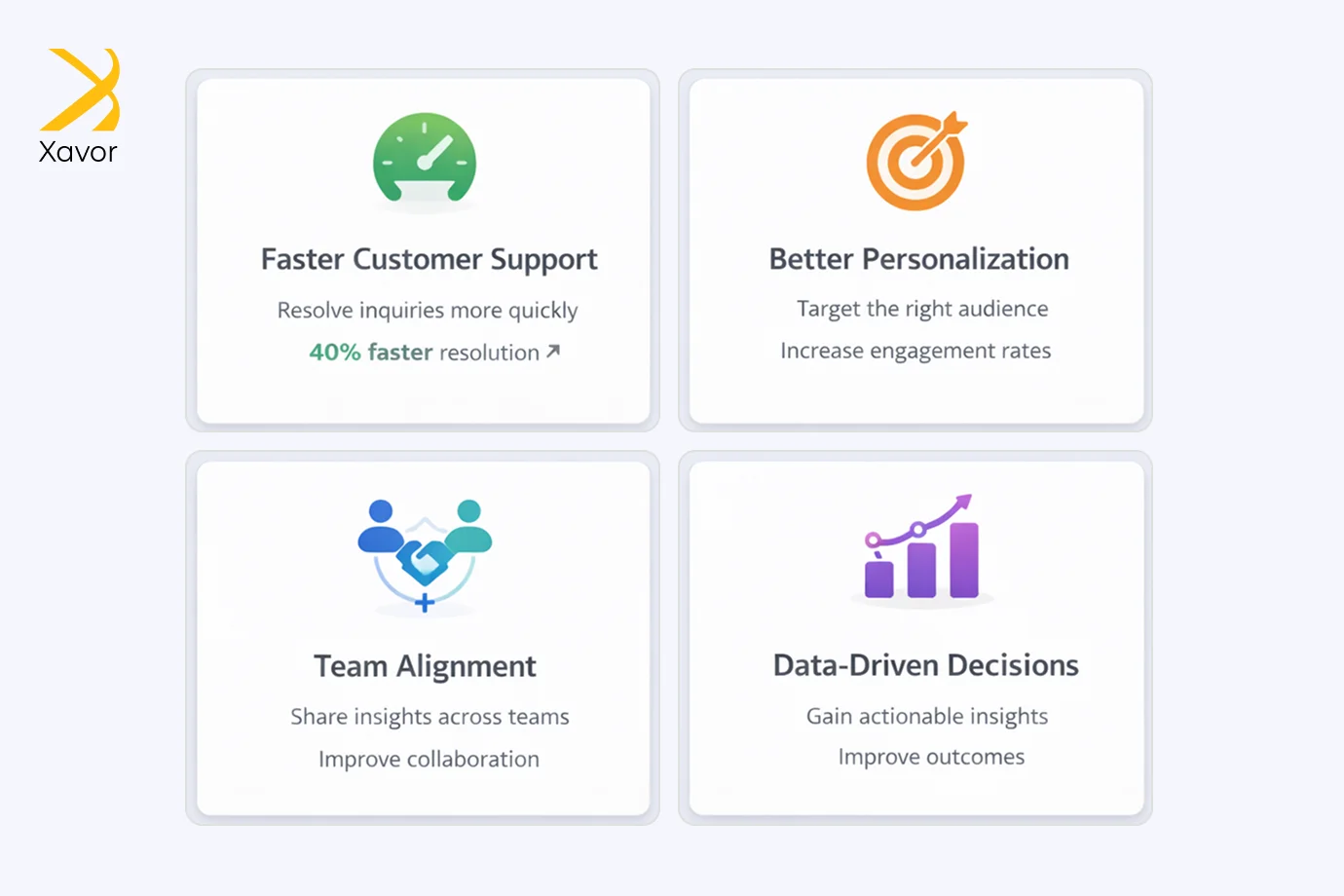
1. Faster customer help
Support teams can see the customer’s past issues and purchases in one place. They fix problems quicker and do not ask the same questions again.
2. Better sales and marketing messages
Teams can send offers that match what the customer likes and has bought before. For example, a travel agency can share deals based on past trips, not random ads.
3. Teams work together with fewer mistakes
Sales, marketing, and support look at the same customer information. That reduces confusion and makes handoffs smoother.
4. Better decisions using current information
Because the data is updated and connected, it becomes easier to notice trends, spot problems early, and choose the next action with more confidence.
Conclusion
When customer information is spread across tools, the company ends up doing extra work just to reach a basic understanding of what is going on. That extra work leads to delays and inconsistent follow-through, even when the teams are capable and trying hard. Customer 360 reduces that by connecting the key sources, keeping the data organized in a consistent way, and linking records so the customer view holds together.
The point is not to create a “perfect” profile. The point is to make everyday decisions easier and more reliable. When the customer view is usable inside Salesforce records and processes, teams can act with fewer handoffs and fewer corrections. From there, it becomes realistic to apply automation and AI insights on top of the same trusted inputs, with rules in place for privacy and sensitive data.
If you want to implement Customer 360 without turning it into a long project, Xavor can build the first working Customer 360 setup in Salesforce Data Cloud. We will connect your key customer data sources so teams can use the unified customer view during real customer conversations. Reach out at [email protected].

FAQs
Salesforce Customer 360 is an approach to connecting customer data from multiple sources so marketing, sales, service, commerce, and IT work from the same customer view. It isn’t a single product, but a framework that uses different Salesforce clouds together to create a centralized record of interactions.
Customer 360 pulls information from systems like CRM, ERP, ecommerce, marketing tools, and service channels, then organizes it into a unified profile. It also matches records that belong to the same person or account, reduces duplicates, and uses a shared data model so teams stop working with conflicting definitions.
When data sits in silos, decisions are often based on incomplete or inconsistent information, which causes delays and misalignment. Customer 360 improves decisions by placing trusted, governed context inside everyday workflows, helping teams act faster, coordinate better, and personalize engagement.