

For nearly a decade, mobile development services were split into two deeply entrenched camps. First, are the pure native purists writing Swift and Kotlin, and second, the cross-platform pragmatists relying on React Native. But if you look at the mobile landscape in 2026, that dividing line has completely vanished.
React Native is no longer just a framework for spinning up quick MVPs. It is the enterprise standard, heavily adopted by tech giants like Meta, Microsoft, and Shopify. At the absolute center of this revolution is Expo.
Once considered just a beginner-friendly wrapper, Expo has matured into the definitive toolchain for React Native development. Think of it as the Next.js of the mobile world. With the rollout of Expo SDK 54 and the highly anticipated SDK 55, the ecosystem is undergoing a massive architectural shift.
If you are building mobile apps this year, here are the five major Expo framework trends and features you need to know about.
The death of the bridge: The new architecture is mandatory
If you have been hovering around the React Native ecosystem for a while, you have undoubtedly heard about the “New Architecture.” For years, it was an experimental opt-in feature. In 2026, with Expo SDK 55 and React Native 0.83, the Legacy Architecture is officially dead and removed from the codebase. The new architecture is now mandatory.
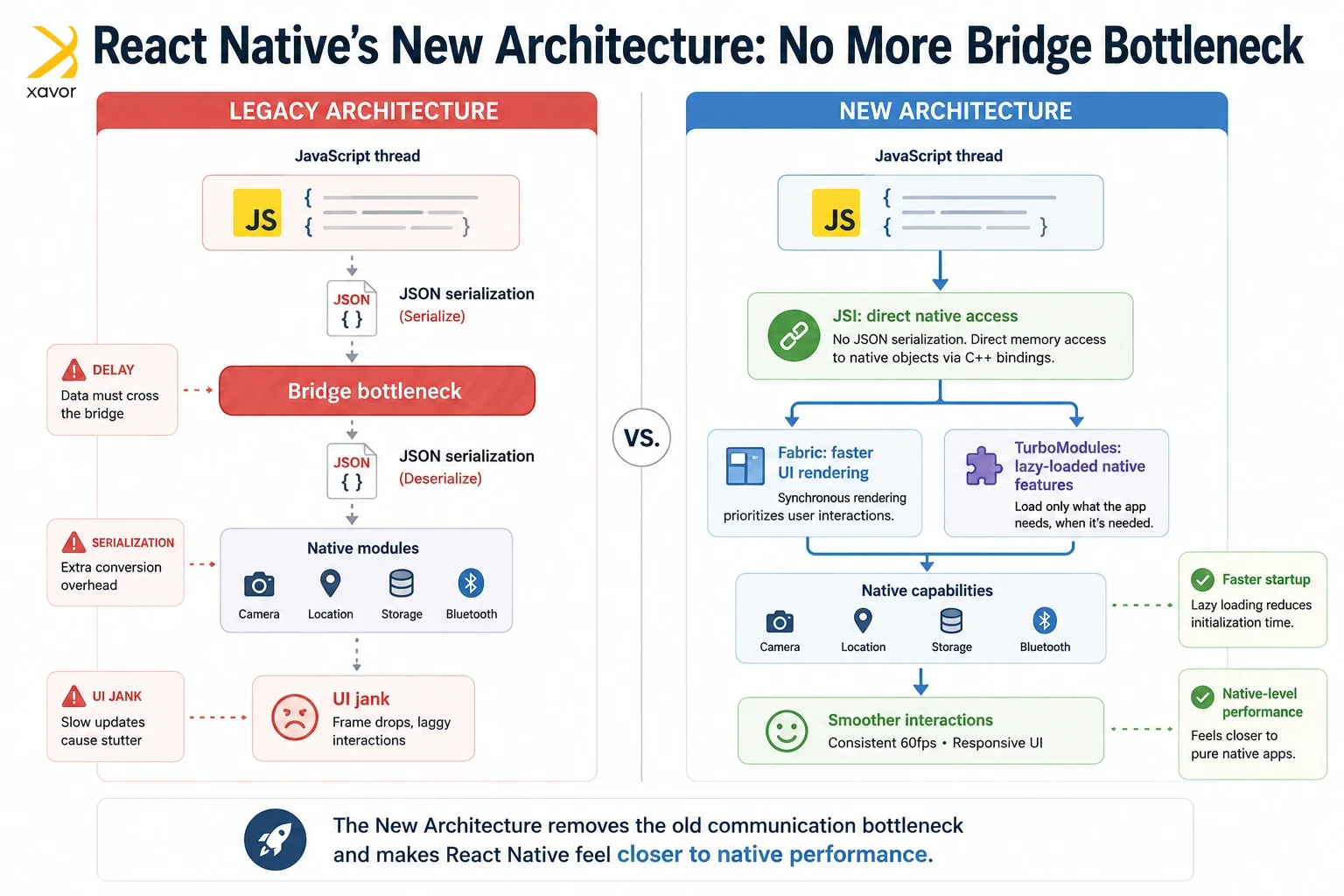
Why is this such a massive deal for Expo developers?
Historically, React Native relied on a “Bridge” to communicate between the JavaScript thread and the native device hardware. Communication in this way required data to be serialized into JSON to be sent across the bridge with deserialization. For heavy animations or complex lists, this caused a notorious UI stutter known as “jank.”
The New Architecture fixes this completely through three core upgrades:
- JSI (JavaScript Interface): Allows JavaScript to hold direct references to C++ native objects. No more JSON serialization.
- Fabric Renderer: A rewritten UI layer that updates synchronously with the host platform (iOS/Android), prioritizing urgent UI interactions like swipe gestures over background tasks.
- TurboModules: Native modules are now lazy-loaded, meaning your app only initializes the specific device features (like the camera or GPS) exactly when the user needs them, slashing startup times.
Therefore, Expo ensures that every new app built in 2026 starts with baseline performance that is virtually indistinguishable from a pure native app through forcing the new architecture as the default
Hermes v1 and the magic of bytecode diffing
Over-the-Air (OTA) updates are arguably Expo’s superpower. Through Expo Application Services (EAS), developers can push bug fixes and minor feature updates directly to users’ devices without waiting for Apple or Google to review the app in their respective stores.
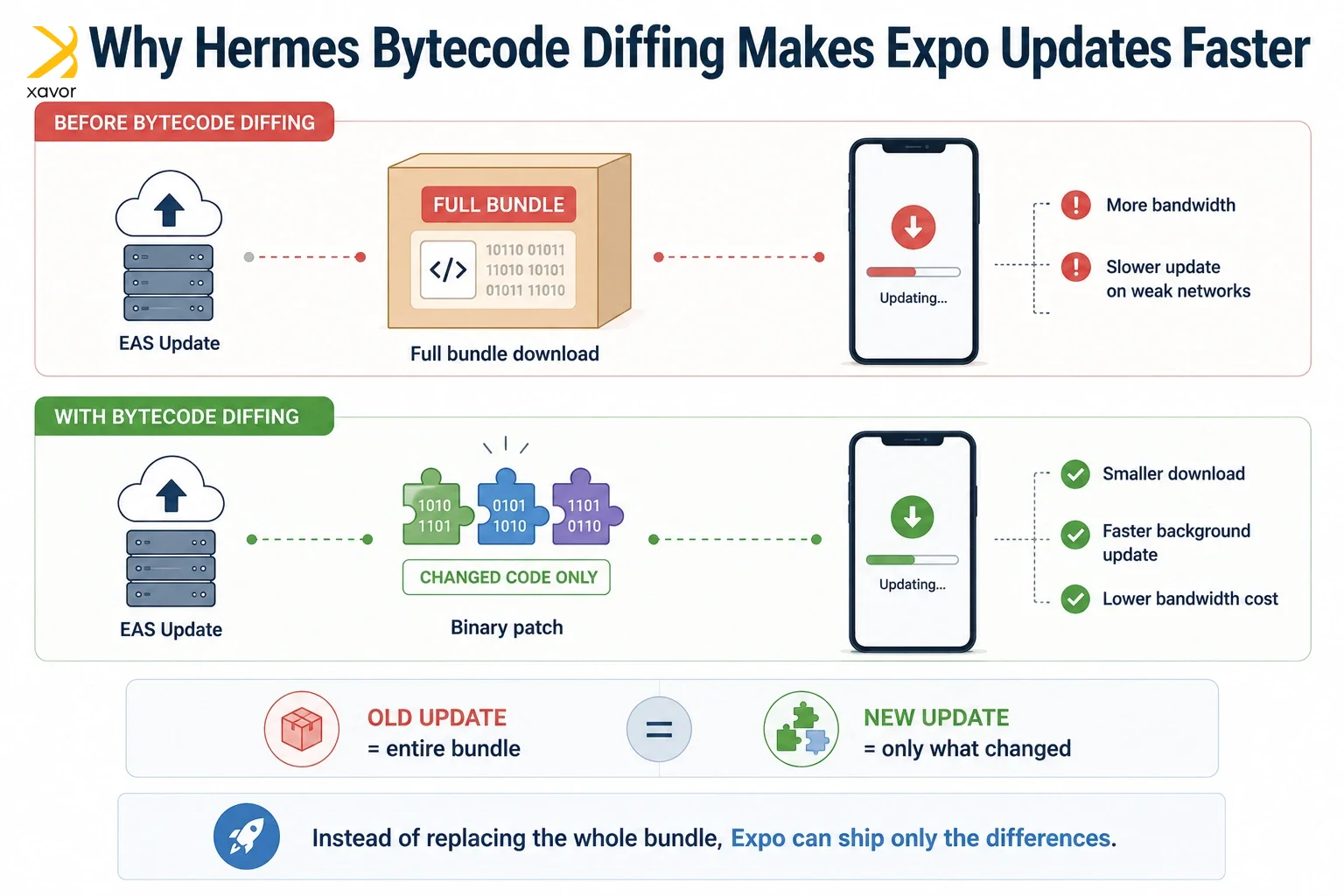
With the latest SDKs, Expo has supercharged this process by fully embracing Hermes v1, Meta’s mobile-optimized JavaScript engine. But the real game-changer in 2026 is Hermes bytecode diffing.
Previously, when you pushed an OTA update, the user’s device had to download the entire new JavaScript bundle. While small, this could still eat up bandwidth and slow down the update process on poor cellular connections.
Bytecode diffing changes the math entirely. Now, EAS Update only sends the binary patches—the literal differences between the old code and the new code.
- 75% Smaller Updates: Update sizes are now a fraction of their previous weight.
- Instant Application: Smaller files mean lightning-fast downloads, allowing updates to apply almost instantly in the background.
- Cost Efficiency: For developers, this drastically reduces the bandwidth consumed on EAS plans, saving money at scale.
Expo router and the Next. js-ification of mobile
Routing in React Native used to be a nightmare of nested navigators and highly manual deep-linking configurations. Then came Expo Router, which brought the file-based routing paradigm of web frameworks (like Next.js) directly to mobile.
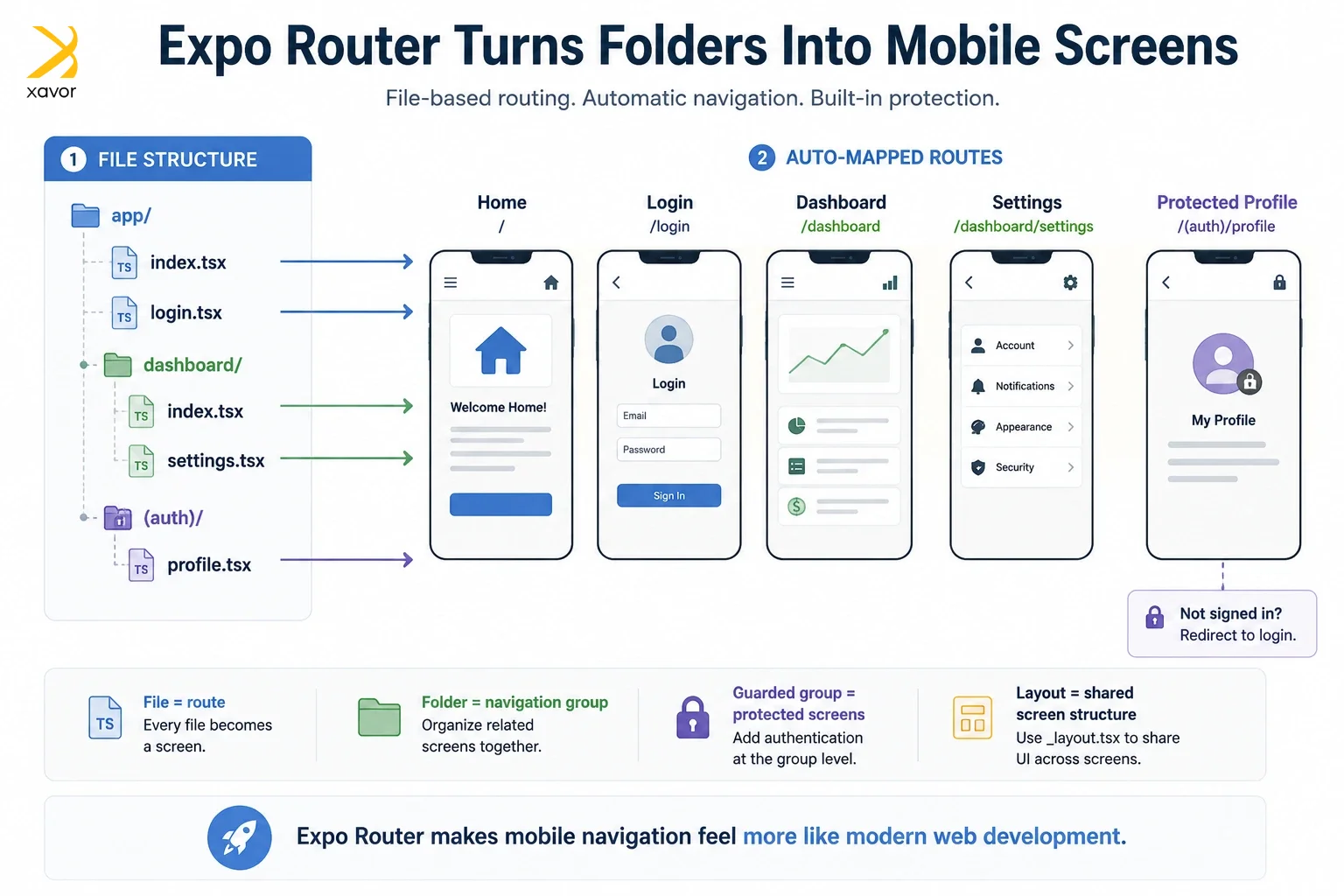
In the top five Expo Framework trends, Expo Router easily earns its place as it is not just a routing library; it is a full-fledged application framework. The latest updates have introduced features that fundamentally change how we structure apps:
- Experimental SplitView Support: A long-awaited feature that makes building responsive, tablet-optimized, two-pane layouts incredibly simple.
- Guarded Groups: Client-side routes can now be grouped and protected by authentication guards right at the folder level. If a user isn’t logged in, the router instantly redirects them to an anchor route without flashing protected screens.
- Synchronous Layouts: Screens now update synchronously by default, eliminating those awkward visual flickers during tab transitions.
Furthermore, Expo is aggressively pushing toward the future by laying the groundwork for React Server Components (RSC) on mobile. While still in its early stages, RSC support means we will soon be able to offload heavy data-fetching and UI rendering logic to the server, resulting in drastically smaller app bundle sizes.
The “brownfield” revolution
A massive hurdle for enterprise companies has always been the “all-or-nothing” nature of mobile frameworks. If a bank had a massive iOS app written in Swift and wanted to adopt React Native, they had to painstakingly integrate it, often managing messy Node.js environments alongside Xcode.
The latest set of Expo framework trends has solved this in 2026 with the introduction of the expo-brownfield package.
“Brownfield” development refers to adding new code to an existing project. With this new package, Expo introduces an isolated approach to integration. You can now package your entire React Native/Expo app as a standalone native library (an AAR for Android or an XCFramework for iOS).
Native developers can then drop this library directly into their existing Swift or Kotlin codebases. They don’t need to install Node.js, they don’t need to run Metro bundlers, and they don’t need to understand React. They just consume your Expo features like any other native dependency. This is a massive trojan horse for getting Expo into legacy enterprise apps.
EAS workflows: The ultimate mobile CI/CD5
Finally, we cannot talk about Expo in 2026 without mentioning the evolution of EAS (Expo Application Services). Building mobile apps locally is notoriously frustrating due to Xcode and Android Studio dependencies. EAS moved the build process to the cloud, but the newest of all Expo framework trends is the shift toward EAS workflows.
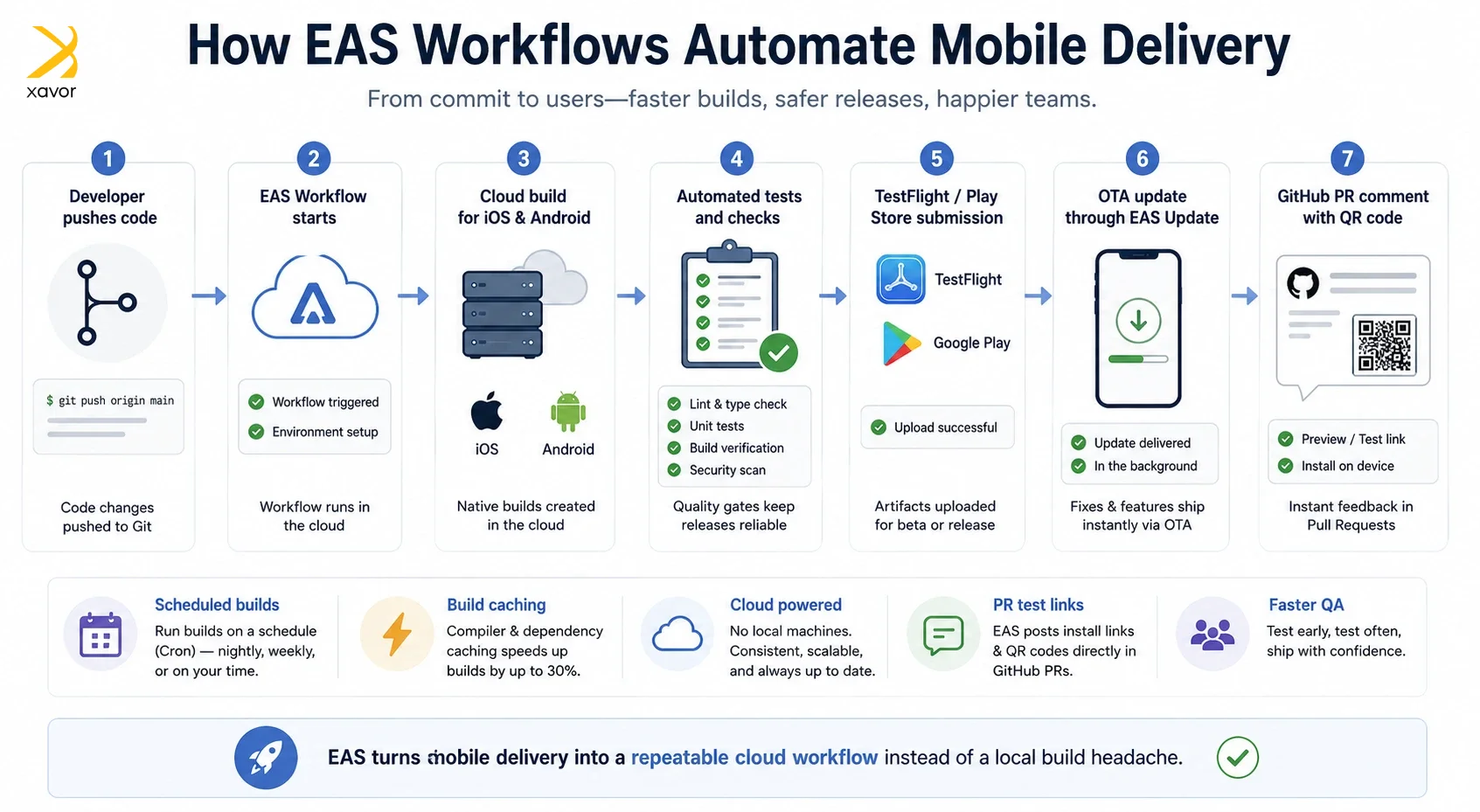
EAS Workflows have effectively replaced traditional GitHub build triggers with a hyper-tailored mobile CI/CD pipeline.
- Scheduled Cron Jobs: You can now automate routine tasks. Want to automatically trigger a production build and submit it to Apple’s TestFlight every Friday at 2:00 AM? You can do that natively in EAS.
- Compiler Caching: EAS now supports advanced build caching, speeding up subsequent Android and iOS builds by up to 30%.
- GitHub Comment Jobs: When a workflow finishes, EAS can automatically post a report (with QR codes for instant testing) directly into your GitHub Pull Requests, making QA testing entirely frictionless.
Conclusion
The debate over whether to use cross-platform or pure native tools is over. In 2026, choosing Swift or Kotlin for a standard, data-driven application is increasingly seen as a premature optimization.
With the mandatory enforcement of the New Architecture, the Next.js-style development experience of Expo Router, and the enterprise-grade deployment tools of EAS, the Expo framework has moved up the abstraction ladder.
It allows developers to ship features at web-speed, without sacrificing a single drop of native mobile performance. If you aren’t building with Expo today, you are already falling behind.
But Xavor can help you regain pace with expert mobile app development services. Our developers are proficient in all major mobile development frameworks and technologies, including Expo, Flutter, and more.
Contact us at [email protected] to book a free consultation session.

FAQs
Neither is universally better as it depends on your project. Expo is ideal for faster development and built-in tooling, which is the requirement for 90% of projects. While React Native CLI offers greater flexibility and lower-level access for apps with highly customized native requirements.
Use Expo Go for quick prototyping with standard Expo APIs. On the other hand, go for a development build for real app development when you need custom native code, config plugins, third-party native libraries, or a closer production-like testing environment.
Yes, Expo supports many native capabilities out of the box, and with development builds and config plugins, you can integrate custom native modules and third-party SDKs without abandoning the Expo workflow.