

ServiceNow is really going places. The company has expanded much beyond traditional ITSM services. It shows in ServiceNow’s branding, as well as in how they now position themselves as an AI-first business transformation platform.
And ServiceNow customer service management (CSM) is an essential part of that messaging. ServiceNow CSM unifies every aspect of customer service with more structure and visibility. Such omnichannel support in customer service is what impresses your customers more than any product you sell them.
In this guide, we’ll discuss everything you need to know about ServiceNow CSM. And how it can help your business up its customer experience game.
What is ServiceNow CSM?
ServiceNow CSM is a cloud platform built on the Now Platform that provides AI tools, capabilities and features to manage customer service operations. But it does so in a unique way by connecting customer service with other operational departments, like:
- IT
- Field operations
- Service agents
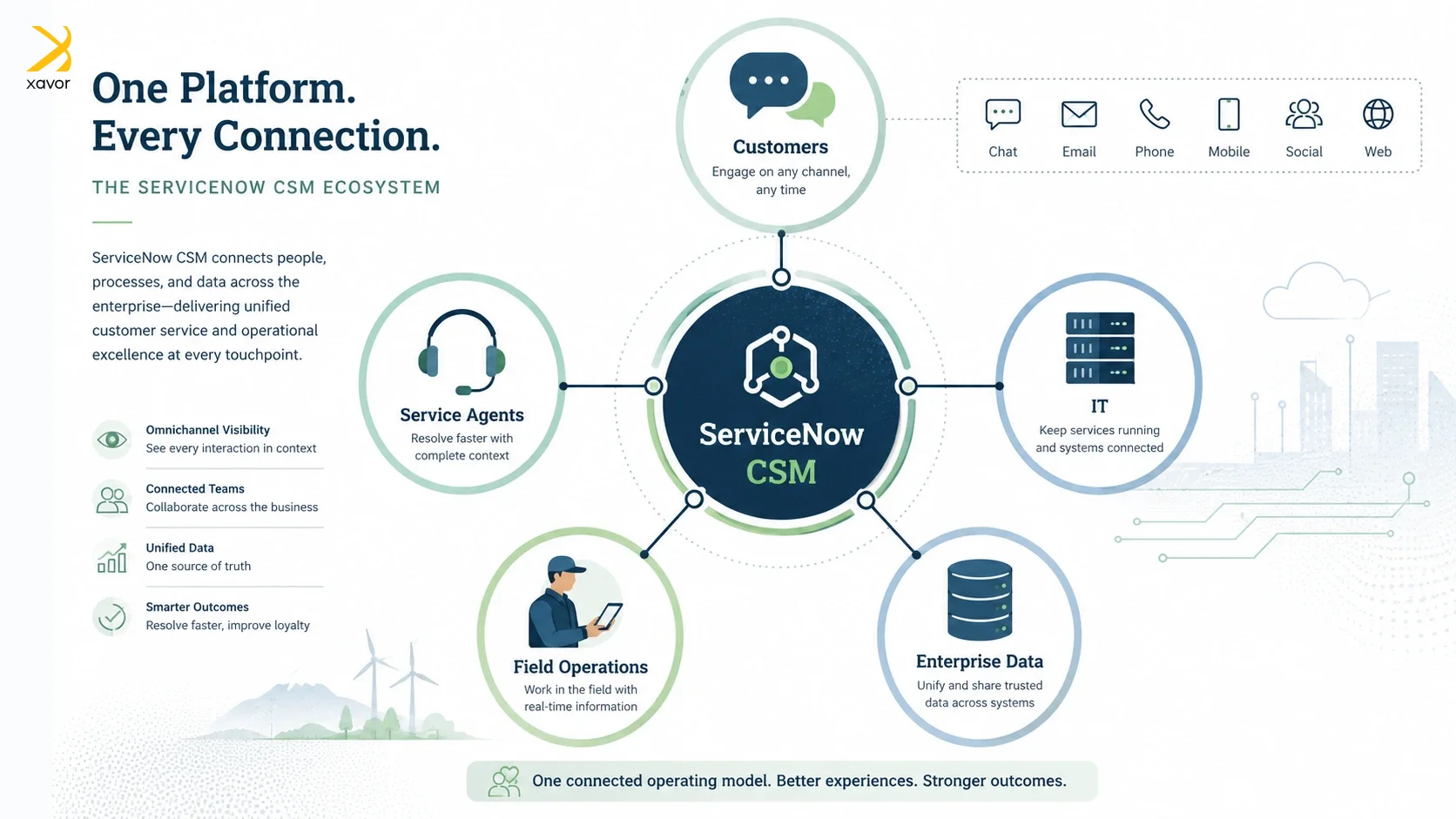
You won’t find this omni-channel approach in every traditional customer service platform. ServiceNow brings together people with systems and data to give you a bird’s-eye view of the entire customer lifecycle.
That is why ServiceNow CSM implementation manages customer interactions and queries to resolve their issues in a much faster and more efficient way than regular ticket management systems.
Core features in ServiceNow CSM
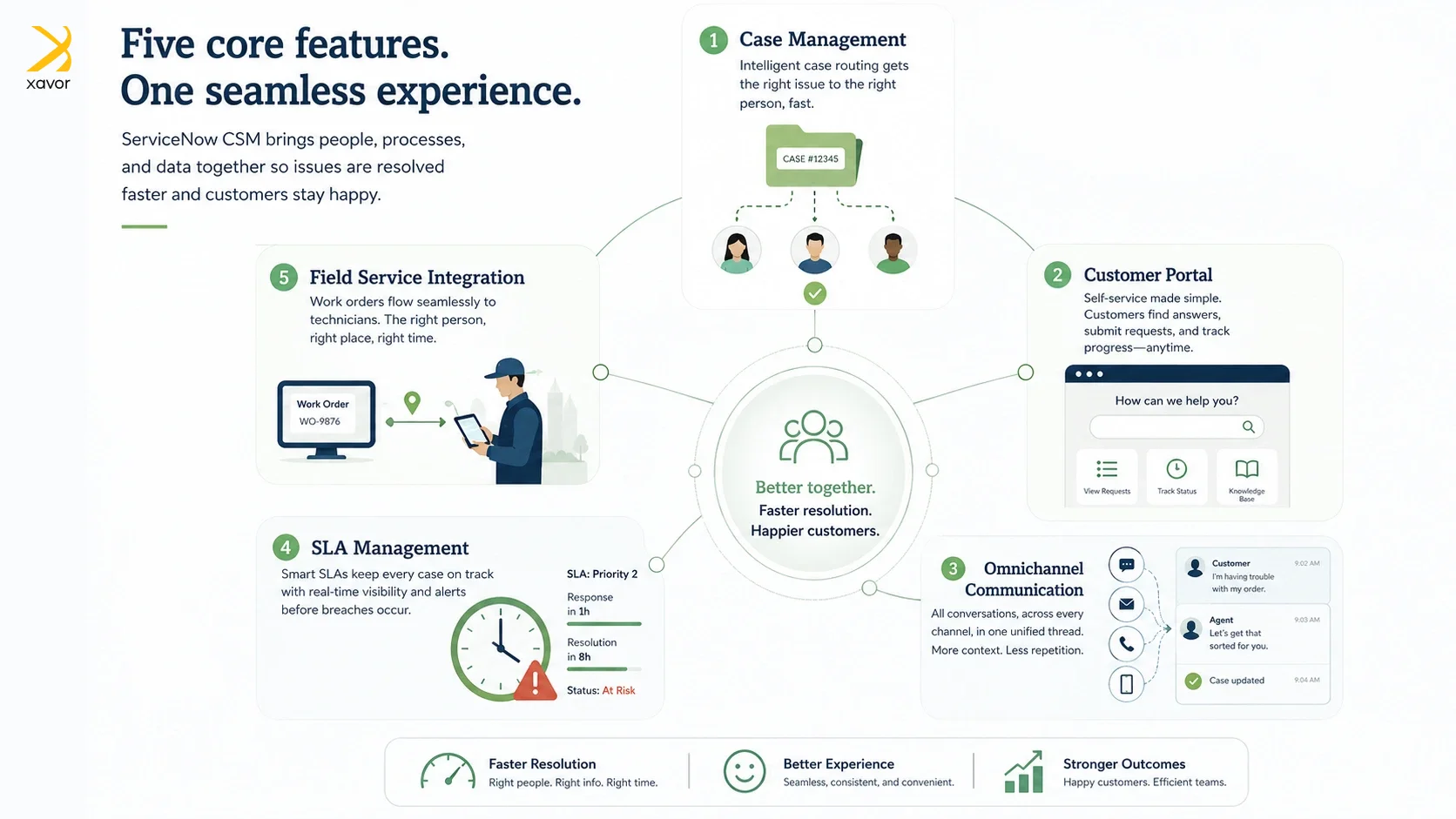
There are some key features in ServiceNow CSM that handle the different aspects of customer information and service requests. Together, they work to resolve issues faster and improve customer satisfaction.
1. Case Management
Case management is the main CSM support feature. Customer requests are converted into cases. It is the control panel for managing those cases. Case routing depends on the human agent’s skill. But you can use AI agents to automatically route the relevant cases to the right department or team.
Furthermore, case routing is affected by customer tiers to prioritize which cases are resolved first.
2. Customer service portal
ServiceNow CSM also comes with self-service features. The customer service portal is designed for customers to help themselves through quick fixes for their problems, such as:
- Access to a knowledge base
- Community form for collaboration
- Submitting and tracking requests
Customer service management with self-service options greatly improves resolution time.
3. Omni-channel communication
There are multiple ways customers can approach ServiceNow problem management. They can drop an email or make a call. Or if they are more tech-savvy, they can interact with AI agents to communicate their issues.
Regardless of what channel they choose, you’ll get a unified view of their conversation history.
4. SLA management
A case is governed by Service-level agreements (SLAs) in ServiceNow. CSM automatically tracks and manages SLAs, so you always know which customer is entitled to what kind of service and if there are any breaches of SLAs.
5. Field service integration
ServiceNow Field Service Management (FSM) is a cloud-based platform that automates offsite work operations. And ServiceNow CSM integrates with FSM to resolve customer issues that need personnel to physically visit a location.
So, if a customer problem needs an on-site visit, the agent can create a work order, assign it to a technician, and track the progress in one place.
The right way of ServiceNow CSM implementation
ServiceNow customer service management should be simple. But many do struggle with ServiceNow implementation. A common mistake is trying to replicate existing processes inside ServiceNow CSM. Companies often migrate tickets and workflows exactly as they are, only to discover that inefficient processes become digitized inefficiencies.
Another common pitfall is implementing CSM in isolation. Different departments often remain disconnected, which limits the visibility and automation that ServiceNow is designed to provide.
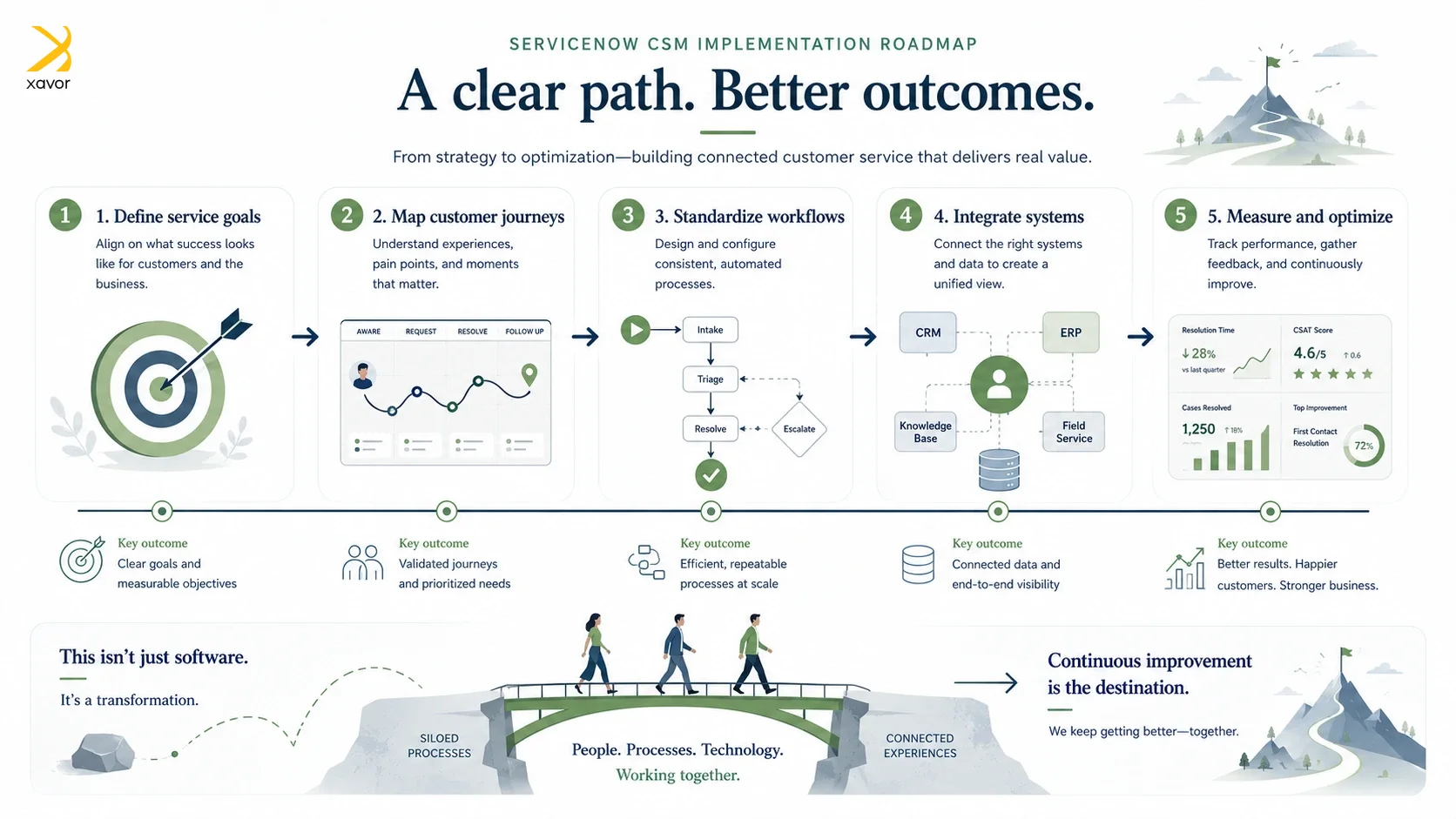
The correct ServiceNow CSM implementation strategy is direct and practical.
1. Start with customer service goals
First, define the business outcomes you want to achieve. It can be reducing resolutions or increasing self-service adoption. You can target multiple outcomes, but try to keep one as your primary goal to accurately gauge your performance.
2. Map customer journeys
Customer service management orchestrates the entire customer journey. That is why you need to understand how cases move through the organization. There are often friction points where issues get delayed. Human agents can also lose time switching between systems during resolution.
Some companies spend months documenting how cases flow. But you really need to know where they stall and work on removing the bottlenecks.
3. Design standardized workflows
Don’t use ServiceNow CSM to recreate inefficient legacy workflows. What you need are standardized workflows that simplify and automate your processes.
4. Integrate enterprise systems
You won’t be using ServiceNow CSM alone in your business. ServiceNow’s own modules are often dependent on each other for common tasks. Let alone other platforms, Salesforce and PLM software outside of the ServiceNow ecosystem.
Therefore, connect ServiceNow CSM with other enterprise platforms in your company to create a unified customer service experience.
5. Measure results and optimize
Once ServiceNow CSM is up and running in your organization, track KPIs to continuously refine its performance. Some common metrics to monitor are resolution time, SLA performance, and agent productivity. Having a clear idea of what’s working is essential to expand your customer service management operations in the future.
ServiceNow CSM vs ITSM: What’s the difference?
ServiceNow started back in 2004 or 05 as an ITSM platform. And ServiceNow IT service management still remains the platform’s flagship module. However, it’s also why some people think of ServiceNow as an ITSM platform. So, they don’t get what’s different about ServiceNow CSM.
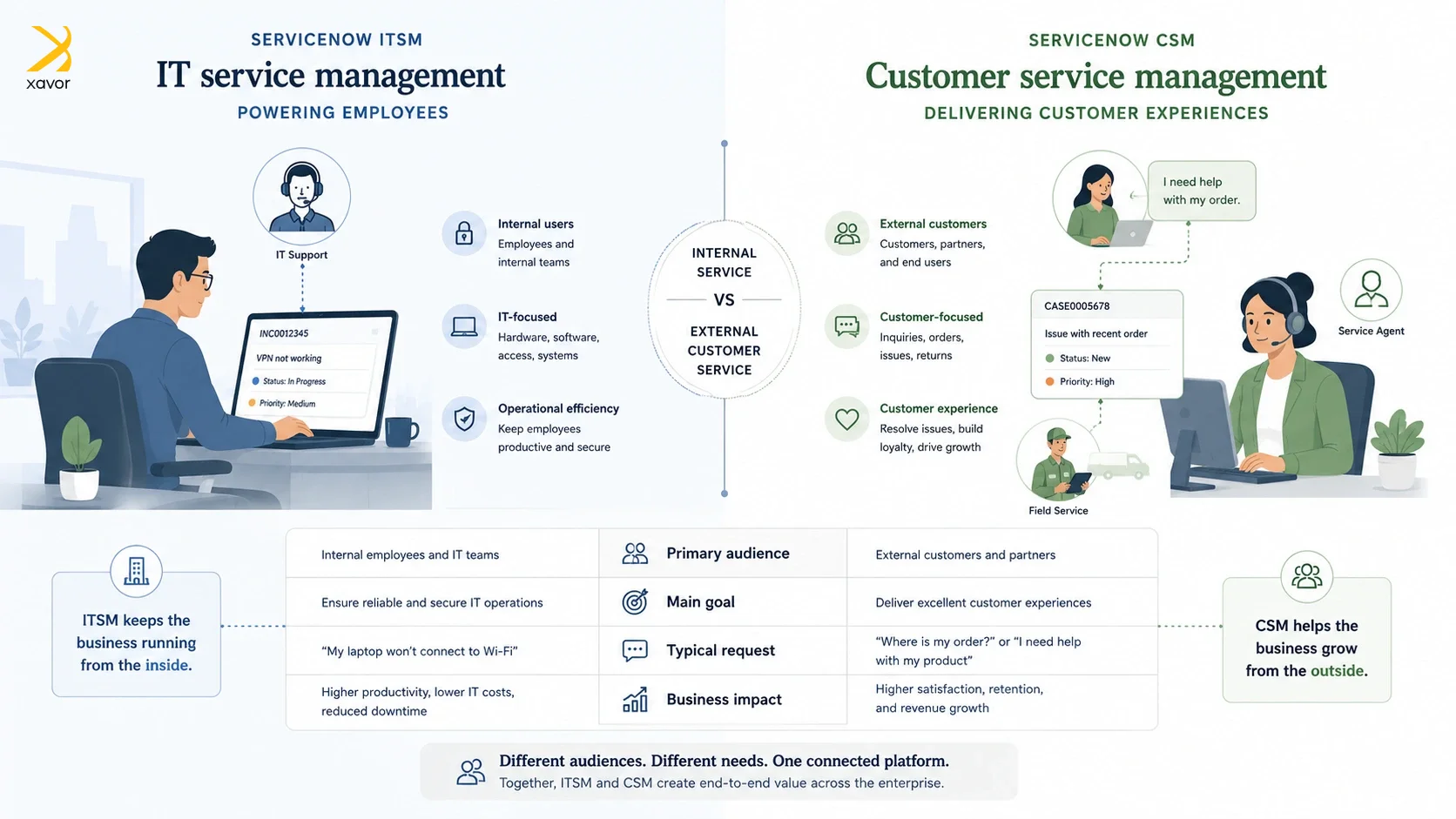
The simplest way of differentiating them is to think in an internal-external binary. ServiceNow ITSM handles internal IT services within a company. Its focus is to facilitate internal employees by providing anything they need to do their jobs.
On the other hand, CSM in ServiceNow serves external clients to improve the customer experience. The platform connects with customer-facing teams to keep customers happy.
That said, theoretically it’s not impossible for both platforms to do each other’s job. You can track customer issues in ITSM and build employee workflows in CSM. But it very rarely happens or is needed in the real world.
Where is ServiceNow CSM is commonly used?
ServiceNow CSM is designed for customer support management in several industries. You can adapt its modules according to any industry’s specific requirements. What remains constant is the platform’s agility and ability to transform customer support.
1. Telecommunication
ServiceNow CSM is widely used in telecommunications to manage complex customer service operations. These operations span across network, billing, and field-service environments.
Particularly, outage management requires fast coordination between customer support teams and on-site technical field teams so customers can receive timely updates and resolutions.
Telecommunication is also the domain where ServiceNow IT service management is used in tandem with CSM. Read our case study where we improved service delivery for a telecom provider to know more about the role of ITSM in this industry.
2. Manufacturing
Manufacturers have other external audiences apart from their customers. They have to deal with suppliers, distributors, and service partners throughout the product lifecycle. For example, manufacturers use supplier portals to give partners a centralized place to submit and track service requests.
IoT integration is also often used with ServiceNow CSM to detect equipment issues proactively, which reduces downtime before customers report a problem.
3. Finance and banking
Financial services work at an enormous scale and at a quick speed. And juggling both in today’s world is humanly impossible without the help of technology solutions like ServiceNow CSM and Fintech.
CSM supports financial services to manage high-volume transactions in different subdomains, such as:
- Banking,
- Insurance and lending
- Wealth-management organizations
Compliance tracking is also essential because financial service teams must follow internal policies along with regulatory requirements and must have audit trails for every penny.
4. Healthcare
Patient support requires timely handling of appointment queries, billing and claim management, plus care access issues. ServiceNow CSM is part of the platform’s healthcare workflows to assist physicians and hospitals in managing customer service interactions. Especially those involving sensitive personal or health-related information.
5. Retail
ServiceNow CSM, with its omnichannel support, is a perfect fit for retail and online stores because customers expect to contact brands through the medium of their preference. Instagram, in particular, is like a gold mine for e-commerce sites to reach prospective customers.
CSM also provides visibility into purchases and inventory levels, which are essential for order management. Return management is another major use case. CSM has workflows for refunds, product defects, and reverse logistics.
Conclusion
The goal of a company is to have customer service that is not just the best, but legendary. These words ring true as much today as they did back when Sam Walton co-founded Walmart.
But a legendary customer service can’t be created in isolation. It needs to connect to everything else within an enterprise. Only then does it start becoming a competitive advantage.
And that’s the larger implication here. In an era where customers switch providers over a single bad experience, your service architecture is your brand promise. ServiceNow CSM gives you the connective tissue to actually keep that promise, at scale, across every channel and industry.
That’s exactly the work we do at Xavor. Our ServiceNow services customize the platform’s different modules according to your needs. Drop us a line at [email protected] to discuss your requirements with our ServiceNow experts.

FAQs
CSM in ServiceNow stands for Customer Service Management. It helps businesses manage customer requests, automate service workflows, resolve cases faster, and connect customer service teams with back-office departments for better customer experiences.
ServiceNow ITSM is used to manage internal IT services and support requests for employees, such as incidents, changes, and IT issues. ServiceNow CSM is used to manage external customer service requests, helping businesses resolve customer cases, automate workflows, and improve customer experience.
No, ServiceNow CSM is not the same as CRM. A CRM manages customer relationships, sales, and account data, while ServiceNow CSM manages customer service cases, automates support workflows, and connects teams to resolve customer issues faster.