
LangChain and LangGraph are two must-have items if you want to build applications with LLMs. These are two frameworks that will have a huge impact on your final product and overall AI development experience. Both are open-source, powerful options that connect LLMs with workflows and tools.
However, first-timers often don’t know how to differentiate them. And that can be a problem because your choice for a framework matters big time.
The confusion is understandable. Both share similar names and even work together in many applications. Yet they’re designed to solve fundamentally different architectural challenges.
In this article, we’ll explain LangChain vs LangGraph differences and when to choose which one.
The Lang family of frameworks
You might have guessed that LangChain and LangGraph were developed by the same company. They both have similar-sounding names for this reason. The “Lang” prefix simply means language, as is large language models.
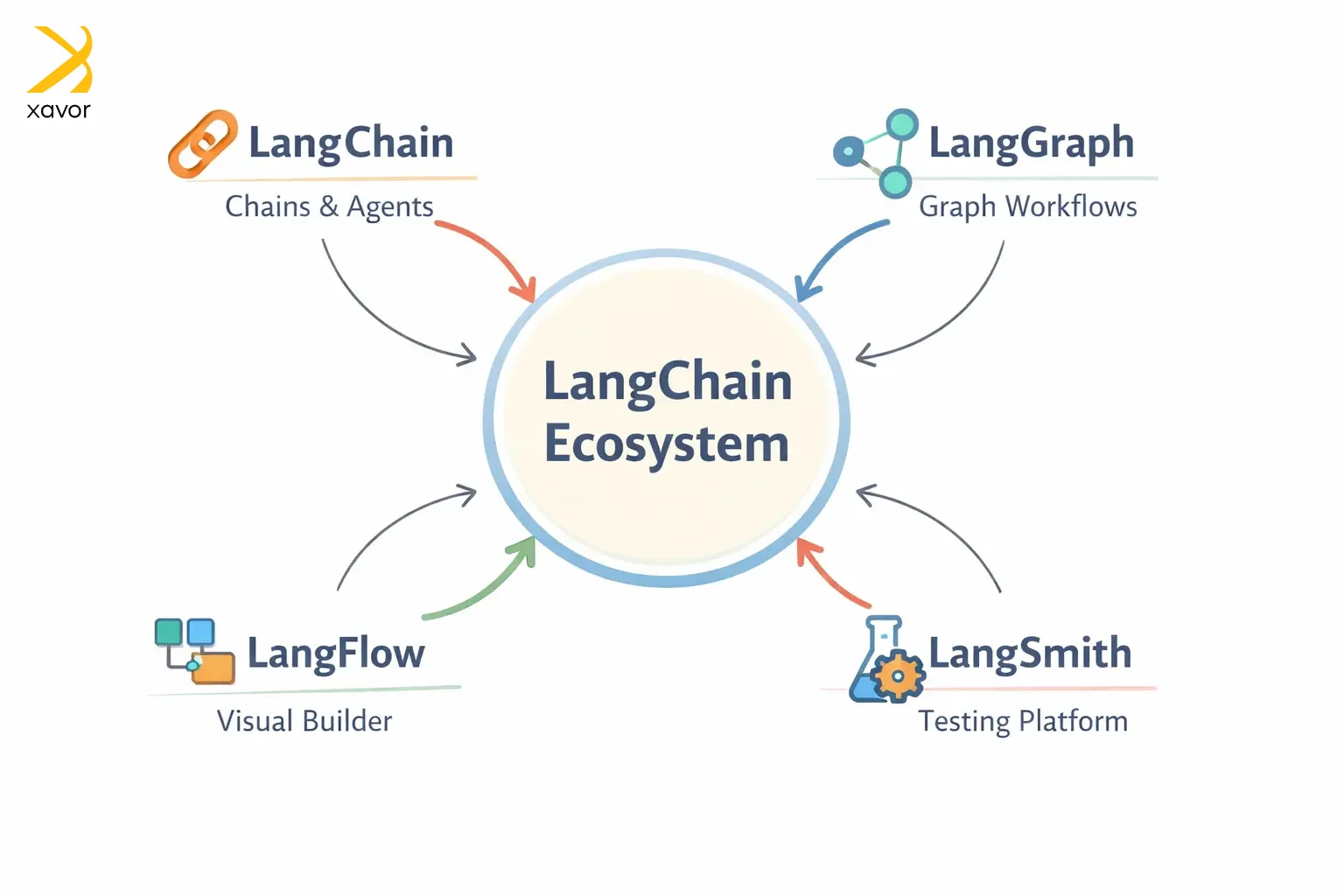
LangSmith and LangFlow are two other members of this family of frameworks. Here is a table with brief introduction of each framework:
| Framework | Launch Date | Founding company | What it is |
| LangChain | 2022 | LangChain Inc. | A chain of language model calls |
| LangGraph | 2024 | LangChain Inc. | Graph-based orchestration for language model agents |
| LangFlow | 2023 | Logspace | A visual flow builder for language model pipelines |
| LangSmith | 2023 | LangChain Inc. | Crafting platform for language model apps |
The LangChain ecosystem was created to make modern LLMs do actions beyond single prompts. Things like fetching data, connecting with APIs, and using external tools. Before LangChain, there was no standard way to do any of this.
LangChain was started by Harrison Chase to solve this as a side project, and it quickly exploded on GitHub. And today, it is the gold standard for creating useful LLM applications.
What is LangChain?
LangChain is the foundation of the whole ecosystem. It is the first framework that started the whole project. LangChain connects LLMs with external tools and data sources.
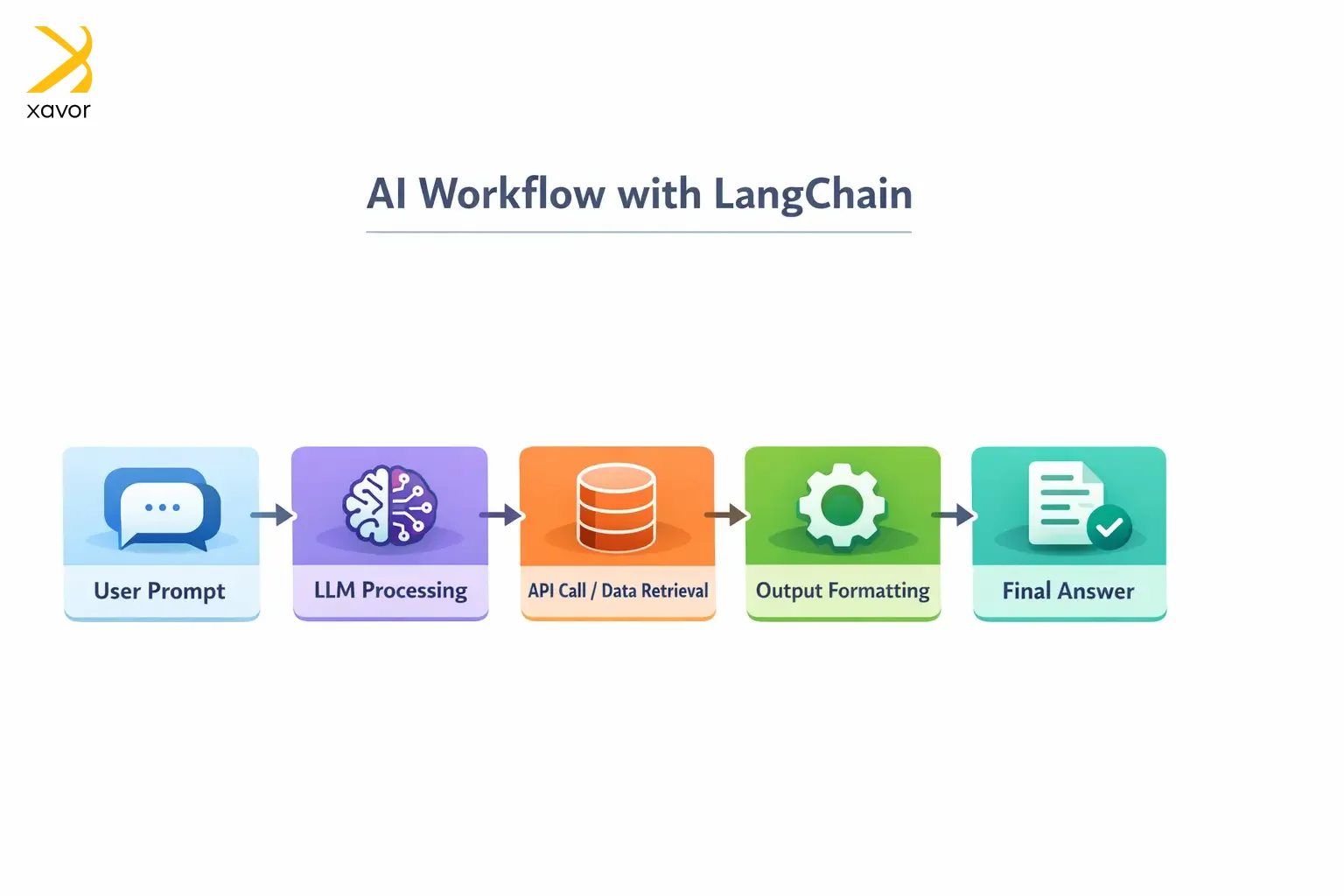
Chase originally designed it to enable raw LLM capabilities to take on real-world functionalities. It is built around the concept of chaining operations. Workflows created in LangChain are called chains. These chains tie together different tasks in a logical sequence, such as:
- Calling APIs
- Generating text
- Retrieving documents
This simplifies creating apps that need to connect multiple steps together. Each chain’s output is the next one’s input. Examples include chatbots that need to retrieve data, summarize it, and then answer user queries.
Plus, LangChain gives you pre-built, plug-and-play components. So, you don’t have to write boilerplate code to connect an LLM to a database or format its output. Instead, you just snap existing pieces together like Lego blocks.
Like for data retrieval, you can use a data loader component. And LangChain has a modular architecture. You can mix and match different components to build any workflow that you want.
LCEL (LangChain Expression Language)
LCEL is LangChain’s declarative syntax for connecting components. It makes mixing and matching components easier with less boilerplate. LCEL was launched in 2023 and defines chains in a clean, readable way using something called pipes (|).
python
chain = prompt | model | output_parser
This one line tells LangChain to take the prompt, pass it to the model, then parse the output. LCEL handles all the messy details itself, which otherwise takes you to write many lines of code.
What is LangGraph?
LangGraph is built on top of LangChain. You can think of it as an extension to address the limitations of LangChain. Not all AI workflows are linear, where you define the steps, and they are executed in order. Sometimes multiple agents need to work in parallel. Maybe a human needs to step in and approve something before the workflow continues.
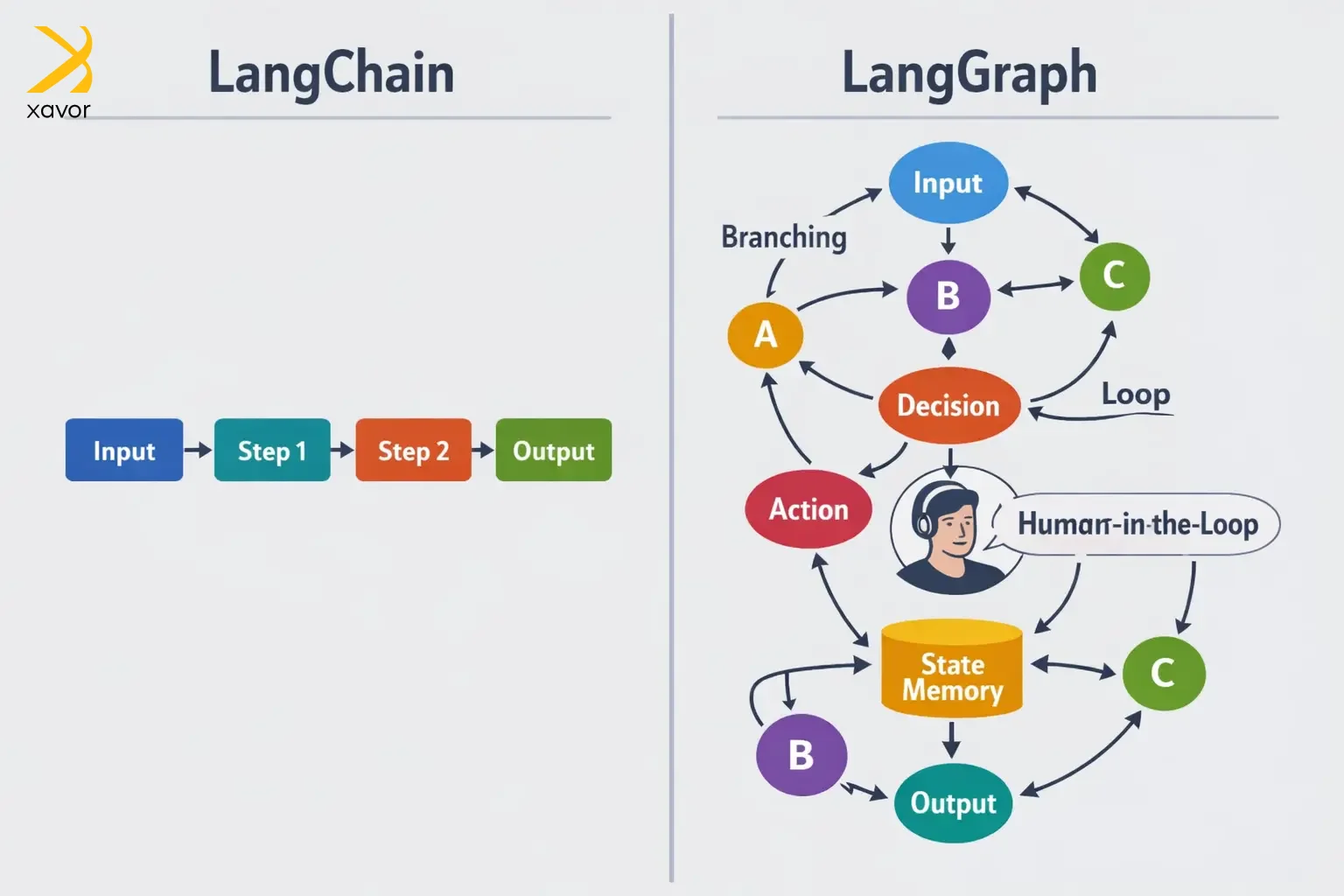
The LangCain team created LangChain to handle such nonlinear processes, which are part and parcel of state management. Stateful apps remember context across multiple steps.
To do this, LangGraph converts traditional chains into graphs where each node represents a task. And the edges represent how those tasks connect. It is the most advanced orchestration layer in the LangChain ecosystem so far.
LangGraph’s node-edge structure makes it easier to manage loops and branching in stateful apps without writing endless if/then statements.
LangChain vs LangGraphGraph: Differences at a glance
Here’s a quick overview of the main differences between LangChain and LangGraph. This will equip you with enough knowledge to be able to make your choice.
| Aspect | LangChain | LangGraph |
| Workflow Structure | Linear chains of LLM calls | Graph-based workflows |
| State Management | Limited with implicit data control | Built-in with explicit control |
| Complexity | Basic control flow with minimal branching | Supports complex flows with extensive branching |
| Integration | Extensive APIs and tools integrations | Uses LangChain’s integration support |
| Learning Curve | Easy for beginners to pick up | Steeper curve for more powerful tasks |
Excel and Python are a great analogy to understanding LangChain vs LangGraph differences. LangChain is like Excel, great for straightforward linear data manipulation where you work row by row in a predictable flow.
And LangGraph is like Python when you are dealing with complex, dynamic spreadsheets that can branch and loop in ways Excel simply wasn’t built for.
LangChain vs LangGraph: Which suits your workflow?
The choice between the two is all about your use case. LangChain and LangGraph are designed to solve two different sets of LLM application development challenges. Once you know your use case, the rest of the process becomes relatively easy to work around.
LangChain use cases
LangChain is your workhorse for anything predictable. Look no further if your workflow has a clear beginning, middle, and end. It thrives when the steps are known, the logic is sequential, and you just need to move fast.
We created an agentic system using LangGraph for a legal firm that wanted to automatically summarize client contracts and flag unusual clauses. Since the steps are always the same, LangChain handled this in hours.
It is also a great rapid prototyping. You can use its pre-built connectors to quickly go from an idea to a working demo.
LangGraph use cases
LangGraph is for when the AI needs to think. This is where things get interesting, and where most companies are headed when they need to do serious stuff.
Its workflows don’t care if the next step isn’t predetermined. LangGraph evaluates what just happened, decides what to do next, potentially loops back, and sometimes stops and asks a human before proceeding.
For example, FinTech services can use LangGraph to deploy AI agents to handle loan pre-approvals. The agent pulls credit data, cross-references risk models, flags edge cases for human review, waits for a compliance officer to sign off, and only then proceeds.
Now take that idea further. Instead of one intelligent agent, imagine a whole team of them collaborating on a problem too complex for any single agent to handle alone.
LangGraph supports this natively. The most compelling real-world example is drug discovery, where separate agents specializing in molecular biology, pharmacology, and toxicology each contribute their domain expertise and combine their findings into insights none of them could have reached independently.
It’s essentially a high-performing expert team, built in software.
Conclusion
The Lang ecosystem is a natural corollary of the ChatGPT revolution. It made it possible to create LLM-based apps that can do multiple tasks. And the best part is that LangChain is an open-source, community project. It will make the future of AI development faster with everyone contributing their part.
However, you can only benefit from this ecosystem if you know what every tool offers. We gave a quick LangChain vs LangGraph comparison that will give you a basic idea. It will set the foundation from which you can take your project forward.
There are a few other things that matter in one way or another. But they usually come up later in the development cycle. In case you already are in that phase, partner with Xavor to get expert AI development services right when you need them.
Our AI experts can orchestrate LangChain, LangGraph, and other latest AI tools according to your needs, the way you want it.
Contact us at [email protected] to book a free consultation session.

FAQs
LangChain is a framework for building simple, linear LLM applications using chains(sequential steps) where one output feeds into the next input. LangGraph is built on top of LangChain but enables complex, stateful agentic workflows with conditional branching, loops, and multi-step decision-making using graph-based orchestration.
The main advantage of using LangChain with LangGraph is combining LangChain's rich ecosystem of integrations with LangGraph's sophisticated state management and conditional logic. This lets you build complex agentic applications that can make dynamic decisions, handle multi-step workflows, and maintain conversation context.
Use LangGraph when you need to build complex, multi-step AI workflows with state, such as agent systems, decision trees, or iterative reasoning tasks. It’s especially useful when your application requires control over execution flow, memory, and coordination between multiple LLM calls or tools.