

Flutter continues to dominate cross-platform development in 2026, powering millions of production apps across mobile, web, and desktop from a single Dart codebase. It’s performance, beautiful UI capabilities, and rapid development cycle make it a favourite for startups and enterprises alike.
However, Flutter’s fast and easy cross-platform nature makes it a prime target for hackers. Flutter apps are not inherently secure. Real-world breaches like exposed API keys to full reverse-engineered business logic have cost companies millions i damages, regulatory fines, and lost user trust.
This professional guide by our Flutter development services expands on the most critical security risks in Flutter applications.
We’ll explore why each vulnerability occurs, its real-world impact, technical depth, and actionable, production-ready fixes with code examples and best practices validated in our 2025–2026 audits.
Security requirements of cross-platform vs native apps
Cross-platform frameworks like Flutter or React Native offer faster development. But that comes at the cost of more security vulnerabilities. Security controls often need to be implemented differently per platform, so you don’t actually save much time, and you risk doing it wrong on one or both.
Flutter sits between your code and the OS. That middle layer can leak data in unexpected ways and have its own vulnerabilities independent of iOS or Android. The reliance on community plugins to access native features is another chink in the armor. Those plugins vary wildly in security quality and maintenance.
And to make it more difficult, cross-platform security testing requires you to understand both the framework layer and the native layer to test them properly.
Flutter security vulnerabilities in 2026
These are common security problems that can be very lethal for your Flutter app. This section tracks down the severity of each challenge, why it happens, and how you can mitigate it with proper framework implementation.
1. Reverse engineering of APKs
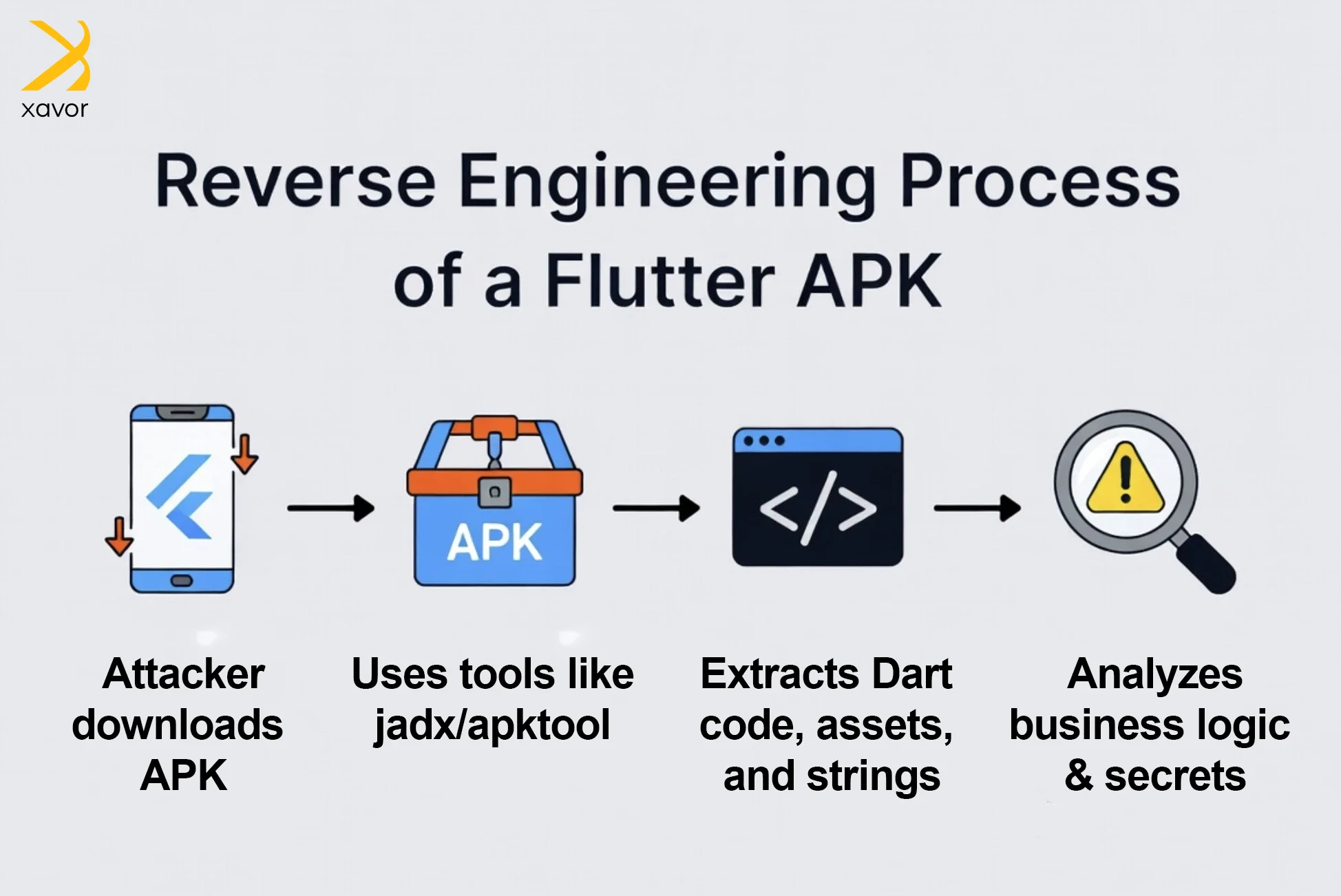
Flutter compiles Dart code into native ARM/x86 libraries (via the Dart VM and Skia engine). While this makes apps performant, attackers can still decompile APKs using tools like jadx, apktool, or reFlutter. They extract readable Dart logic, API endpoints, hardcoded values and even business rules.
Why it happens
- Dart bytecode is not fully encrypted.
- Default builds include debug symbols and strings.
- Flutter’s AOT (Ahead-of-Time) compilation is reversible with sufficient effort.
Real-world impact
Competitors or malicious actors have reverse-engineered fintech and e-commerce Flutter apps to clone features, steal intellectual property, or discover backend vulnerabilities.
How to fix it
Enable built-in obfuscation (symbol renaming via R8/ProGuard): Bash
flutter build apk –obfuscate –split-debug-info=/path/to/symbols
(Do the same for iOS with –obfuscate.)
- Move all sensitive business logic to your backend.
- Use the confidential package to obfuscate string literals.
- For maximum protection on Android, combine with full R8 rules in
android/app/proguard-rules.pro.
Note: Obfuscation makes reverse engineering harder but is not 100% foolproof—treat client-side logic as untrusted.
2. Hardcoded API keys & secrets
Risk overview
Developers often embed Firebase keys, Stripe secrets, Google Maps API keys, or JWT tokens directly in lib/ files or assets/.
Why it’s dangerous
Any extracted APK instantly exposes these secrets, enabling API abuse, data theft, or unauthorized charges.
How to fix It
- Never store secrets client-side.
- Proxy all sensitive operations through your backend.
- Use environment-specific config via flutter_dotenv or runtime secrets fetched securely post-authentication.
- For build-time secrets, use CI/CD variables (never commit to Git).
Best practice in 2026: Adopt secret managers like AWS Secrets Manager or HashiCorp Vault on the backend.
3. Insecure data storage
Risk overview
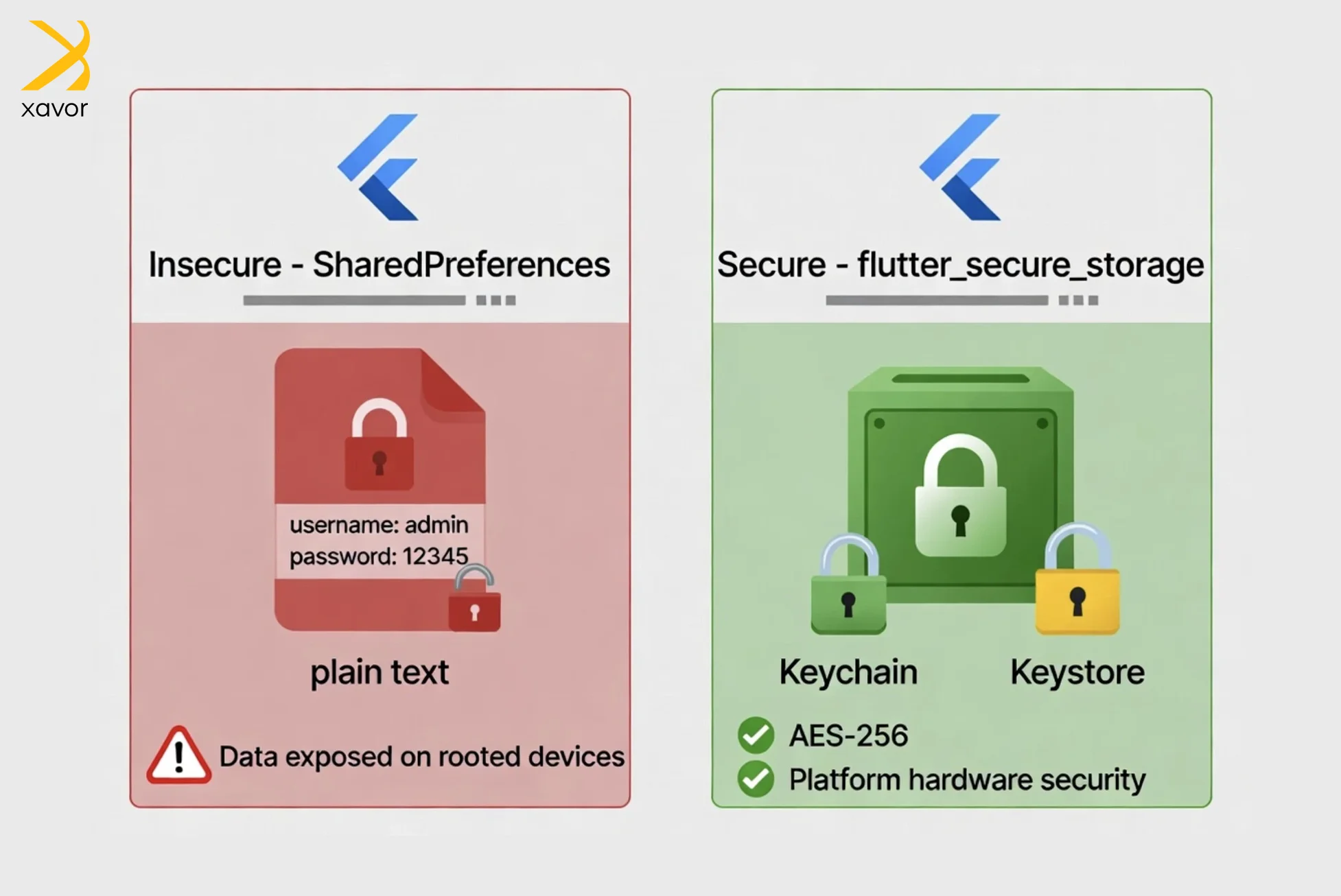
Using SharedPreferences, Hive (unencrypted), or plain files leaves tokens, user PII, and session data exposed on rooted/jailbroken devices or via forensic tools.
Why it happens
Convenience over security—default storage is plaintext.
How to fix It
Use flutter_secure_storage (industry standard in 2026). It leverages Android Keystore and iOS Keychain with AES-256 encryption.
Code example
import ‘package:flutter_secure_storage/flutter_secure_storage.dart’;
final storage = FlutterSecureStorage(
iOptions: IOSOptions(accessibility: KeychainAccessibility.first_unlock),
);
aOptions: AndroidOptions(encryptedSharedPreferences: true),
);
await storage.write(key: ‘auth_token’, value: ‘your-jwt-here’);
String? token = await storage.read(key: ‘auth_token’);
Additional tips
- Encrypt additional data with the encrypt package (AES-GCM).
- Never store long-lived sensitive data locally—re-fetch after re-authentication
4. Man-in-the-middle (MITM) attacks
Risk overview
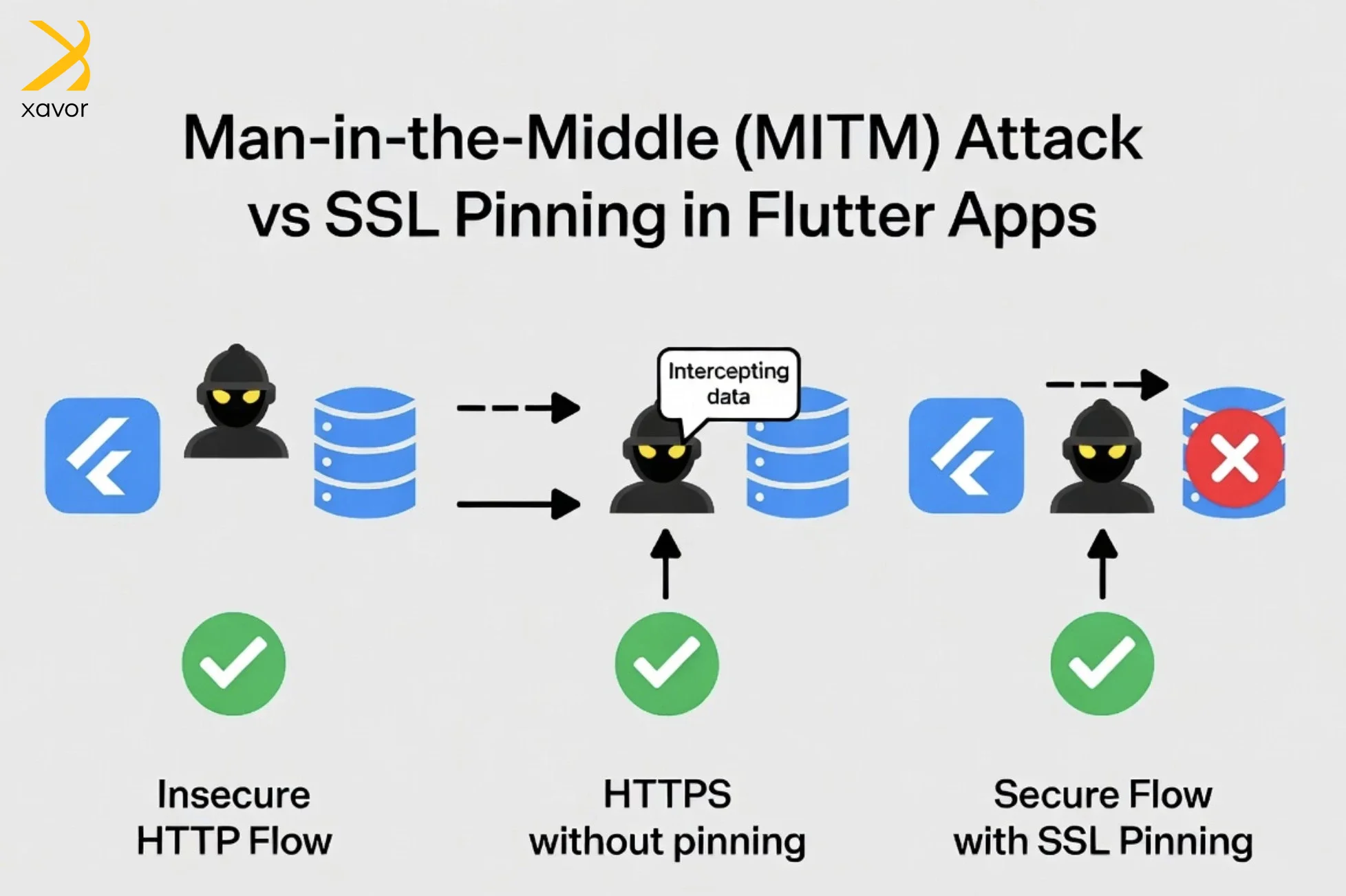
HTTP traffic or weakly validated HTTPS allows attackers on public Wi-Fi or using tools like Burp Suite/Frida to intercept requests.
How to fix It
- Enforce HTTPS only.
- Implement SSL/TLS certificate pinning.
Production implementation using http package:
import ‘dart:io’;
import ‘package:http/io_client.dart’;
import ‘package:flutter/services.dart’;
Future<HttpClient> getPinningHttpClient() async {
final sslCert = await rootBundle.load(‘assets/certs/your_server_cert.pem’);
final securityContext = SecurityContext();
securityContext.setTrustedCertificatesBytes(sslCert.buffer.asUint8List());
final client = HttpClient(context: securityContext);
client.badCertificateCallback = (cert, host, port) => false;
return client;
}
(Alternative: Use dio + http_certificate_pinning plugin for easier fingerprint-based pinning.)
5. Lack of authentication/authorization checks
Risk overview
Relying only on frontend checks (e.g., hiding UI elements) allows attackers to bypass via modified APKs or direct API calls.
How to fix It
- Always validate on the backend (never trust the client).
- Use JWT/OAuth 2.0 with short-lived access tokens + refresh tokens.
- Implement Role-Based Access Control (RBAC) and Multi-Factor Authentication (MFA).
- Add local_auth package for biometric checks (Face ID / Fingerprint).
6. Debug Mode and logging issues
Risk overview
Production builds with debugPrint, print(), or kDebugMode enabled can leak API responses, tokens, or stack traces.
How to fix It
- Use flutter build –release (debug mode is automatically disabled).
- Replace print() with a proper logger (e.g., logger package) with environment-based levels.
- Strip logs before release using build scripts.
7. Dependency vulnerabilities
Risk overview
Outdated or malicious third-party packages (pub.dev) introduce supply-chain attacks. Static review of the manifest only catches part of the problem, which is why teams can compare Koi endpoint alternatives alongside pubspec.yaml audits to catch risky package behavior at runtime instead of relying on dependency listings alone.
How to fix It
- Run flutter pub outdated and flutter pub upgrade regularly.
- Audit packages with pubspec.yaml review and tools like OWASP Dependency-Check.
- Pin exact versions and avoid unmaintained packages.
- Enable flutter pub get –no-example for minimal installs
Additional advanced risks for 2026
1. Input validation and injection attacks: Sanitize all user input on both client and server. Use validator package on Flutter side, but enforce on backend to prevent SQLi/XSS.
2. Device integrity checks: Detect rooted/jailbroken devices using packages like jailbreak_root_detection or device_info_plus + custom checks. Block high-risk devices in fintech/health apps.
Best Flutter libraries for mobile app security
Flutter is still a relatively young platform. But in about a decade, it has expanded to offer a set of libraries and tools to tackle most mobile app security risks.
These are the five Flutter libraries that should cover major security challenges:
1. flutter_secure_storage
flutter_secure_storage is the go-to library for storing sensitive data like tokens and passwords. Always use it when you want to encrypt sensitive data automatically.
However, keep in mind that it doesn’t work for biometrics or hardware-backed encryptions.
2. local_auth
This library is meant for a biometric authentication UI. local_auth handles fingerprint and face ID prompts cleanly for both Android and iOS. You need to pair it with flutter_secure_storage or biometric_storage to actually protect data behind the biometric check.
3. biometric_storage
The closest thing to a complete solution. It ties biometric authentication directly to encrypted storage and uses hardware-backed encryption on Android. But it falls short on iOS as it doesn’t use Secure Enclave. Currently, biometric_storage is the best single library for authentication and storage needs.
4. dio
dio is used for secure API communication. It moves data between the app and the server through HTTPS with TLS and certificate pinning. In simple English, that means the app won’t be fooled into talking to impostors.
Man-in-the-middle attacks remain one of the most common mobile attack vectors. So, dio is your best tool to ensure safe network calls in Flutter.
Conclusion
Mobile app security is like a cat-and-mouse game. Hackers are always coming up with cunning moves to outsmart developers. But it is the developer’s job to always stay one step ahead of them. That is why security in Flutter apps is an ongoing process.
Addressing these risks from day one, using the latest 2026 best practices can protect your users, reputation, and business. Flutter also routinely comes up with new updates and features to augment your security measures. So, always keep an eye out for what’s new in the Flutter space.
Xavor’s Flutter development services implement foolproof security protocols to keep your app safe from all threats. Our developers have years of experience dealing with Flutter security challenges to work around the best way possible to keep hackers at bay.
Contact us at [email protected] to book a free consultation session.

FAQs
Flutter apps can be vulnerable to reverse engineering, where attackers extract sensitive logic or API keys from the compiled code. Insecure data storage and weak network protections can expose user data. Additionally, improper authentication or authorization handling can lead to unauthorized access.
You can protect a Flutter app by obfuscating the release build, never hardcoding secrets, and storing sensitive data securely with tools like Keychain/Keystore. Use HTTPS with certificate pinning, strong authentication, and server-side validation to prevent tampering and unauthorized access.
Store sensitive data in Flutter using secure storage plugins like flutter_secure_storage, which rely on iOS Keychain and Android Keystore. Avoid saving secrets in plain text, shared preferences, or local files, and encrypt any highly sensitive data before storing it.