
If you have ever been part of an incident bridge at 2 AM, you already know the feeling. Alerts are coming from one tool, tickets are being tracked in another, and everyone is asking the same question. What exactly is going on? This is the reality for many IT teams today.
Even with mature processes in place, IT Operations Management and IT Service Management often work in isolation. The result is slower incident response, frustrated teams, and unhappy users.
Fortunately, ServiceNow allows you to integrate ITOM and ITSM to get the most out of your system. It brings together your operational and service IT tasks, so you have the visibility and control to solve incidents faster.
In this blog, we’ll look at how you can integrate ITSM and ITOM in ServiceNow. And what benefits it brings with real case studies.
The everyday reality of siloed IT teams
Most organizations already have solid ITSM practices. Incidents are logged, SLAs are defined, and service desks are operational. At the same time, ITOM tools are monitoring infrastructure, applications, and networks around the clock.
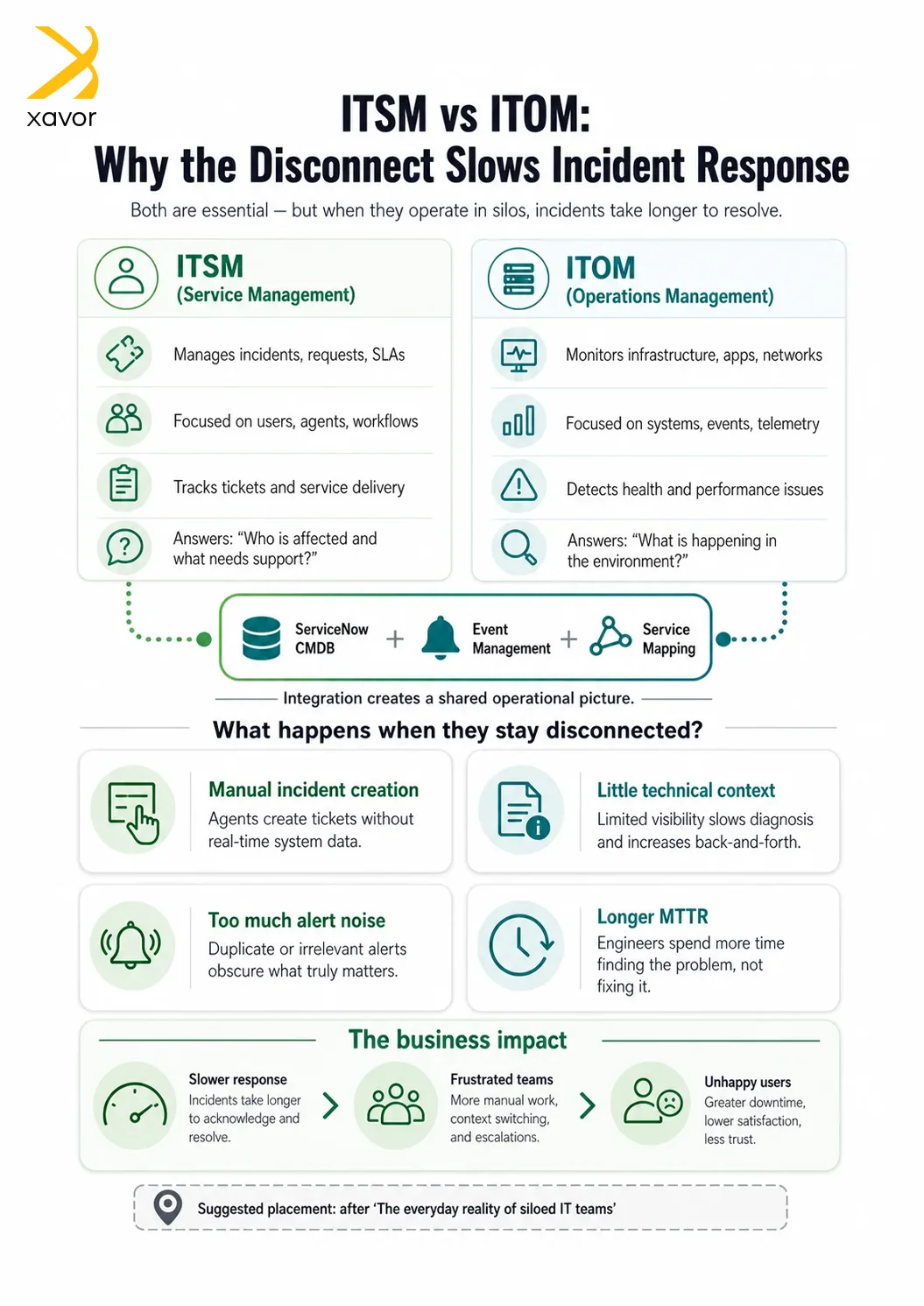
But these systems often do not talk to each other. That is primarily because ITSM and ITOM are built for two different purposes. The former deals with people and processes, while the latter is designed for machines and telemetry. So, naturally, they operate on different data models.
What does that look like in practice?
- Monitoring tools generate alerts, but no incident is created automatically
- Service desk agents receive tickets without any technical context
- Operations teams and support teams work in parallel, not together
- Engineers spend more time figuring out the problem than solving it
Why this is a bigger problem than it seems
On paper, it looks like a simple integration gap. But even when everything looks fine, it’s a systemic problem that affects how IT teams respond. Without real incident management, these gaps often start to show cracks.
Delays in taking action
When alerts do not automatically turn into incidents, someone has to manually step in. That delay, even if it is just a few minutes, can impact business operations. These few minutes add up to cause serious delays, which can be very costly in high-impact systems.
Lack of context
Service desk agents often see only the symptoms. They do not have visibility into what is happening behind the scenes in the infrastructure.
For example, when an incident reaches the service desk, it may look like the application is slow. But that is too vague. The underlying issue could be a failing database or a memory leak in a service.
Too much noise
Monitoring tools can generate thousands of alerts. Without proper filtering, teams struggle to identify what actually matters. Without ITSM-ITOM integration, alerts are not correlated into a single incident. That in turn means no business context is applied.
Longer resolution times
When teams are disconnected, collaboration slows down. Everyone is working hard, but not always in sync. Since there is no shared, real-time view, the mean time to resolution can increase. This leads to incidents lingering around longer than they should.
How to integrate ITSM and ITOM in ServiceNow
ServiceNow is one of the few platforms that provides built-in ways to integrate ITSM and ITOM. Let’s take a look at some of the ways you can make ServiceNow ITSM and ITOM work together.
1. ServiceNow CMDB
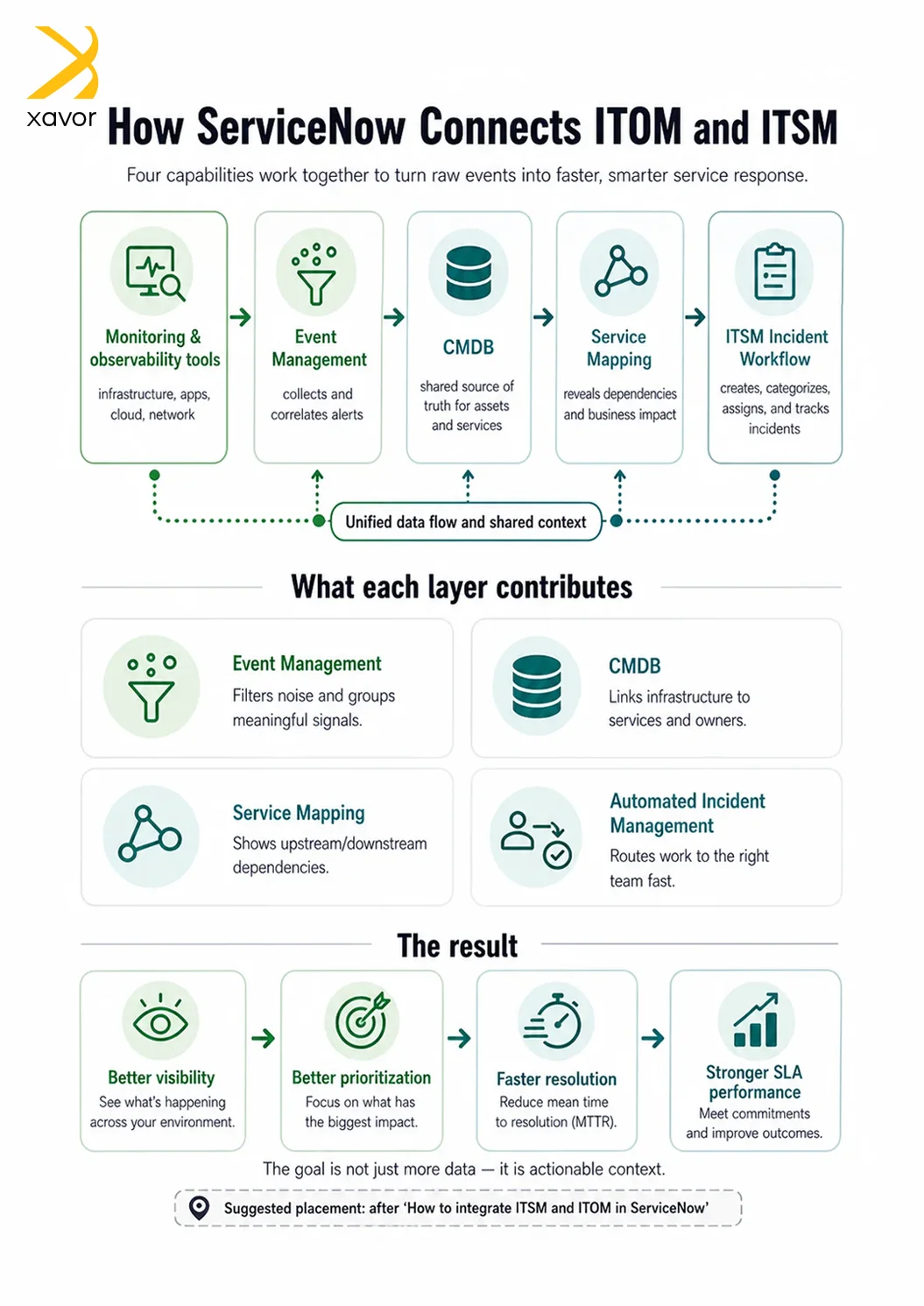
ServiceNow CMDB is the foundational way to integrate ITSM and ITOM in ServiceNow. It serves as the shared data layer between the two. You can store apps and services between them using CMDB.
It essentially binds them together through relationships, so you can have a common view.
2. Event-driven integration
You can use event management for more advanced operations and integrations. Event-driven integrations correlate alerts into meaningful incidents. This reduces alert fatigue and improves MTTR.
3. API integration
Integration tools like Datadog and Splunk are your third option to connect ServiceNow ITSM and ITOM. These tools use REST APIs to create a unified ecosystem where both tools work in cohesion. API-based integrations are also great for cross-platform workflows outside of ServiceNow.
What changes when ITOM and ITSM work together
When ITOM and ITSM are connected through a unified platform like ServiceNow, the entire experience improves for both the teams and end users.
Incidents are created automatically
Instead of relying on manual steps, events from monitoring tools can directly create incidents. This ensures that nothing important is missed.
Tickets come with context
Imagine opening an incident and already knowing which server, application, or service is affected. That context helps teams act faster and more confidently.
Noise is reduced
Event correlation helps filter out duplicate or low-priority alerts. Teams focus only on what truly needs attention.
Teams work as one
Operations and service management teams are no longer isolated. They share the same data and work toward the same outcome.
A real scenario that many teams will recognize
Let’s say your company’s customer portal suddenly slows down.
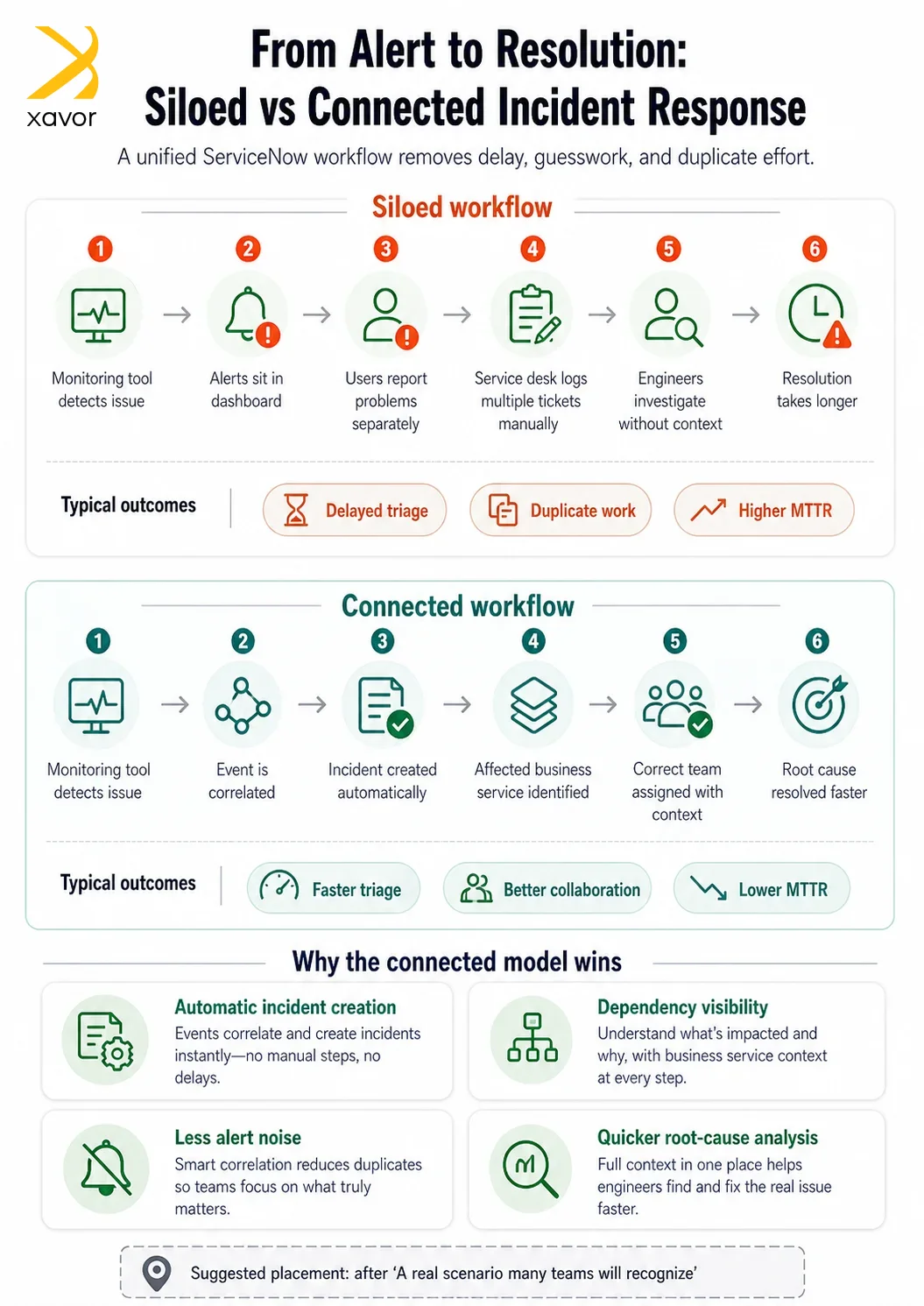
In a siloed setup:
- The monitoring tool detects high CPU usage
- Alerts are generated, but sit in the monitoring dashboard
- Users start reporting issues to the service desk
- The service desk logs multiple incidents manually
- Engineers are brought in, but they lack visibility into dependencies
It takes time to connect the dots.
Now imagine the same situation in a connected environment:
- The monitoring tool detects the issue
- An incident is created automatically with all relevant details
- The system identifies the affected business service
- The right team is assigned immediately
- Engineers can see dependencies and pinpoint the root cause quickly
Case Study 1: Financial services organization
One of the organizations we worked with had a common problem. Their monitoring system was generating a high volume of alerts, but their service desk was handling incidents separately.
The team often missed critical issues because they were buried under noise.
After connecting ITOM and ITSM:
- Only meaningful alerts were converted into incidents
- Incidents were enriched with infrastructure data
- Teams could quickly identify impacted services
The result was a significant reduction in resolution time and a noticeable improvement in SLA performance.
Case Study 2: E-commerce business during peak sales
Another client faced repeated outages during major sales events. Their biggest challenge was not detecting issues, but understanding them quickly.
They lacked visibility into how different components were connected.
Once ITOM and ITSM were integrated:
- Service mapping provided a clear view of dependencies
- Incidents were routed to the right teams without delay
- Teams could identify root causes faster
During their next sales event, the platform remained stable, and the team handled incidents with much more confidence.
How platforms like ServiceNow help
Solutions like ServiceNow bring ITOM and ITSM into a single ecosystem.
Here are a few capabilities that make a real difference:
Event management
It collects events from different monitoring tools and uses intelligence to identify what actually matters.
Service mapping
It shows how applications and infrastructure components are connected, making it easier to understand the impact.
Automated incident management
It ensures incidents are created, categorized, and assigned without manual effort.
CMDB as a single source of truth
It provides accurate and up-to-date information about your IT environment.
Challenges you might face and how to handle them
Integration sounds great, but it is not always straightforward.
Incomplete CMDB
If your data is not accurate, the insights will not be reliable. Start with improving data quality through discovery and regular updates.
Too many alerts
Without proper configuration, even integrated systems can become noisy. Focus on defining clear rules and thresholds.
Team resistance
People are used to their existing workflows. Change management and proper training can make a big difference.
Overcomplication
Trying to do everything at once can slow you down. Start small and build gradually.
Practical tips to get started
If you are thinking about connecting ITOM and ITSM, here are a few simple steps:
- Start with your most critical business services
- Use out-of-the-box features instead of over-customizing
- Focus on reducing alert noise early
- Keep your CMDB clean and updated
- Track improvements in metrics like MTTR and SLA compliance
Conclusion
Siloed tools might seem manageable on a normal day. But during critical incidents, they create delays, confusion, and unnecessary pressure on your teams. Connecting ITOM and ITSM changes that experience completely. It brings clarity, speed, and collaboration into your incident response process.
ServiceNow provides native integration options to connect ITSM and ITOM. So, you can have a clear view of your IT assets and services. Moreover, integrating the two also does wonders to automate IT operations for smooth service delivery.
Xavor’s ServiceNow experts can help you integrate ITSM and ITOM to reduce usage wastage and optimize spending on your ServiceNow instance. We support cloud, hybrid, and on-premises systems as per your business needs.
Contact us at [email protected] to book a free consultation session.

FAQs
ITSM in ServiceNow focuses on managing day-to-day IT services like incidents, requests, and support for users. On the other hand, ServiceNow ITOM focuses on monitoring and managing the underlying IT infrastructure, such as servers, networks, and cloud environments.
Connecting ITSM and ITOM provides full visibility from infrastructure issues to service impact. It helps teams quickly identify root causes and resolve incidents faster by linking operational data with service workflows.
ITOM can automatically detect and alert issues in infrastructure, while ITSM manages the incident lifecycle. Together, they enable faster diagnosis, automated ticket creation, and more efficient resolution of IT issues.