
Incident assignments are one of the most important parts of the ticket lifecycle in ServiceNow. If an incident reaches the wrong team first, resolution slows down, reassignment increases, and unnecessary effort is added for both the service desk and support teams.
In many organizations, this still happens because assignments depend on manual judgment or broad rules based on category or subcategory.
A more reliable approach is to use the Configuration Item (CI) selected on the incident and pull support ownership from ServiceNow CMDB. If the CI already has a support group defined, ServiceNow can use that information to assign the incident automatically.
This makes routing more accurate and ensures that the incident is aligned with the actual ownership recorded in the platform. In this blog, we’ll look at this more dynamic approach in ServiceNow solutions. The logic remains the same, but the assignment changes depending on the CI selected on the record.
What is Incident Management in ServiceNow?
In ServiceNow, an incident is any unplanned interruption that can disturb IT services. These interruptions can be anything, like a server going down or a user being unable to log in. Regardless of their provenance, these incidents are a hindrance to IT services and significantly impact the customer experience.
ServiceNow allows companies to manage and resolve incidents in a systematic way. It first logs them, then tracks their origins, and finds applicable solutions to fix them. This whole process is called incident management.
These incidents keep popping up, everything now and then. And businesses need to resolve them as quickly as possible to maintain high service levels and business continuity.
Incident Management is a core application within the ServiceNow ITSM module. But it often works with other modules as well. Particularly, it is used in CMDB to link incidents to CIs and determine ownership.
The problems of incident assignment
Incidents need to be assigned to the proper team for resolution. If it’s a network-related incident, it needs to be assigned to the network team. Now ServiceNow has built-in rules to make incident assignments quick.
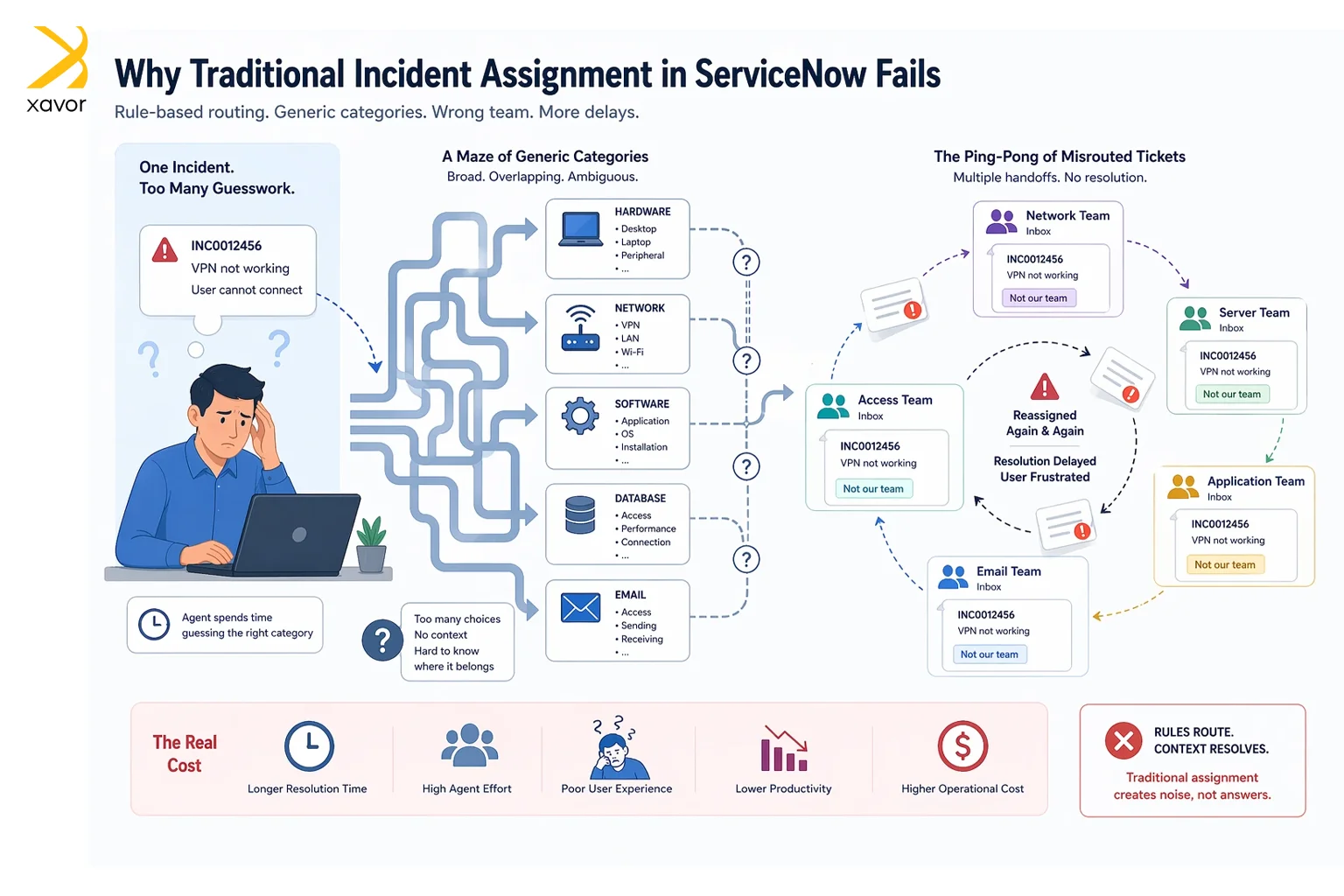
Like, there will be some broad categories to decide which team the incident belongs to. But those categories can be too generic. Incidents aren’t usually black and white, neatly fit into predefined rules and categories.
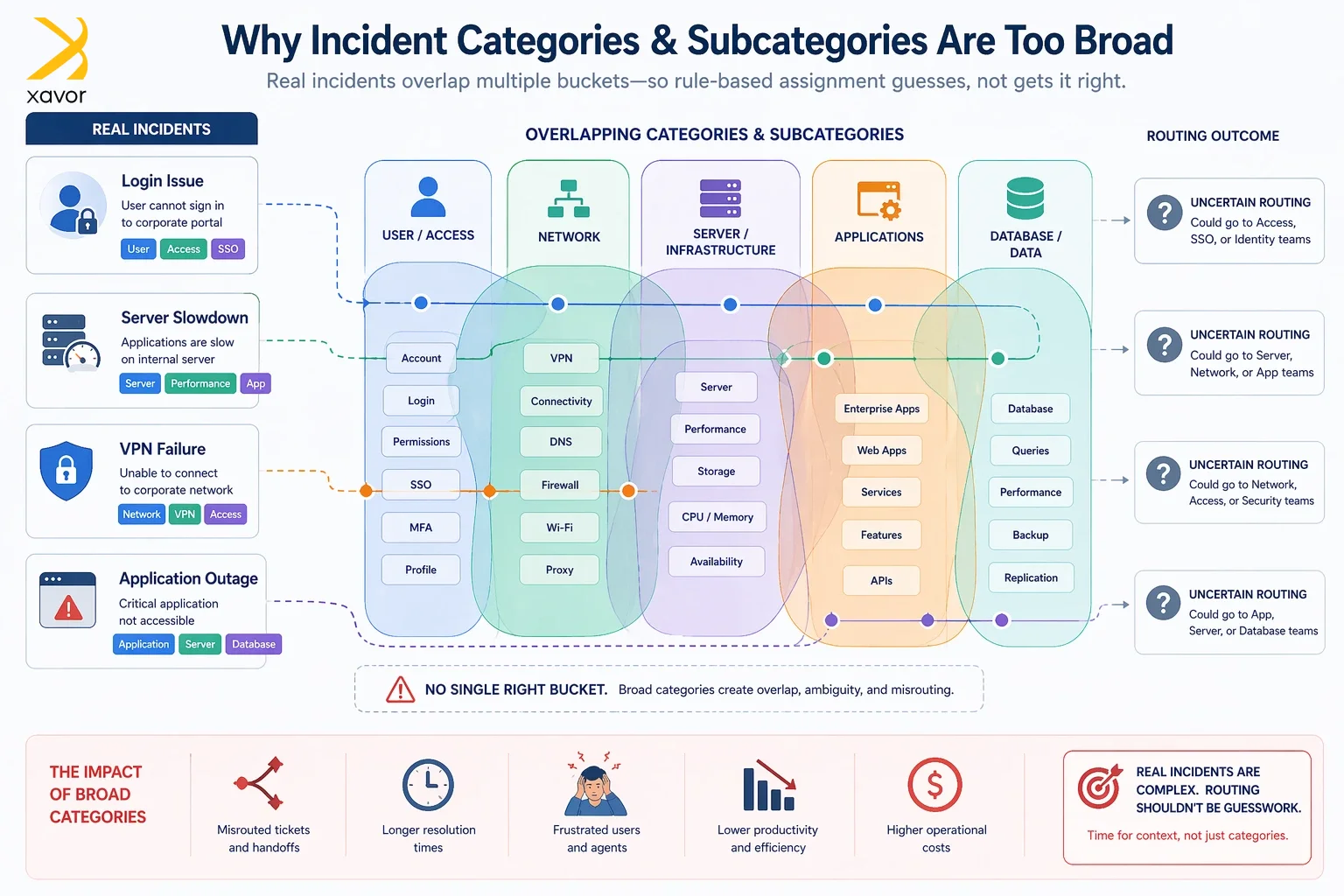
Here is a table showing the common incident categories and subcategories in ServiceNow:
| Category | Subcategory |
| Inquiry | Antivirus Email Internal Application |
| Software | Email Operating System |
| Hardware | CPU Disk Keyboard Memory Monitor Mouse |
| Network | DHCP DNS IP Address VPN Wireless |
| Database | DB2 SQL Server Oracle |
Sometimes, an incident is related to multiple categories or subcategories. Therefore, companies either manually assign incidents or use AI agents. Either way, the process is error-prone and results in wrong assignments. This causes delays and multiple reassignments to solve a single issue.
CMDB as the source of assignment
The CMDB in ServiceNow is not only a place to store technical records. It also helps define ownership and support responsibility for configuration items such as applications, servers, databases, and other infrastructure components.
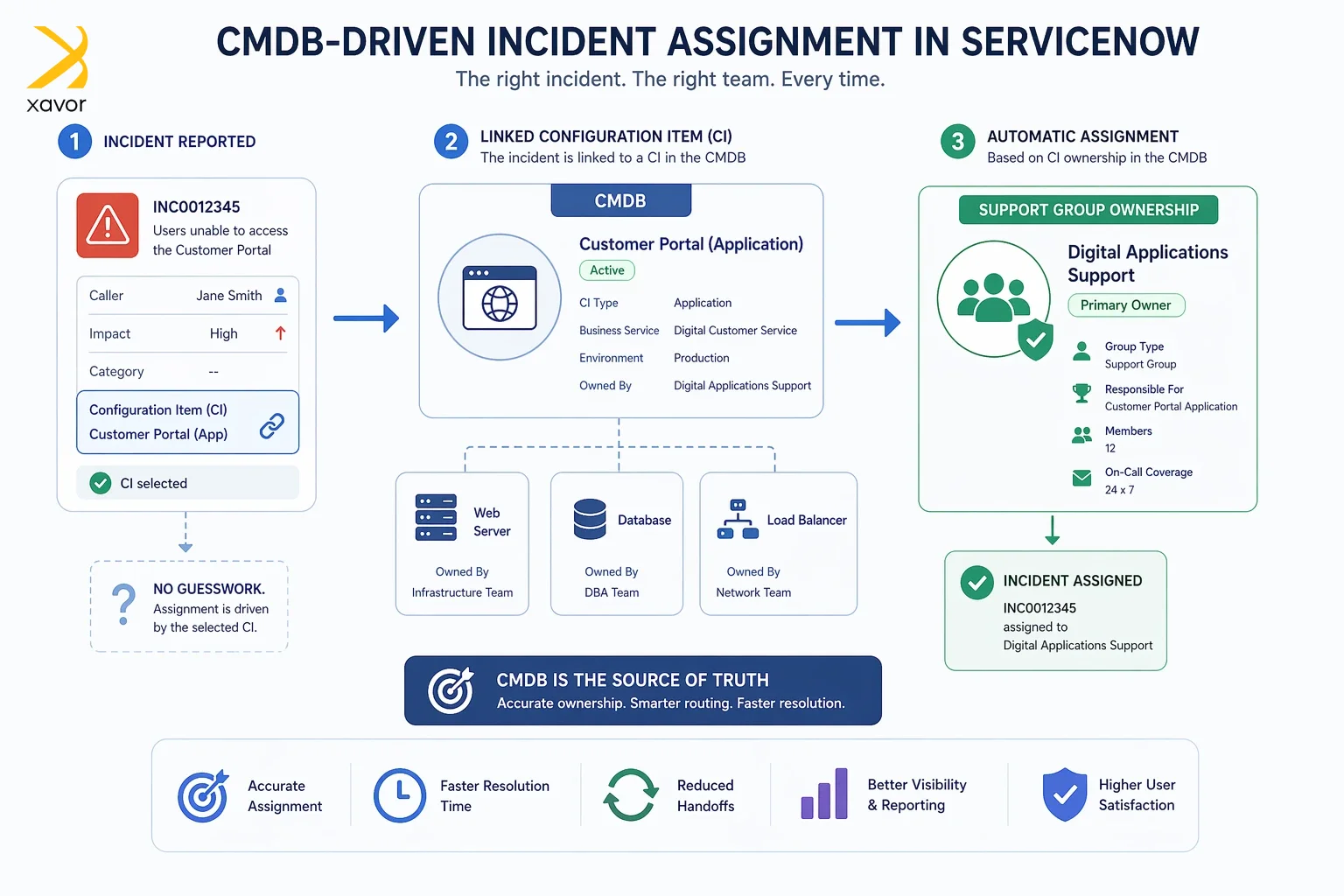
Every incident usually has a CI. And each CI in the CMDB already has an owner defined. So, when a CI is selected on an incident, that record provides context about the affected system.
Instead of asking an agent to decide which team should handle the issue, ServiceNow can look at the selected CI and use the support group already maintained on that record. In this way, the assignment is driven by CMDB data rather than by guesswork.
Implementation in ServiceNow
You can implement this using a Business Rule on the Incident table. The rule typically runs before insert so that the assignment group is set as soon as the incident is created. The script first checks whether a CI exists and whether the assignment group is already populated.
If either condition is not suitable for automation, the script exits. If a CI is available, GlideRecord is used to fetch the record from the CMDB. Once the CI is found, the script reads the support group and assigns the incident to it.
Business rule script
(function executeRule(current, previous) {
if (!current.cmdb_ci || current.assignment_group) {
return;
}
var ciGR = new GlideRecord(‘cmdb_ci’);
if (ciGR.get(current.cmdb_ci)) {
if (ciGR.support_group) {
current.assignment_group = ciGR.support_group;
}
}
})(current, previous);
Note: This pattern works best when support groups are consistently maintained on CI records in the CMDB.
Benefits
Going with this approach improves assignment accuracy because the decision is based on CI ownership rather than user input alone. It also reduces reassignment, which helps incidents reach the correct team more quickly. Since the support group is maintained on the CI record, the script remains simple and does not need frequent changes when ownership changes. The update happens in the CMDB, not in the code.
Another advantage is consistency. Different agents may classify incidents differently, but if they select the correct CI, the platform can still assign the ticket in a standard way. This makes the ServiceNow ticketing process more stable and easier to maintain.
Incident Management process in ServiceNow
ServiceNow Incident Management follows a lifecycle for resolving an incident. Incidents and their resolutions can vary, but they follow the same process.
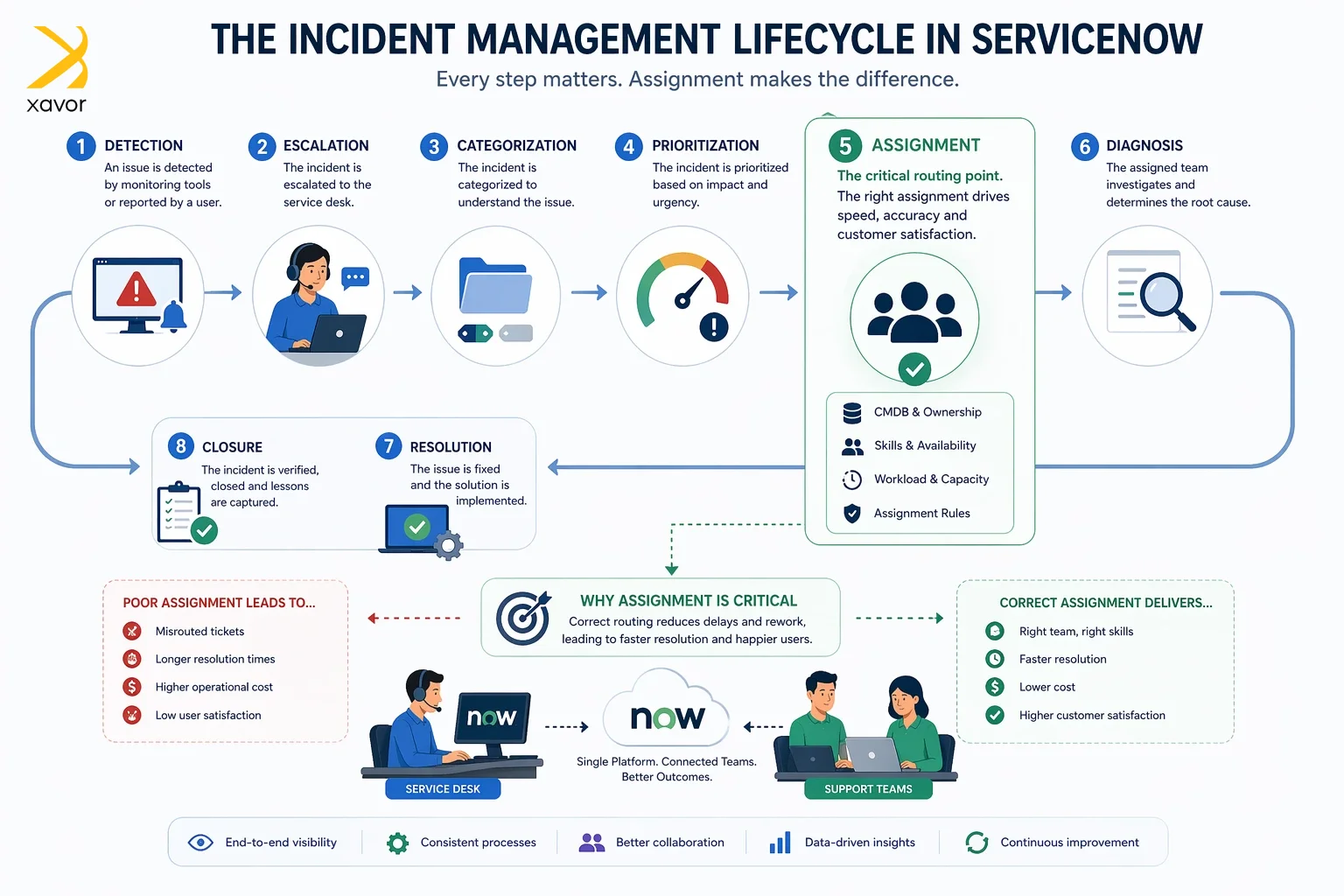
Let’s take a look at the major steps in the Incident Management process.
1. Detection
An incident is first identified and recorded. It can be reported by users through the portal, phone, email, walk-ins, or created automatically by monitoring tools or other systems.
2. Escalation
After the incident is logged, the right people may be notified. If the issue is important enough, it is escalated so someone takes action quickly. Not every small issue needs an alert.
3. Categorization
The incident is then classified by type. It is usually based on a category and a subcategory. This helps route it correctly and also makes similar issues easier to handle in the future.
4. Prioritization
Then the team decides how urgent the incident is by looking at impact and urgency, such as how many users are affected or whether there is financial risk.
5. Assignment
Assignment involves sending the incident to the correct assignment group, and then usually to a specific person who becomes responsible for working on it.
6. Diagnosis
The assigned team analyzes to look for the cause and works within the SLA. They may involve other teams if needed. If the priority changes, SLA handling in ServiceNow may change too.
7. Resolution
The incident is considered resolved once service is restored, either through a temporary workaround or a permanent fix.
8. Closure
After confirming the issue is fixed, the ticket is closed. The solution is communicated to stakeholders, and useful lessons are recorded so similar incidents can be prevented or resolved faster later.
Considerations
The success of this solution depends on CMDB data quality. If support groups are missing from CI records, the automation will not work consistently. That means the CMDB must be maintained properly for this design to be effective.
It is also important to decide when the rule should run. In many cases, running it only on insert is enough. That prevents the incident from being reassigned later if someone updates the CI or if the assignment group has already been set manually.
Developers should also be careful not to overwrite an assignment group unnecessarily. If the incident has already been assigned through some other logic, the script should respect that.
Conclusion
Dynamic assignment of incidents in ServiceNow can be implemented in a very practical way by using the support group stored on the selected Configuration Item. Rather than relying on manual routing or broad assignment rules, the platform can use CMDB data to make a more accurate decision at the time the incident is created.
This approach is simple, maintainable, and closely aligned with how ServiceNow is designed to use configuration data. For developers, it is a strong example of using the CMDB not just as a technical repository, but as an active part of ITSM automation.
Xavor’s ServiceNow experts devise a reliable incident management solution using the platform’s different modules. We ensure that your IT tickets are always assigned to the relevant teams automatically and resolved with accuracy.
Contact us at [email protected] to book a free consultation session. Our ServiceNow team will examine your needs and existing workflows to come up with the most practical implementation plan.

FAQs
CMDB (Configuration Management Database) in ServiceNow is a centralized repository that stores information about an organization’s IT assets and their relationships. It helps teams understand how systems are connected, enabling better incident management, change control, and overall IT operations.
ServiceNow Incident Management is a process that helps organizations quickly identify, track, and resolve IT issues that disrupt normal operations. It ensures incidents are handled efficiently through workflows, prioritization, and automation to restore services as quickly as possible.
The 5 C’s of Incident Management are: Categorize to identify the type and nature of the incident. Confirm is to validate that the incident is real and needs action. Contains means to limit the impact to prevent it from spreading. Correction fixes the issue and restores normal service. And finally, closing – means documenting the resolution and formally closing the incident.