

Manufacturing and engineering software like PLM or CAD have historically been conservative about cloud adoption. And it is understandable because legacy systems are deeply embedded in these industries.
But that has now changed with major PLM vendors hosting their products on the cloud. That is why companies are looking to migrate their existing PLM systems to cloud resources, often turning to PLM cloud migration services for a smoother transition.
Lift and shift is one of the fastest paths for this journey. It just creates a cloud-ready copy of your PLM data that can be shipped instantly.
However, lift and shift cloud migration is tricky. They often fail to deliver expected results, usually due to some common mistakes that businesses make.
In this article, we’ll look into those mistakes and tell you how to avoid them to move your PLM software to the cloud the right way.
What is lift and shift?
Lift and shift is a cloud migration strategy that quickly moves applications and data to the cloud without any major changes. The data architecture and workflows remain exactly the same in this approach.
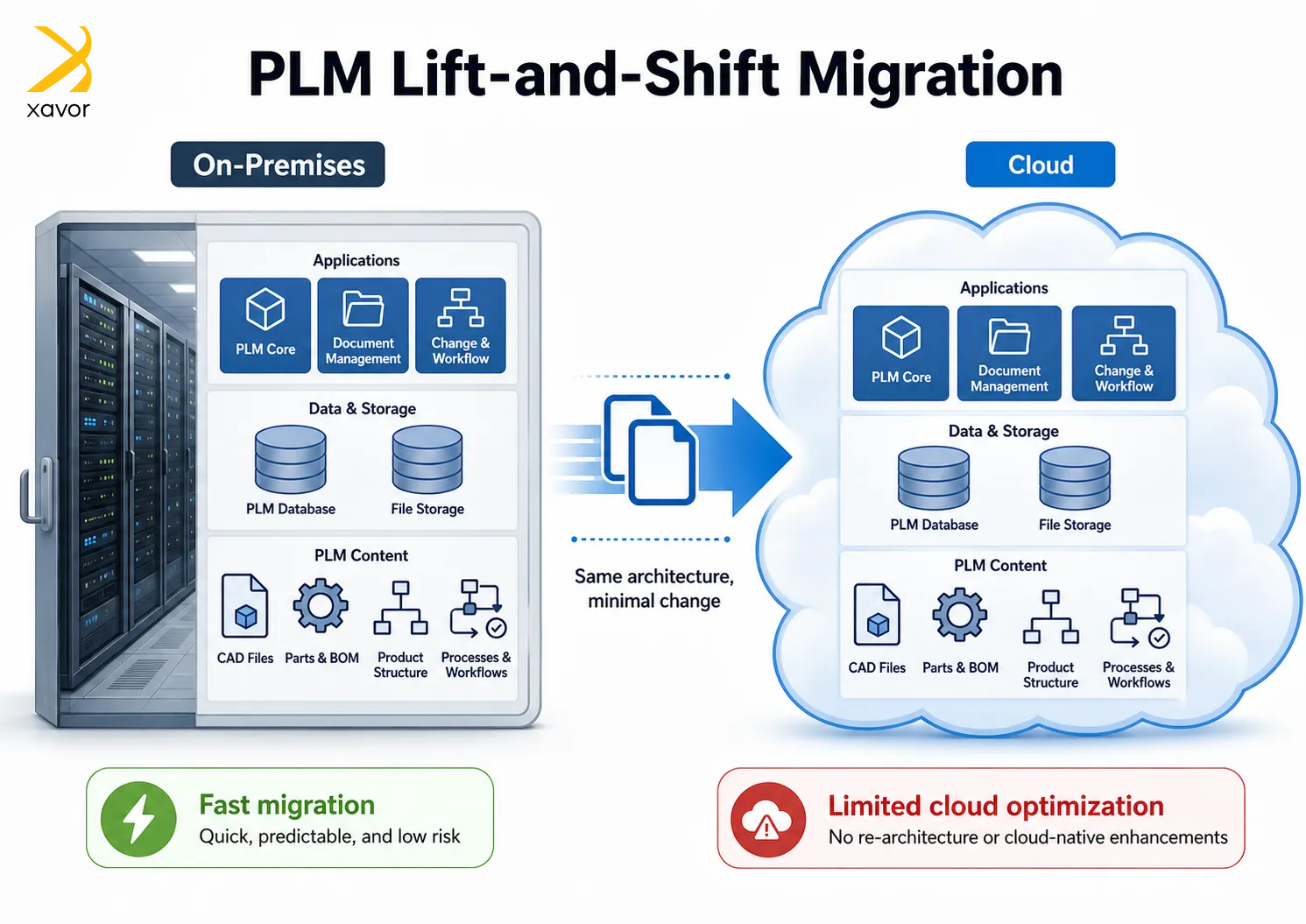
So, when you move to the cloud, everything looks and feels the same as in your on-premises system.
Rehosting is another name for lift and shift. It is one of many cloud migration strategies, such as refactoring and replacing. But lift and shift cloud migration remains the most popular due to its speed and convenience.
Lift and shift for PLM data migration
We discussed this in our blog about lift and shift off of Agile, that PLM data is very messy and interconnected. Therefore, for PLM data migration, lift and shift is often difficult and requires diligence.
Many of the mistakes that we’ll discuss ahead stem from these operational realities. So, we recommend you read that blog as well for grasping the subject better.
Common lift and shift mistakes that ruin PLM migrations
We have resolved quite a lot of problems during PLM data migrations. And we have seen with experience that the real problem is the short-term strategy behind lift and shift.
The approach itself doesn’t cause problems for PLM migrations if you have a plan behind it. But many customers are lacking in one of these aspects of migration.
1. Migrating corrupted legacy data
One of the most costly mistakes in a lift-and-shift PLM migration is assuming that the source data is clean and ready for the new environment. For some reason, many users do that. But in reality, legacy PLM systems often contain years or even decades of accumulated errors.
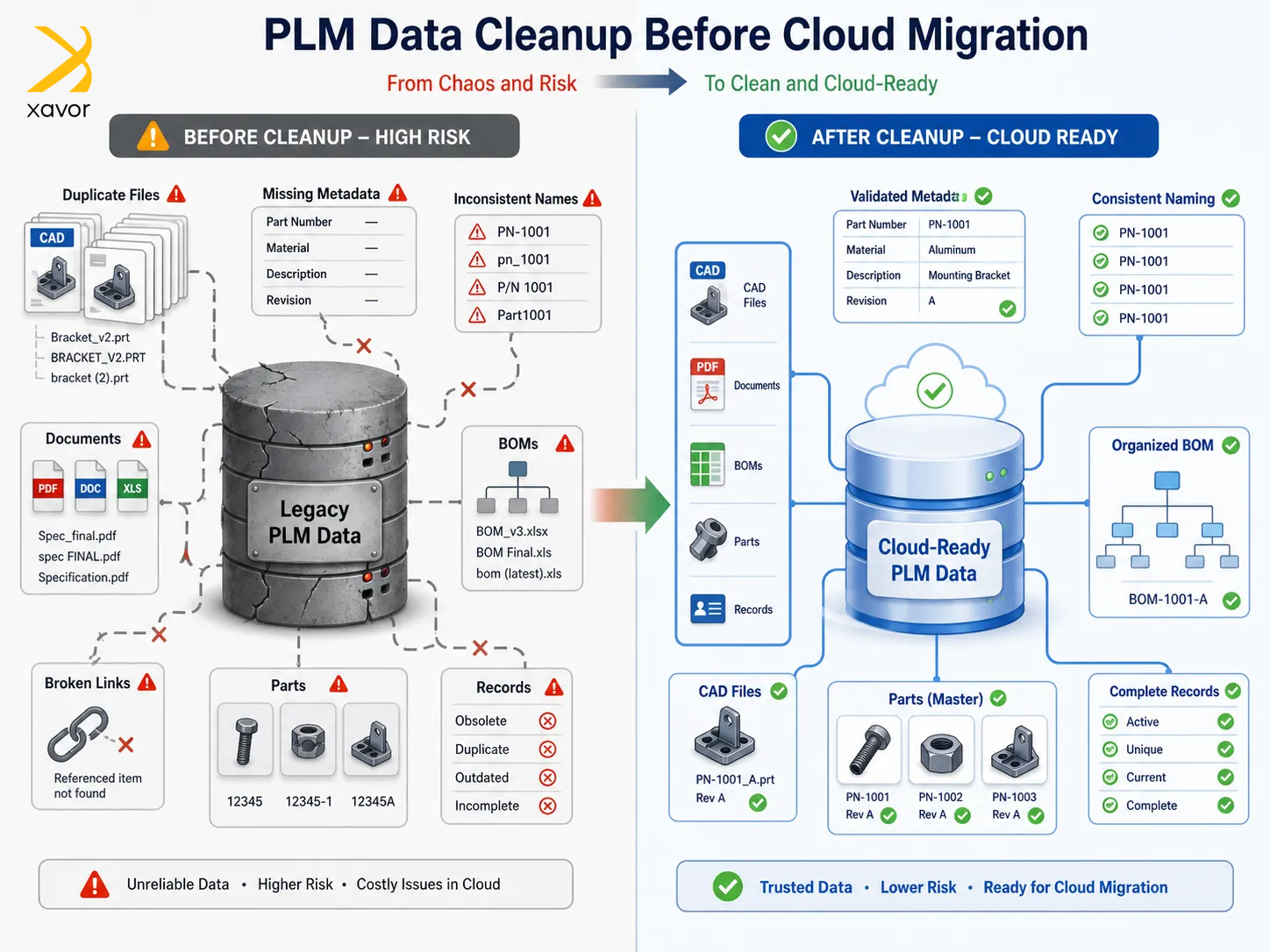
Yes, lift and shift moves everything as-is. However, organizations attempt to move their entire database without performing a comprehensive data audit. It is a recipe for a plethora of issues, such as:
- Migrating duplicate files,
- Missing metadata,
- Inconsistent naming conventions
- Broken relationships between data sets
The new system inherits all the inefficiencies and errors of the old system. A notable example is the Ericsson PLM implementation with Dassault’s 3DEXPERIENCE, which faced severe challenges. Reports indicated that every time the migrated data was tested, all use cases failed, largely due to corrupted and distorted legacy data.
Ways to avoid corrupted data
Start with a rigorous data profiling and cleanup phase to avoid migrating corrupted data. And do this before any data is moved at all.
You can do this by performing a data audit. Review the source data to identify common issues like duplicates and broken links. Next, implement equivalency rules. In easy terms, these are established standards for handling duplicate parts. For example, exact matches should be consolidated into a single master record, while near-duplicates should be flagged for engineering review.
Cleansing metadata before mapping should also be on your checklist. Never map attributes to the new PLM data model without first cleaning the source metadata. Address issues like orphaned CAD files and invalid BOM structures with circular references.
2. Ignoring CAD dependencies
CAD files are usually 2D or 3D digital drawings of different components. They are used a lot in product lifecycle management. But CAD files have intricate relationships with BOM hierarchies and associated documents.
A standard lift and shift migration often treats PLM data as simple flat files or isolated database rows. It is a flawed approach that overlooks the complex dependency graphs inherent in CAD assemblies.
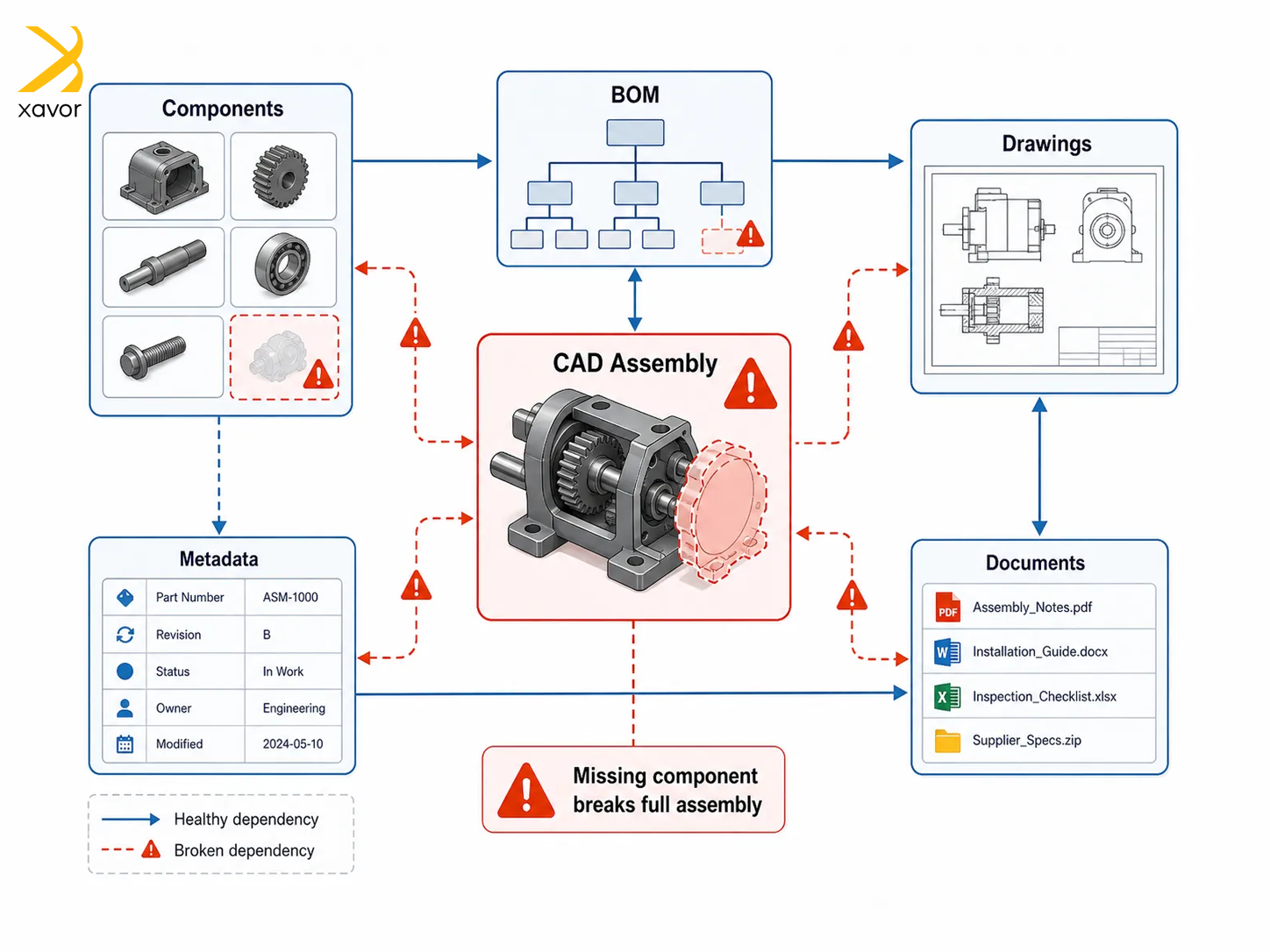
If a migration tool simply copies files from one vault to another without validating these relationships, it can result in broken links between CAD models and BOMs.
So, when engineers attempt to open an assembly in the new system, missing component references can halt production and require extensive manual rework.
Workarounds to fix broken links
Safeguarding CAD dependencies requires specialized validation techniques. Therefore, run a dependency graph scan on CAD assemblies before exporting them from the legacy vault. It will reveal broken links that must be fixed prior to migration.
Additionally, implement MD5 or SHA-256 checksums for every CAD file during extraction. Compare these checksums after import to detect any silent data corruption that may have occurred during the transfer.
3. Underestimating cloud latency
Lift and shift fundamentally changes the network architecture when you move to the cloud. And organizations often fail to account for the impact of network latency on CAD file performance.
Moving the Vault server to the cloud changes the network route, which is then limited by the speed of the internet connection to the cloud provider. That can cause problems because CAD files are typically large and require frequent read/write operations.
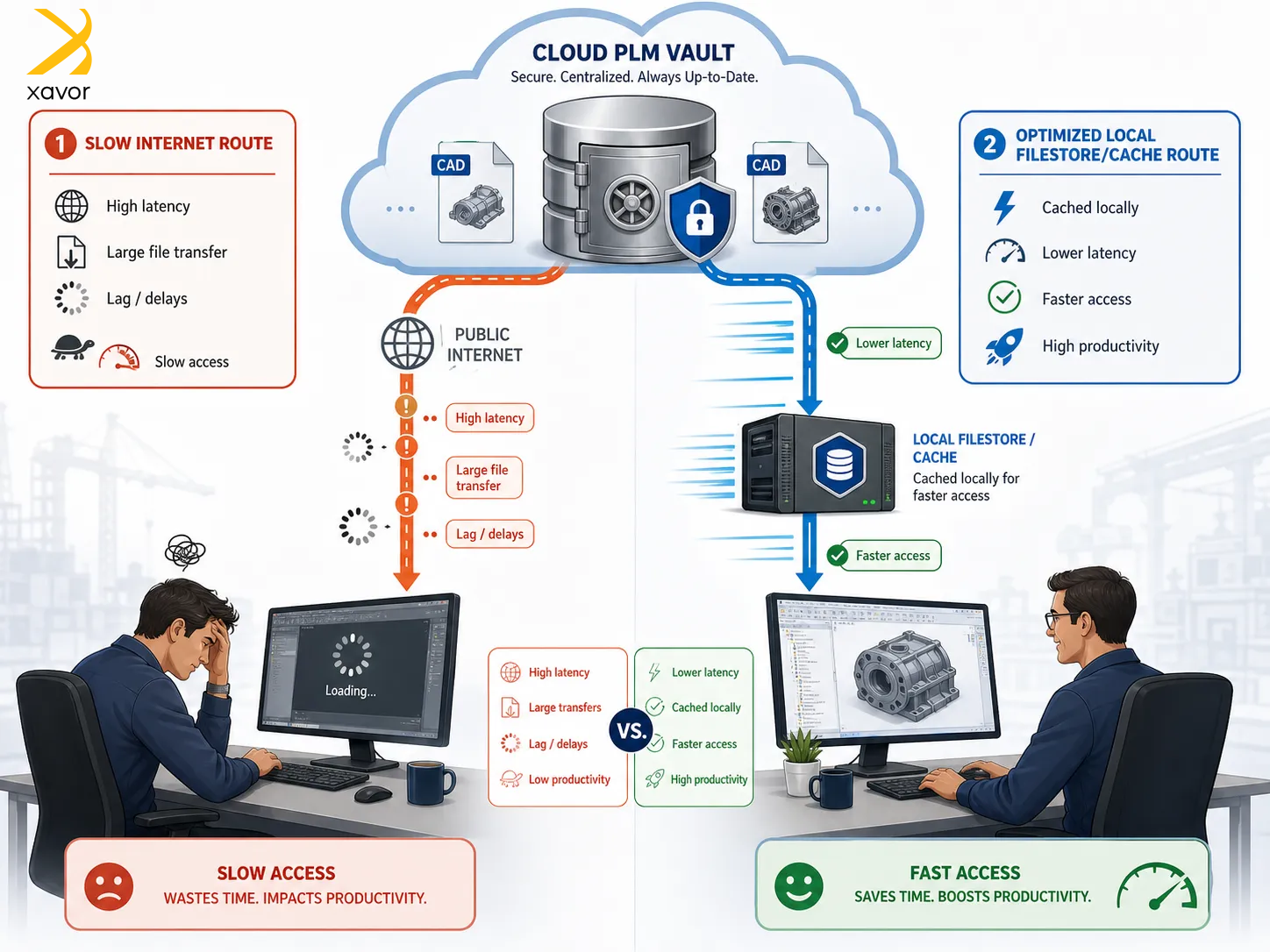
A lift-and-shift migration can result in severe performance degradation. Users may experience significant lag when downloading projects or even during basic cursor movements in remote drafting scenarios.
Solutions for the issue of latency
Addressing latency requires architectural adjustments rather than a pure lift-and-shift. If using systems like Vault Professional, consider setting up a replicated Workgroup or Filestore server at the local site. It is a fast, local connection for heavy CAD users while maintaining a cloud-based server for remote access and synchronization.
We also recommend conducting pilot migrations and simulating heavy user loads to test performance and latency before full production rollout.
4. Lack of automated rollback mechanisms
Always hope for the best and prepare for the worst. Follow this motto religiously in data migration because it rarely succeeds on the first attempt. Often, multiple iterations of testing and fixing get you the desired results.
Moreover, executing a “Big Bang” lift-and-shift migration without a contingency plan is even more prone to failures. For example, a batch import issue can corrupt the target database.
The absence of an automated rollback mechanism can lead to extended system downtime and potential data loss in such emergencies. Partial commits can leave the PLM system in an inconsistent state, which makes it difficult to determine which records were successfully migrated and which failed.
How to implement rollbacks
A phased approach with rollback capabilities is essential for a safe migration. Snapshot-Based Rollback is a great choice in this case. They capture the state of the PLM system before each batch import. If the batch fails validation, the system restores to this snapshot.
Using a delta-tracking journal to log every attribute change with a timestamp connected to the user ID and the previous value. Delta tracking allows for precise tracking of what changed during the migration and facilitates incremental loads.
Conclusion: To lift and shift or not?
Lift and shift is a very useful migration technique, but it’s not a silver bullet. In our opinion, it is the most apt choice when you have pressure to leave your old infrastructure. Maybe you need to migrate before a deadline or constraints like that.
But getting it right the first time is really difficult. You’ll be shifting old problems to a new system if you don’t have a clear plan behind your lift and shift approach.
Xavor helps you lift and shift the right way. We clearly define the migration scope after assessing your business operations. Then move every piece of your data with a security-first approach.
Contact us at [email protected] to book a free consultation session.

FAQs
Lift and shift is a cloud migration approach where applications are moved from on-premise systems to the cloud without making significant changes to their architecture. It’s a fast way to migrate, but it may not fully take advantage of cloud features like scalability or improved performance.
Lift and shift moves applications to the cloud as-is, without changing their architecture. While replatforming makes small optimizations, like updating databases or runtime environments. So, the application works better in the cloud while avoiding a full redesign.
Lift and shift timelines vary based on application size and complexity. Simple applications can be migrated in a few days to weeks, while larger or more complex systems may take several weeks to a few months.