
A customer asks your AI agent whether a discounted item can be returned. Your knowledge base contains a 30-day return policy and a 14-day policy for discounted purchases, but neither explains whether opened items qualify. Without clear conditions, the agent may give an answer that does not apply to the purchase. Before deploying Salesforce AI agents, businesses need to review the information those agents will use. An Agentforce knowledge base preparation checklist can help identify these issues early, while Salesforce development services can support the technical work required for implementation.
How Agentforce uses knowledge articles to answer customer questions
Salesforce Agentforce can answer customer questions using information retrieved from approved knowledge sources. Through retrieval-augmented generation (RAG), the system searches indexed content for information relevant to the customer’s request. Agentforce then uses that information to generate a response. The quality of the answer depends partly on whether the retrieval system finds accurate content that applies to the customer’s situation.
Salesforce’s Agentforce Data Library allows businesses to connect knowledge articles or other supported sources to an agent. The platform creates a searchable index using Salesforce Data 360. Understanding how Salesforce Data 360 implementation works can help teams plan the data connections and retrieval setup their agents will depend on. When configured with the Answer Questions with Knowledge action, the agent can retrieve information from the connected library. Still, access restrictions or poorly organized articles may prevent it from finding the expected answer.
For instance, a customer asking about warranty coverage needs information specific to the purchased product. If the retrieved article describes an older model, the response could contain an incorrect warranty period. This is why Salesforce Knowledge for Agentforce requires attention to content accuracy and retrieval configuration. Agents that primarily perform actions using CRM records may have different data requirements.
Prepare your knowledge base: Seven checks before launch
Agentforce knowledge base preparation starts with defining what the agent should answer. You then need to identify the relevant content and correct any inconsistencies. Confirm that the agent can retrieve approved information. Testing the resulting answers completes the initial review. These seven checks provide a practical way to assess Agentforce data readiness before customers begin using the service.
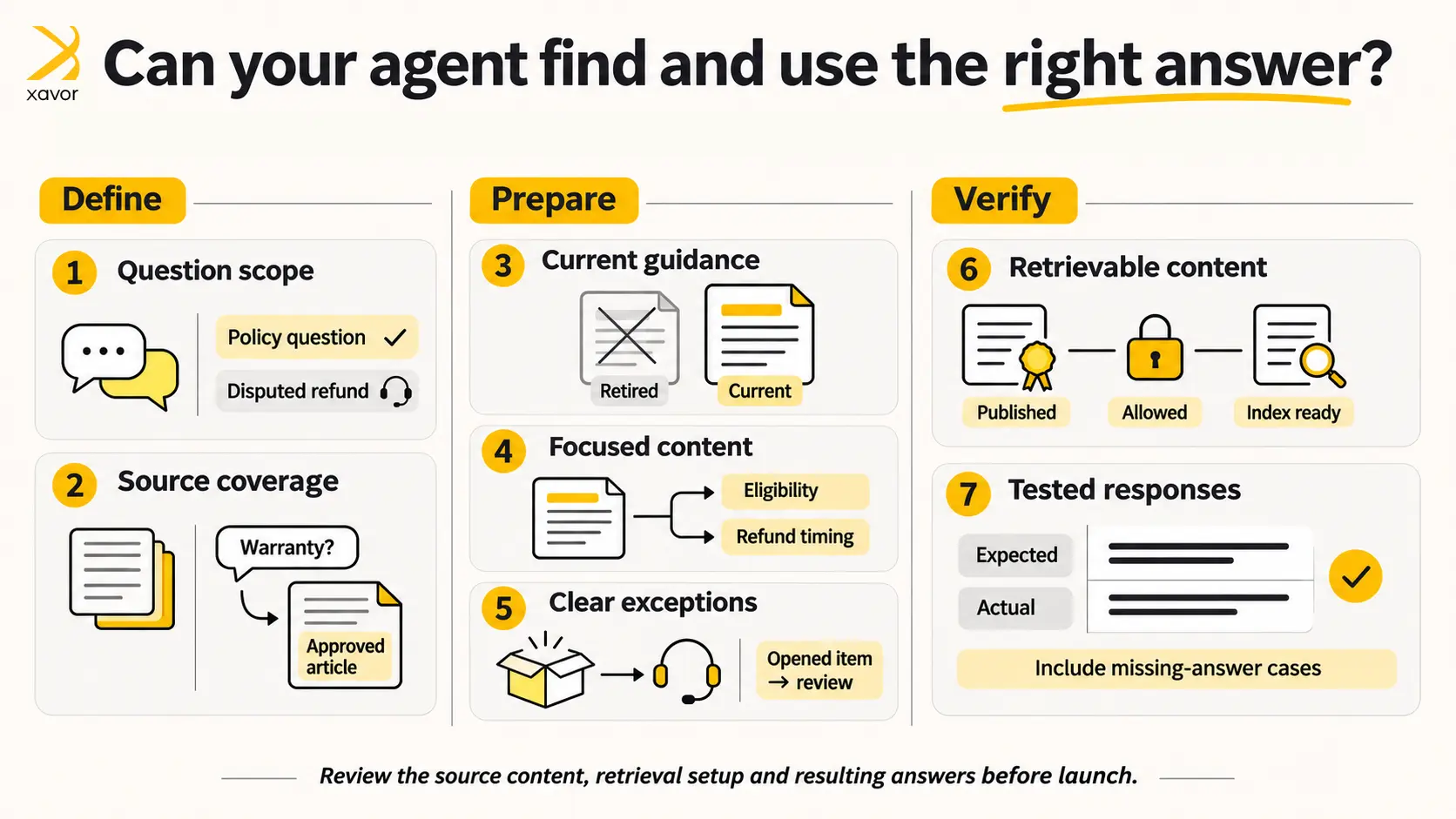
1. Define the customer questions your agent should answer
Start by reviewing common support requests and deciding which questions your first agent should handle. A retailer might begin with delivery policies and return eligibility because these questions usually have documented answers. Customer service managers can review case histories to identify suitable requests. Keep the initial scope manageable so each question can be tested against a clearly defined information source.
You should also identify requests requiring human assistance. For example, an agent might explain the standard refund policy while referring disputed refunds to customer support. Document these boundaries before configuring the agent. This makes it easier to determine whether an unexpected response comes from missing knowledge or from the agent attempting a task outside its approved responsibilities.
2. Map customer questions to existing articles
Once the agent’s scope is clear, match each supported question to the relevant Salesforce knowledge articles. Record each article’s title and content owner. Note which customer question it answers. This review will reveal gaps in the existing material. A company might have a detailed shipping policy but no approved explanation for deliveries delayed by customs inspections.
Pay attention to questions that require information from multiple sources. A warranty question may depend on the product model and purchase date, with different articles covering each condition. Make sure the relevant information is available and that the articles clearly explain when each rule applies. Your inventory should identify any missing answers that require approval before launch.
3. Remove outdated or conflicting guidance
An Agentforce knowledge base can contain articles that were accurate when published but no longer reflect current policies. For example, an older article might specify a 12-month warranty while a newer document states 24 months. If both remain available for retrieval, the agent may produce inconsistent answers. Review overlapping articles and confirm which information is currently approved.
Salesforce’s content preparation guidance recommends checking articles for contradictory information and keeping terminology consistent. Where policies have changed, clearly identify the effective date and applicable product versions. Retire obsolete material according to your publishing process. Assign someone responsible for approving changes so the knowledge base continues to reflect the latest business policies.
4. Structure articles around specific questions
Salesforce Knowledge articles should make the relevant answer easy to identify. An article that combines refunds with unrelated topics, such as account cancellations, may contain useful information, but the retrieval system processes content in smaller sections. Combining unrelated subjects can make it harder to retrieve the appropriate passage. Salesforce recommends organizing source content into focused topics with descriptive headings.
For example, separate a lengthy returns document into articles covering return eligibility and refund processing. Use clear titles and explain conditions beside the rules they affect. Avoid instructions such as “see the previous section” when the answer depends on information elsewhere in the document. Retrieved passages should provide enough context to be understood independently.
5. Make policy exceptions explicit
Many customer service questions involve exceptions to standard rules. A store may accept returns within 30 days but require approval for opened electronics. If the knowledge article only describes the general return period, Agentforce may produce an incomplete answer. Document the conditions that affect eligibility and explain what customers should do when their request falls outside the standard policy.
You should also define situations requiring escalation. For example, a customer requesting a refund beyond the permitted period may need human review. The relevant knowledge article should explain the policy, while the agent’s configuration should determine how the handoff occurs. Test both elements together to confirm the customer receives an appropriate response.
6. Check content access and intended audience
Correct information is only useful when the agent can retrieve it. Salesforce Knowledge uses publication settings and access controls that can affect which articles are available. During preparation, review the permissions associated with the agent’s running user. Confirm that the intended articles are published and that the library’s selected content fields include the information needed to answer customer questions. Check any public-article or data-category filters, including category visibility. Before testing, confirm that the library and its search index are ready for use.
Salesforce’s knowledge retrieval troubleshooting documentation recommends checking source availability and content quality when expected answers are missing. You should also review which articles contain internal instructions. Customer-facing agents should retrieve content appropriate for their audience, while internal procedures remain subject to the organization’s access requirements.
7. Test responses against approved answers
After preparing the content, test how Agentforce answers questions based on the knowledge articles. Start with straightforward requests and compare the results with approved responses. Then test different ways of asking the same question, including incomplete requests and cases involving policy exceptions. Record where the agent retrieves irrelevant information or provides an answer that does not match the approved policy.
Salesforce’s Agentforce Testing Center supports generating test cases from connected knowledge sources. You can review expected and actual responses to identify issues. Investigate whether information is missing or retrieval settings need adjustment. Review the agent’s instructions as another possible cause. Repeat the tests after making corrections, especially when changes affect several related articles.
Make Agentforce implementation easier with AgentPath
Preparing your knowledge base is an important step, but bringing Agentforce into your business involves more than getting the content ready. You also need to connect the right data, configure the agent around your workflows, and test how it performs before launch.
AgentPath is Xavor’s modular Salesforce Agentforce services offer, built on its Salesforce development experience. Designed for businesses launching their first AI agent or improving an existing implementation, it provides five clearly defined ways to get started, from identifying a suitable use case to building, expanding, troubleshooting, or managing Agentforce agents.
Rather than committing to a large implementation project upfront, businesses can choose the service that matches their current needs. Each delivery engagement has an agreed scope and acceptance criteria. These services help address Agentforce knowledge base requirements as part of the wider implementation.
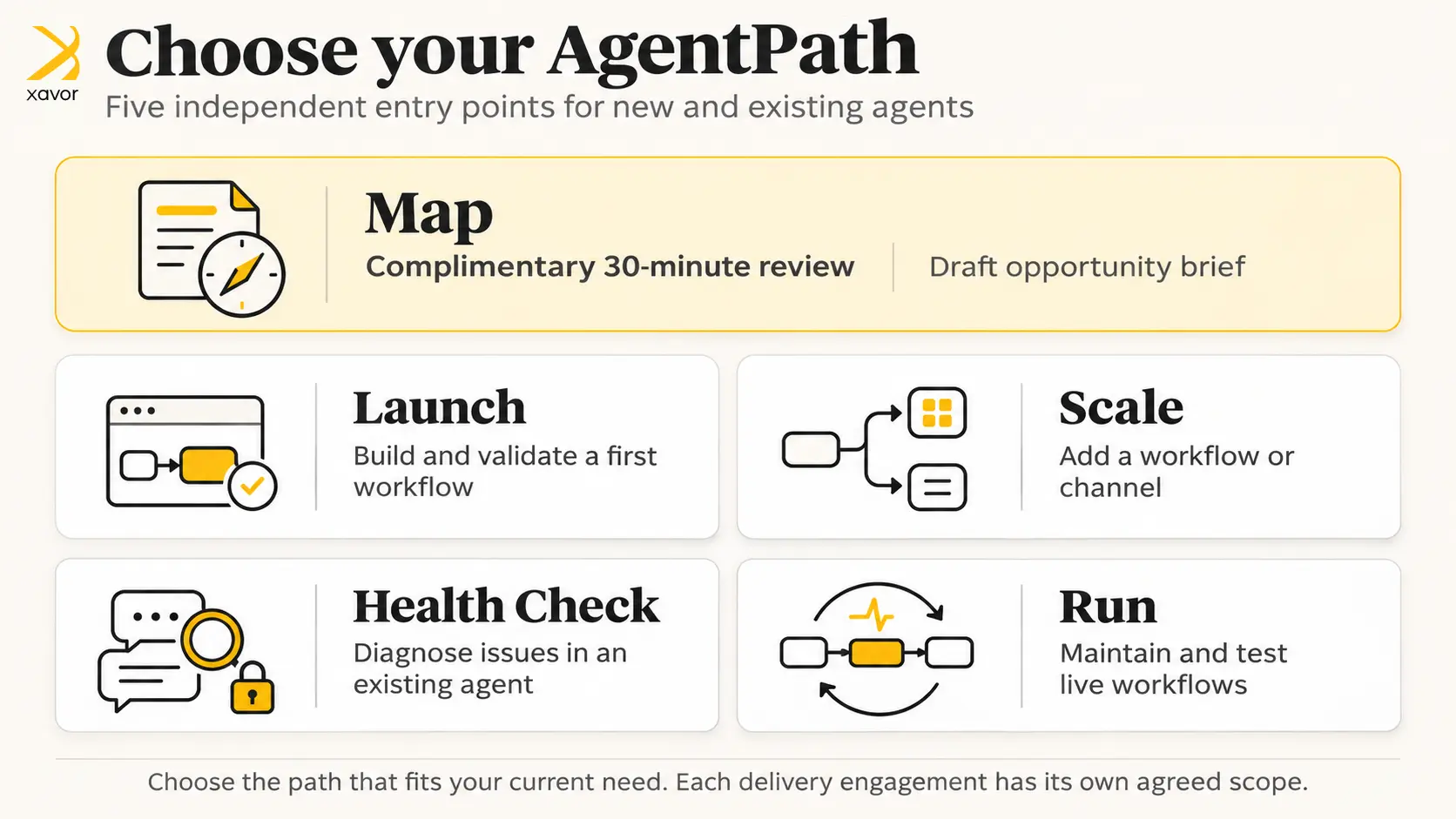
The five paths are independent, not a required sequence. Map is a complimentary 30-minute review to discuss a potential workflow, while Launch, Scale, Health Check, and Run are separately scoped delivery engagements.
For businesses preparing their Agentforce knowledge base, AgentPath Launch is a natural starting point. Xavor reviews the available data and helps build and test the first agent around an agreed workflow. Businesses already using Agentforce can instead use AgentPath Health Check to investigate issues with Agentforce knowledge retrieval, permissions, or agent performance. Agentforce observability can provide further insight into monitoring agent behavior and identifying problems after deployment.
Example: Preparing a returns policy for Agentforce
Consider a retailer preparing an Agentforce service agent to answer product return questions. Its knowledge base contains one article stating that products can be returned within 30 days. Another specifies a 14-day return window for discounted items. Neither clearly explains whether opened products qualify. A customer asks whether an opened, discounted item can be returned after seven days.
The retailer needs to clarify which rules apply before expecting the agent to answer that question consistently. The following hypothetical example shows how the information could be revised.
| Existing knowledge article | Revised guidance |
| Returns accepted within 30 days | Standard-priced products can be returned within 30 days of delivery. |
| Discounted products can be returned within 14 days. | Discounted products can be returned within 14 days of delivery. |
| No guidance on opened products | Opened products require eligibility review by customer support. |
| Exceptions are handled individually | Requests requiring an exception should be referred to customer support. |
With the revised guidance available, the agent can be tested against several customer questions. For the opened, discounted item, the expected response should explain the 14-day period and direct the customer to support for an eligibility review. The retailer should verify the response against its approved policy and confirm that the configured handoff works as intended.
Your final knowledge-base readiness checklist
Before deployment, review the following Agentforce knowledge base readiness checks with the content owners and Salesforce administrators responsible for implementation. Each check should have an observable result, such as an approved article inventory or completed test record. Keep the checklist available after launch so future policy changes can be assessed using the same criteria.
| Readiness check | What to verify |
| Customer questions | The agent’s supported questions are documented. |
| Content coverage | Each supported question has an approved information source. |
| Article accuracy | Outdated information and conflicting policies have been resolved. |
| Content structure | Articles use clear headings and explain relevant conditions. |
| Policy exceptions | Exceptions and escalation requirements are documented. |
| Access permissions | The agent can retrieve the intended articles. |
| Agentforce testing | Responses have been checked against approved answers. |
Completing the Agentforce knowledge base readiness checklist gives businesses a clearer understanding of what remains before launch. Continue reviewing the content as policies change or new customer questions emerge. Salesforce’s documentation also recommends monitoring retrieval quality after deployment, since real customer interactions can reveal information gaps that were missed during initial testing.
Once your Agentforce knowledge base is ready, the next step is to launch your first agent or improve an existing implementation. Xavor’s AgentPath offers a clear starting point for both. To discuss your requirements and book a complimentary 30-minute consultation with an Agentforce implementation partner, contact us at [email protected].

FAQs
No. Begin with the articles relevant to your agent's approved scope. Review them for accuracy and missing information, then update the material that could affect customer responses. Unrelated articles can remain under your existing knowledge management process, provided they are excluded from the agent's retrieval scope where appropriate.
Configure Agentforce to acknowledge when it cannot establish an answer from approved information. Where appropriate, the agent should direct the customer to a human representative. Test unanswered questions before deployment to confirm that the agent follows the intended instructions and does not invent unsupported policy details.
Business content owners should approve policy changes and maintain article accuracy. Salesforce administrators should manage the relevant access settings and retrieval configuration. The function responsible for Agentforce should review response quality and arrange additional testing when knowledge articles or agent configurations change.