

Modern mobile apps aren’t just screens and buttons—they are living systems running multiple tasks in the background. Syncing user data, handling push notifications, and doing a ton of other things that we expect from modern apps requires juggling between these background tasks simultaneously.
Background processes are the invisible threads that keep apps responsive and reliable. We don’t see them on our screens or are able to click on them. But they ensure smooth operations and functionality in mobile applications.
For engineers developing cross-platform applications with frameworks like Flutter and React Native, understanding these threads is critical. This article explores why background processes matter, common pitfalls, and strategies for building performant apps that feel fast and fluid without draining resources.
What are background processes in mobile apps?
Background processes are tasks that run even when the user is using other apps or the app is closed. These tasks can do things like:
- Get updates from servers
- Sync data between the app and the server
- Handle notifications
- Record usage or activity
- Run scheduled tasks, like reminders or cleaning old data
Unlike tasks you see on the screen, background processes need to run smoothly, so they don’t slow down the device, use too much battery, or cause the app to crash. In cross-platform apps like Flutter apps or React Native apps, this can be trickier because the app code is separate from the phone’s operating system.
Types of background tasks
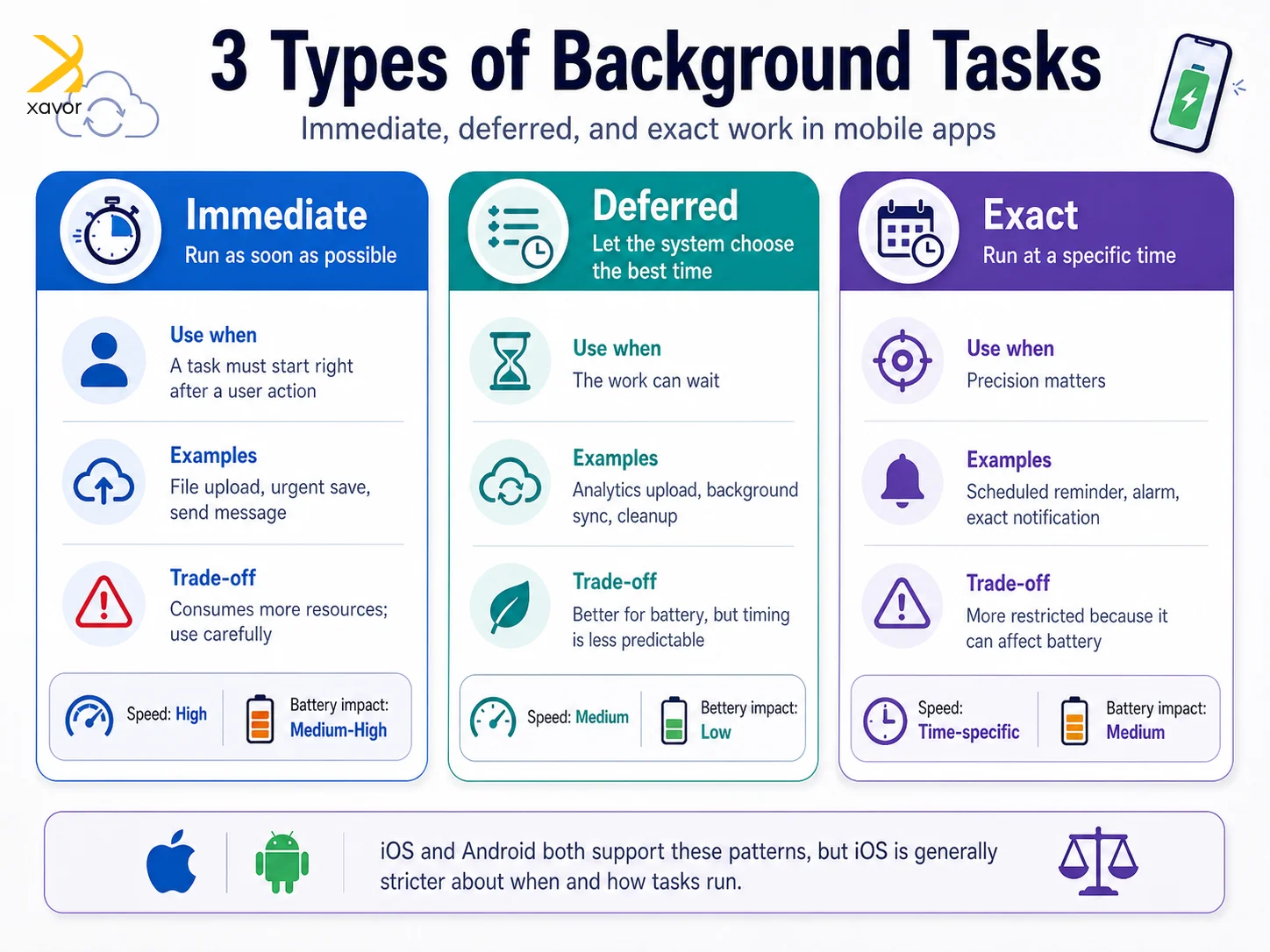
Background tasks are further classified into three categories based on how urgent they are and how long they are needed:
- Immediate
- Deferred
- Exact
Immediate
Immediate tasks are meant to run right away. You use them when something needs to happen as soon as possible, like uploading a file after a user action. These tasks can continue running even if the app goes into the background, but they should be used carefully because they consume more resources.
Deferred
Deferred tasks are more flexible. They don’t need to run instantly, so you let the system decide the best time to execute them. This helps conserve battery and optimize performance. Tasks like analytics uploads, background syncing, or cleanup work usually fall into this category because there’s no harm if they run a bit later.
Exact
Exact tasks are the opposite of deferred tasks in terms of control. They must run at a specific time, such as sending a scheduled notification. They require precise timing and can impact battery life. That is why operating systems place stricter limits on when and how you can use them.
These classifications more or less apply to both Android and iOS. But iOS is much stricter about when and how they run.
Why background tasks matter for cross-platform apps
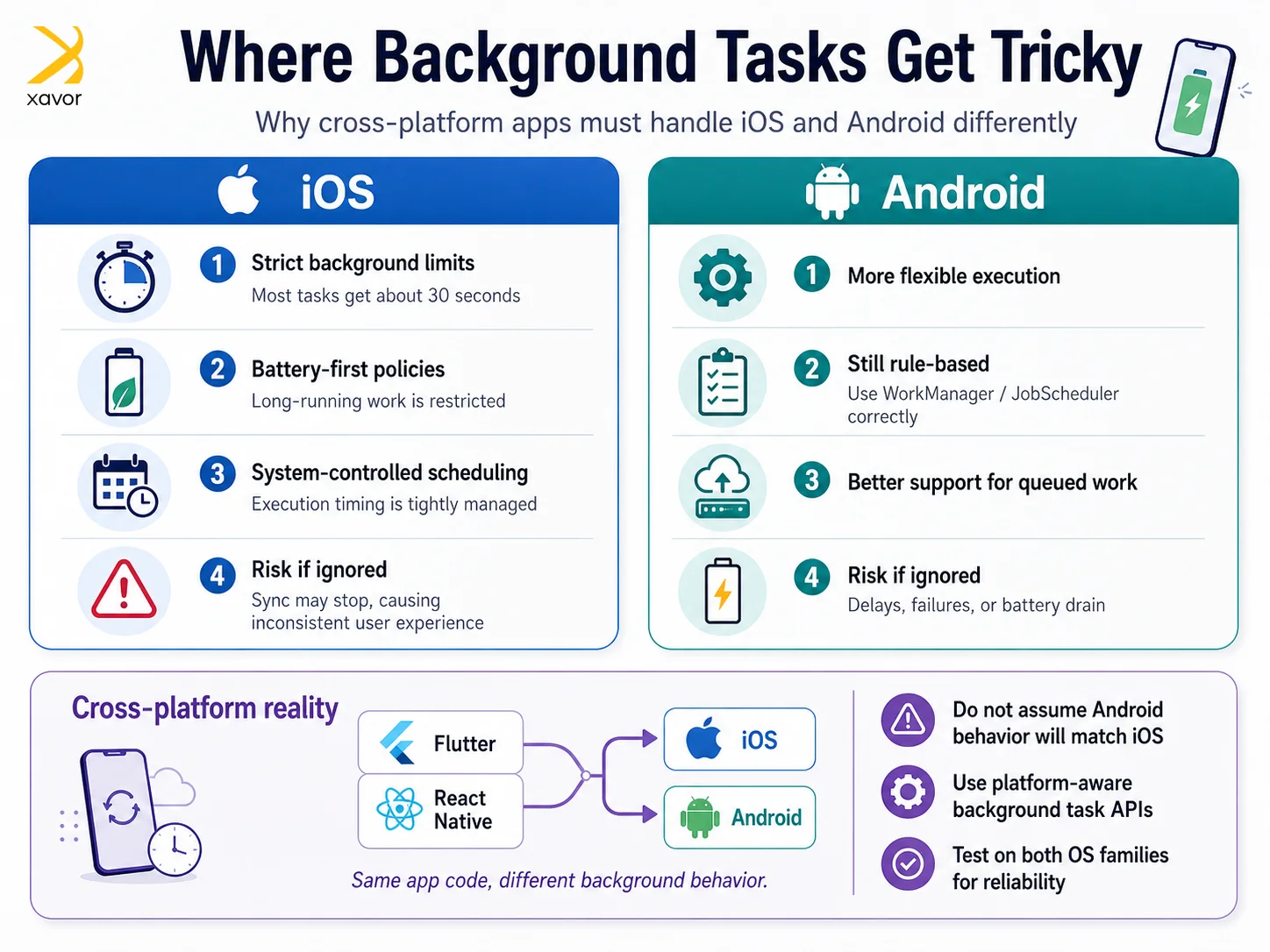
Cross-platform tools let developers write the app once and run it on both iOS and Android. But each phone system treats background tasks differently:
- iOS limits long-running background tasks to save battery.
- Android is more flexible, but still has rules for background tasks.
This means developers can’t assume that a task that works on Android apps will work the same on iOS. For example, a data sync that runs fine on Android might stop on iOS, causing inconsistent experiences for users.
That is why it requires a separate set of skills to implement and manage background tasks in cross-platform apps.
Common problems in Flutter and React Native
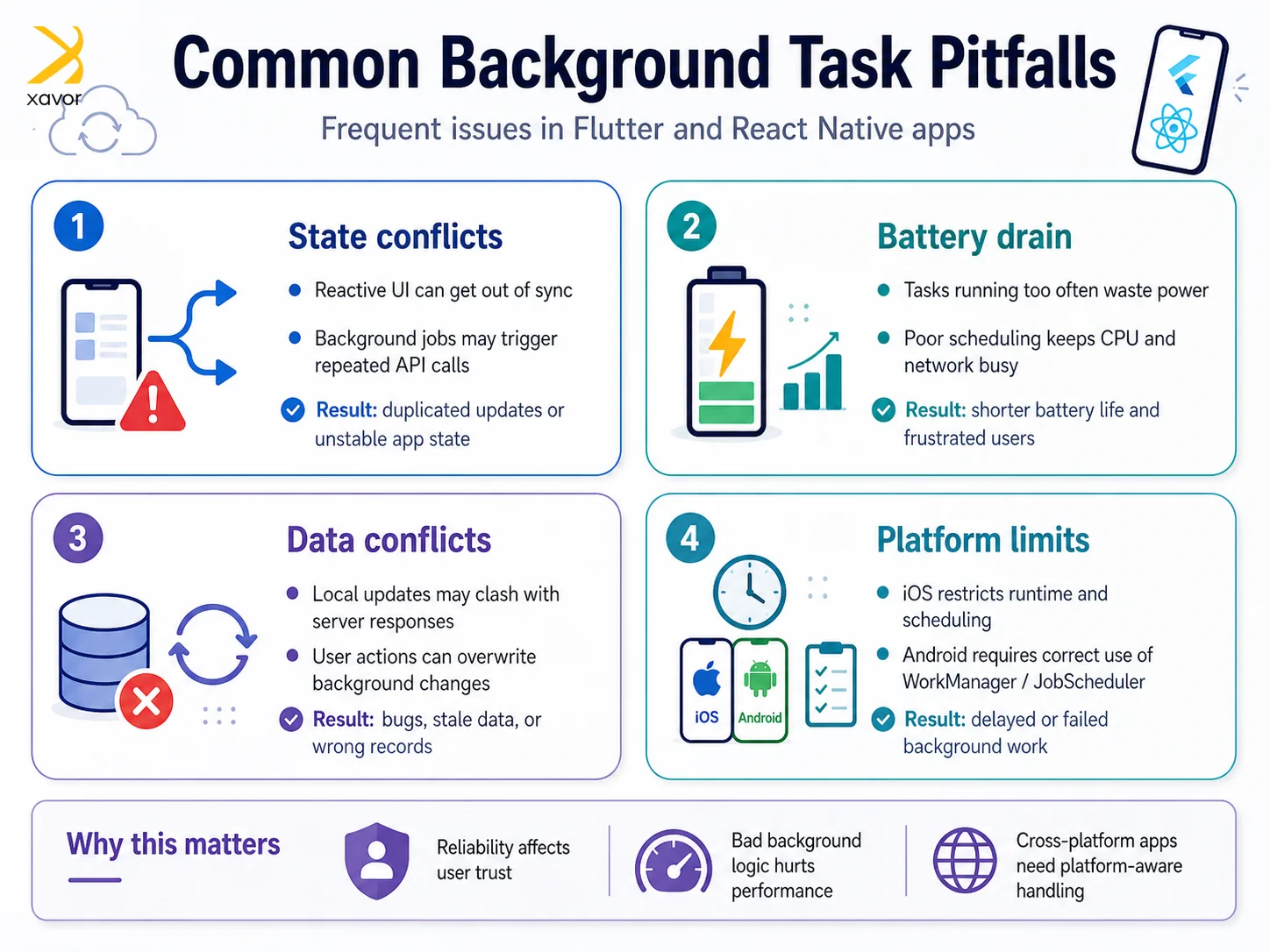
1. State Conflicts
Flutter uses reactive widgets, and React Native uses JS-bridged components. Long-running background tasks can mess up app state or cause repeated API calls if not handled carefully.
2. Battery Drain
Background tasks that run too often or aren’t optimized can quickly use battery, which frustrates users.
3. Data Conflicts
Background tasks that update local data might clash with user actions or API responses, leading to bugs or wrong data.
4. Platform Limits
iOS only allows most background tasks to run for about 30 seconds. Android gives more freedom but has rules with Work Manager and Job Scheduler—using them incorrectly can cause delays or failures.
Tips for making background tasks work better
There are some work arounds that improve the performance of backgrounds by a mile.
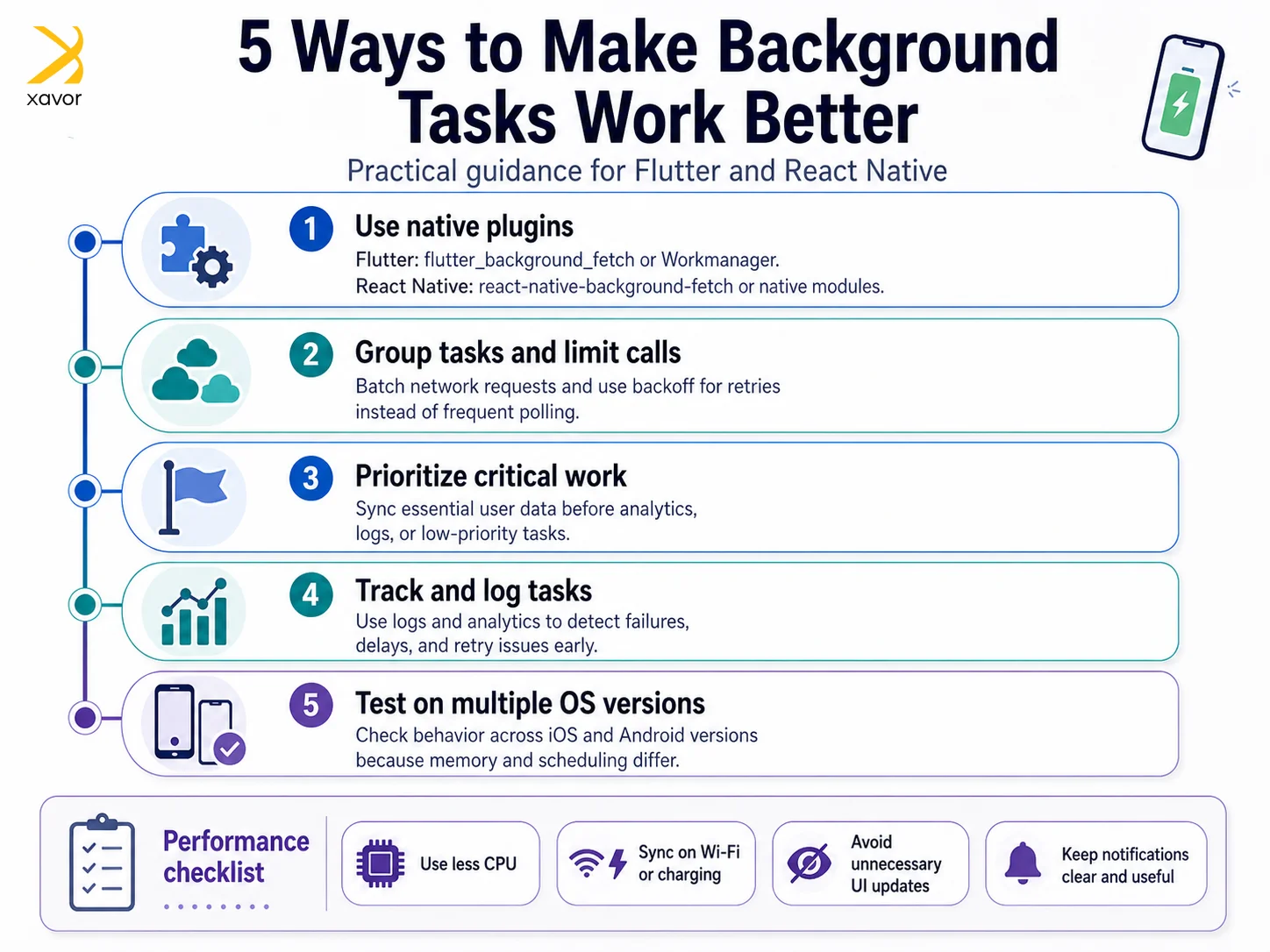
1. Use Native Plugins
- Flutter: Use flutter_background_fetch or the Work Manager plugin.
- React Native: use react-native-background-fetch or native modules.
These help your app follow each platform’s rules for background tasks.
2. Group Tasks and Limit Calls
Don’t make network calls too often. Combine multiple updates into one request and add delays for retries if needed.
3. Focus on Important Tasks First
Not every background task is equally important. Make sure critical data syncing happens before things like analytics or logs.
4. Track and Log Tasks
Keep logs and analytics for background tasks. This helps you catch problems early.
5. Test on Different OS Versions
iOS and Android handle memory and background tasks differently. Test your app on multiple versions to make sure it works everywhere.
Offline-first design and syncing data
Many apps need to work even when there’s no internet. Background tasks help with this.
- Local storage: Use local databases like SQLite, Hive, or Realm to save data temporarily.
- Sync later: Background tasks send updates to the server once the network is available.
- Avoid conflicts: Use timestamps, version numbers, or other checks to keep data correct.
This approach makes the app feel smooth and prevents data loss when the connection is weak.
Main workloads affected by background tasks
Background processes significantly influence how a mobile device works.
App responsiveness
They play a big role in overall responsiveness. Because of background processes, your system can keep multiple apps and services running at the same time. But if too many of those processes are active, or if they use a lot of resources, the device can start to feel slow.
You might notice lag, delayed app switching, or a generally less responsive system.
Battery life
Battery life can be seriously affected by these processes. A lot of common background tasks, like tracking location or downloading updates, are resource-intensive. So, they keep using power even when you are not actively using the device.
This drains battery power quickly. That is why managing these tasks well is important for improving battery life.
Security and privacy
Background processes also matter for security and privacy. Some of the most important protection tools work quietly in the background, such as:
- Antivirus software
- Firewalls
- Threat detection systems
These security background processes can become a problem if they are poorly configured or malicious, because they may collect data or create security risks without the user noticing.
Data storage
They also influence storage and disk performance. Tasks like indexing files, caching data, and creating backups constantly read from and write to storage. Over time, this can use up disk space and slow down performance if not managed properly.
Balancing user experience with performance and battery
A good app should feel fast and smooth. Background tasks should run quietly without diminishing the user experience:
- Use less CPU: Avoid heavy calculations in the background.
- Smart syncing: Run background sync only when the device is charging or on Wi-Fi.
- Clear notifications: Keep messages short and useful.
- Avoid unnecessary updates: Don’t redraw screens or update state more than needed.
For cross-platform apps, even small delays matter. Heavy background tasks can block React Native’s JS thread or make Flutter rebuild too many widgets, slowing the app.
Real-world example
A FinTech startup built a cross-platform app for Android and iOS that syncs transaction data every few minutes. At first, the team checked for updates too often, which caused:
- iOS stopping background tasks
- Fast battery drain
- Duplicate data
After improvements:
- Background tasks were grouped and limited
- Data sync ran only when there was internet or when the app opened
- Conflicts were handled using timestamps and unique IDs
Results:
- 40% fewer API calls
- 25% better battery life
- No data inconsistencies
This shows that paying attention to background tasks—what users don’t see—makes the app feel faster, smoother, and more reliable.
Conclusion
Background tasks are the hidden engine of modern cross-platform apps. They handle the actual multitasking that makes apps so useful, but users usually don’t notice them until something goes wrong.
The challenges of managing background processes across platforms are many. But they are not insurmountable tasks. You can run them efficiently with the methods and techniques mentioned in this blog.
It can be Flutter or React Native; you must know the limits of each platform. Then focus on the most important tasks first. Manage app state and performance carefully, while also enabling apps to work offline and recover effectively.
Xavor’s mobile app development services ensure that applications work smoothly in the background. Our developers use the best tools and practices to design apps that are equally good in performance and aesthetics.
Contact us at [email protected] to book a free consultation session.

FAQs
Background tasks are processes that run behind the scenes without user interaction, such as syncing data, sending notifications, or updating content. They help apps stay functional and up-to-date even when not actively in use.
Yes, poorly optimized background tasks can drain battery. However, modern mobile operating systems limit and manage background activity to balance performance with battery efficiency.
Mobile OS platforms like iOS and Android restrict background execution to save battery and resources. Tasks may stop if the app is force-closed, permissions are disabled, or system limits are reached.