

ServiceNow offers a flexible scripting model that allows developers to customize application behavior, control user interaction, and implement business logic. These capabilities are especially important in ServiceNow managed services, where maintainability and performance directly impact long-term platform success. Two core elements of this model are client-side scripting and server-side scripting.
Although both rely on JavaScript, they execute in different environments and serve fundamentally different purposes. Understanding this distinction is critical for designing applications that remain responsive, reliable, secure, and maintainable.
Before comparing their tradeoffs, it is important to understand how each scripting layer operates.
What is client-side scripting?
Client-side scripting refers to JavaScript that executes in the user’s browser. These scripts run when users interact with the ServiceNow interface, such as when a form loads, a field value changes, or a record is submitted.
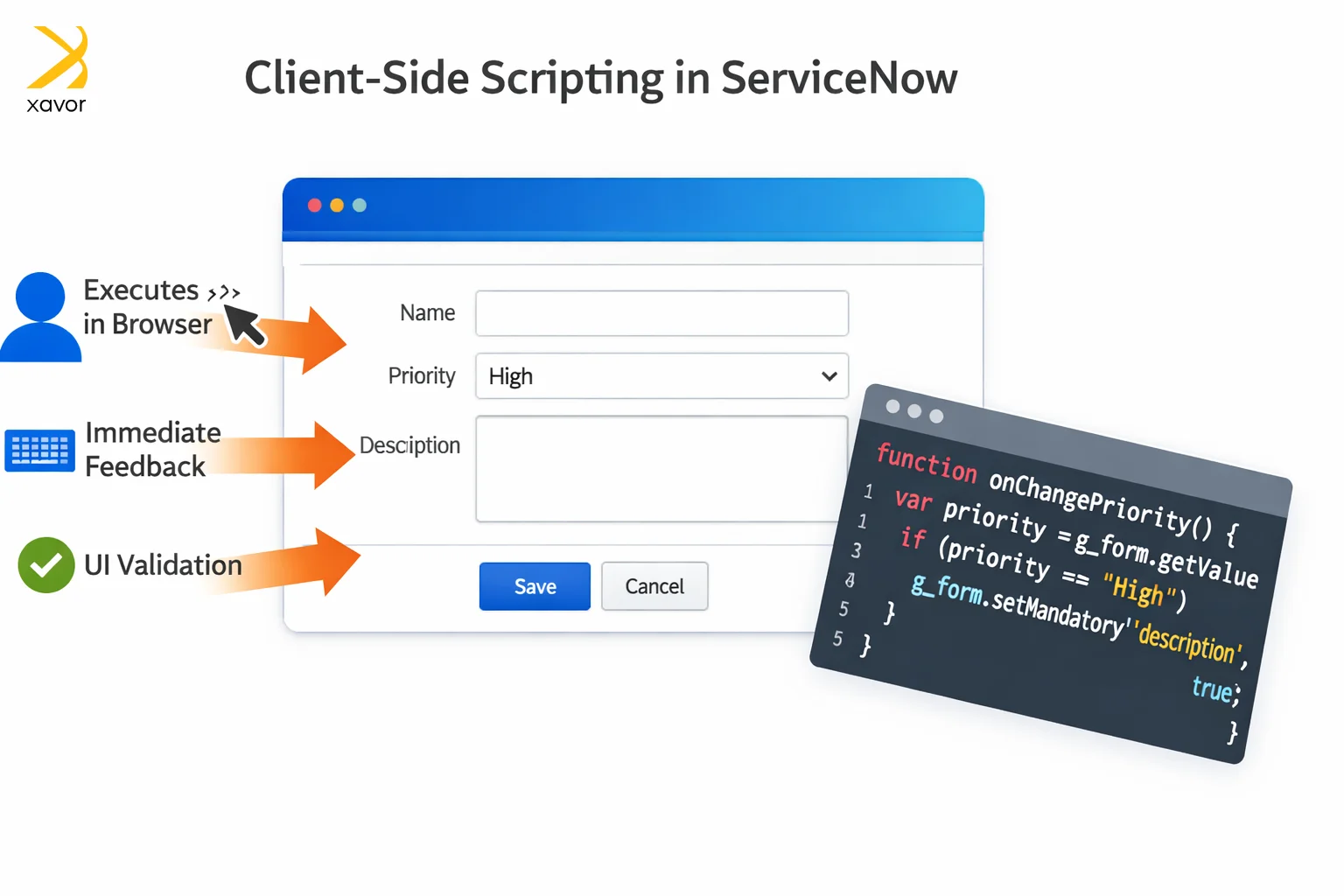
Because client scripts execute locally, they provide immediate feedback without requiring a server round-trip. This makes them essential for building dynamic and interactive user experiences.
Client-side scripts are commonly used to validate input, control field visibility, set mandatory conditions, auto-populate values, and display contextual messages. For example, selecting a specific category can instantly reveal relevant fields, improving usability and guiding data entry.
However, client scripts operate strictly within the visible UI design. They do not execute when records are created or updated through REST APIs, imports, scheduled jobs, or background scripts. As a result, client-side logic cannot be relied upon for enforcing rules that must apply system-wide.
Example:
Client Script (onSubmit Validation)
function onSubmit() {
var priority = g_form.getValue(‘priority’);
if (priority == ‘1’) {
var justification = g_form.getValue(‘u_justification’);
if (!justification) {
g_form.showFieldMsg(‘u_justification’,
‘Justification is required for Critical priority’,
‘error’);
return false;
}
}
return true;
}
What is server-side scripting?
Server-side scripting refers to JavaScript that executes within the ServiceNow instance itself. These scripts run independently of the browser and are triggered by database operations, workflows, scheduled processes, and integrations.
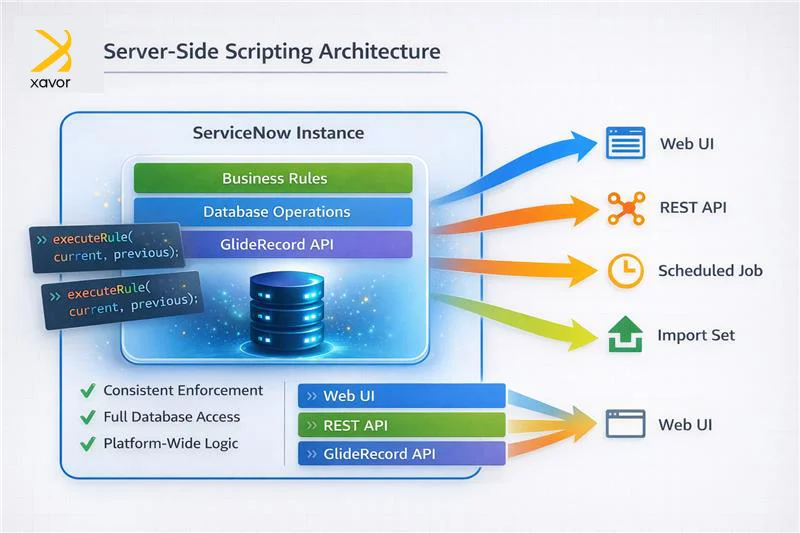
Since server scripts execute close to the data layer, they have full access to platform APIs such as GlideRecord and GlideAggregate. This makes them responsible for enforcing business logic, validating records, performing database operations, and maintaining system integrity.
Server-side scripts ensure consistent behavior regardless of how data enters the system. Whether records originate from the UI, APIs, imports, or AI automation, server logic executes reliably.
Because of this authority, server-side scripting governs rules that must always apply, including data validation, lifecycle management, automation, and security enforcement.
Example:
Business Rule (Server-Side Enforcement)
(function executeRule(current, previous) {
if (current.priority == 1 && gs.nil(current.u_justification)) {
gs.addErrorMessage(‘Justification is required for Critical priority’);
current.setAbortAction(true);
}
})(current, previous);
Key differences: Client-side vs. server-side scripting
Client-side and server-side scripting differ mainly in where they run and what they do.
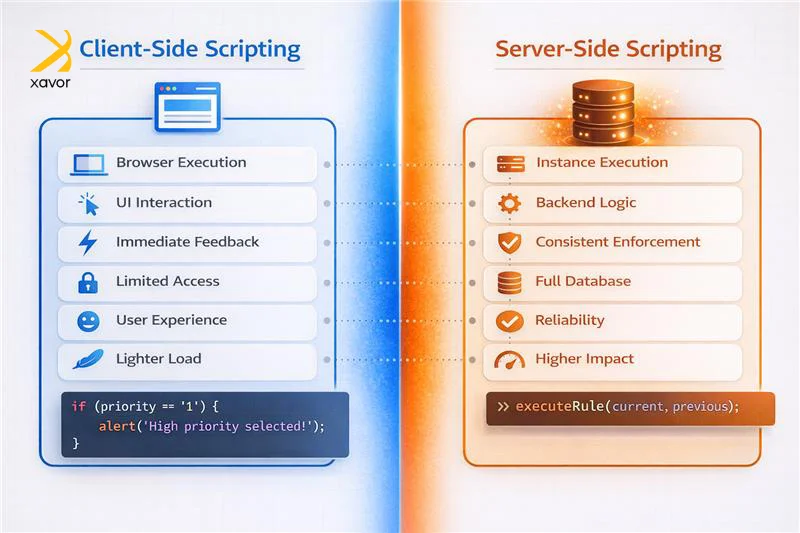
- Execution context: The primary difference between client-side and server-side scripting lies in execution context.
- Focus and responsibilities: Client scripts run in the browser and focus on interaction and responsiveness. Server scripts run on the instance and focus on enforcement and consistency.
- User Experience vs reliability: Client-side logic enhances the user experience by providing immediate feedback. Server-side logic ensures correctness and reliability across all entry points.
- Data access: Client scripts have restricted access to data and can’t directly modify the database. Server scripts have full database access and can perform CRUD actions.
- Performance impact: Client scripts typically have a lighter footprint because they don’t rely on continuous server communication. Server scripts can increase system load depending on how complex the backend operations are.
- Real-time feedback: Client scripts can update the interface immediately and provide real-time responses. Server scripts usually don’t change the UI right away since they focus on backend processing.
- Security: Client scripts are generally limited to UI-level changes and carry fewer security considerations. Server scripts often work with sensitive data and require stronger protections, including strict access control and validation.
| Aspect | Client-side Scripting | Server-side Scripting |
| Execution context | Runs in the user’s browser | Runs on the server/instance |
| Focus and responsibilities | UI interaction and responsiveness | Enforcement, consistency, and backend logic |
| UX vs reliability | Immediate feedback and better user experience | Correctness and reliability across all entry points |
| Data access | Limited data access, no direct DB changes | Full DB access, can perform CRUD |
| Performance impact | Usually lighter, fewer server calls | Can add load based on operation complexity |
| Real-time feedback | Updates UI instantly | Doesn’t update UI immediately, backend-focused |
| Security | Mostly UI-level concerns | Handles sensitive data, requires stronger controls |
Client-side strengths and limitations
Client-side scripting plays a critical role in delivering a smooth and responsive interface.
It is particularly effective for:
- Validating input before submission
- Dynamically updating form behavior
- Reducing unnecessary server calls
- Guiding user actions
By providing immediate feedback, client scripts help prevent avoidable errors and reduce friction during data entry.
However, client-side scripting has clear limitations.
Excessive client logic can negatively affect form performance. Heavy onLoad scripts or multiple asynchronous calls may delay rendering and degrade responsiveness.
More importantly, client scripts cannot be treated as authoritative enforcement. Because they run in the browser:
- Users may bypass or disable them
- Integrations do not trigger them
- Background processes ignore them
For these reasons, client-side validation should be treated as an early checkpoint, not a safeguard.
Server-side strengths and risks
Server-side scripting governs platform-level behavior and carries enforcement responsibility.
It is essential for:
- Business rules
- Data validation
- Record processing
- Automation
- Security enforcement
Because server scripts execute regardless of how data enters the system, they ensure consistent and reliable application behavior.
That authority, however, introduces a broader impact.
Poorly designed server logic, such as inefficient queries, recursive triggers, or unnecessary updates, can increase transaction time and degrade instance-wide performance.
Unlike client-side inefficiencies, which typically affect a single user session, server-side inefficiencies can impact the entire platform.
Strong server-side design therefore requires both technical capability and careful restraint.
Security as a decision driver
Security requirements frequently clarify where logic should be executed.
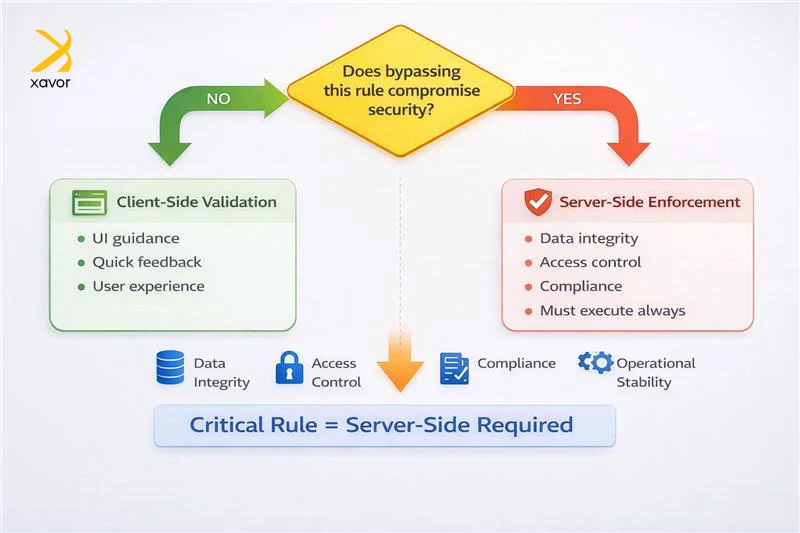
If bypassing a rule could compromise:
- Data quality and integrity
- Access controls
- Compliance requirements
- Operational stability
that logic must execute server-side.
Client scripts can guide behavior and improve usability, but sensitive rules should never rely on browser-side enforcement alone.
This distinction becomes especially important in enterprise environments where integrations and automated processes generate records without user interaction.
Why both layers matter
Strong ServiceNow solutions depend on using both client-side and server-side scripting together. Each layer has a distinct role and combining them creates a smoother user experience without compromising data quality.
Client scripts improve usability by validating inputs instantly, guiding users, and reducing errors before a form is submitted. This makes the interface feel faster and more responsive, and it helps prevent common mistakes early.
Server scripts protect the platform by enforcing the same rules in the backend, no matter how the data is created or updated. Whether a record is changed through the UI, an import, an API call, a background process, or integration solutions, server-side logic ensures the correct behavior every time.
This layered validation is not redundancy. It is a deliberate architectural practice that separates user experience concerns from system enforcement. Solutions built with this approach are more consistent, easier to troubleshoot, and simpler to maintain as the application grows.
Conclusion
Great ServiceNow development depends on clarity and intention. When logic is placed in the right layer, the platform behaves consistently in real scenarios. That consistency supports users during daily work and helps developers release changes with confidence. It also protects data integrity by ensuring important rules apply no matter how records enter the system.
As applications grow, this discipline becomes even more important. Integrations introduce new entry points and automation increases record activity. Edge cases surface faster, and weak boundaries create more support overhead. When responsibilities stay well separated, troubleshooting becomes calmer and more direct. The result is a solution people can rely on and a codebase teams can grow without stress.
If you want help designing ServiceNow solutions that are scalable, secure, and supportable, Xavor can help. Our team works with organizations to apply strong scripting patterns, improve performance, and strengthen governance across the platform. Reach out at [email protected].

FAQs
No, client scripts improve the form experience, but they only run in the UI. Records created through APIs, imports, scheduled jobs, or background processes can bypass client logic, so critical validation must be enforced server-side.
When the rule must always apply. Anything tied to data integrity, access control, compliance, lifecycle enforcement, or platform-wide correctness should run on the server so it works consistently across all entry points.
On the client side, heavy onLoad logic and too many calls can slow forms. On the server side, inefficient queries, unnecessary updates, recursion, or overly complex business rules can increase transaction time and impact the whole instance.