

Maintaining backend stability is becoming more difficult with the increased adoption of AI in software applications. Designing a backend that meets the specific demands of AI/ML solutions requires a break from traditional software development methods.
When we first started integrating AI into our Node.js backend, everything was synchronous at first. A user hit an endpoint, we made a call to OpenAI’s API, and once the full response was ready, we sent it back. Everything worked as expected, but only until more users started using it did the cracks start to appear.
The delay in generating responses became noticeable. Users waited 10–15 seconds for AI answers. And if the model took longer? The whole request timed out. That’s when we realized we needed a better approach. One that felt fast didn’t block the main thread, and scaled well with more users.
So, we built a hybrid AI architecture, and it turned out to be the most stable and performant version yet.
In this post, we’ll show you how we structured it, why it worked, and how you can build the same setup using Node.js, Express, Redis, and BullMQ.
Why integrate AI into Node.js applications
Node.js is one of our favorite tools for building modern, high-performance applications. It is lightweight and fast. So naturally, we wanted to see how it works with AI-powered applications.
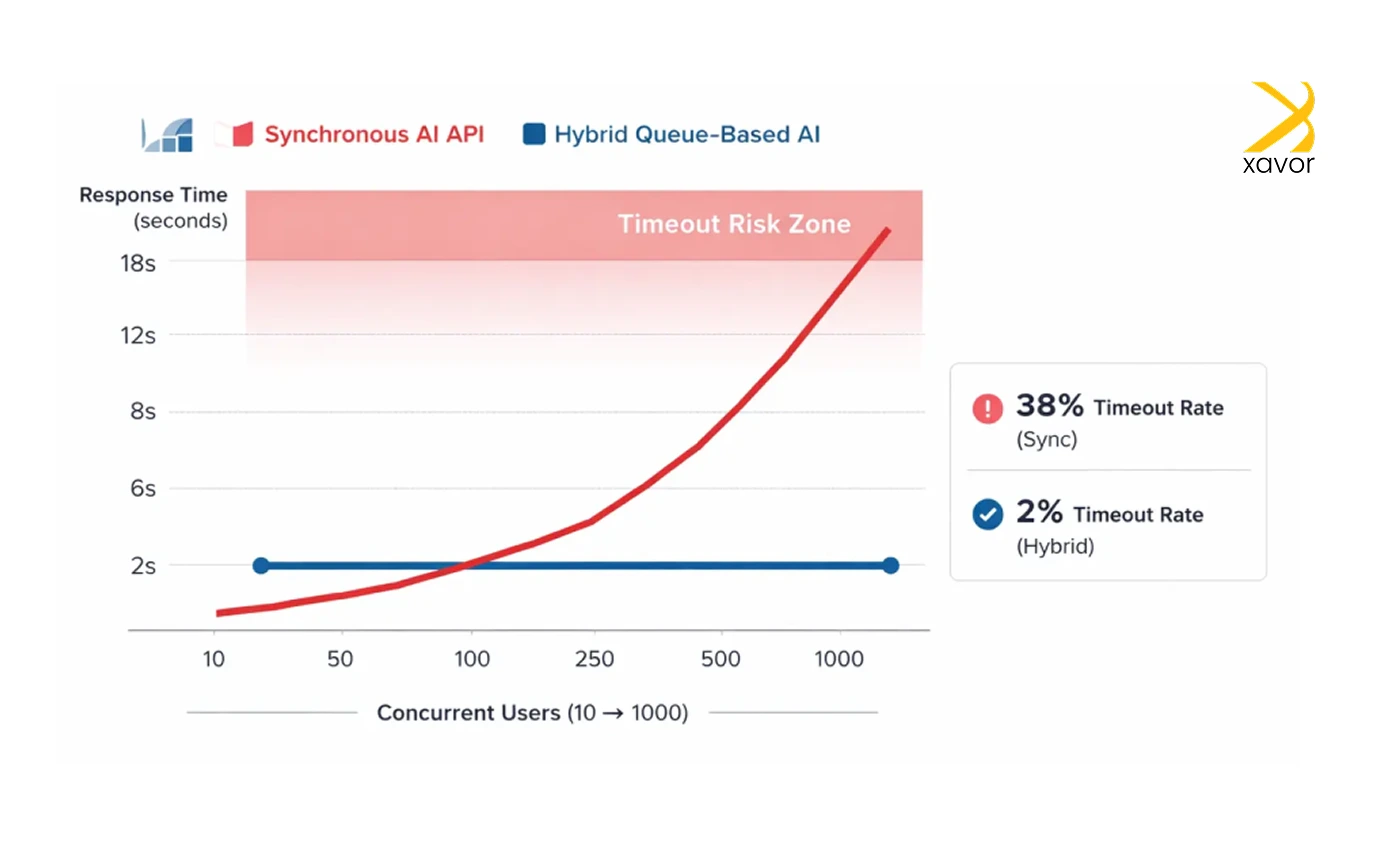
The main reasons that gave us the impetus to do this project were.
1. Real-time performance
Node.js is excellent at handling real-time AI tasks like modern chatbots, fraud detection, and live predictions. Its event-driven design supports high concurrency without slowing down performance.
2. Quicker interface
We wanted something that could execute AI models quickly. Node.js was suitable for this task because of its V8 engine.
3. One tech stack
As developers, we always look for simpler ways of doing anything because it makes our lives a lot easier. Node.js uses JavaScript as its runtime environment across frontend, backend, and AI logic. Therefore, it was the perfect way to build faster without constantly switching between tech stacks.
4. AI ecosystem
The Node.js ecosystem for AI development is growing with new libraries each year, which allows us to run many machine learning models directly in JavaScript.
5. User experience
AI-based features just hit differently on Node.js. You can Google that yourself, but features like personalization, intelligent search, and conversational interfaces feel faster and smoother when delivered through Node.js.
The problem: AI requests were blocking the API
Okay, so now let’s discuss what really bugged us during this project. Whenever you add AI features to any application, you’re essentially inserting an external service into your normal API flow. Your application does not control or run that service itself, but instead calls over the internet when it needs “thinking” or decision-making.
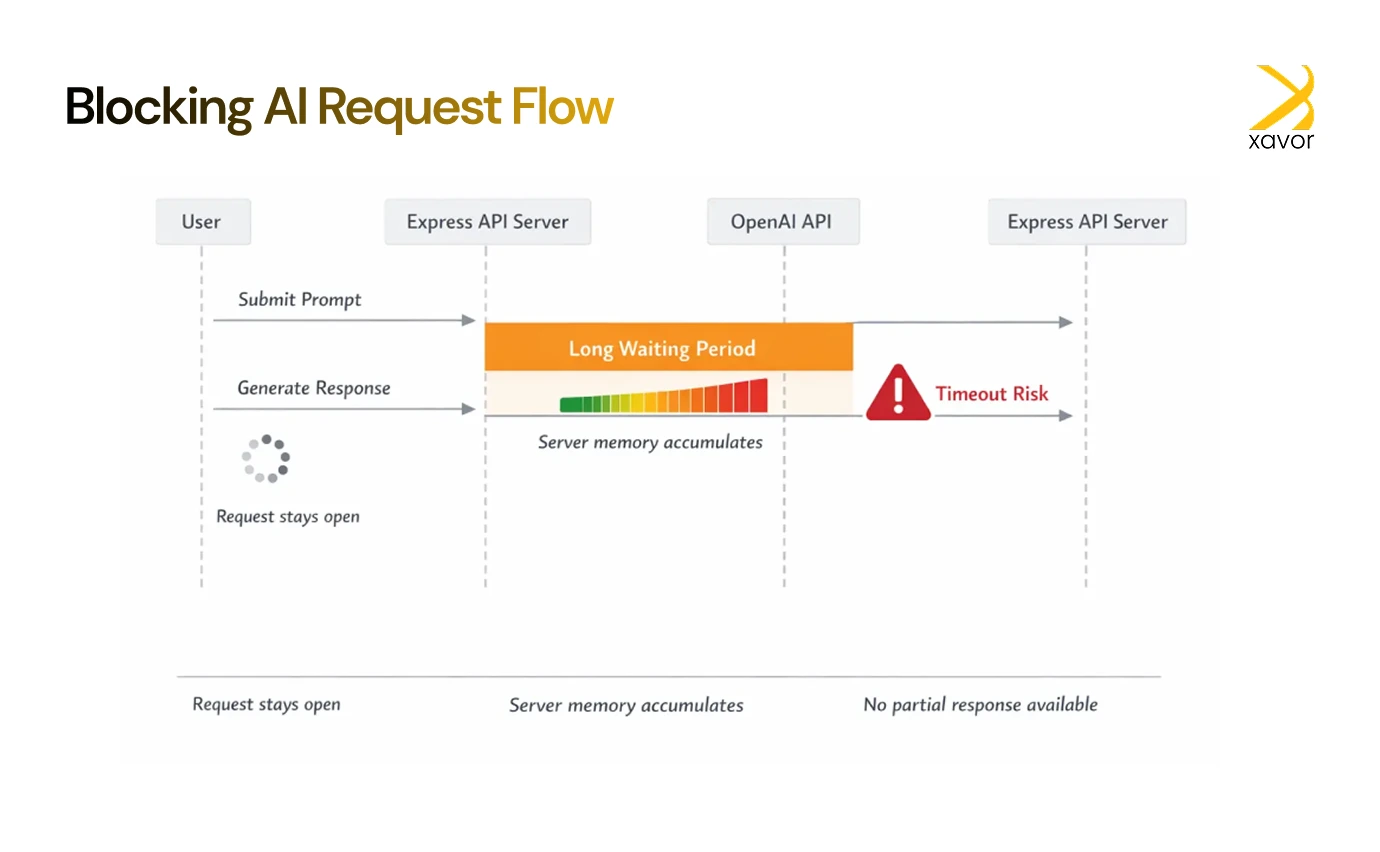
In our case, implementing this was straightforward at first.
- A user sent a prompt to the backend.
- We called the OpenAI API.
- We waited for the complete response.
- Then returned it as JSON.
This approach worked well when traffic was low. Each request finished quickly, and users didn’t notice any delays.
However, once usage increased, the weaknesses became obvious. Because the backend waited synchronously for the AI response, every request stayed open for several seconds. As more users sent prompts at the same time, the system began to struggle.
Here’s why that was a major problem:
- Slow user experience: Users had to wait without feedback while the AI generated a response, making the app feel unresponsive.
- Rising memory usage: Each open request consumed server memory, and at higher traffic levels, this quickly added up.
- Timeout failures: If the OpenAI API took too long or timed out, entire requests would fail or crash.
- No partial updates: Users couldn’t see progress or receive partial responses while the AI was still working.
The idea of “AI as a feature” was solid. But the implementation needed to be smarter. A blocking, wait-until-complete approach doesn’t scale well when AI responses take time, and traffic grows.
To make this work reliably at scale, the implementation needed to move away from blocking requests and toward a more resilient, asynchronous design.
How hybrid AI integration proved to be turning point
The first experience made this clear to us about what we needed to do. We realized that two very different things were being treated as one, and we had to separate them, namely:
- The generation of the AI response that could take time
- The delivery of that response to the user which needed to feel fast
Trying to do both at the same time was what caused the system to slow down.
So, the solution was to separate them.
Understanding the new workflow
Now, let’s see how we did things differently using Redis. We call it a hybrid approach because the app responds to the user right away, but does the slow AI work in the background. This keeps the app feeling fast even when the AI takes time to finish.
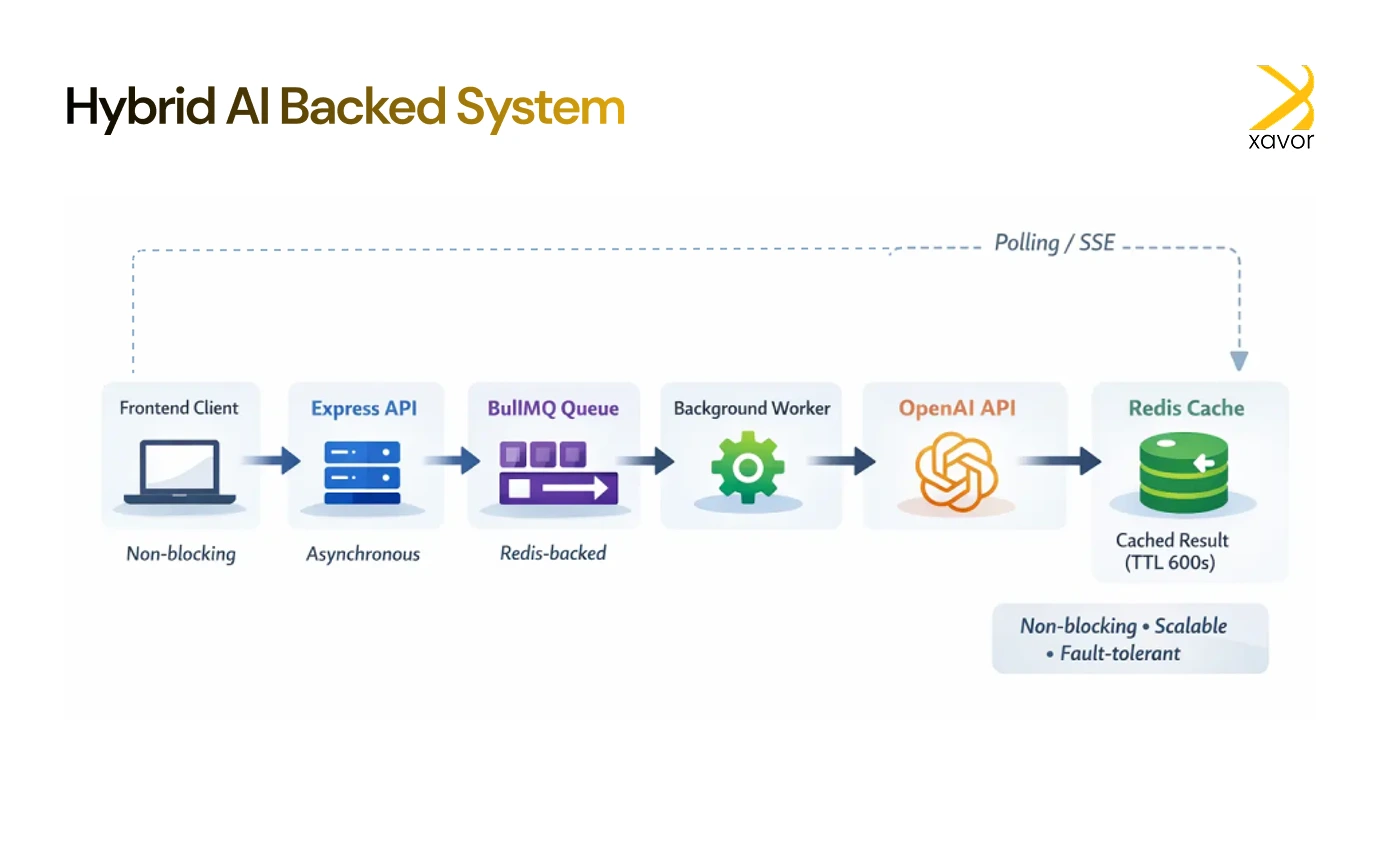
Here is what that looks like in an actual workflow:
- User submits a prompt
When a user sends a prompt, the backend does not wait for the AI to respond. Instead, it immediately accepts the request and confirms that the task has started. Therefore, the user sees that something has happened right away.
- The task is queued
In the backend, the AI request is placed into a queue.
A queue is basically like a to-do list:
- Tasks wait their turn
- They are processed one at a time (or in controlled batches)
- The main API remains free to handle new requests
- A background worker handles the AI call
A separate background service is working whose only job is to handle slow or heavy work outside the main API.
This service picks up the queued task, calls the OpenAI API, and waits for the AI to finish generating the response. Because all of this happens outside the main API flow, slow AI responses don’t block the server.
- The result is stored
Once the AI response is ready, it’s saved in Redis, which acts as fast, temporary storage.
Using Redis allows quick access to results and safe recovery if the frontend reconnects. But the most important feature of doing it this way is that there is no need to regenerate the response. It saves a lot of time by reducing delays.
- The frontend retrieves the result
While the AI is working behind the scenes, the frontend is reassuring the user while waiting for the result in a smart way. The end user is shown a message, such as “We’re working on it,” so they know their request didn’t disappear.
Meanwhile, the app can either check for updates few seconds or wait for the server to send the answer. As soon as the result is available in Redis, it’s delivered to the user.
This gave users immediate feedback (“we’re working on it”) while offloading the AI request to a queue in the background.
Now, the server stayed responsive. Users got updates faster. And even long AI tasks didn’t block the main flow.
How we structured the hybrid AI integration
My project structure looked like this:
/ai-hybrid
├── index.js
├── routes/
│ └── ai.js
├── services/
│ └── aiService.js
├── workers/
│ └── aiWorker.js
├── queues/
│ └── aiQueue.js
├── utils/
│ └── redisClient.js
Here’s how each part works.
API route: Queue the job and return Job ID
// routes/ai.js
const express = require(‘express’)
const router = express.Router()
const { enqueueAIJob, checkJobResult } = require(‘../services/aiService’)
router.post(‘/submit’, enqueueAIJob)
router.get(‘/result/:jobId’, checkJobResult)
module.exports = router
Queue service: Enqueue job
// services/aiService.js
const { aiQueue } = require(‘../queues/aiQueue’)
const redis = require(‘../utils/redisClient’)
exports.enqueueAIJob = async (req, res) => {
const { prompt } = req.body
const job = await aiQueue.add(‘generate-ai’, { prompt })
res.json({ message: ‘Job queued’, jobId: job.id })
}
exports.checkJobResult = async (req, res) => {
const jobId = req.params.jobId
const result = await redis.get(`ai:response:${jobId}`)
if (result) {
return res.json({ status: ‘done’, result: JSON.parse(result) })
}
return res.json({ status: ‘pending’ })
}
Redis client helper
// utils/redisClient.js
const Redis = require(‘ioredis’)
const redis = new Redis(process.env.REDIS_URL)
module.exports = redis
Queue setup with BullMQ
// queues/aiQueue.js
const { Queue } = require(‘bullmq’)
const connection = { connection: { host: ‘localhost’, port: 6379 } }
const aiQueue = new Queue(‘ai-queue’, connection)
module.exports = { aiQueue }
Background Worker: Generate AI Response
// workers/aiWorker.js
const { Worker } = require(‘bullmq’)
const redis = require(‘../utils/redisClient’)
const { OpenAI } = require(‘openai’)
const openai = new OpenAI({ apiKey: process.env.OPENAI_API_KEY })
const worker = new Worker(‘ai-queue’, async job => {
const { prompt } = job.data
const response = await openai.chat.completions.create({
model: ‘gpt-4’,
messages: [{ role: ‘user’, content: prompt }]
})
const result = response.choices[0].message.content
await redis.set(`ai:response:${job.id}`, JSON.stringify({ result }), ‘EX’, 600)
}, {
connection: { host: ‘localhost’, port: 6379 }
})
worker.on(‘completed’, job => {
console.log(`Job ${job.id} completed`)
})
worker.on(‘failed’, (job, err) => {
console.error(`Job ${job.id} failed:`, err)
})
Real-world application: AI-powered code reviewer
We tested this architecture by building an AI code reviewer. The user uploads a code snippet and receives AI feedback on improvements, complexity, and bugs.
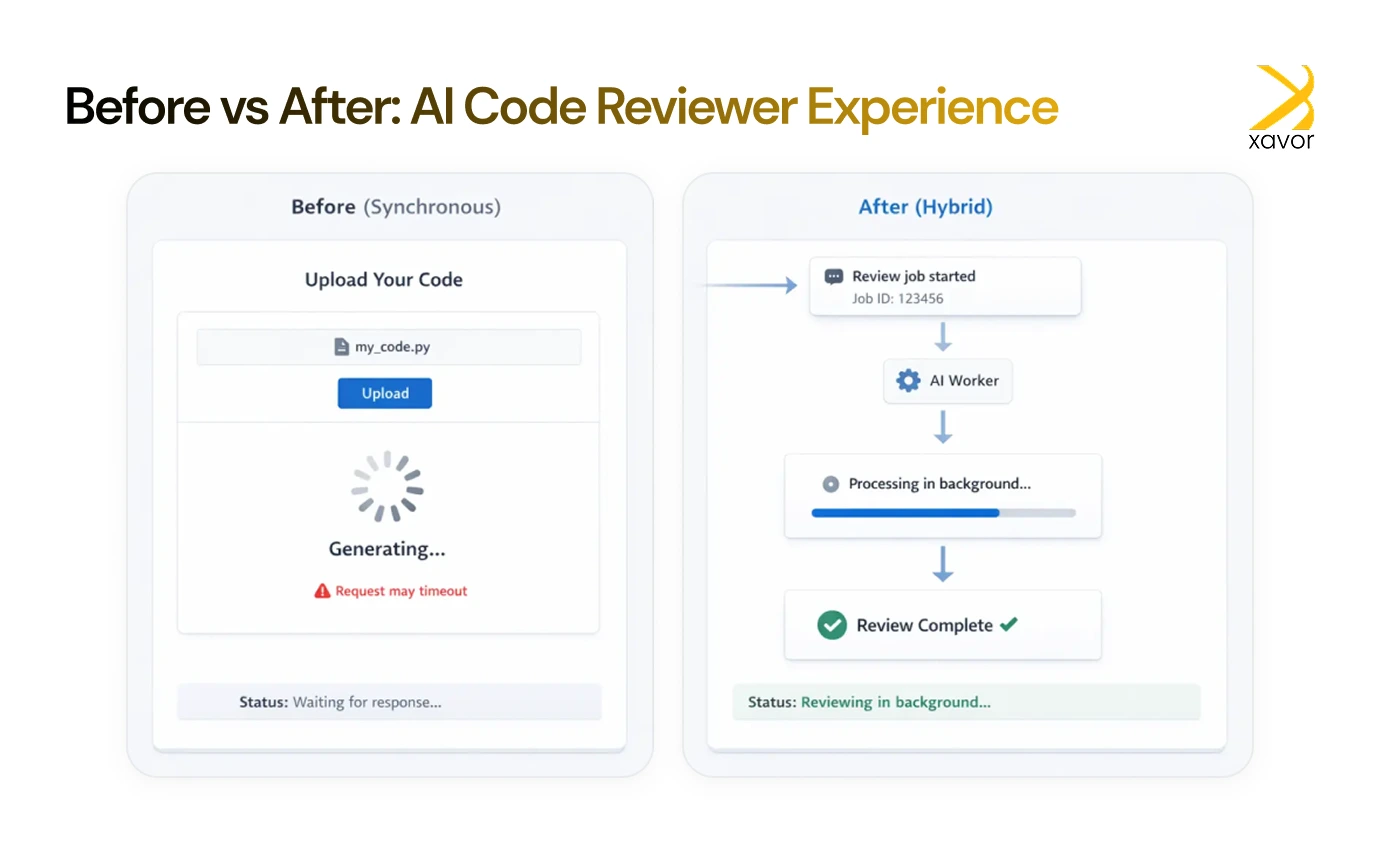
In the new hybrid version:
- We accept the code snippet and enqueue the job.
- The worker generates the AI review asynchronously.
- When done, it stores the response in Redis.
- The frontend shows a loader and polls the backend.
- As soon as the Redis value exists, it’s returned and shown.
Users didn’t wait on a hanging spinner. We didn’t worry about API timeouts. Everyone won.
Conclusion
Our time working with AI in software development has taught us one thing: AI behaves like infrastructure once integrated into a product. That is why it needs to be treated like an infrastructure, not just some feature.
Instead of forcing AI to fit into traditional request–response patterns, we adapted the architecture to the nature of AI itself. We hope this project cleared many things about what it takes to build a backend architecture that can withstand the demands of AI-powered applications.
Xavor helps teams design AI features that deliver under real production loads. Contact us at [email protected] to talk to our AI experts.

FAQs
NodeJS is a JavaScript runtime used for building fast, scalable server-side applications, APIs, and real-time services. It enables developers to use JavaScript for both frontend and backend development, making it popular for web applications, microservices, and data-intensive platforms.
NodeJS is primarily a backend technology. While JavaScript runs on the frontend in browsers, NodeJS allows JavaScript to run on the server-side for building APIs, databases interactions, and server logic.
Yes, Node.js can be used for AI applications, particularly for integrating AI models, building chatbots, and creating AI-powered APIs. However, for heavy machine learning training, languages like Python are preferred due to better library support, while Node.js excels at deploying and serving AI models in production.