
Salesforce Security Center is a Salesforce product that consolidates security, compliance, and governance metrics from multiple Salesforce orgs into one view, so a security team can see where configuration has drifted without opening each org separately. We deploy and administer Salesforce environments at Xavor Corporation in Irvine, California through our Salesforce development and administration services. It presents metrics from connected orgs against a common baseline. Salesforce does not publish a list price for it and describes the pricing model instead. And a posture view across several orgs surfaces deviations faster than most admin teams close them.
The value of a posture dashboard is bounded by how quickly someone closes what it surfaces.
What Salesforce Security Center reports
Security Center presents authentication, permission, user, and configuration metrics from the Salesforce orgs connected to it, in a single app rather than one org at a time.
Four categories carry the reporting:
- Authentication: how users log in across connected orgs, and where login patterns diverge.
- Permissions: who holds sensitive system permissions such as View All Data and Modify All Data, and how those assignments change.
- User activity: account status, access patterns, and the user-level signals that precede a review.
- Configuration: Health Check scores, installed packages, connected apps, and settings that drift from intent.
The app aggregates Health Check across tenants, so a parent tenant shows both the average score for all connected tenants and each tenant’s individual score. Data refreshes once per day, with on-demand updates available more frequently, and the app retains six months of history.
Alerts sit on top of the metrics. A threshold on the number of users holding Modify All Data, for example, produces an email and an in-app notification when the count rises past the number you set.
A metric that looks acceptable inside one org can read as a deviation once it sits beside four others.
Security Center reports on posture. Securing the environment is separate work, and we cover the threats and protective layers behind Salesforce data security there. Security practice is covered on that page; this piece is about one product that reports on it.
How the monitoring works across orgs
Security Center collects security health metrics from connected Salesforce orgs and presents them against a common baseline, which surfaces the differences between orgs that separate admin teams configured independently. The comparison is the mechanism.
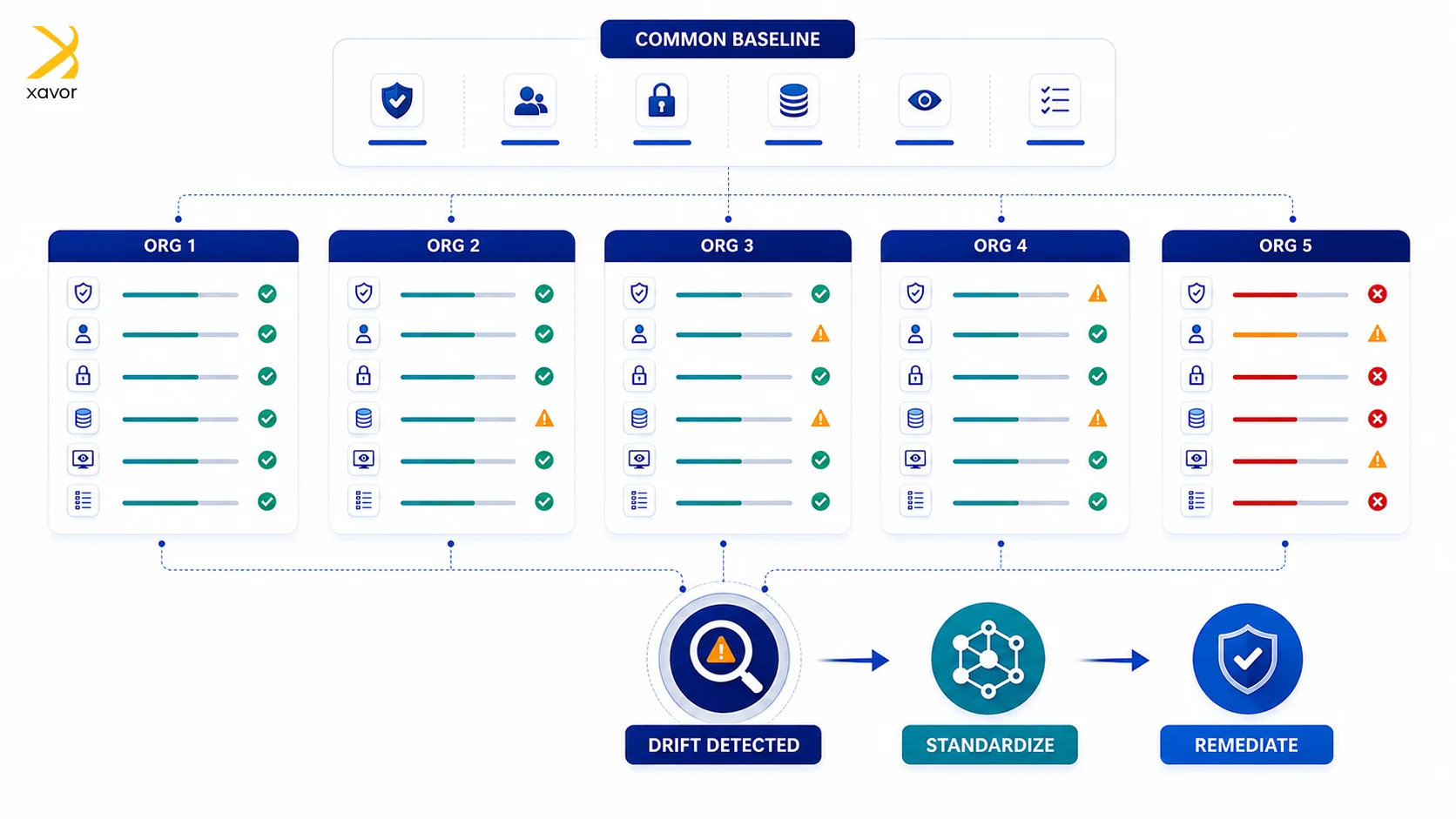
Large Salesforce estates accumulate orgs over time. Acquisitions bring their own. Business units stand up sandboxes that become production. Each carries the decisions of whoever administered it.
Those decisions rarely conflict with policy on purpose. They diverge because nobody was comparing them, and Salesforce cloud security monitoring at the estate level exists to close that gap.
Multi-org drift is a consequence of independent administration rather than of misconfiguration, which changes what the fix looks like.
Remediation follows the same logic. A deviation appearing in one org is a configuration task. The same deviation appearing in six is a standards problem, and fixing it org by org leaves it free to return.
What Salesforce publishes about pricing
Salesforce prices Security Center at 10% of net spend, published on its platform security pricing page rather than as a per-user figure. The percentage applies to what a customer spends on other applicable Salesforce products, which Salesforce defines as products that are technically compatible.
Three things sit alongside that number:
- Security Center is priced separately from Shield. Shield runs at 30% of net spend and covers Event Monitoring, Field Audit Trail, Platform Encryption, and Data Detect. Security Center is a separate line at 10%.
- Applicability varies by contract. Which of your existing products count toward net spend depends on what you own, and Salesforce directs buyers to a sales representative to establish it.
- The page is informational. Salesforce notes it is provided for information purposes only and subject to change.
Percentage-of-spend pricing scales with the size of the Salesforce contract rather than with the number of orgs being monitored.
That distinction belongs in a renewal conversation rather than a deployment one, because the number moves when the wider contract moves. Estimates circulating from licensing advisories tend to describe Shield rather than Security Center specifically, so the 10% figure on Salesforce’s own page is the one to work from.
What turning it on creates
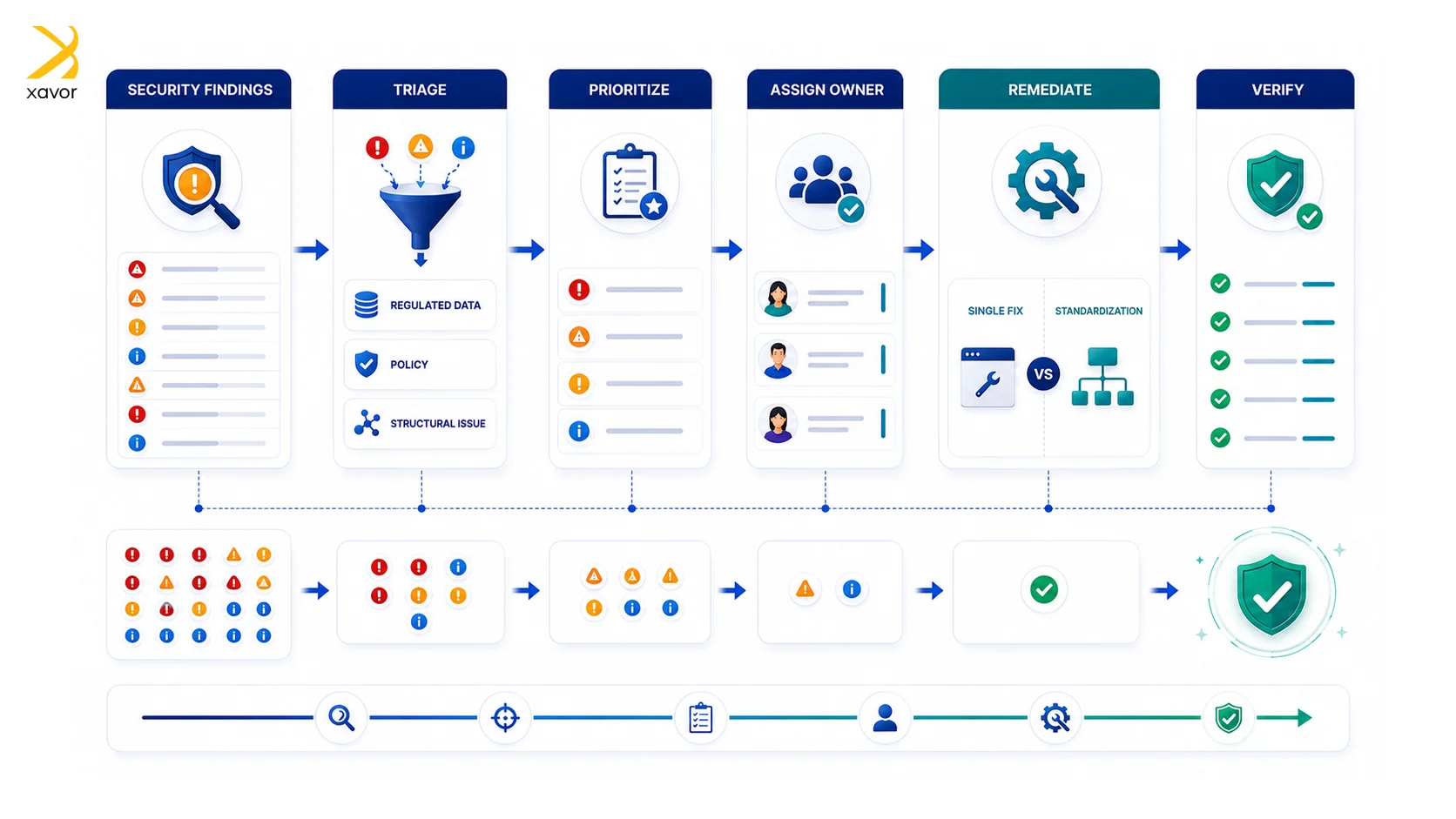
A posture view across several orgs surfaces deviations in a batch, and the batch arrives faster than most admin teams close it. Enablement produces a list. Closing the list is the project.
Three criteria set the order:
- Regulated data first: orgs holding customer financial, health, or personal data carry consequence the others do not.
- Policy against preference: some deviations breach a standard, and some reflect two admins making different reasonable choices.
- Single-fix against structural: a setting corrected once differs from a pattern requiring a standard nobody has written.
Access is its own decision, and it is more distributed than it first appears. Connecting an org requires the Manage Security Center permission in the parent tenant and in every child tenant, and the connection itself is made by logging in with credentials for a child-tenant user who holds it. Someone has to be able to authenticate into each org you want to watch.
Environment type constrains the design. A production parent can connect production or sandbox children, while a sandbox parent can connect only sandboxes, so a production-wide view has to be anchored in production. Salesforce recommends multi-factor authentication for everyone with Security Center access, since the app surfaces sensitive information by design.
The first decision after enablement is triage order, since a hundred deviations with no ranking produces a backlog rather than a fix.
The pattern is familiar from access governance elsewhere. We built a governed vendor access lifecycle on ServiceNow for an asset management firm, where the finding was that visibility alone changed nothing until approvals, expiry, and ownership were designed around it. That engagement reached 100% auditability of approvals and an 80% reduction in overdue access.
Remediation capacity is the constraint most estates hit, and ongoing Salesforce administration and configuration management is where that work sits.
Enablement is the short part
The work that decides what Security Center returns starts once the dashboard is populated.
Consolidated findings show where an estate has drifted. Closing that gap needs triage order, ownership per org, and admin capacity that most security teams have already committed elsewhere.
Turning Security Center on takes an afternoon. Working through what it surfaces takes longer, and that is where most teams run short of admin capacity. If you want the remediation side scoped alongside the license, [email protected] reaches our Salesforce team.

FAQs
Salesforce prices Security Center at 10% of net spend on other applicable Salesforce products, published on its platform security pricing page. Which products count toward that figure depends on your contract, and Salesforce directs buyers to a sales representative to confirm it.
Security Center is a Salesforce product that consolidates security, compliance, and governance metrics from multiple Salesforce orgs into a single view, so security teams can compare configuration across an estate rather than reviewing each org separately.
It reports security health, compliance, and governance metrics from connected orgs, presented against a common baseline.