

Salesforce Health Cloud is a purpose-built platform for healthcare organizations that helps patients and providers connect more effectively. It allows teams to automate workflows and deliver more personalized care by using secure cloud technology along with mobile and social tools. By providing a complete 360-degree view of each patient, Health Cloud helps reduce operational costs and improve productivity.
Since its launch in 2016, Salesforce Health Cloud has come a long way and continues to evolve alongside the needs of an industry where trust, sensitivity, and adaptability are essential. Its ongoing development reflects the unique complexity of healthcare environments. Customer 360 for health is Salesforce’s latest AI-powered healthcare solution, and it builds this progress by supporting more empathetic care experiences, strengthening patient trust, and improving collaboration across care teams and departments.
In this guide, you’ll learn what Salesforce Health Cloud does, where it fits in healthcare operations, and how to plan implementation, integrations, and long-term success. For many organizations, the platform is only one part of the outcome. Planning, integration, data governance, and adoption determine the result. That is where Salesforce consulting services can play an important role, particularly for interoperability and long-term optimization.
What is Health Cloud in Salesforce?
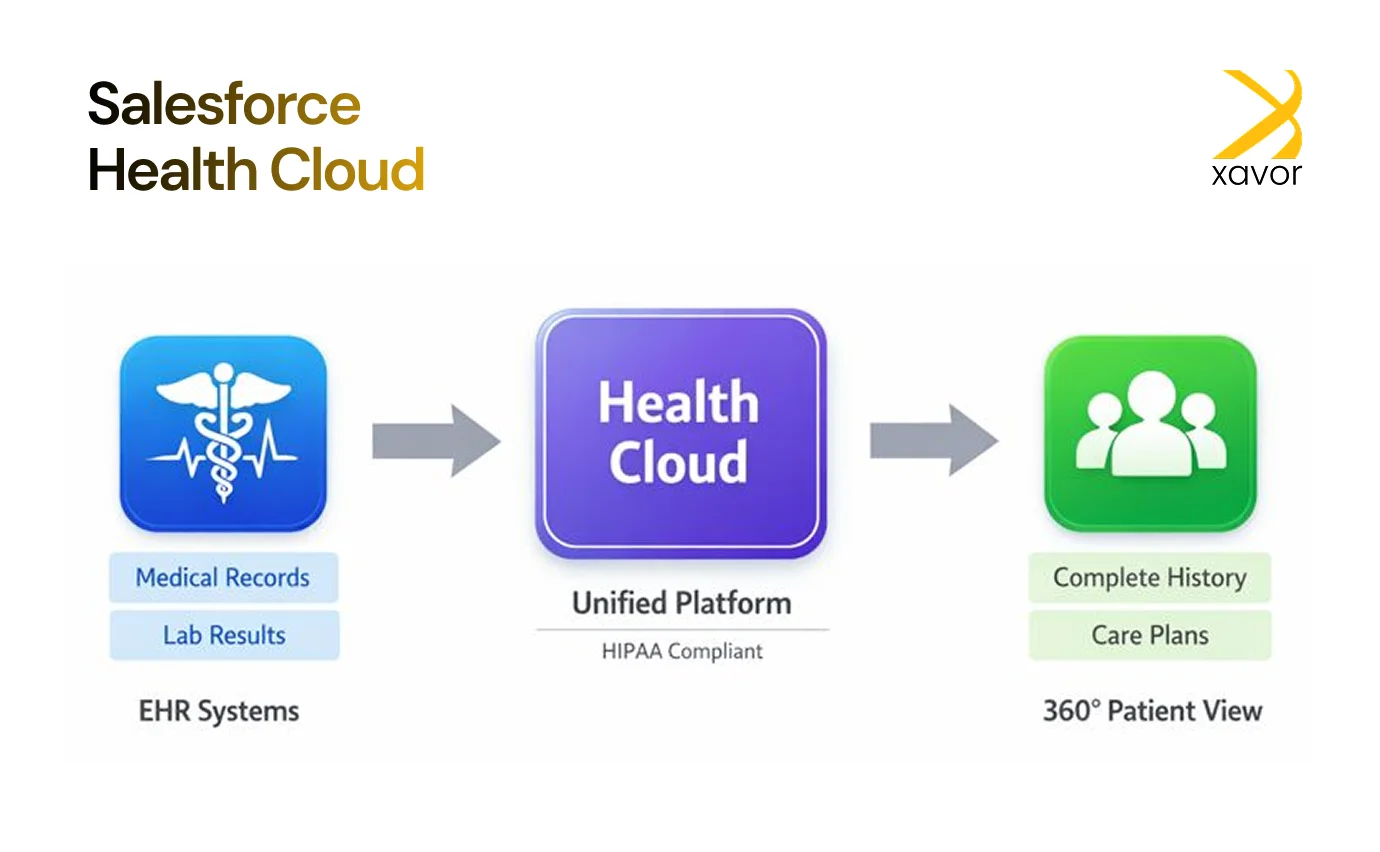
Salesforce Health Cloud is a HIPAA-compliant healthcare CRM software that integrates EHR systems to centralize patient information from fragmented data sources. By unifying these inputs, it enables providers to support proactive care delivery, improve personalization, and advance value-based care strategies.
Developed on the Salesforce platform, Health Cloud consolidates medical records, social determinants of health, payer and insurance details, and treatment plans into a single, unified patient profile. This comprehensive approach improves coordination across care teams, enhances patient satisfaction, and enables better clinical decisions through a clearer understanding of each patient.
Why healthcare organizations implement Health Cloud
Healthcare teams juggle a lot every day. Appointments, follow-ups, records, and patient questions never slow down. When information is spread across different systems, even small tasks take longer. Clinicians need the full patient picture quickly. Support teams need smoother ways to help people. Patients want communication that feels clear and connected.
Salesforce Health Cloud addresses these needs by bringing patient and member engagement, service operations, and care coordination workflows into one platform. Here are the key benefits of implementing Health Cloud.
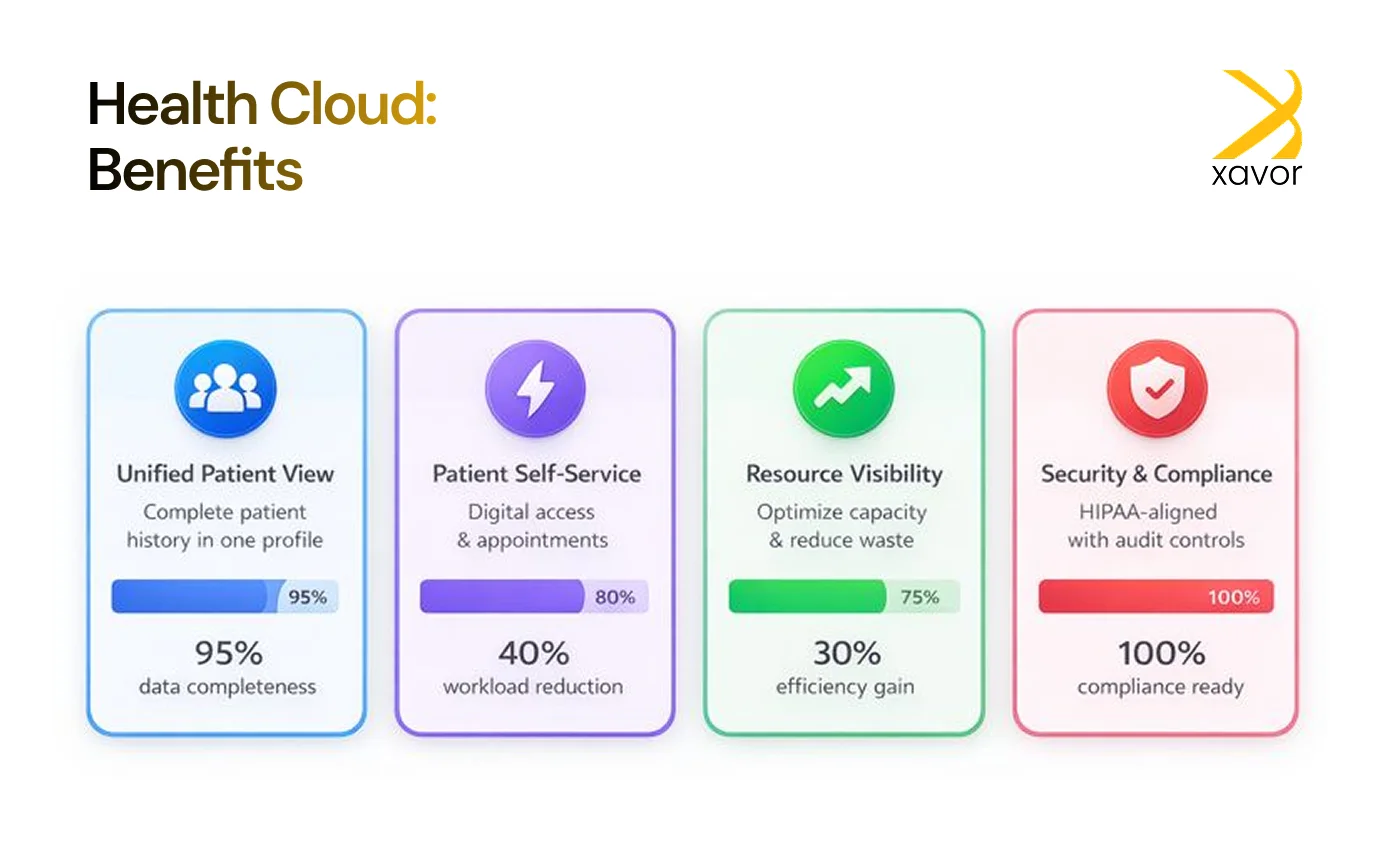
1. Unified patient view
Health Cloud brings essential patient information into a single profile, including demographics, medical history, medications, lab results, and interaction history. This helps teams act faster, reduce time spent searching across systems, and support consistent decisions throughout the care journey.
2. Patient self-service and digital access
Through self-service capabilities supported by Experience Cloud, patients can view records, manage appointments, track medications, and get answers to common questions. This reduces routine workload for staff while giving patients greater visibility and control over their care.
3. Utilization and resource visibility
Health Cloud can support workflows that improve visibility into how resources are used, including capacity, equipment coordination, and supply-related processes. Better utilization of insight helps reduce waste, manage demand peaks, and support timely access to care.
4. Security and compliance readiness
Health Cloud includes security controls designed for regulated environments, such as role-based access, audit history, and governance features. It supports compliance requirements such as HIPAA and GDPR and can align with healthcare interoperability needs, including HL7-based integrations, to help protect sensitive patient information.
Salesforce Health Cloud vs traditional healthcare CRMs
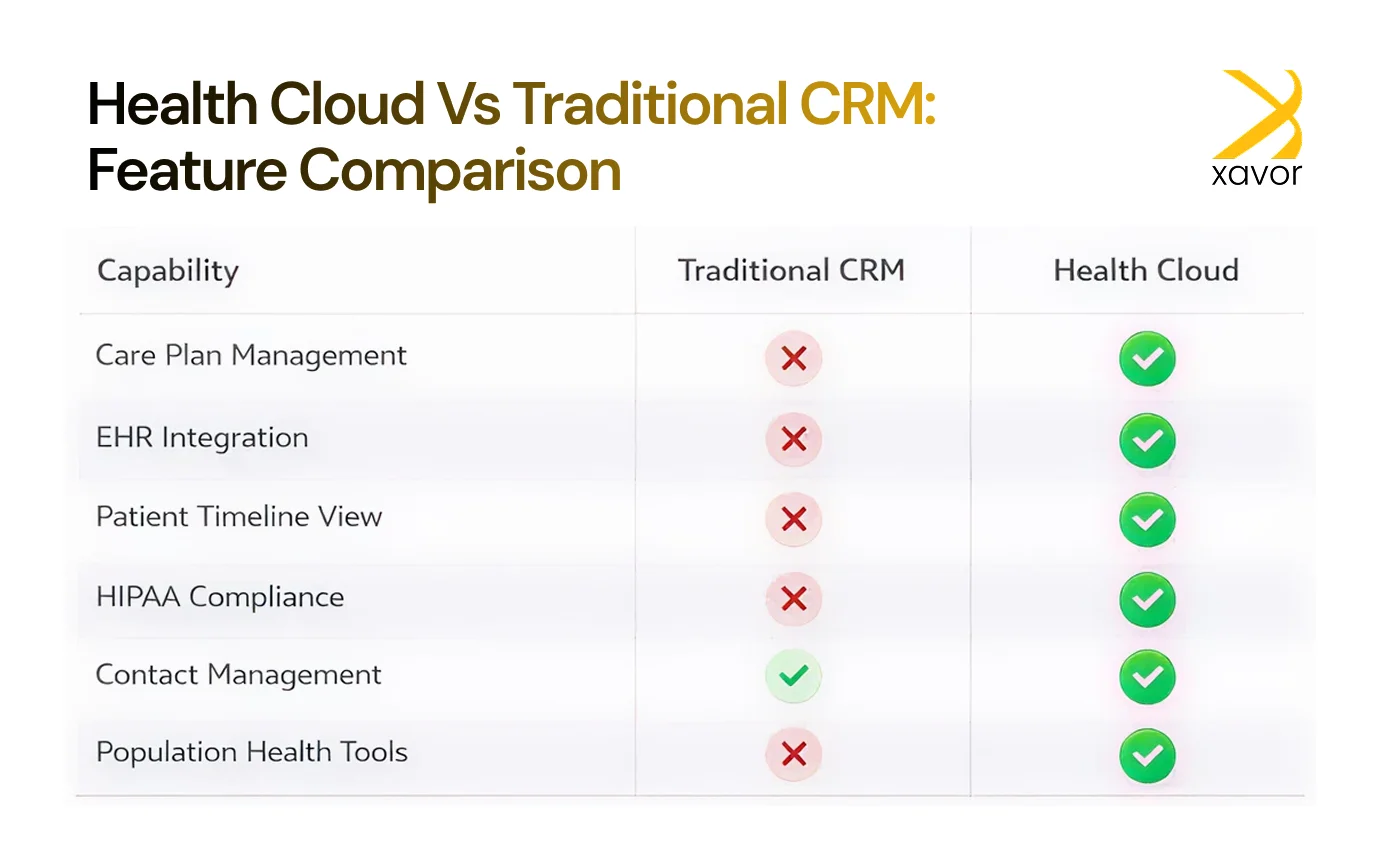
Many traditional CRM systems were built for sales and customer service, not for the day-to-day realities of healthcare. They can track contacts and interactions, but they usually lack tools for managing care journeys, coordinating care teams, or working with clinical data in a structured way.
Salesforce Health Cloud is a CRM by Salesforce that was designed specifically for healthcare. It includes healthcare-ready capabilities such as care plan management, patient timelines, and population or risk-based workflows, along with security features that support HIPAA-aligned use in regulated environments.
Another key difference is integration. Health Cloud is built to connect with clinical and operational systems such as EHR platforms, so teams can work with up-to-date patient context. This supports better coordination and helps ensure decisions and outreach are based on current information, not incomplete records.
Key features of Salesforce Health Cloud
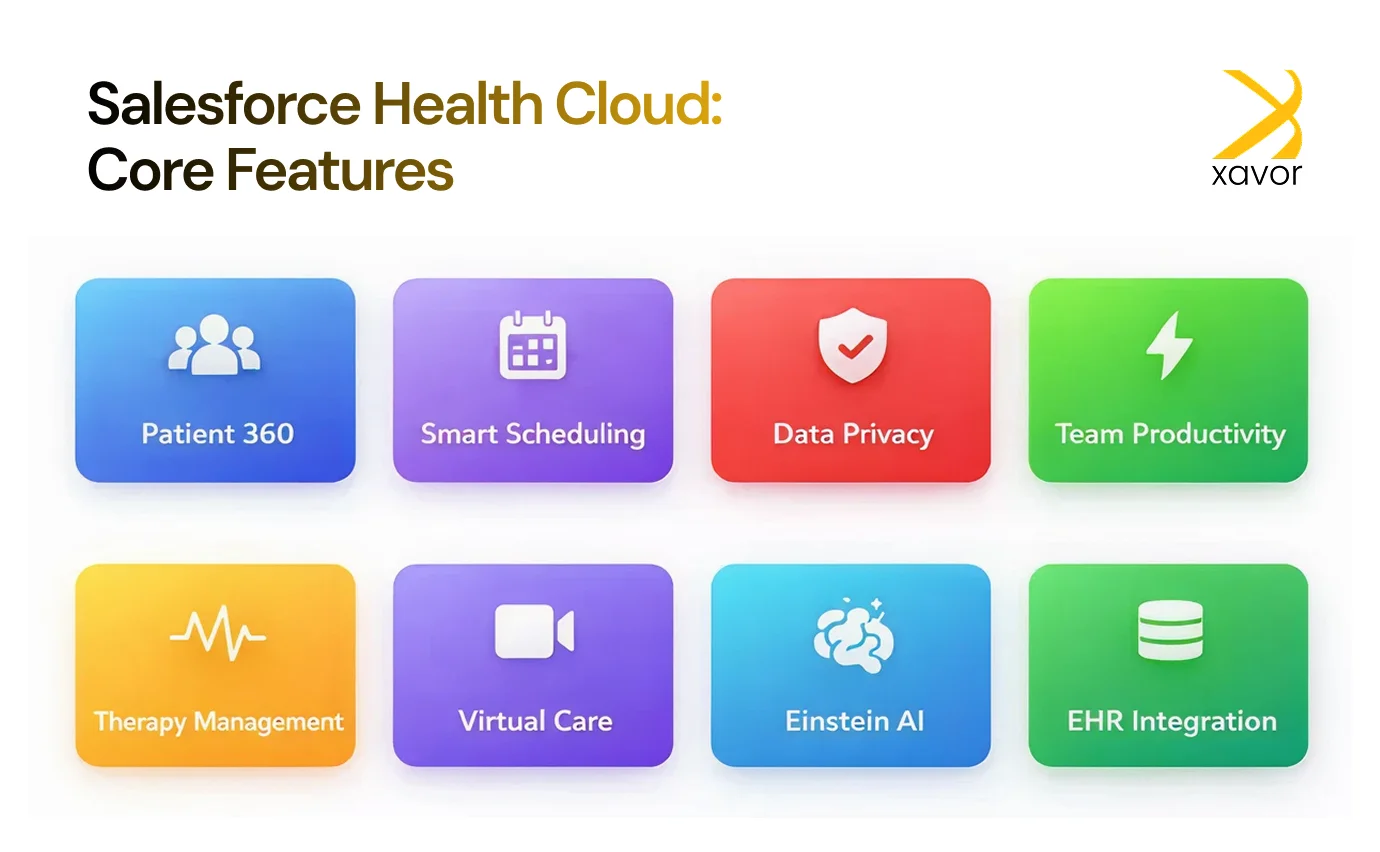
- Patient 360: Offers a comprehensive view of each patient by bringing together demographics, communication preferences, and medical history. This enables healthcare teams to deliver more personalized and effective care.
- Intelligent appointment management: Uses AI to improve scheduling and streamline appointment handling, helping providers manage time efficiently and deliver timely care.
- Data privacy and protection: Includes strong healthcare data governance capabilities that automate patient information handling, support regulatory compliance, and safeguard sensitive data.
- Care team productivity: Improves collaboration across care teams through tools that simplify communication, task coordination, and workflow management.
- Advanced therapy management: Helps manage complex therapies by supporting proper treatment administration and enabling progress monitoring over time.
- Virtual care capabilities: Enables remote consultations and patient monitoring beyond traditional care settings, helping expand access and continuity of care.
- Einstein for Health Cloud: Provides AI-powered analytics and insights that support better decision-making, improve outcomes, and enhance operational efficiency.
- EHR-to-Salesforce API connections: Ensures smooth integration with EHR systems, allowing organizations to bring patient data into Salesforce for more unified management.
How Salesforce supports value-based care models
Healthcare is shifting away from fee-for-service and moving toward value-based care (VBC), where payments and incentives are tied to outcomes, not volume. This change pushes organizations to improve care quality, reduce avoidable utilization, and make sure patients receive the right care at the right time.
Salesforce Health Cloud supports value-based care by helping teams manage populations, run targeted programs, and track performance in a structured way.
Health Cloud supports value-based care

1. Population health management
Health Cloud helps segment and organize patient groups based on factors such as risk level, conditions, demographics, or utilization patterns. This makes it easier to identify who needs to outreach first and plan interventions early.
2. Preventive and chronic care programs
Health Cloud supports programs for chronic conditions such as diabetes or COPD, as well as preventive care services such as screenings and vaccinations. Care teams can track milestones, monitor progress, and get alerts when patients miss key steps.
3. Care gap closure
With automation and AI-driven insights in healthcare, Health Cloud can highlight missed follow-ups, overdue screenings, or care gaps such as delayed vaccinations. Teams can act quickly by assigning tasks, starting outreach, and tracking completion.
4. Real-time performance tracking
Health Cloud helps track KPIs tied to value-based contracts, such as readmissions, utilization rates, and patient experience measures like CAHPS. When these metrics are visible in one place, teams can respond faster and adjust programs before performance slips.
By supporting these workflows, Health Cloud helps organizations meet payer and regulatory expectations while improving patient experience and care consistency.
How to get started with Salesforce Health Cloud
Thinking about using Salesforce Health Cloud to improve the way you deliver care? Here’s a simple step-by-step guide to help you get started without feeling overwhelmed.
Step 1: Get clear on what you actually need
Before jumping into setup, take a step back and think about your goals. What’s not working today? Are you struggling with scattered patient data, slow workflows, or poor coordination between teams? Knowing exactly what you want Health Cloud to solve will make the whole rollout smoother.
Step 2: Set up your account
Once you’re ready, go to the Salesforce website and sign up for a Health Cloud account. You’ll just need to enter a few basic details about your healthcare organization to get started.
Step 3: Make your dashboard work for you
After your account is ready, spend some time customizing the dashboard. The Patient 360 view is especially helpful because it lets you decide what patient information you want to see right away, like history, medications, or contact preferences.
Step 4: Connect your care team
Next, build your care network using Collaborative Care Networks. This helps you bring in everyone involved in patient care, like doctors, nurses, and even family members when needed, so communication stays organized and consistent.
Step 5: Start adding patient data
Now you can start entering patient details into the system. This includes things like medical history, current medications, upcoming appointments, and any other key information. The more complete the data is, the better your overall picture of each patient becomes.
Step 6: Use AI to find insights
Once you have data in place, you can start using Einstein Analytics to make sense of it. It can help you spot trends, predict patient needs, identify risks early, and support smarter clinical and operational decisions.
Step 7: Begin engaging patients
Finally, you can start using Health Cloud to communicate directly with patients in a more personal way. Send appointment reminders, follow-ups, wellness tips, or updates so patients stay informed and feel supported.
Salesforce Health Cloud pricing
Salesforce Health Cloud is available in four editions. Each edition includes a different set of features and limits, so selecting the right option, and any required add-ons is an important part of budgeting and implementation planning.
| Edition | List price (USD) | Notes |
| Health Cloud Enterprise | $350 user/month (annual contract) | Core Health Cloud CRM capabilities |
| Health Cloud Unlimited | $525 user/month (annual contract) | Expanded platform support and capabilities |
| Health Cloud Agentforce 1 for Service | $750 user/month (annual contract) | Includes Agentforce for Health Cloud and related capabilities |
| Health Cloud Agentforce 1 for Sales | $750 user/month (annual contract) | Sales-focused edition with Agentforce components |
Add-ons that extend Health Cloud capabilities
Along with the core Health Cloud editions, Salesforce offers optional add-ons that provide extra functionality. These add-ons can be selected based on gaps in the base license or the specific workflows your organization needs to support.
1. Provider network management: $100 per user per month
Helps organizations manage and understand their provider network in one place, with stronger visibility into provider relationships, performance, and network context.
2. Agentforce for Health Cloud: $150 per user per month
Salesforce Agentforce adds AI-based support designed for Health Cloud workflows, helping teams handle routine tasks and interactions more efficiently through agent-driven assistance.
3. Home health: starting at $30 per login per month
Supports care delivery outside traditional facilities by enabling workflows for in-home services, visit coordination, and field-based care activities.
Salesforce Health Cloud services from Xavor
Xavor provides secure, scalable Salesforce Health Cloud implementation services for healthcare organizations that need better care coordination, stronger engagement, and reliable system connectivity. Our approach centers on two priorities that matter in regulated environments: security and interoperability.
We configure Health Clouds with governance-driven access controls, compliance-ready workflows, and data protection practices. We also build integrations that connect a Health Cloud with EHR platforms, payer systems, labs, and digital health tools using standards such as HL7 v2/v3, FHIR, SMART on FHIR, CDA, and X12, along with tools like Mirth Connect.
What Xavor delivers
- Salesforce Health Cloud setup, configuration, and optimization
- Interoperability and integration services (HL7 and FHIR interfaces)
- Security and compliance-aligned design (HIPAA, MACRA, MIPS, Meaningful Use)
- Platform support, upgrades, and maintenance
- Connected health and device integration support
- AI-focused workflow support to reduce administrative effort
Partner with Xavor to deploy a Salesforce Health Cloud with a secure foundation that supports consistent healthcare operations.
Still not sure how to choose the right Salesforce consulting partner? Explore these top 10 tips for choosing the right Salesforce consulting partner in 2025.
Conclusion
Salesforce Health Cloud helps healthcare organizations manage patient and member relationships in a way that fits real healthcare workflows. It brings key information, communication history, and care coordination tools into one place, so teams can work faster and stay aligned without relying on scattered systems. When used well, it supports smoother patient experiences, stronger internal coordination, and more consistent service delivery.
The biggest results usually come when a Health Cloud is built around clear priorities, connected properly with systems like the EHR, and supported with strong data governance and security controls. A phased rollout with the right integrations and training helps teams adopt the platform quickly and keeps performance measurable through reporting and structured workflows.
If you want to plan, implement, or optimize Salesforce Health Cloud with a focus on security, interoperability, and long-term value, Xavor can help. Reach out at [email protected].

FAQs
Salesforce Health Cloud pricing depends on the edition and the add-ons you choose. List pricing starts at $350 per user per month (Enterprise) and goes up to $750 per user per month for Agentforce editions, billed annually. Total cost also depends on implementation scope, integrations (like EHR), data migration, and ongoing support.
To install Health Cloud, you first need the right Health Cloud licenses in your Salesforce org. After that, you enable Health Cloud features, set up healthcare data models, configure Patient 360 layouts, apply security and access controls, and connect integrations such as the EHR. Most organizations also build care plans, workflows, and reports before go-live.
Hiring Salesforce Health Cloud consulting services helps when you need expertise in healthcare workflows, security and compliance planning, and interoperability. A specialized team can handle implementation, HL7/FHIR integrations, data governance, and user adoption, so Health Cloud is deployed correctly and delivers measurable results faster.