
ServiceNow is a major workflow automation platform. Its various modules help businesses automate their different processes and services. ServiceNow CSM (Customer Service Management) is one of such modules designed to handle customer issues specifically.
CSM in ServiceNow provides uninterrupted, efficient customer service. And that matters a lot because just one negative experience can drive away over 30% of customers.
Plus, ServiceNow CSM connects with other enterprise tools easily. This integration is crucial for businesses because a quality customer experience comes from collective workflows working like a well-oiled machine. Many organizations rely on expert ServiceNow implementation services to make these integrations smooth and effective.
In this blog, we’ll look at some of those integrations in CSM and how they contribute to customer experience.
What is CSM in ServiceNow?
ServiceNow customer service management is a cloud-based platform that helps businesses deliver faster, more connected customer service. It brings customer interactions, service teams, intelligent workflows, and business systems into one place.
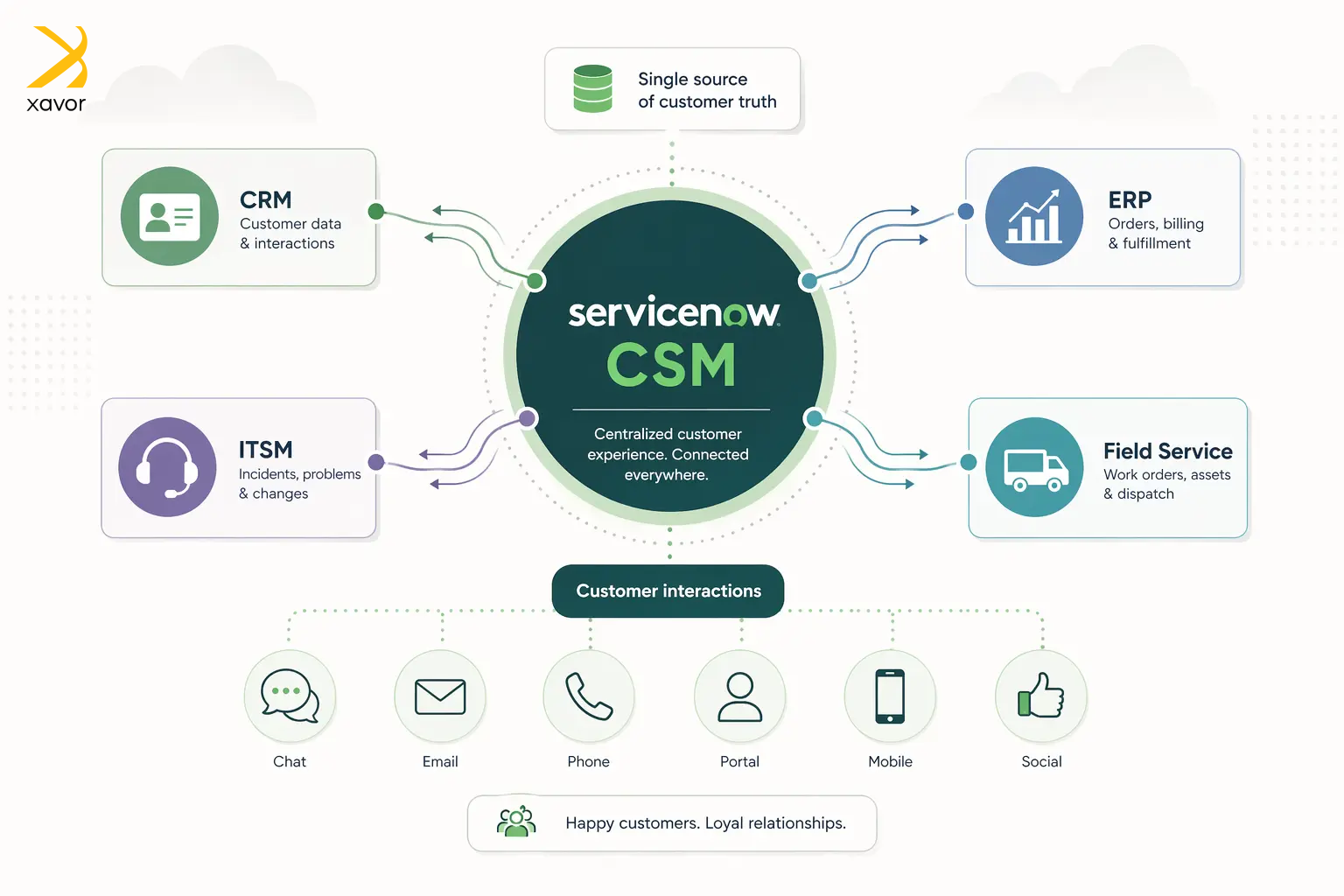
Companies can use CSM in ServiceNow as a shared system where customer requests can be captured, assigned to the right people, and resolved with full context, while also enabling collaboration across teams, such as:
- Customer service
- IT
- Field service
ServiceNow CSM helps organizations streamline support operations, respond more quickly, improve visibility into customer issues and service health, and ultimately provide a smoother, higher-quality customer experience.
ServiceNow CSM integration capabilities
The CSM module in ServiceNow comes with a range of flexible integrations. You can connect it with other business tools, like CRMs, ERPs, and PLM platforms.
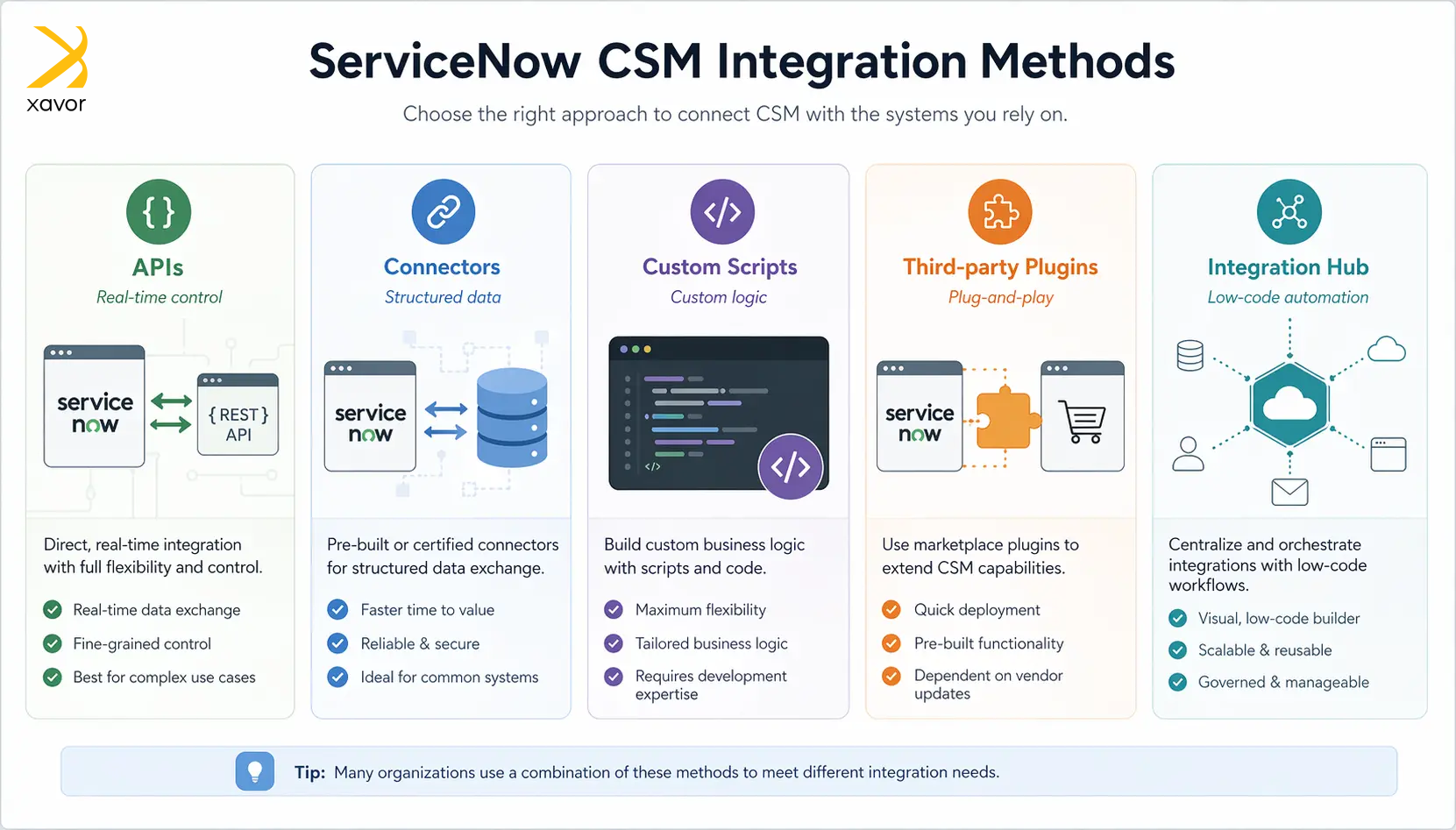
There are currently four major integration options in ServiceNow CSM.
- APIs
- Connectors
- Custom scripts
- Third-party plugins
- Integration Hub
1. APIs
ServiceNow CSM provides REST and SOAP APIs that allow it to directly communicate with other systems. This means external applications like CRMs, ERPs, or custom-built platforms can create, update, or retrieve customer service data in real time.
These APIs are typically used when organizations need precise control over how systems interact or when building custom integrations. APIs enable seamless system-to-system communication, which ensures that customer data flows smoothly across platforms without manual intervention.
2. Connectors
Service Graph Connectors are designed to bring data from external systems into ServiceNow in a structured and reliable way, particularly into the CMDB. They pull information from platforms like cloud providers or enterprise tools and ensure the data is normalized and accurate.
In the context of CSM, this enriched data helps agents better understand the customer’s environment and link issues to actual services or infrastructure, improving both diagnosis and resolution.
3. Custom scripts
ServiceNow allows developers to write custom scripts to handle integrations and complex logic that cannot be achieved through out-of-the-box tools alone. These scripts can run on the server side or on the client side.
With custom scripting, you can call external APIs, transform data, or enforce specific business rules tailored to your organization. This approach is especially useful for cases requiring highly customized integration services or for edge cases where prebuilt connectors or low-code tools are insufficient.
4. Third-party plugins
There are several third-party integrations available for CSM. These integrations make connecting with other platforms very easy. This is important because resolving customer issues often requires coordination across different departments.
CSM ensures that relevant teams have access to the same information and can collaborate effectively. It eliminates silos and enables smoother handoffs, making the overall service process faster and more reliable.
5. Integration Hub
Integration Hub is ServiceNow’s low-code tool that simplifies integrations by allowing users to connect systems using pre-built connectors, known as spokes, without heavy coding.
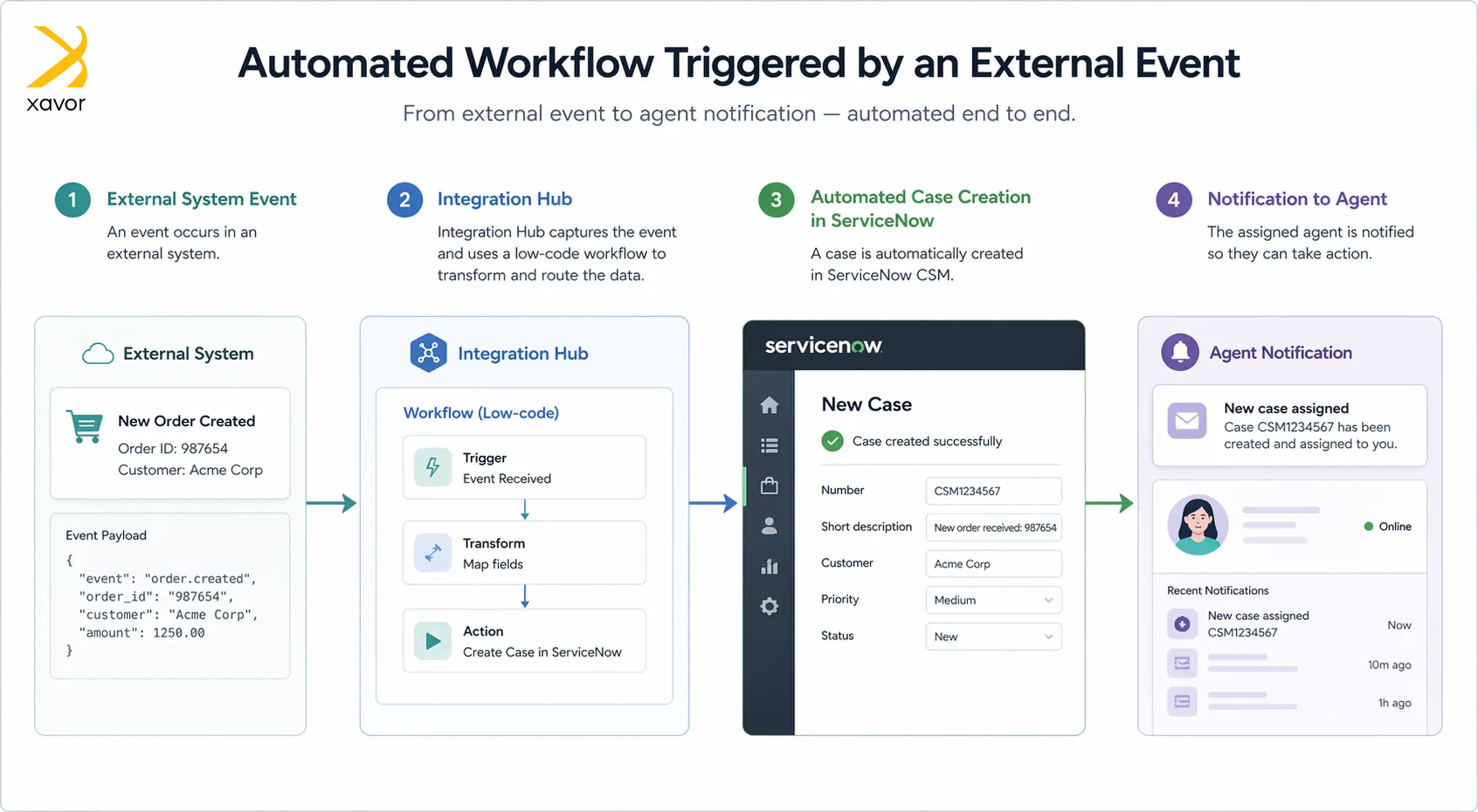
It enables organizations to automate enterprise workflows across different tools. For example, automatically creating a case in ServiceNow when an event occurs in another system. This makes integrations faster to build and easier to maintain, especially for teams that want flexibility without relying heavily on developers.
Best practices for ServiceNow CSM integrations
The following section will look at some of the best practices to perform ServiceNow CSM integrations in the most perfect way possible.
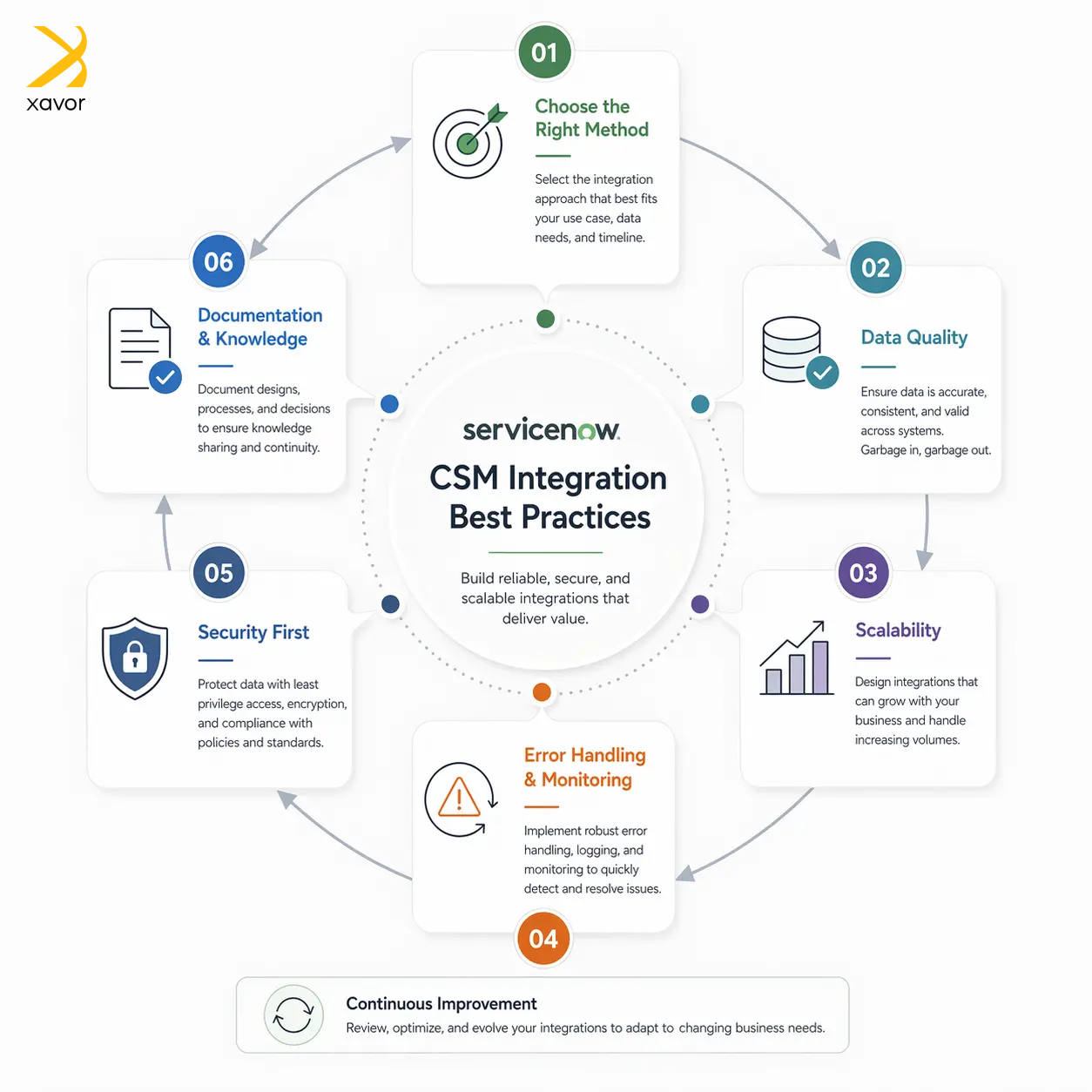
1. Use the right integration method for the use case
Not every integration needs a custom script or a complex setup. It’s important to choose the right approach based on the requirement. APIs are good for real-time communication, while Integration Hub is the go-to choice for low-code automation.
Service Graph Connectors are ideal for structured data ingestion. Overengineering simple integrations can increase maintenance effort, while underengineering complex ones can lead to performance and reliability issues. The key is to balance flexibility, scalability, and simplicity.
2. Ensure data quality and consistency
Integrations in any CSM tool are only as good as the data they exchange. You should define clear data standards, avoid duplicates, and ensure proper field mapping between systems.
Poor data quality can lead to confusion, incorrect case handling, and loss of trust in the system. Using mechanisms like data normalization, reconciliation rules, and validation checks helps maintain a clean and reliable dataset across integrated systems.
3. Design for scalability and performance
As the number of integrations and data volume grow, performance can become a bottleneck. Efficient integrations should be designed to handle high volumes without slowing down the platform.
This includes using asynchronous processing where possible, avoiding unnecessary API calls, and optimizing scripts and workflows. A scalable design ensures that the system continues to perform well as the business expands.
4. Implement proper error handling and monitoring
Integrations can fail due to network issues, incorrect data, or external system downtime.
Instead of silently failing, integrations should include robust error handling, logging, and alerting mechanisms. This allows teams to quickly identify and resolve issues before they impact customer service.
Monitoring tools and dashboards can provide visibility into integration health and performance.
5. Secure your integrations
Since integrations often involve sensitive customer and business data, the security of the CSM system must be a priority. This includes using secure authentication methods, encrypting data in transit, and following the principle of least privilege when granting access.
Proper credential management and regular audits help prevent unauthorized access and data breaches, ensuring compliance with security standards.
6. Maintain clear documentation and governance
Over time, integrations can become complex and difficult to manage if they are not well-documented. Maintaining clear documentation of integration logic, data flows, and dependencies helps teams understand and troubleshoot the system more effectively.
Governance practices, such as naming conventions, version control, and change management, ensure that integrations remain organized, maintainable, and aligned with business needs.
Conclusion
People commonly think of ServiceNow as an ITSM platform, but that’s not its full set of capabilities, nor how the company positions itself. ITSM is just one of the flagship modules of the platform. ServiceNow is a cloud-based enterprise automation platform that makes business workflows faster and more efficient.
ServiceNow CSM is designed to integrate with other business tools for this same overarching vision. It connects with relevant enterprise systems to automate and improve customer experience from all angles.
And we discussed all the possible ways you can integrate CSM in ServiceNow with your existing tools. But if you need help to choose and implement the best integration method, partner with Xavor’s ServiceNow consulting services.
Our certified ServiceNow experts perform an in-depth analysis to find out which ServiceNow integration method best suits your setup.
Contact us at [email protected] to book a free consultation session.

FAQs
Customer Service Management (CSM) in ServiceNow is a platform that helps organizations manage and resolve customer issues efficiently across multiple channels. It streamlines case management, automates workflows, and improves customer support experiences by connecting service teams, data, and processes in one system.
ITSM (IT Service Management) in ServiceNow focuses on managing internal IT services like incidents, requests, and infrastructure support for employees. On the other hand, CSM is designed for handling external customer interactions, helping organizations manage and resolve customer issues and improve overall customer experience.
Salesforce is a comprehensive CRM platform focused on sales, marketing, and customer engagement across the entire customer lifecycle. ServiceNow CSM is specifically designed for customer service operations, emphasizing case management, workflow automation, and integration with IT and operational processes to resolve customer issues efficiently.