

A customer filters a furniture catalog for sofas under 80 inches wide, then receives a recommendation for a bestselling 96-inch sectional. The item may be popular, but it ignores a requirement the shopper has already set. Ecommerce product recommendations work best when they reflect what a customer is looking for and where they are in the buying journey. A useful suggestion on a product page may be a distraction at checkout. Getting that context right is an important part of custom ecommerce development.
What are ecommerce product recommendations?
Ecommerce product recommendations are suggestions displayed to shoppers based on product information and customer activity, including browsing behavior and purchase history. Retailers can also use merchandising rules to determine which products appear. These recommendations help customers discover relevant items throughout the shopping process. Retailers may select products manually or use predefined rules. More advanced systems can generate recommendations by analyzing customer activity and identifying relationships between products.
Different recommendation types serve different purposes. Related products offer alternatives to the item being viewed, while complementary products are purchased alongside it. Personalized recommendations use individual customer information, whereas bestseller lists reflect broader purchasing patterns.
For example, Shopify’s Search & Discovery documentation distinguishes related products from complementary products and explains how merchants can manage these suggestions.
Where should ecommerce product recommendations appear?
Product recommendations can appear at different stages of the shopping journey, from the homepage to post-purchase interactions. Their purpose depends on where they appear. Homepage recommendations help customers begin browsing, while category pages narrow their choices. Product pages support comparisons, and cart recommendations help customers complete their purchases.
The following table presents 12 practical product recommendation examples ecommerce managers can adapt to their own catalogs.
| Placement | Recommendation type | Example | Relevance factor |
| Homepage | 1. Bestsellers | Popular denim styles | Category and availability |
| Homepage | 2. Recently viewed | Previously explored dining tables | Browsing history |
| Homepage | 3. Previous purchases | Skincare refills | Purchase history |
| Category page | 4. Filter-matched suggestions | Compact sofas | Dimensions and budget |
| Category page | 5. New arrivals | Recently added running shoes | Category and size |
| Product page | 6. Similar products | Alternative carry-on suitcases | Product attributes |
| Product page | 7. Upgrades | Higher-capacity cordless vacuum | Relevant feature improvements |
| Product page | 8. Complementary products | Bulbs for a selected lamp | Product compatibility |
| Product page | 9. Technical compatibility | Printer cartridges or spare parts | Exact model specifications |
| Cart | 10. Frequently bought together | Memory card for a camera | Purchase patterns and compatibility |
| Cart | 11. Practical add-ons | Floor protectors for furniture | Existing cart contents |
| Post-purchase | 12. Replenishment | Air-purifier replacement filters | Ownership and replacement timing |
These are illustrative shopping situations rather than measured results from a particular retailer.
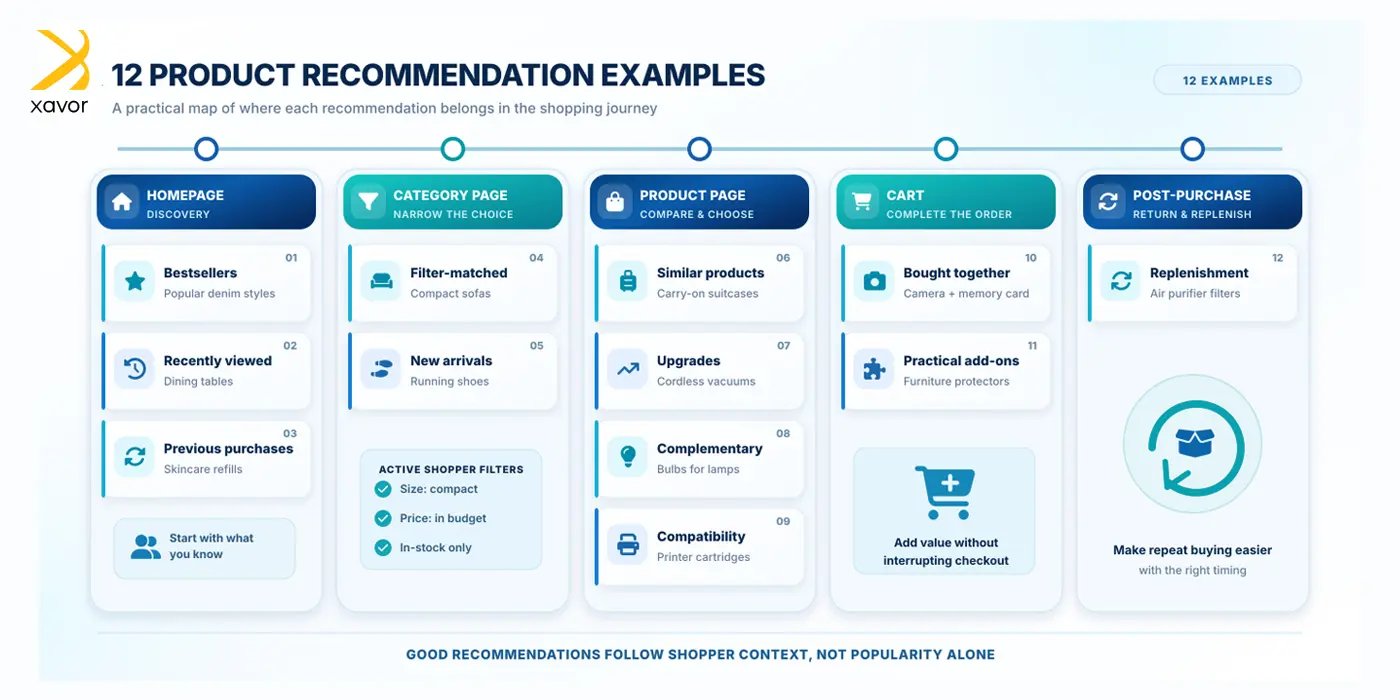
Homepage recommendations: helping customers begin shopping
1. Show category bestsellers to first-time visitors
Homepage product recommendations give first-time visitors a starting point when little is known about their preferences. In this situation, best seller recommendations can highlight products that other customers frequently purchase. A fashion retailer, for instance, could feature popular denim styles or seasonal clothing collections.
Bestseller recommendations can be useful, but a storewide list may not suit everyone. Someone browsing women’s clothing probably has little interest in bestselling men’s accessories. Keeping recommendations relevant to the active category and checking availability makes these suggestions more useful. Bestseller rankings also need regular updates as seasonal demand changes.
2. Help returning customers revisit previously viewed products
Consider someone comparing dining tables across several visits. They may explore different wood finishes, check measurements, and leave before making a decision. A recently viewed section allows that customer to return to the exact products they considered without repeating the search.
For furniture and home goods retailers, retaining the selected variant makes a difference. Showing the same table in another finish may force the customer to compare options again. These recommendations should preserve product details where possible and clearly indicate when an item is unavailable.
3. Make repeat purchases easier
Purchase history can support personalized product recommendations for returning customers. A skincare retailer might display a moisturizer someone regularly orders, making it easier to buy the same product again. A simple “Buy again” label explains why the item is being suggested.
Past purchases still require context. Someone who ordered a skincare gift six months ago may have no personal interest in that category. Retailers should consider current browsing behavior and repeat-purchase patterns before treating every previous order as an ongoing preference.
Category pages: narrowing the choice
4. Recommend products that respect selected filters
Filters tell retailers which requirements shoppers are unwilling to compromise on. Someone browsing dining tables made of solid oak and priced below $1,000 should not see a veneer table simply because it is a bestseller.
Furniture product recommendations often depend on dimensions and materials. Price limits matter just as much. Use these requirements to determine which products qualify before ranking the matches by popularity. The same approach applies to shoe sizes and compatible parts.
5. Introduce relevant new arrivals
New products often lack the purchase history needed to appear in bestseller recommendations. A new-arrivals section can introduce them to customers browsing the appropriate category. Someone looking at running shoes could see recently released models matching their selected size and intended activity.
New arrivals should be recommended based on their relevance to the customer’s current search, not simply because they were recently added to the catalog. Retailers can use product categories and selected filters to identify suitable options, even when newer products have limited sales history.
Product pages: helping customers compare products
6. Show similar products as alternatives
Product page recommendations are most useful when customers are still deciding which item meets their needs. Related product recommendations help them explore alternatives without starting another search. A customer viewing a black carry-on suitcase, for example, might appreciate other models with similar dimensions or a different handle design.
Product similarity should be based on how well an alternative meets the customer’s requirements. For example, a large checked suitcase may belong to the same brand as the carry-on being viewed, but it would not be a suitable alternative. Recommendations should prioritize products with comparable specifications that serve the same purpose.
7. Suggest upgrades with a clear benefit
Upsell product recommendations introduce higher-priced alternatives when their additional features offer a meaningful benefit to the customer. For example, someone comparing cordless vacuums for a larger home may be interested in a model with longer battery runtime.
Retailers should make the benefits of upgrading clear by showing relevant specifications alongside the price difference. This allows customers to assess whether the additional features justify the higher cost. A generic label such as “Premium choice” offers little value without a clear explanation of what makes the upgraded model better.
8. Recommend complementary products that work together
Complementary recommendations suggest products a customer might use with the item being viewed. A desk lamp could be shown alongside a suitable bulb, or a coffee machine alongside its compatible filters. Unlike similar-product suggestions, the goal is not to offer another version of the main product. It is to help the customer finish the purchase with what they need.
Cross sell product recommendations are most useful when the relationship is obvious and the accessory is genuinely suitable. A merchant can maintain approved accessory relationships for items where fit matters, rather than relying only on products other shoppers purchased.
9. Account for compatibility in large catalogs
Large catalogs introduce a different problem: products may look similar but have different technical requirements. Two printer cartridges can appear almost identical while supporting different models. Industrial spare parts create an even greater risk when a small specification difference makes a part unusable.
Here, compatibility is a qualification step, not just a factor in ranking. Retailers can use model identifiers and approved replacement information to rule out unsuitable items, then check detailed specifications where needed. If a match cannot be confirmed, it is better not to recommend it as compatible.
Xavor addressed a similar product-discovery challenge in a retail AI support project. The conversational system uses product catalog information to answer specific customer questions, demonstrating how accurate product data can improve the relevance of retail assistance.
Cart recommendations: suggesting useful additions
10. Recommend products frequently bought together
Frequently bought together recommendations use past orders to identify products often purchased as a pair or set. Customers also bought recommendations draw on similar purchase relationships. For example, an electronics store might notice that shoppers often buy a memory card with a particular camera model.
A purchase pattern is a starting point, not proof that two products work together. Before showing the memory card as an add-on, the retailer needs to confirm that it supports the selected camera. This makes the recommendation useful rather than merely popular.
11. Suggest practical accessories based on cart contents
Not every cart suggestion needs to come from buying-pattern data. A retailer can set a simple rule to show floor protectors when a shopper adds a dining table, or the correct battery type when a device is sold without batteries. These are practical reminders tied to what is already in the cart.
The distinction matters. In its 2021 research on cart cross-sells, Baymard Institute found that 52% of the desktop ecommerce sites it benchmarked showed irrelevant cart suggestions or relied only on what other customers bought. One clearly useful add-on is often better than a carousel of loosely related products. The recommendation should be easy to ignore so it does not interrupt checkout.
Post-purchase recommendations: making future purchases relevant
12. Recommend replenishment when customers need it
Product recommendations can remain useful after checkout, especially for items requiring regular replacement. An air-purifier retailer could suggest replacement filters based on the model purchased and the manufacturer’s recommended service interval. The recommendation gives the customer a practical reason to return.
Retailers should consider a customer’s purchase history when deciding when to recommend replacement products. For example, someone who recently ordered several spare filters is unlikely to need another reminder immediately. Using previous order information helps retailers schedule replenishment recommendations more appropriately and ensure that suggested replacements are compatible with products the customer already owns.
Relevant versus irrelevant recommendations: what should retailers check?
A recommendation can belong to the correct product category while still being unsuitable for a particular shopper. Relevance depends on the requirements the customer has expressed and the information available about each product.
| Shopping situation | Relevant recommendation | Irrelevant recommendation |
| Customer filters sofas to under 80 inches | A 76-inch sofa within budget | A bestselling 96-inch sectional |
| Customer browses size 8 running shoes | Available running shoes in size 8 | Shoes available only in size 6 |
| Customer views a particular camera | A compatible memory card | An unsupported card |
| Buyer searches for a printer cartridge | Cartridge approved for the printer model | Cartridge for another model |
| Shopper adds a coffee machine to the cart | Compatible filters | Another coffee machine |
The distinction matters most when products have strict technical requirements. Selected filters and product compatibility should determine which items qualify for recommendation. Availability must also be confirmed before broader ranking criteria are applied.
Accurate product catalog information is essential for generating relevant recommendations. If inventory data is outdated or product specifications are incorrect, retailers risk suggesting items that appear suitable but fail to meet the customer’s requirements.
For retailers using Salesforce, Xavor’s overview of Salesforce Commerce Cloud provides additional information about the platform’s ecommerce and personalization capabilities.
How should retailers measure product recommendation performance?
Recommendation clicks show that shoppers noticed an item, not that the suggestion helped them buy it. Track click-through rates, add-to-cart activity, conversion rates, and average order value. For cart recommendations, watch checkout completion as well. A controlled test against a version without the recommendation can help determine whether the placement adds value.
Look at the results by placement, not only across the whole site. If a module receives clicks but generates few add-to-cart actions, review whether the suggested products match the shopper’s intent. If cart recommendations coincide with higher checkout abandonment, test fewer suggestions or a less intrusive position. Quality checks should catch out-of-stock items and recommendations that ignore selected filters. They should also flag incompatible accessories.
Conclusion
Effective ecommerce product recommendations start with one question: does this suggestion help the shopper make the decision in front of them? The answer depends on placement and accurate catalog data. It also depends on the requirements the customer has already expressed.
Standard recommendation widgets can cover many common use cases. Businesses with specialized catalogs or more complex product-discovery needs may require a more tailored approach. Explore Xavor’s custom ecommerce development services or contact [email protected] to discuss your requirements.

FAQs
Personalized product recommendations use information about an individual shopper, such as browsing behavior or purchase history, to select relevant products. A general bestseller list reflects broader customer activity rather than an individual's preferences.
Related recommendations suggest alternatives to the product being viewed. Complementary recommendations suggest items purchased alongside it. Another carry-on suitcase is a related product, while a compatible luggage accessory is complementary.
Cart page product recommendations can appear near the order summary or immediately after an item is added. They should relate to products already selected and should not interfere with checkout. Compatible accessories are generally more suitable than competing alternatives at this stage.