
Email is still the most common entry point for attacks in any organization. That hasn’t changed over the years. What has changed is how those attacks look. Phishing emails today are much harder to detect. They don’t make obvious mistakes anymore. Many of them are well-written, targeted, and sometimes even sent from compromised legitimate accounts.
Because of this, Microsoft has started using AI more deeply, especially Microsoft 365 Defender. It is changing how email threats are detected and handled.
In this blog, we’ll compare AI-lead email protection in Microsoft 365 services with standard defense mechanisms. The difference will show how much safer and better things are with AI in the scene.
The email security almanac
IBM reported an 84% year-over-year increase in phishing emails in 2025. These emails delivered infostealer malware, which highlights that email remains a major channel for credential theft and initial compromise.
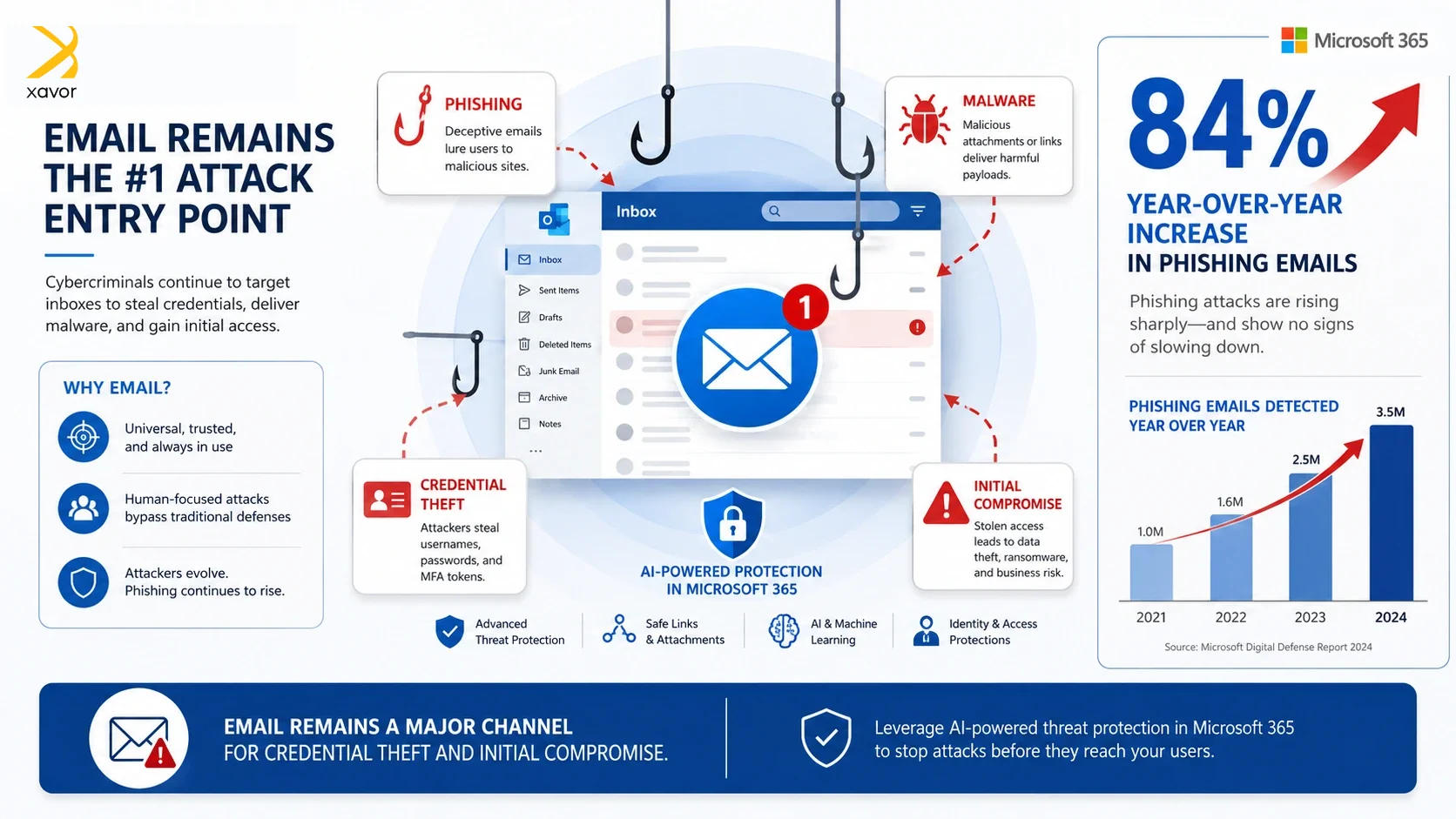
In a similar vein, pretexting is a concerning email-based social engineering tactic where an attacker fabricates a believable scenario to trick the victim into divulging sensitive information, make fraudulent payments, or grant system access.
How email protection worked before AI
We might as well start using the abbreviation of B.I., before AI, like B.C., to define a watershed moment in history. There has been a real difference in how everything in the world worked before and after AI. In the past, email security mostly worked by looking for things that were already known to be dangerous.
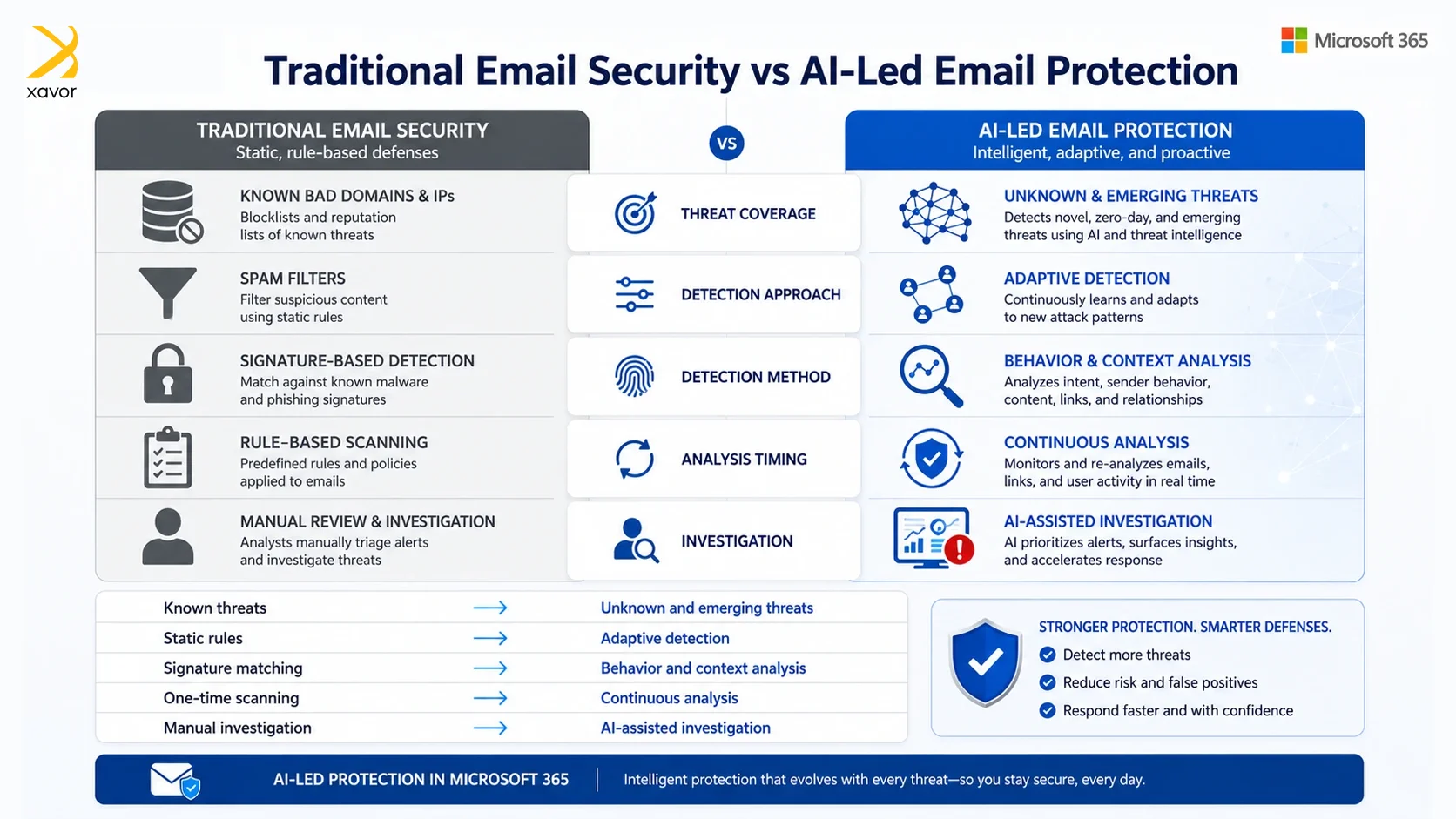
For example, security tools would check whether an email came from a domain that had already been reported as malicious. They would also use spam filters to look for suspicious wording or common signs of junk mail. Another common method was signature-based detection, where the system compared emails, links, or attachments against known patterns from previous attacks.
These methods were not wrong and did their work. But only against basic and repeated threats. If attackers reused the same domain, file, link, or message pattern, the security system could recognize it and stop it.
New, targeted, or carefully crafted attacks were harder to catch. If a phishing email came from a new domain, used a slightly changed message, or contained a file that did not match any known malicious signature, it could slip through the filters.
What AI changes in Microsoft 365
With AI in Microsoft 365 Defender, Email Debugger functionality goes beyond simply identifying known threats. Instead, AI adds a smarter layer by evaluating behavior, patterns, and context to improve email protection.
That is why Microsoft 365 can better understand whether an email makes sense based on how people normally communicate, who usually contacts whom, and what kind of message is being sent.
Smarter phishing detection
AI helps Microsoft 365 look beyond the surface of an email. Instead of only asking rudimentary questions, like “Is this sender already known to be malicious?” it can also ask, “Does this email look unusual for this user or organization?”
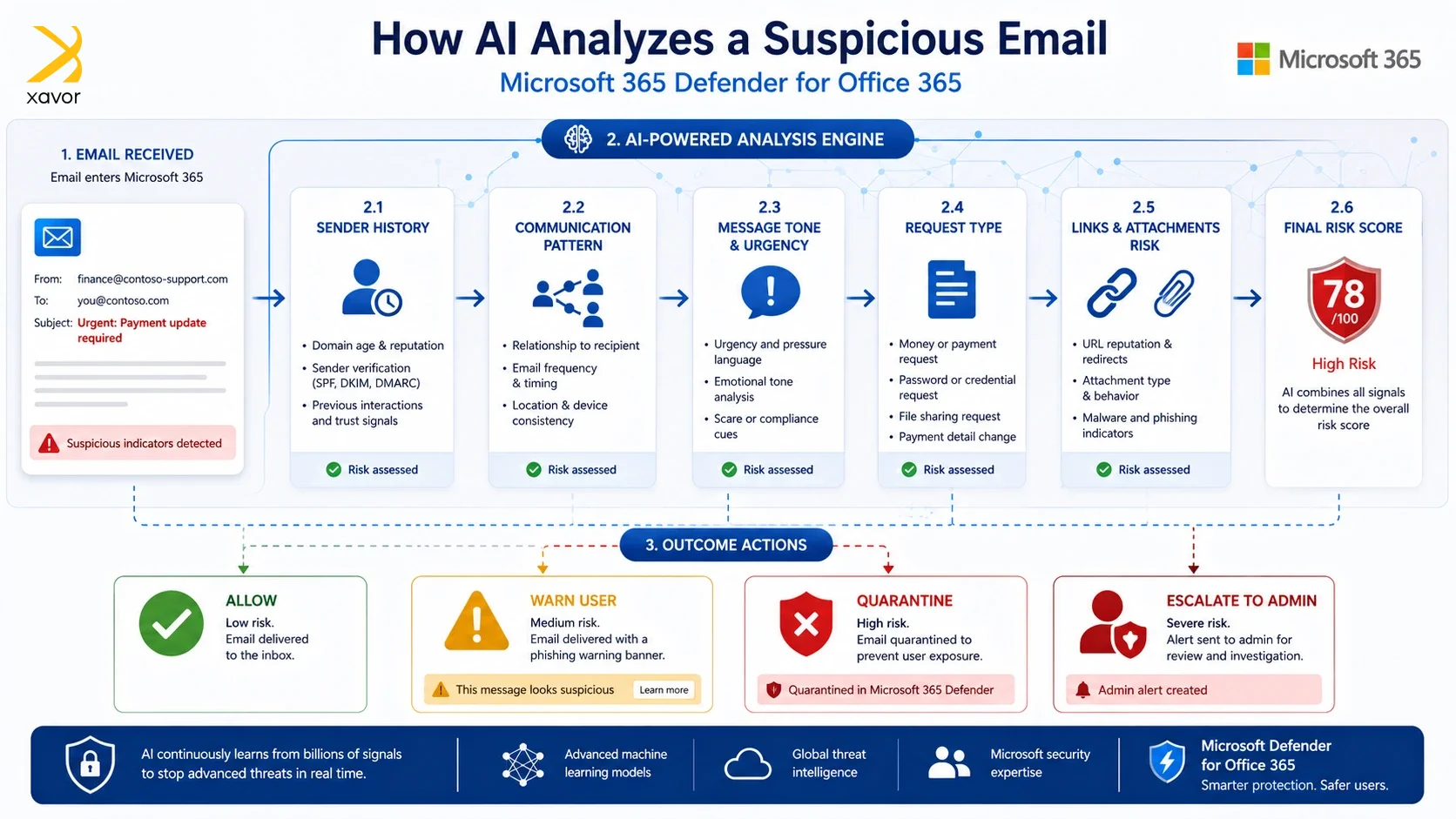
It looks like a small difference but deep down it analysis things like:
- Who normally emails the employee
- How often those people communicate
- The usual tone and structure of messages
- Whether the message is asking for money, passwords, files, or urgent action
For example, imagine an employee receives an email asking them to make a payment. The email may look professional, use the right company branding, and contain no obvious malware or suspicious attachment.
But if the sender does not normally contact that employee, or if the request is unusual compared to previous communication patterns, Microsoft 365 can flag it as suspicious.
This is especially useful for detecting business email compromise attacks, where attackers pretend to be executives, vendors, finance teams, or trusted business contacts.
Improved impersonation protection
Traditional impersonation protection mainly also looked for obvious signs, such as email addresses or display names that looked similar to real people in the company.
For example, an attacker might use a name like “John Smith” but send the email from a fake address that looks close to the real one.
Microsoft 365 Defender improves this by also looking at behavior. This matters because attackers do not always use fake accounts. Sometimes they compromise a real email account and use it to send malicious messages. In that case, the email address may be real, but the behavior may still be unusual.
For example, a real vendor account may suddenly start sending payment-change requests, unusual attachments, or messages to employees it has never contacted before.
AI can help detect these changes in behavior, even when the sender appears legitimate. It adds a stronger layer of protection against impersonation and account compromise.
Safe Links with real-time analysis
Safe Links also provide stronger protection now. Earlier, a security system might check a link when the email first arrived. But attackers often try to avoid detection by making a link look safe at first and then changing the destination later.
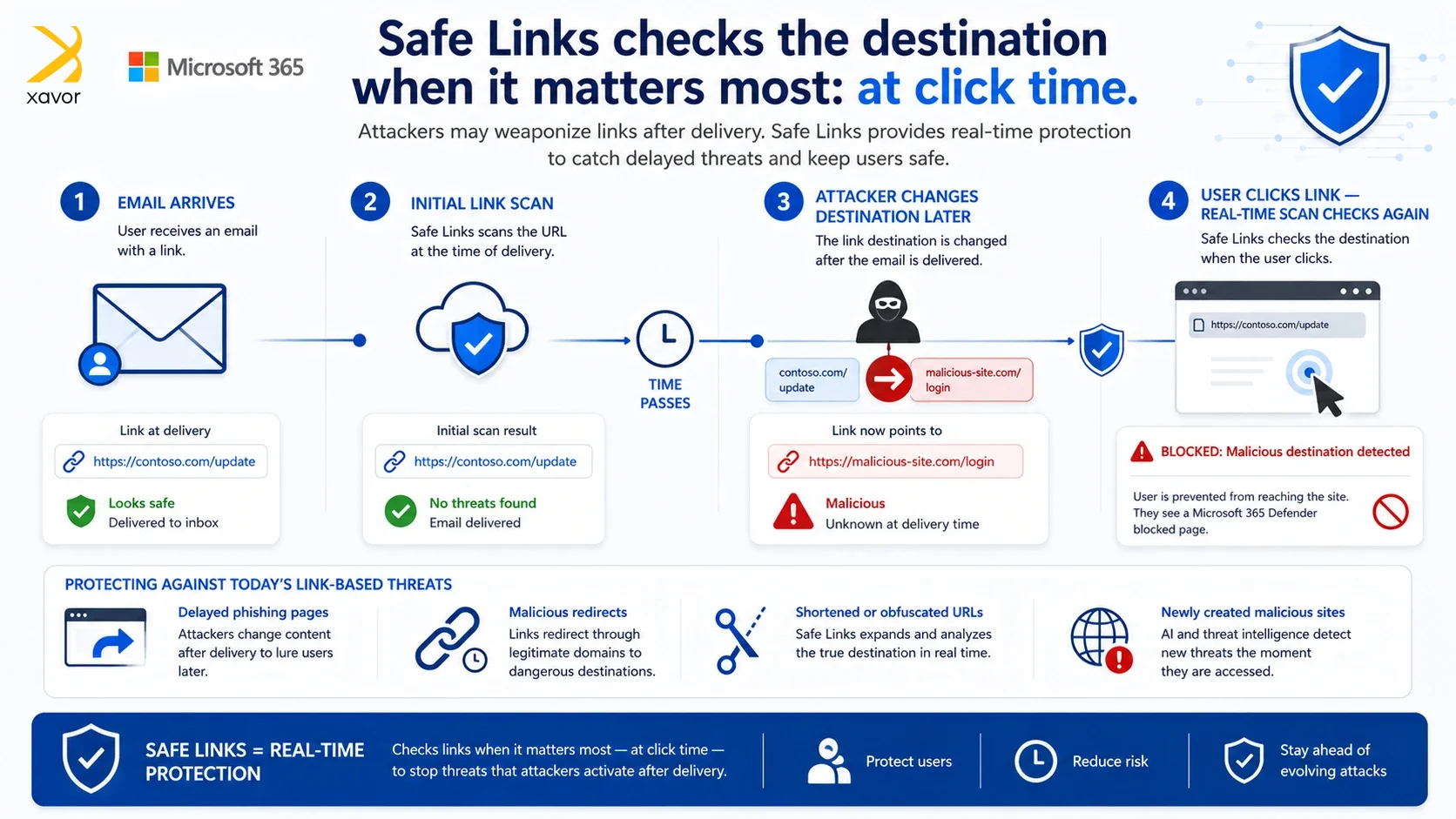
With real-time data analysis, Microsoft 365 can check the link again when the user actually clicks it.
This helps detect threats such as:
- Links that redirect through multiple websites
- Phishing pages that appear after the email has already been delivered
- Newly created malicious websites
- Shortened URLs that hide the real destination
- QR codes that lead users to phishing pages
Attackers often change their tactics after an email has already passed the first security scan. So, this additional real-time analysis takes care of it.
Detecting suspicious intent
Not every email attack contains malware or a clearly dangerous link. Many modern attacks rely on social engineering. That means the attacker tries to manipulate the user into doing something risky, such as sending money, sharing credentials, opening a file, or changing payment details.
These emails can look normal on the surface. The message may not contain malware, but the intent behind it can still be dangerous.
AI tools can help analyze the purpose and tone of the message. It can identify signs of urgency, pressure, unusual financial requests, credential requests, or attempts to bypass normal procedures.
Reduced manual work AI also helps security teams and IT admins work faster.
Without AI, admins often have to manually investigate suspicious emails one by one. They need to check who received the email, whether anyone clicked the link, whether similar emails were sent to other users, and what action should be taken.
AI can reduce this workload by automatically connecting related information.
When a threat is detected, Microsoft 365 can help identify:
- Other users who received similar emails
- Related messages across the organization
- Common patterns in the attack
- Suspicious links, attachments, or senders
This gives admins a head start. Instead of beginning every investigation from zero, they can review the analysis, understand the scope of the issue faster, and respond more quickly.
What admins should focus on
AI improves email security, but it does not replace proper configuration. Microsoft 365 works best when the right security features are enabled and managed correctly.
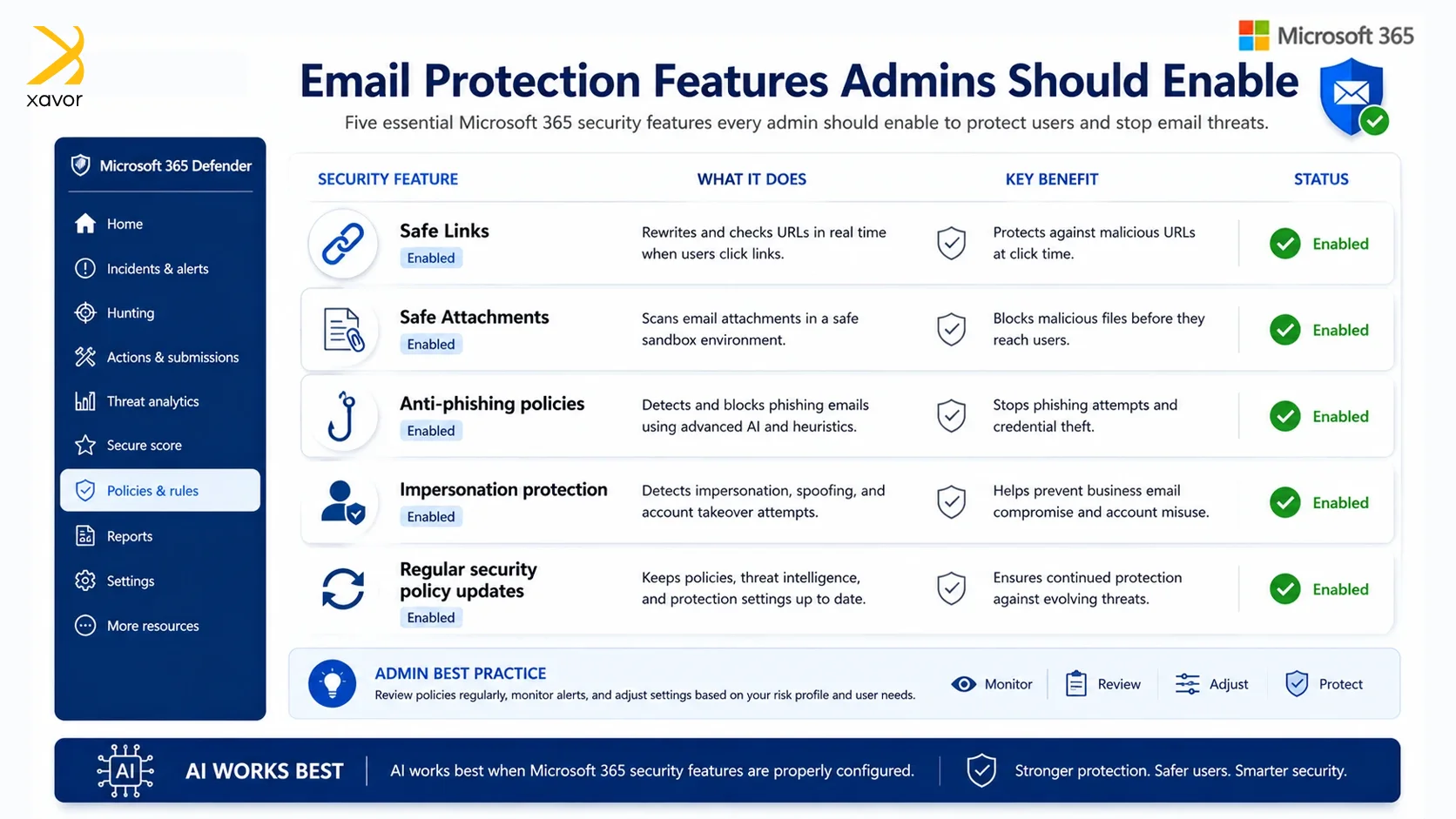
Admins should make sure that:
- Safe Links are enabled
- Safe Attachments are enabled
- Anti-phishing policies are properly configured
- Impersonation protection is turned on
- Security policies are updated as threats change
AI is powerful, but it needs a well-managed environment to be effective. It helps protect against modern attacks like phishing, impersonation, business email compromise, malicious links, QR code phishing, and social engineering.
Conclusion
Emails have always been personal. That’s precisely what makes it dangerous. Attackers just walk through doors that people open for themselves. Usually, the name looked familiar, or the message felt real. Traditional security could only stop what it had already seen before. That was never going to be enough.
AI changes the equation fundamentally. Microsoft 365 Defender no longer just asks whether a threat is known. It is too smart or that. Rather, it can sense you can say when something feels wrong, given everything it knows about how your organization communicates.
There’s an old idea in security that resonates more today than ever: the weakest link in any chain is the one that gets attacked first. For decades, that link has been the inbox. AI is finally strengthening it.
The broader implication goes beyond email. As AI makes attackers more capable — writing flawless phishing copy, personalizing lures at scale, automating social engineering — the only credible response is AI-assisted defense that operates at the same speed and sophistication. This isn’t a feature upgrade. It’s an arms race, and standing still is the same as falling behind.
Don’t leave your inbox as the easiest entry point in your organization. Activate Microsoft 365 Defender for Office 365 today and put AI to work before the next attack lands.
Contact us at [email protected] to book a free consultation session.

FAQs
Standard Microsoft 365 cloud mailboxes include built-in protection against spam, malware, phishing, and spoofing through default threat policies that are on by default. Advanced protections like Safe Links, Safe Attachments, impersonation protection, post-delivery remediation, and deeper investigation typically require Microsoft Defender for Office 365 Plan 1 or Plan 2.
Not necessarily. If Microsoft Defender for Office 365 is fully configured and you are migrating away from a Secure Email Gateway, Microsoft recommends testing and moving in stages rather than disabling it abruptly. For coexistence, configure mail flow correctly, especially Enhanced Filtering for Connectors, so Defender can see the original sender and avoid misclassification.
Not necessarily. If Microsoft Defender for Office 365 is fully configured and you are migrating away from a Secure Email Gateway, Microsoft recommends testing and moving in stages rather than disabling it abruptly. For coexistence, configure mail flow correctly, especially Enhanced Filtering for Connectors, so Defender can see the original sender and avoid misclassification.