
All good things must come to an end. Microsoft SharePoint has certainly been nothing but good for business collaboration and content management. It has been a core collaboration and document management platform for many organizations for over a decade.
However, if you’re still running SharePoint 2016 or 2019, you might want to start preparing for migration. Microsoft will officially end all extended support for these versions on July 14, 2026. While these environments may continue to function, operating unsupported SharePoint systems introduces serious security, compliance, and operational risks. This is why many organizations are now evaluating SharePoint migration services to ensure a smooth transition to newer, supported environments.
Understanding what SharePoint end of life means and preparing for migration in advance is essential for maintaining a secure and reliable collaboration platform. Therefore, this piece will list seven key things you need to do before the deadline to stay ahead.
The obituary for SharePoint 2016 and 2019
End-of-life (EOL) is a common term used in the software world. It typically means that a company stops supporting some of their product or their versions, which means:
- No new updates
- Bug fixes and patches
- Discontinued customer support
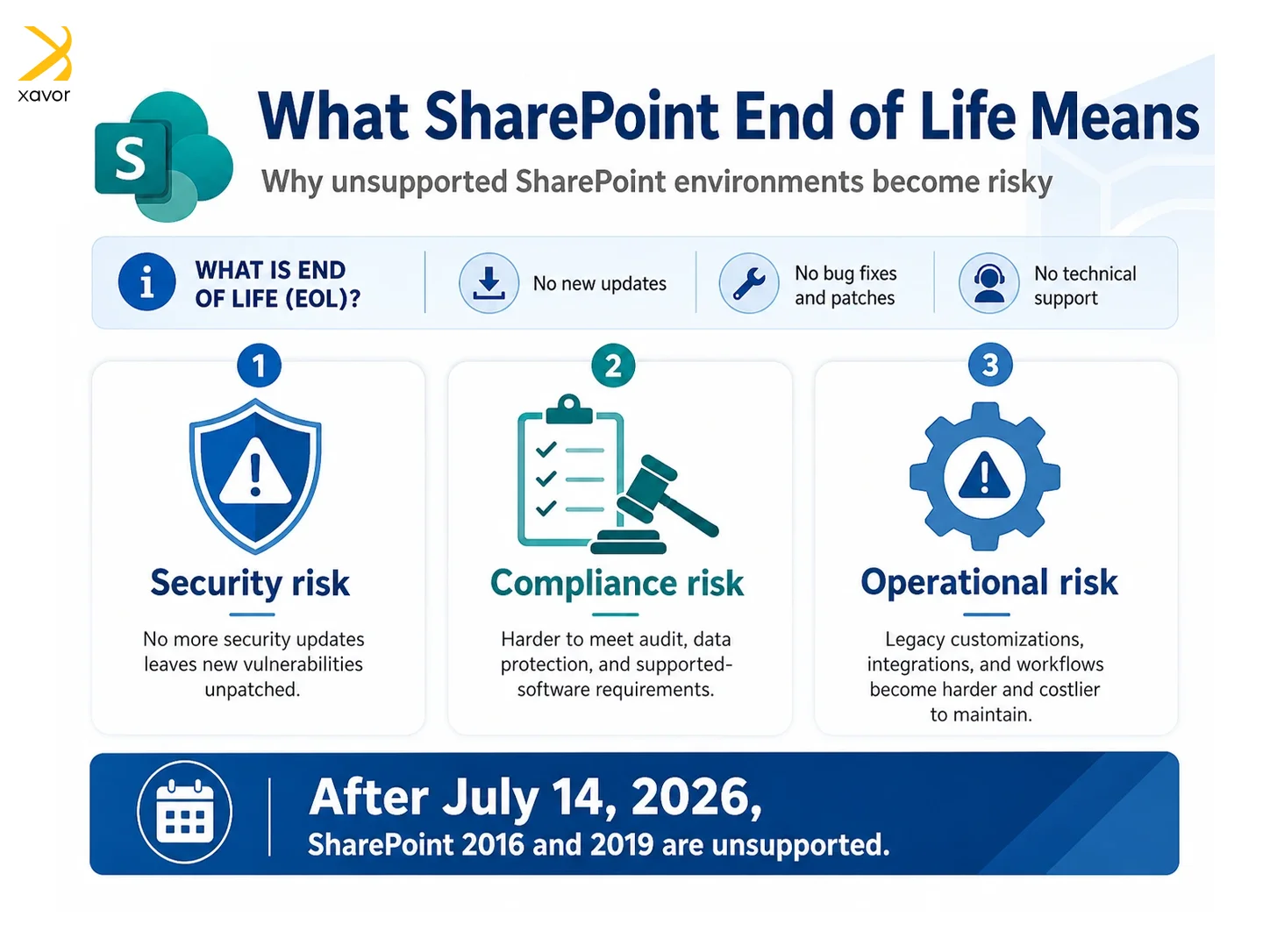
When the SharePoint 2016 and 2019 versions reach their EOL, Microsoft will no longer provide security updates, hotfixes, or technical assistance. Any newly discovered vulnerabilities remain unpatched, increasing exposure to security threats.
Although the versions may continue to operate, they slowly become harder to maintain, more expensive to secure, and more difficult to align with modern IT and compliance requirements.
Companies usually announce EOL for one of their products when they are planning to roll out newer products. For example, Oracle also announced EOL for its highly popular Agile PLM by 2027 because it wanted its users to shift to their cloud-based PLM platform.
Microsoft’s reason for retiring SharePoint 2016 and 2019 is also part of the company’s broader strategy of moving customers toward its cloud-based services, particularly SharePoint Online.
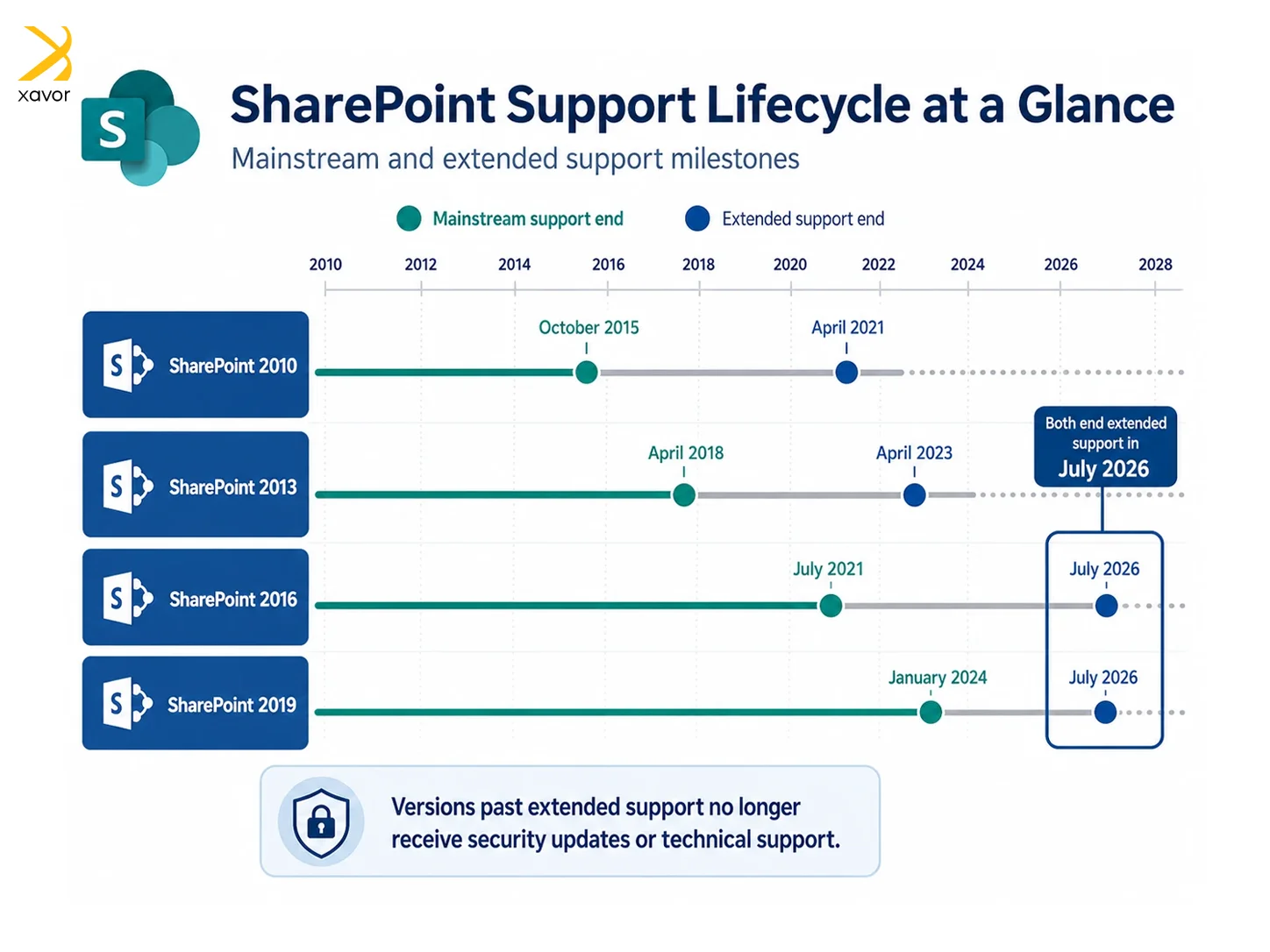
Here is a complete list of which SharePoint versions are affected by previous and upcoming EOL:
- SharePoint 2013 has already reached the end of both mainstream and extended support. It is no longer supported and presents a high security risk for organizations still using it.
- SharePoint 2016 has exited mainstream support and is currently in extended support. While it still receives limited updates, it is nearing the end of its lifecycle, making migration planning a priority.
- SharePoint 2019 remains supported and receives updates. However, it is still an on-premises platform and does not offer the full range of modern collaboration, security, and automation features available in Microsoft 365.
| Version | Mainstream support end date | Extended support end date |
| SharePoint 2010 | October 2015 | April 2021 |
| SharePoint 2013 | April 2018 | April 2023 |
| SharePoint 2016 | July 2021 | July 2026 |
| SharePoint 2019 | January 2024 | July 2026 |
Organizations running SharePoint 2013 or older SharePoint 2016 deployments should treat migration as a near-term requirement rather than a future consideration.
What you should do: Five key steps to migrate
Migration is a business change, not just a technical task. SharePoint migration impacts more than technology. It changes how users collaborate, share information, and access content. Treating migration purely as a technical activity often results in user dissatisfaction and governance challenges.
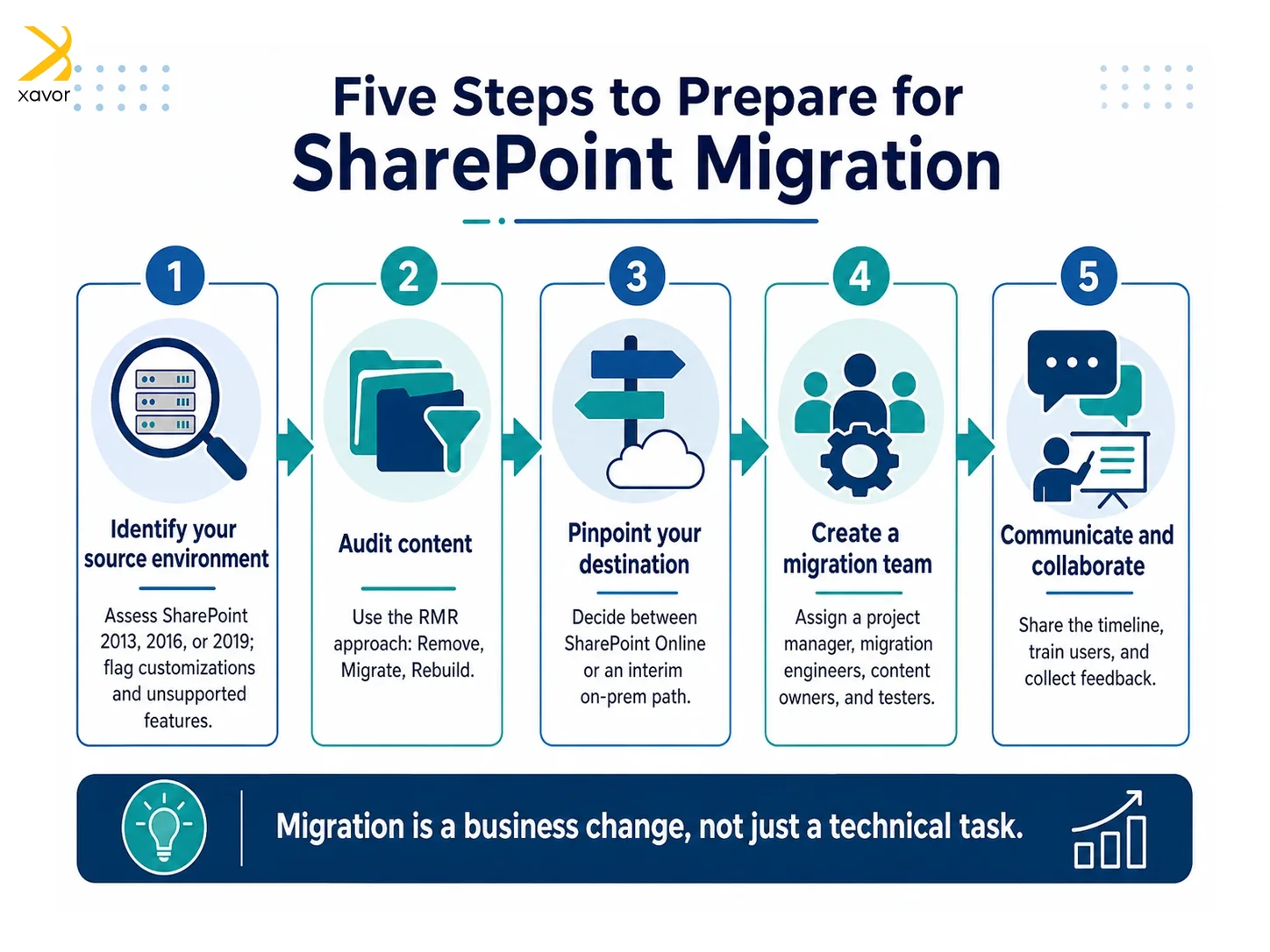
When migration is aligned with business goals, it becomes an opportunity to improve collaboration, reduce technical debt, and modernize processes.
Here’s a five-step roadmap to do a Successful SharePoint migration properly:
1. Identify your source environment
Start by checking your current SharePoint setup, whether it’s SharePoint 2013, 2016, or 2019. You can use tools like the SharePoint Migration Assessment Tool (SMAT) to identify issues like customizations, workflows, or unsupported features.
This helps you understand potential challenges early on. For SharePoint 2019, use PowerShell scripts or third-party tools since SMAT doesn’t support it.
2. Audit content
Migration is a great opportunity to clean up the “rot” in your business data. No, seriously, redundant, obsolete, and trivial (ROT) content gets built up in SharePoint over years of use. Use the Remove, Migrate, Rebuild (RMR) strategy to:
- Remove unnecessary content
- Migrate essential, active content
- Rebuild complex or outdated solutions like custom workflows
3. Pinpoint your destination
Migratory birds know their exact migration coordinates spanning thousands of kilometers. Just like that, you should be crystal clear about where you ultimately want to move your SharePoint resources.
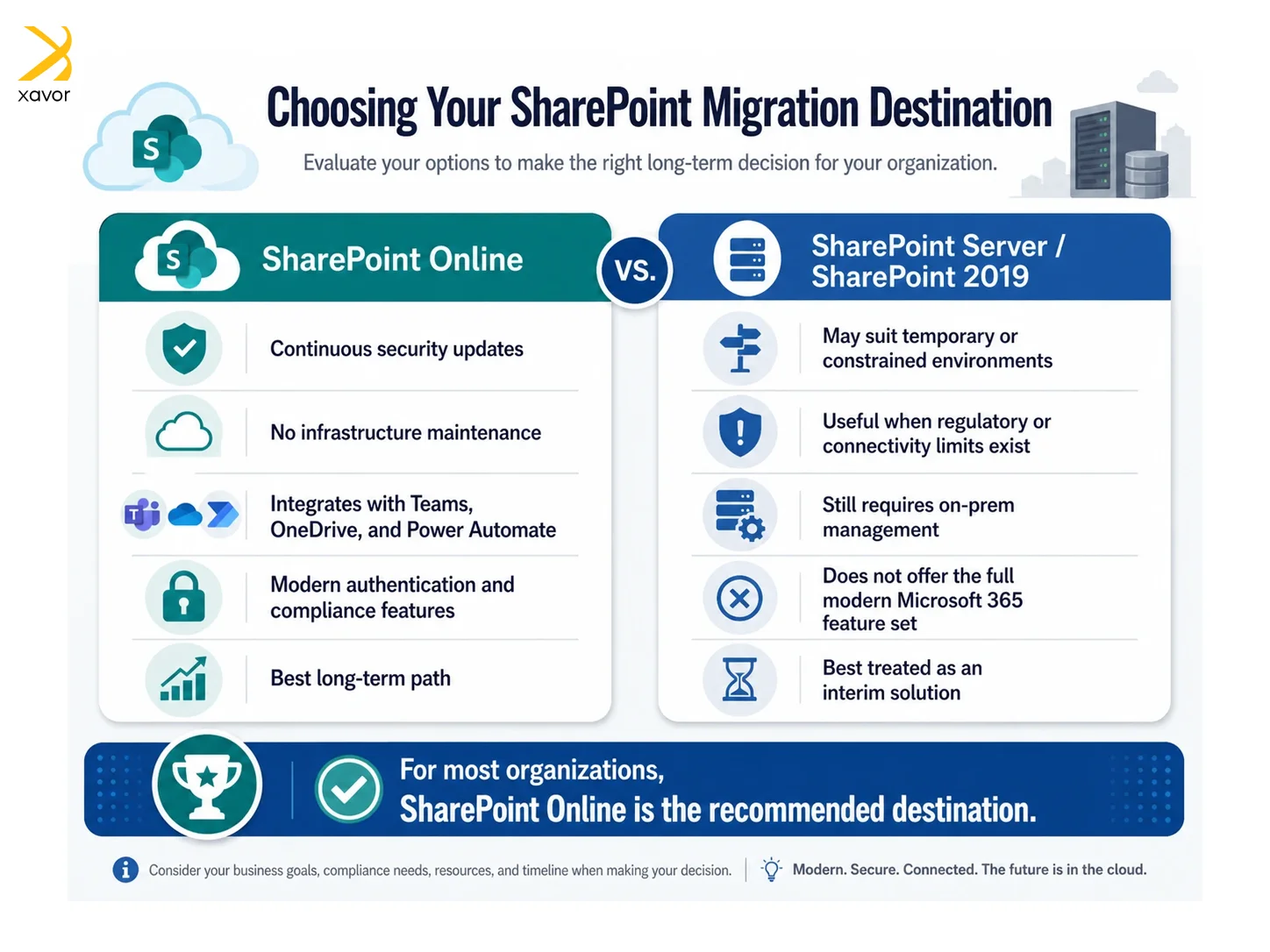
Are you moving to SharePoint Online or staying with SharePoint Server on-premises? The right choice depends on your business requirements and strategic goals.
4. Create a migration team
Migration is a team effort. Therefore, assign roles like project manager, migration engineers, content owners, and testers. Have clear responsibilities to prevent confusion and ensure the migration stays on track.
5. Communication and collaboration
Communicate with users about the changes well in advance. Share the timeline, what will be migrated, and how it will benefit them. Provide training, support, and collect feedback post-migration to improve future efforts.
What is the best SharePoint migration destination for you?
For most organizations, SharePoint Online is the recommended migration destination. As part of Microsoft 365, SharePoint Online receives continuous security updates, feature enhancements, and service improvements without requiring infrastructure maintenance.
SharePoint Online integrates natively with Microsoft Teams, OneDrive, Power Automate, and other Microsoft 365 services. It supports modern authentication, advanced compliance features, and improved collaboration experiences.
In certain cases where regulatory or connectivity constraints exist, SharePoint 2019 may be used as an interim solution. However, it should be considered a temporary step rather than a long-term platform.
From a security, scalability, and future readiness perspective, SharePoint Online offers the most sustainable path forward.
The perils of delaying SharePoint migration
Don’t put off until tomorrow what you can do today. Many organizations delay their SharePoint migration because of understandable reasons like competing projects or tight budgets. However, in our view, these challenges can be dealt with in phases, if not all at once. A common reason why companies delay SharePoint migration is the belief that they can “make it through one more year.”
But we can assure you that waiting can make the process much more complicated and rushed. The longer you delay, the less time you’ll have for proper planning, which can result in a stressful, last-minute rush when the deadline approaches.
Security is the most immediate concern with unsupported SharePoint versions. Without regular security patches, vulnerabilities remain exposed and can be exploited by attackers. This risk increases significantly for environments that are accessible externally.
Compliance is another challenge. Many regulatory frameworks require supported software, secure authentication, audit logging, and data protection controls. Unsupported SharePoint platforms make it difficult to meet these requirements.
Operational challenges also increase over time. Legacy customizations, outdated workflows, and unsupported integrations become harder to maintain, leading to instability and higher support costs.
Migrating SharePoint is a multi-step process that includes many steps, some of which we discussed in this article. Skipping any of these steps increases risk. If you wait too long, you might also face issues like losing vendor support or missing out on essential tools, making the migration more difficult.
Starting the migration process now gives you control over the timeline and avoids the rush of last-minute planning when the deadline gets closer. Waiting only creates more pressure and makes things harder.
Conclusion
SharePoint end of support is a clear indicator that action is required. Continuing to operate unsupported or aging SharePoint environments increases security risk, limits compliance, and raises operational costs.
Planning migration early and choosing the right target platform will let your organization modernize collaboration while reducing risk. For most environments, SharePoint Online provides the best long-term solution.
A structured approach that includes assessment, cleanup, governance, and communication ensures that SharePoint migration is successful and sustainable.
Xavor provides professional SharePoint consulting services to plan and implement your migration journey. Our experts will safely and precisely move your SharePoint data to modern versions with minimal downtime.
Contact us at [email protected] to book a free consultation session.

FAQs
SharePoint 2016 is no longer in mainstream support. Microsoft ended mainstream support in July 2021, but extended support continues until July 14, 2026, after which it will no longer receive security updates or fixes.
SharePoint 2019 offers improved performance, modern UI features, and better integration with cloud services compared to SharePoint 2016. It includes enhancements like modern team sites, improved search, hybrid capabilities, and a more user-friendly experience.
No, Microsoft is not replacing SharePoint. Instead, Microsoft is evolving it through SharePoint Online in Microsoft 365, adding cloud capabilities, integrations with Teams, and AI-powered features rather than phasing it out.