
OpenClaw is now part of that elite club of AI tools that have changed the world. Jensen Huang recently called OpenClaw the “new computer.” You don’t get a validation like that from the highest echelons of the tech world every day.
It was launched in November 2025, but OpenClaw’s popularity only skyrocketed in the past few weeks. So, what has changed?
Well, for starters, it has gone through some name changes since its launch. Then OpenAI acquired it in February 2026. But perhaps the biggest reason behind the sudden ascension of the OpenClaw AI tool is that it filled a need that the AI community was dying for.
In this blog, we share our perspective on this latest AI sensation. First, we’ll explain what OpenClaw is. Then we’ll look at the qualities that make it stand out. Finally, we’ll share our insights on what it means for technology and business leaders, especially those evaluating the future of agentic AI development services in the enterprise.
What is OpenClaw?
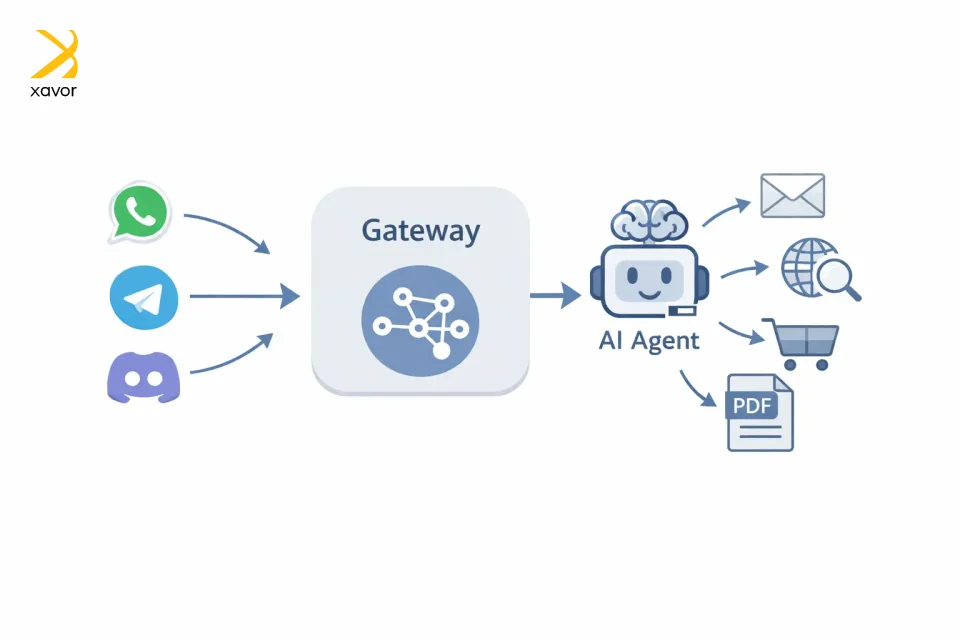
OpenClaw is an open-source, self-hosted AI agent platform that lets you connect LLM-based AI assistants to messaging apps and tools to do real actions for you. Austrian developer Peter Steinberger created OpenClaw under the name of ClawdBot in late 2025 using TypeScript.
However, after a trademark dispute with Anthropic’s Claude chatbot, he had to change its name to Moltbot and finally to OpenClaw.
OpenClaw runs locally on your operating system, and it can automate plenty of tasks, such as:
- Managing emails
- Web browsing
- Online shopping
- Respond to chats
- Summarizing PDFs
It is designed to be extensible. So, you can bolt on new capabilities, connect OpenClaw to different platforms, and automate tasks across many different scenarios, all without being locked into someone else’s ecosystem.
As of now, it is mostly connected through chat apps like WhatsApp, Telegram, and Discord, where users give simple text instructions. And the framework uses private AI assistants to do the above-mentioned tasks on its own.
How does OpenClaw works?
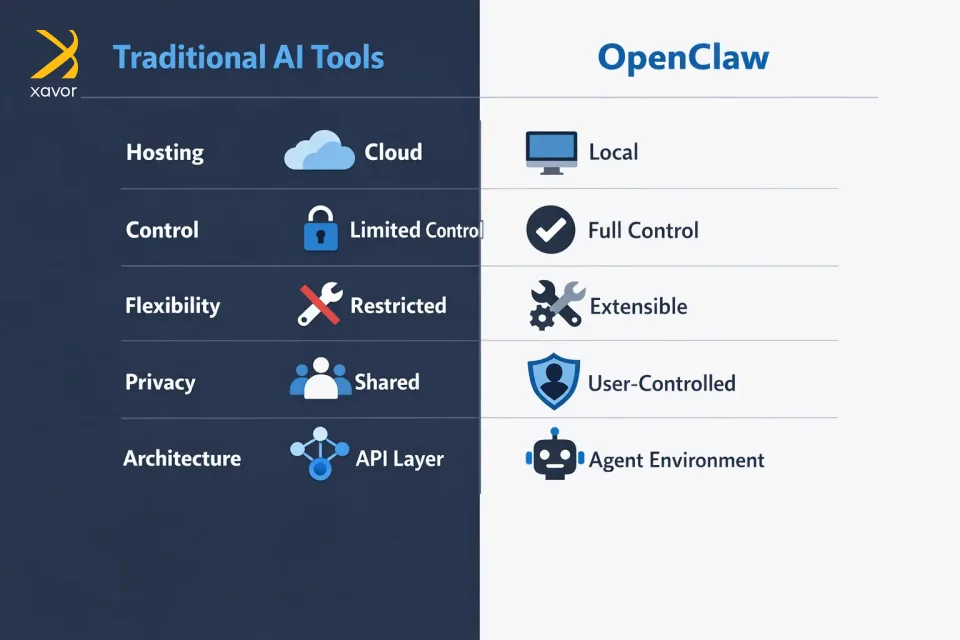
Most AI tools work as interfaces sitting on top of APIs. OpenClaw, however, is something fundamentally different. It’s the environment in which an AI agent actually lives and operates.
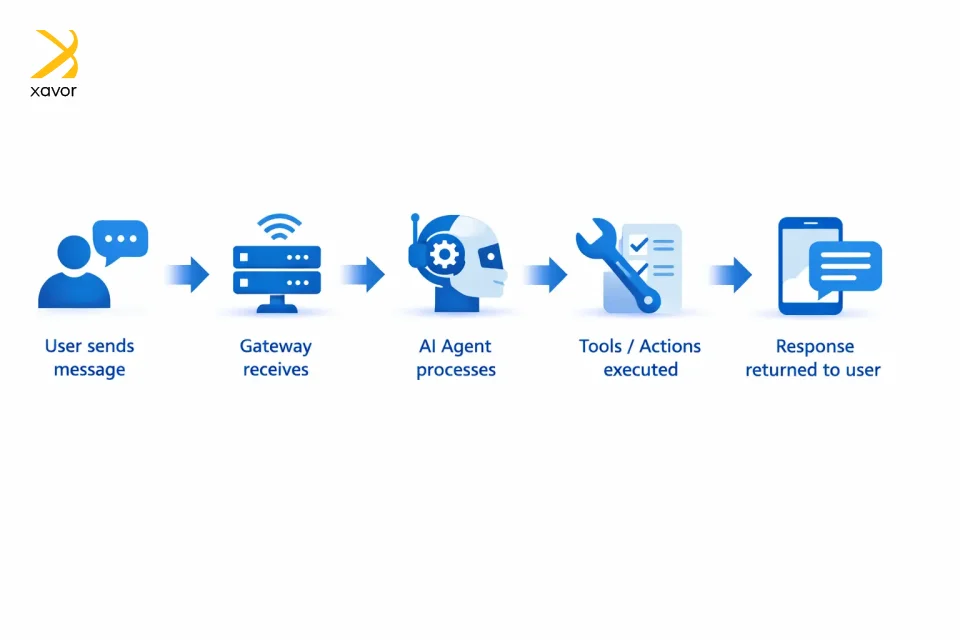
OpenClaw works like a self-hosted bridge between chat apps and an AI agent. You run one central Gateway on your own machine or server, connect your messaging accounts to it, and then the Gateway routes your messages to an agent and sends the replies back to the app you used.
Think of it as an operating system. Your OS doesn’t provide the apps, but makes sure everything runs reliably. OpenClaw does the same for AI since the model provides the thinking, and OpenClaw provides everything else, such as:
- Sessions and memory
- Tool access and security boundaries
The surge in popularity: What’s unique about OpenClaw?
OpenClaw has suddenly become very popular. On GitHub, it has collected over 165K stars, and currently OpenClaw AI agent GitHub is a trending topic on the internet. Its popularity first took off in Silicon Valley after people started sharing demos that made it look dramatically more productive.
Those demos suggested it could automate tasks that usually need human effort, which strongly appealed to developers and AI enthusiasts, especially because it can run locally and seems less restricted.
1. It runs on your machine
OpenClaw’s architecture is distinctive because it is self-hosted. Unlike cloud-hosted assistants, it runs on your own machine or server, which gives users greater control over data and operational boundaries.
So, it’s your setup, on your turf, and not just another AI service where everything depends on somebody else’s cloud.
2. One Gateway runs everything
OpenClaw has a central hub called the Gateway that handles all the connections and keeps everything organized in one place.
It’s like mission control for your AI that manages messaging surfaces, sessions, and connected clients. One Gateway makes OpenClaw feel more like infrastructure than a simple chatbot.
3. Support for multiple isolated agents
You can have more than one AI assistant in the same setup with OpenClaew. And each one can keep its own files and memory separately. Therefore, it’s not just one bot doing everything. You can set up different AI workers, each with its own lane.
This multi-agent routing with isolation gives you the ability to create a whole workforce of AI agents to expedite any work you want.
4. It extends to phones, Macs, and headless nodes
Another distinctive feature of OpenClaw is that it can connect to other devices like iOS, Android, or headless machines, so the AI can work across more than just one computer.
It can reach into your other devices and machines, so it feels less like chatbots and more like a connected AI setup.
Why enterprises need an OpenClaw strategy
If you’re a business owner, chances are your employees are already using OpenClaw. It has put AI agents in the hands of the general workforce. Therefore, it is a critical moment for business leaders to include OpenClaw in their business strategy from now on.
But OpenClaw also creates bigger responsibilities around security, governance, and compliance. If agentic AI really develops as expected, the biggest challenge for businesses will not just be adopting the technology.
The next few months will determine how you manage the changes that come with OpenClaw. Here’s our take for businesses to make a shift in human work from doing routine tasks to thinking more strategically.
1. Centralize before your scale
Don’t try restricting OpenClaw usage among your workforce. That ship has sailed, and prohibition usually just drives usage underground, aka shadow AI. Instead, provide enterprise-grade access through centrally managed accounts with proper logging, data controls, and usage policies.
Give employees better tools than they can get on their own, with guardrails built in. This shifts the conversation from “should we allow this?” to “how do we enable this safely?”
2. Pivot work roles around AI
Employees who previously executed tasks now need to define requirements, validate AI outputs, and manage agent workflows. This requires new skills, like prompt engineering and AI output evaluation. Understanding when to trust automation versus when to use your own brain is very important.
Therefore, invest in training programs now, not after productivity gaps appear. Your competitive advantage will come from teams that master AI collaboration faster than competitors.
3. Start with pilot programs
Take things nice and easy. Don’t try to AI-transform everything simultaneously. Identify high-value, low-risk processes where OpenClaw agents can deliver measurable impact. In our experience, these operations are a good starting point to implement OpenClaw:
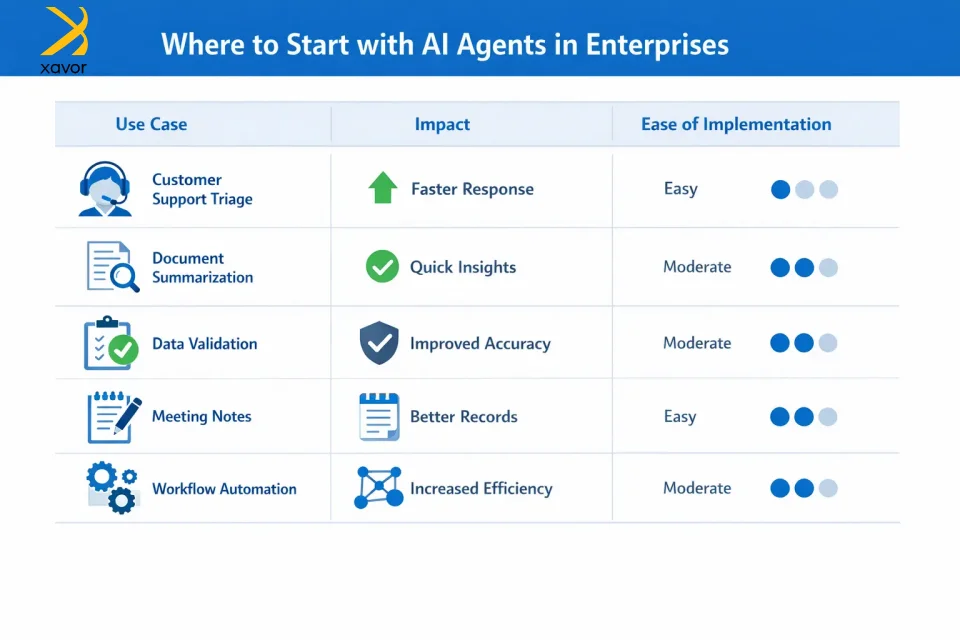
- Customer support triage
- Document summarization
- Data entry validation
- Meeting notes synthesis
Once you prove ROI in contained environments, then expand to the rest of your workflows. However, you also need to avoid getting stuck in the AI pilot purgatory, where the pilot works great, but it crumbles under real-world conditions.
Conclusion
AI tools like Claude Code made process automation faster, but the humans still had to stay heavily involved in the execution process. In other words, the role changed a little, but they were still basically the ones doing the work.
OpenClaw is different because it lets them move from being the executor to being the manager. Instead of sitting inside the coding environment all day, they could guide projects through simple chat, even from their phone, while the agent handles much of the actual execution.
It is a huge turning point for businesses beyond automation. The sense of having an always-available team of AI assistants that could understand intent, remember patterns, work for long stretches, and even manage multiple projects at once is unmatchable. For them, that means finally being able to focus on strategy, ideas, and direction rather than getting stuck in day-to-day implementation.
Partner with Xavor if you want to change your relationship with work using OpenClaw. Our agentic AI services can open up possibilities that were previously out of reach. Contact us at [email protected] to talk to our agentic AI experts.

FAQs
Yes, OpenClaw itself is free to use because it is open-source software with no subscription or licensing fees. However, you may still incur costs for things like AI tokens, hosting, or infrastructure, depending on how you run it.
People use OpenClaw to automate everyday tasks and workflows using AI agents, such as managing emails, browsing the web, summarizing documents, and handling chats. It’s also used to build and run autonomous AI assistants that can plan tasks, interact with tools, and work continuously across apps like WhatsApp, Telegram, and Discord.
OpenClaw can be useful, but it is not something to run casually with sensitive data or shared access. Its own security docs say it is designed for a single trusted operator boundary, not as a secure multi-user system, and security researchers recommend strong isolation and careful hardening.