

If you’re managing Microsoft 365 for your organization, chances are you’ve already come across the news about the pricing changes coming in July 2026. And like most people in IT or operations, your first reaction was probably simple: this is going to increase our costs.
That concern is valid. But after looking at it more closely, it becomes clear that this is not just about higher pricing. It’s actually a good moment to pause and take a proper look at how Microsoft 365 services are being used inside your organization.
In many environments, licenses are assigned once and then forgotten. People leave, roles change, tools evolve, but the licensing often stays the same. Over time, this creates waste and unnecessary spending. Changes like this force us to fix that.
Read this blog to find out what is changing in M365 in July. What will be its business impact, and what can you do to be ready?
Microsoft 365 pricing updates
Microsoft announced a price increase for all Microsoft 365 and Office 365 commercial subscriptions in late 2025. The new prices will take effect on July 1, 2026, for every plan tier. The price hikes range between 8% to as much as 33%, depending on the commercial suit.
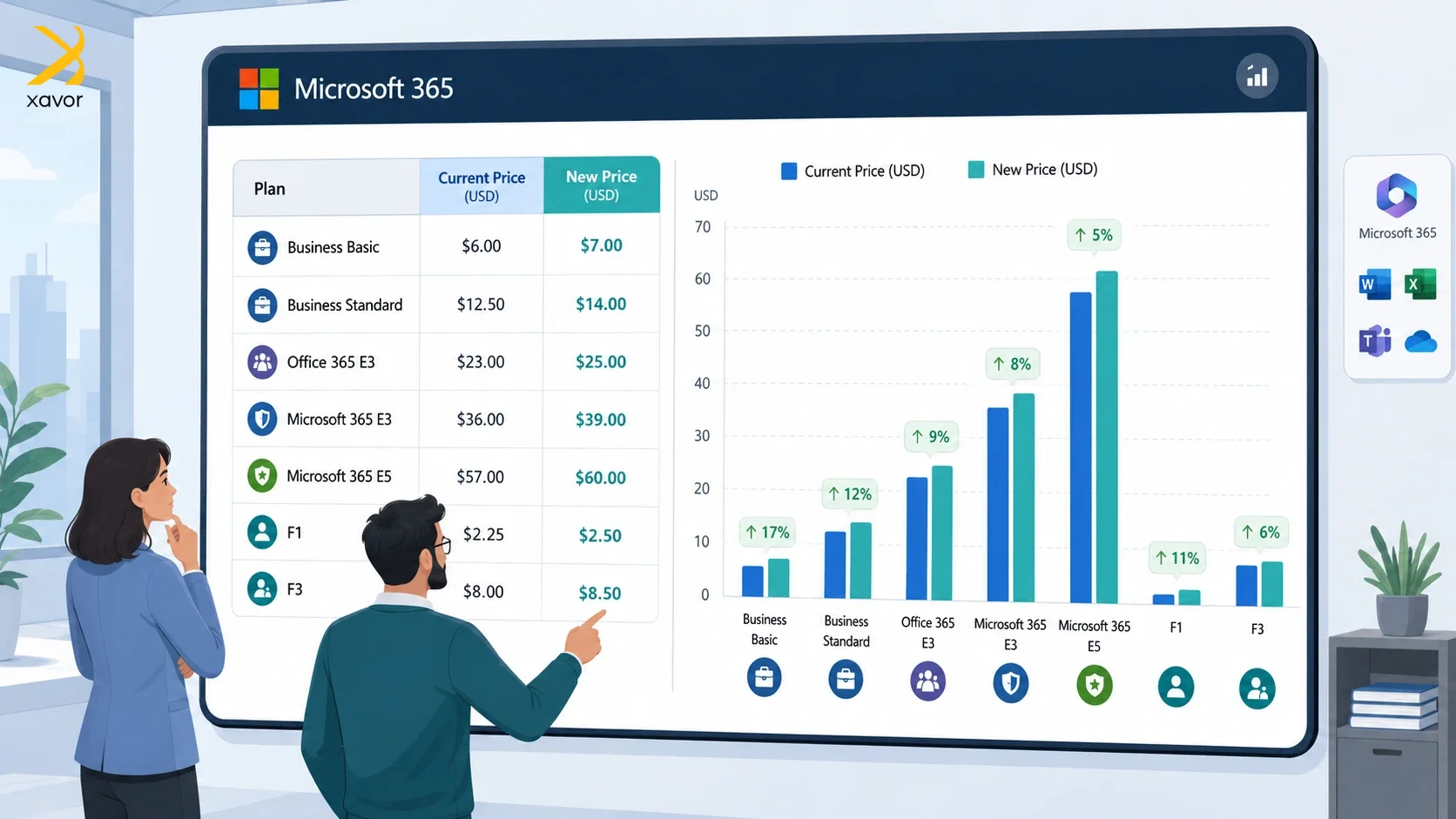
| Plan | Current Price/month | New Price/month | Increase in % |
| Business Basic | $6.00 | $7.00 | 16% |
| Business Standard | $12.50 | $14.00 | 12% |
| Office 365 E3 | $23.00 | $26.00 | 13.0% |
| Microsoft 365 E3 | $36.00 | $39.00 | 8% |
| Microsoft 365 E5 | $57.00 | $60.00 | 5% |
| Microsoft 365 F1 | $2.25 | $3 | 33% |
| Microsoft 365 F3 | $8.00 | $10.00 | 25% |
Source: Microsoft
Standalone products like Apps for Business and Entra Plan 1 have also had similar price changes. However, Business Premium and Office 365 E1 are notable exceptions. Their prices have remained the same despite the price update of this size.
Why the price hike again?
2022 was the last time Microsoft increased 365 prices at this level. So, many users may feel that another price hike in a short time is unjustified. But Microsoft has explained its position on the increase.
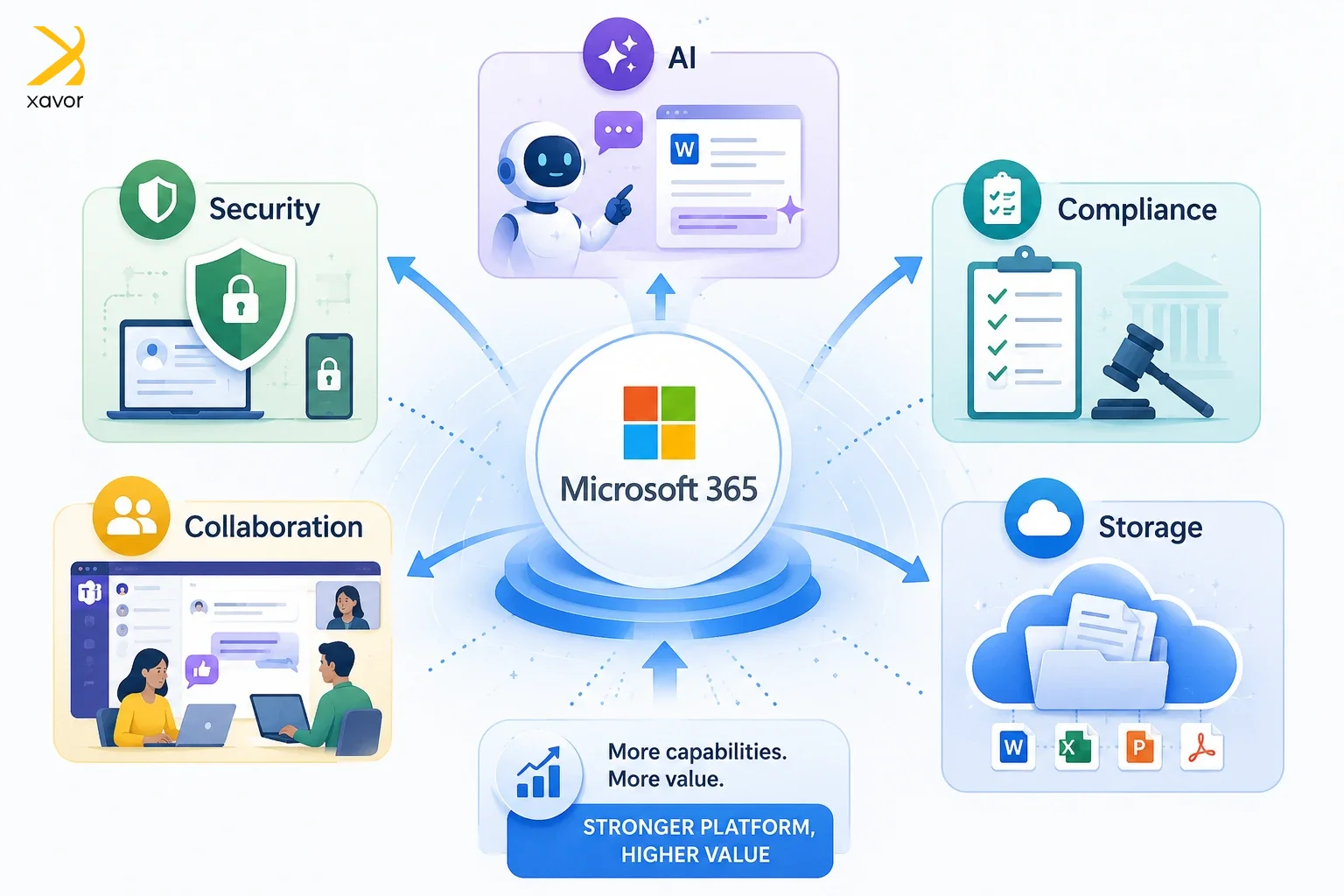
It is not just another inflation adjustment. The platform itself has been evolving quite fast over the past few years. Microsoft has added over 1,100+ features across the 365 platform and SharePoint. There is a lot more built into Microsoft 365 now than there used to be.
Security features are stronger. Compliance tools are more advanced. AI capabilities are being pushed into everyday workflows. Collaboration tools have also improved significantly.
What’s being added
Let’s take a look at some of the new features that have genuinely expanded and improved the platform.
- All Office apps will have basic Copilot AI capabilities, such as Excel analysis and presentation assistance for PowerPoint
- The Mailbox storage has increased to 100 GB for Business Basic, Standard, and Premium users
- Microsoft 365 E5 now has expanded Intune Suite features and deeper security tooling
These capabilities are great for saving time by reducing manual work. And AI will augment quite a lot of work in the 365 ecosystem with these additions.
Who will be affected by these changes?
These price changes apply to all commercial and non-profit organizations. But some businesses that fall into these categories will feel the impact first before others.
1. Users without annual contracts
Microsoft allows users to pay monthly without any annual commitment. But that comes with a 5% extra charge for monthly payments, which began in April. So, when the price increase hits in July, your bill goes up again on top of that.
Add both together, and you end up paying roughly 12% more per year than a customer who prepaid annually.
2. Companies with multiple licenses
Businesses carrying unused or overlapping licenses will feel the increases more sharply. You have seen that Microsoft’s price increases aren’t the same percentage across all license types. So, if you’re paying for a mix of licenses, you can’t just assume everything goes up by the same number.
Therefore, the best time to do a quick check of your subscriptions was in early 2026. The next best time is right now.
3. SMEs using Business Basic or Standard
Small and medium businesses are some of the biggest users of the 365 Business Basic and Standard tiers. And these plans are jumping by 12%–23%. These may not be huge numbers for large enterprises, but they may hit the budgets of SMEs harder than most think.
4. Large organizations using E3 or E5
Microsoft E3 and E5 have seen a small percentage increase compared to other products. But these are enterprise-level suits that are used by large companies at scale. So, these small changes can accumulate to show up on your bill if you’re using thousands of seats.
It’s no exaggeration to say that some enterprises could see millions in added annual spend.
Over-licensing is a problem
The issue is that most organizations are not fully using all of this. In many cases, companies are paying for features that users don’t even know exist. At the same time, they might still be using third-party tools for things that are already available within Microsoft 365.
It is a real problem that can cause businesses serious repercussions. When prices go up, it exposes these gaps. Suddenly, every unused feature and every unnecessary license becomes more visible.
That’s why this change matters. It pushes organizations to become more intentional about how they use the platform.
The common mistakes most organizations are making
Before getting into what you should do, it’s worth understanding where things usually go wrong.
One of the most common issues is over-licensing. Many organizations assign higher-tier licenses to users who don’t actually need them. It’s often done for convenience, but over time, it leads to high extra costs.
Another issue is inactive users. Accounts that are no longer in use but still have active licenses attached. These are easy to miss, especially in larger environments.
Then there is underutilization. Tools like Teams, SharePoint, OneDrive, and Power Platform have a lot of capabilities, but in many cases, they are only used at a very basic level.
And finally, lack of visibility. Many teams simply don’t have a clear picture of who is using what, which makes it hard to make informed decisions.
If any of this sounds familiar, you’re not alone. It is actually quite common.
Where to start if you want to stay in control
The first step is not to panic and not to rush into changes. Instead, start by understanding your current setup properly.
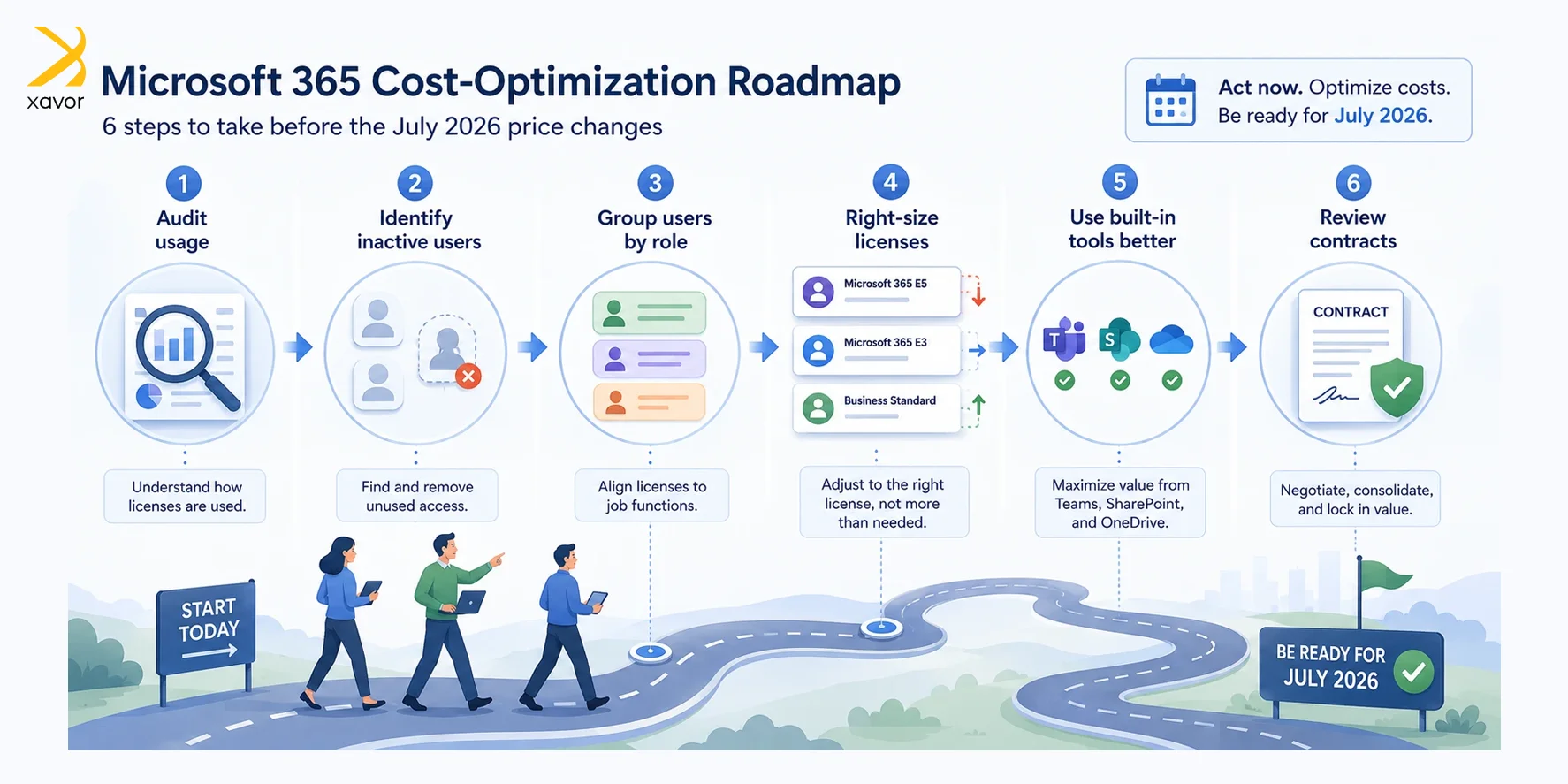
1. Look at actual usage, not assumptions
The first step is really the most important step.
Go through your user base and identify who is actively using their licenses. You might be surprised at how many accounts are either inactive or barely used.
Then look at which services are actually being used. For example, how many users are actively using Teams? How many are storing files in OneDrive? Are SharePoint sites being used properly or just sitting there?
This kind of visibility changes everything. Once you have real data, decisions become much easier.
2. Stop treating all users the same
Not every user needs the same level of access.
In most organizations, you can roughly divide users into a few categories.
There are power users who need advanced features, maybe for reporting, automation, or compliance. Then there are standard users who mainly use email, documents, and collaboration tools. And then there are frontline or operational users who only need very basic access.
If everyone is on the same license, chances are you are overspending.
Once you map users to their actual needs, you can start adjusting licenses accordingly. This alone can lead to noticeable savings.
3. Be careful with upgrades
When new features are introduced, there is always a temptation to upgrade everyone to a higher plan.
But this is not always necessary.
In many cases, only a small group of users actually needs those advanced features. Instead of upgrading everyone, it makes more sense to assign specific add-ons to those users. Using this approach keeps things flexible and avoids unnecessary cost increases.
4. Getting more value without increasing spend
One thing that often gets overlooked is that Microsoft 365 already includes a lot of capabilities that organizations are not fully using.
Before thinking about spending more, it’s worth asking a simple question: are we using what we already have properly? Take Teams as an example. In some organizations, it’s just used for chat. In others, it becomes the central hub for communication, meetings, file sharing, and even integrations.
The same goes for SharePoint and OneDrive. These tools can replace traditional file servers and improve collaboration significantly, but only if they are used properly.
Then there is enterprise automation. Many repetitive tasks can be handled using built-in tools, reducing manual effort and saving time.
When you start using these features properly, the value of your existing licenses increases without any additional cost.
5. Planning ahead without locking yourself in
Another thing to think about is long-term planning.
Multi-year agreements can help with cost predictability, especially when pricing is expected to change. But they also come with a trade-off.
They reduce flexibility. Your organization might grow, shrink, or change direction. New tools might be introduced. Your requirements today might not be the same a year from now.
So before committing to anything long-term, it’s important to think about where things are heading. It’s not about avoiding long-term plans completely. It’s about making sure they still make sense in the future.
6. Don’t ignore the human side of it
Technology decisions are not just about tools and licenses. They are also about people.
A lot of inefficiency comes from the fact that users simply don’t know what they have access to.
They might be using external tools for tasks that could easily be handled within Microsoft 365. Or they might be doing things manually that could be automated.
A bit of awareness and guidance can go a long way.
You don’t need complex training programs. Even small sessions, quick guides, or internal documentation can help users understand how to work better with the tools they already have.
It will improve productivity and also ensures that you are getting better value from your investment.
Conclusion
Price changes are never welcome, but they often highlight things that were already not working properly. The upcoming Microsoft 365 changes are a good example of that.
Instead of treating this as just another cost increase, it makes more sense to use this as an opportunity to clean things up. Review your current usage, align licenses with actual needs, and make sure you are fully using the tools you are already paying for.
With the right approach, you can not only control costs but also improve how your organization works overall.
In the end, it’s not about spending less or more. It’s about spending smart and making sure every part of your Microsoft 365 environment is actually delivering value.

FAQs
Microsoft 365 is primarily subscription-based, but Microsoft also offers one-time purchase versions like Office Home 2024 or Office Home & Business 2024. These provide classic apps such as Word, Excel, and PowerPoint without ongoing subscription fees, but they do not include cloud services or continuous feature updates.
No. Microsoft 365 already includes Microsoft Office apps like Word, Excel, PowerPoint, and Outlook as part of the subscription. You also get cloud storage, security updates, and continuous feature upgrades.
Microsoft Office is a one-time purchase that includes classic apps like Word, Excel, and PowerPoint. Microsoft 365 is a subscription service that includes those apps plus cloud storage, security features, collaboration tools, and ongoing updates.