

When engineers approve a product revision, manufacturers need the details of the updated part before production begins. Sales representatives also need to know which product configuration they can offer customers. If employees transfer those details manually, an outdated record can remain in use after engineering has approved its replacement. AI data integration is the automated process of using machine learning and semantic intelligence to unify, clean, and map disparate data sources in real time without manual coding. It can reduce the effort required to prepare data for transfer between business applications. For example, an AI model can suggest which fields correspond across systems. AI integration services help businesses connect their applications and improve data flow between systems. Even with AI assistance, engineers must still define who can approve an update and when the receiving application should apply it.
How does AI data integration work?
AI data integration uses machine learning or language models to help prepare and combine data from different applications. An AI model can suggest how fields correspond or identify possible duplicate records. Integration software transfers the data, while predefined validation rules determine whether the receiving application can accept each update.
AI data integration supports both development and daily operation. During development, an assistant generates transformation logic, such as instructions for converting date formats, for an engineer to review. Once the integration is running, a model examines incoming records and suggests how to handle problems, such as a missing product category. Engineers must regularly evaluate these suggestions because unfamiliar records may produce incorrect recommendations.
For example, Microsoft Fabric Data Factory supports natural-language assistance for creating pipelines and dataflows that move and transform data. An engineer can describe a required conversion, review the generated instructions, and test them against records with known correct results.
In practice, start with an AI task whose results you can verify. If a model suggests that two supplier names refer to the same company, check the proposed match against an approved supplier identifier before combining the records.
How should ERP, CRM, and PLM share data?
- Enterprise resource planning (ERP) software manages business operations such as purchasing and inventory.
- Customer relationship management (CRM) software maintains customer records and sales activity.
- Product lifecycle management (PLM) software manages product definitions and engineering changes.
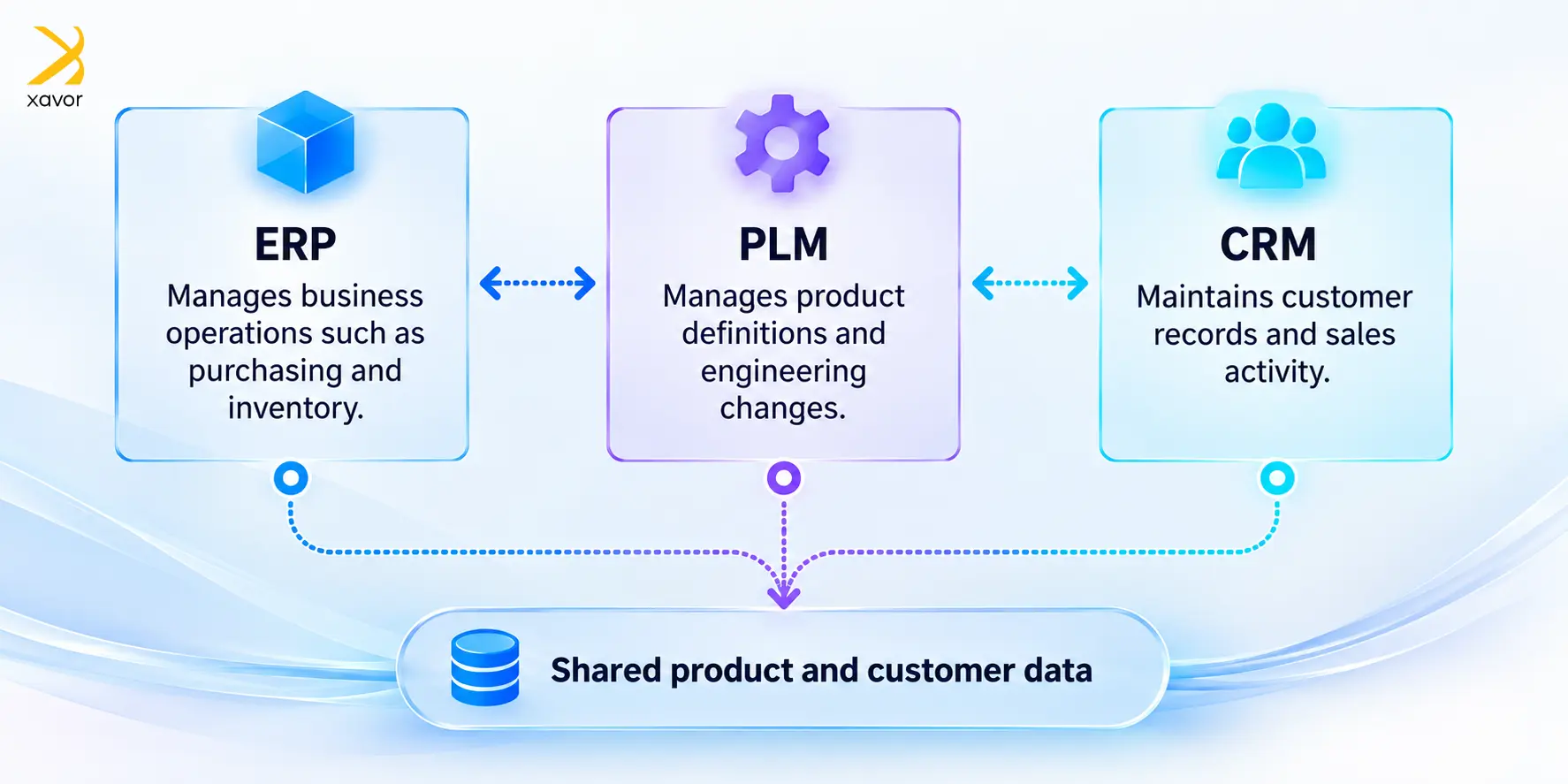
Connecting these applications requires matching their product or customer IDs so that their information updates the correct record in each system.
To keep shared records consistent, you need to decide which application maintains the authoritative value for each field before transferring data. For example, engineering might approve a product revision in PLM, while finance maintains its manufacturing cost in ERP. The integration should use PLM as the source for approved product revisions and ERP as the source for manufacturing costs.
The table below shows how each system manages business records and what information it shares with other applications.
| System | Typical responsibility | Information shared with other applications |
| PLM | Engineering maintains approved product definitions. | Released revisions and bills of materials |
| ERP | Operations manages manufacturing and inventory records. | Stock availability and item costs |
| CRM | Sales maintains customer relationships and requirements. | Account details and requested configurations |
Once you establish which system maintains each field, define how the applications’ product records relate to one another. Sales may describe a product as a set of customer-selected options. Engineering specifies the components that meet those choices in a bill of materials (BOM). Additionally, manufacturing may require a different BOM for each plant. The integration must preserve these relationships so that a sales configuration leads to the correct manufacturing instructions.
Along with defining these relationships, specify when each product revision becomes valid. The engineering department may approve a revision today for production next month. For that reason, include its effective date in the transfer so ERP can store the revision without using it prematurely.
How does an approved product change reach manufacturing and sales?
A manufacturer can configure its AI data integration workflow to transfer released product data from PLM to ERP, then update CRM after ERP confirms acceptance. The steps below explain how an approved product change moves from PLM to ERP and then CRM, including where AI can suggest a product category for review.
Transfer the approved revision from PLM
Configure your PLM platform to send a notification when the engineering department releases a change. The integration then retrieves the approved revision and its affected parts. Give each notification a unique identifier so the receiving software can recognize a repeated notification and avoid processing the same update twice.
Check the data before updating ERP
The integration converts approved PLM fields into the format ERP requires. For example, a field mapping specifies which PLM part number belongs in the ERP item-number field. Before using these mappings in production, engineers should test that each value lands in the correct ERP field.
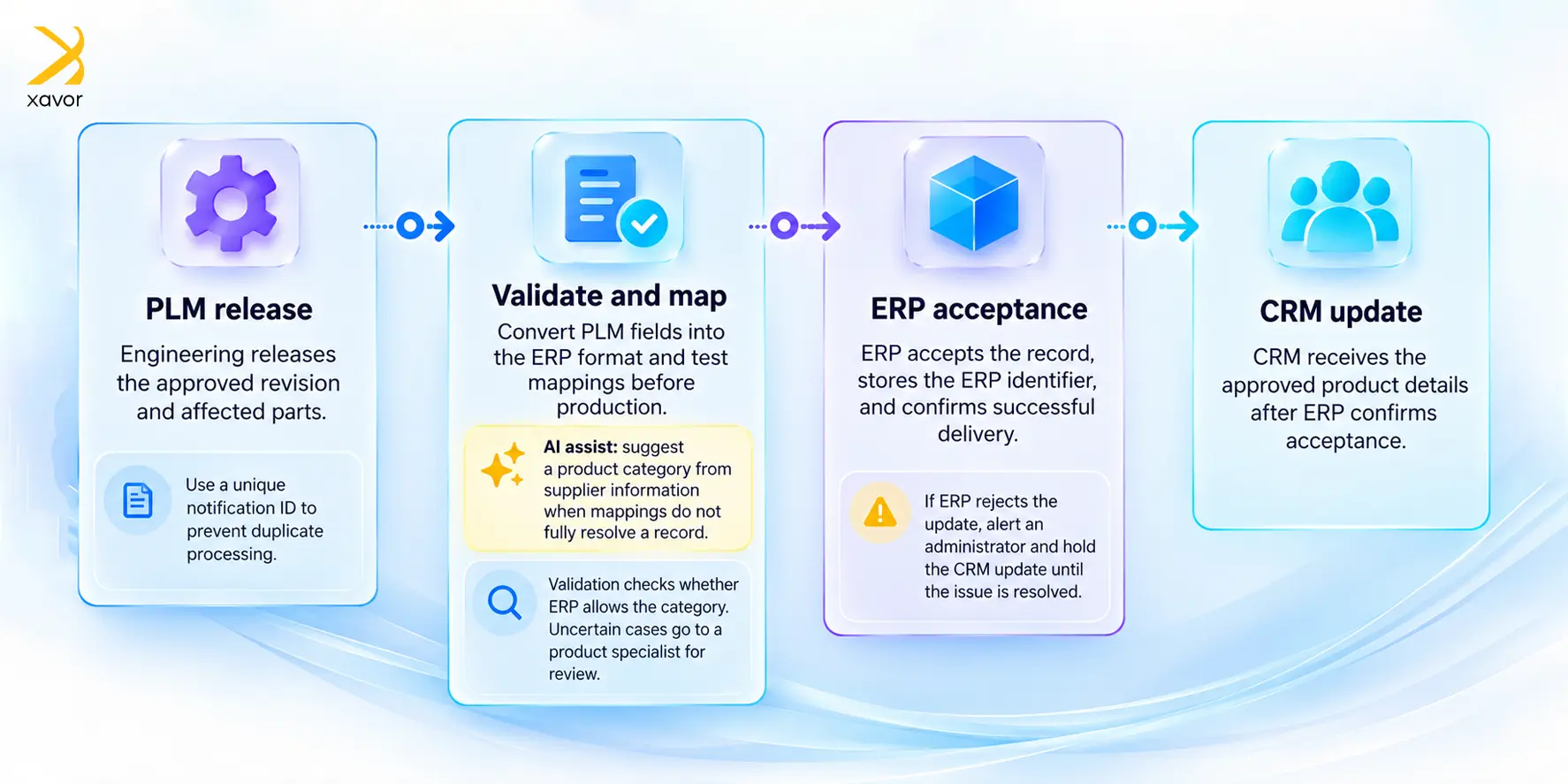
When field mappings alone cannot resolve a record, you can use AI to assist with interpreting the information. A model could suggest a product category from a supplier document and provide the passage supporting its suggestion. Validation software checks whether ERP allows that category. If the classification remains uncertain, a product specialist reviews it before the integration submits the update. You should update sales information after ERP accepts the change.
Once ERP accepts the record, the integration saves the ERP record identifier and confirms successful delivery. CRM can then receive approved details about the revised product. If ERP rejects the update, the integration alerts an administrator and retains the CRM update until someone resolves the error.
Which data integration tools should you choose?
You should choose AI data integration tools according to how quickly the receiving application needs the information and what it must do with it. A daily reporting update can run on a schedule, while a salesperson checking stock during an order needs a current response. These requirements determine how applications should exchange data.
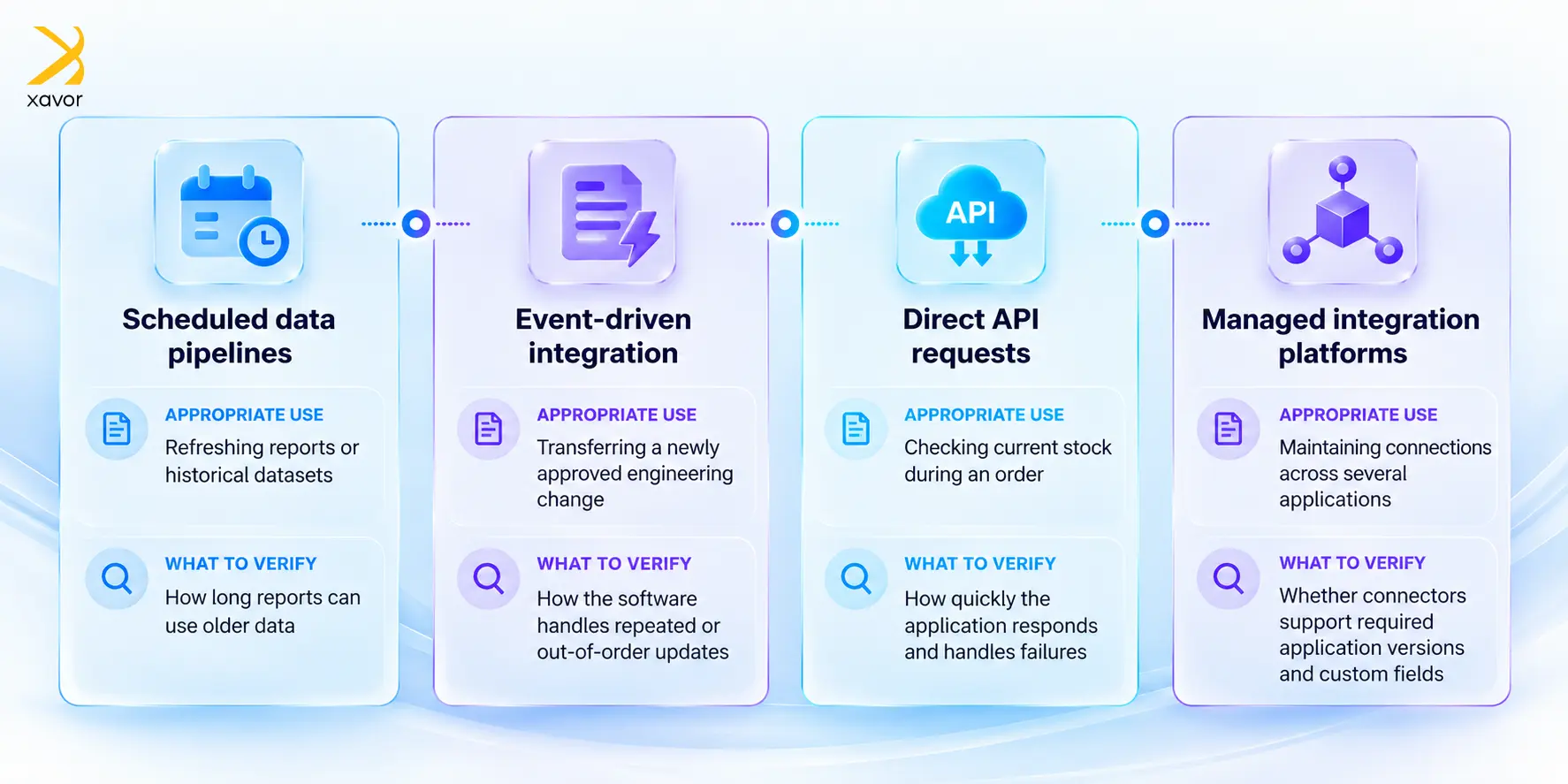
The table below compares common integration options, explains when to use each one, and identifies what to check before choosing a tool.
| Integration option | Appropriate use | What to verify |
| Scheduled data pipelines | Refreshing reports or historical datasets | How long reports can use older data |
| Event-driven integration | Transferring a newly approved engineering change | How the software handles repeated or out-of-order updates |
| Direct API requests | Checking current stock during an order | How quickly the application responds and handles failures |
| Managed integration platforms | Maintaining connections across several applications | Whether connectors support required application versions and custom fields |
An application programming interface (API) lets software request information or submit an update through a defined interface. For operational changes, use an interface that applies the receiving application’s validation rules. For reporting, scheduled pipelines can extract records and convert them into a suitable analytical format.
Before choosing a data integration platform, you need to evaluate it with representative records, including failed transactions. Ask the vendor to demonstrate how an administrator identifies an error and resumes processing. Microsoft’s event-driven architecture guidance explains why independently processed updates can arrive out of order or leave applications temporarily inconsistent. You should test how your proposed integration handles both conditions.
If the available connectors cannot support an older application, that application may need a custom interface. Cloud application development can support that work when the existing application permits the required access. You need to specify which records the new interface can read or change.
How can you keep enterprise data integration reliable?
Reliable AI data integration requires defined responses to failed or incomplete updates. Suppose ERP saves a record, but the integration never receives confirmation. Before retrying, the integration should check whether ERP already processed that transaction. A unique transaction identifier helps prevent retries from creating duplicate records.
Furthermore, access controls should specify what each connection can read and change. Remove information that the AI model has no permission to access before sending data to it. Record which source data produced each update and who approved any manual correction. These controls also apply when generative AI integration gives a model access to business applications.
You should evaluate model recommendations against examples that specialists have already checked. Include records with missing identifiers and conflicting revisions. Also review a sample of accepted recommendations to detect errors that routine validation missed, and repeat the evaluation after changing the model.
After checking the accuracy of AI recommendations, measure whether AI reduces the work employees perform. Compare the time spent reviewing its recommendations with the time previously spent preparing records manually. For engineering changes, also track the delay between PLM approval and ERP acceptance. If incorrect suggestions increase review time, investigate their cause before expanding automated processing.
When should you use data integration services?
AI data integration services can help when a workflow spans applications managed by different departments or requires custom software. Integration engineers can document which department approves each shared field and design recovery procedures for failed transfers. Internal administrators should receive instructions for monitoring the integration and resolving errors after launch.
For example, in a semiconductor manufacturing data-engineering project, engineers used SQL Server Integration Services to automate data extraction and loading. They added error recovery and SQL transformation logic to support repeatable processing. In other cases, engineers can add an AI recommendation step to a controlled process like this and check its output before the next transfer.
To put these recommendations into practice, begin your AI data integration project with a workflow where manual transfers cause measurable delays. Bring sample records and examples of errors you or your colleagues currently resolve. Email us at [email protected] to discuss how Xavor’s integration services can help you define the connections and approval rules your workflow needs.

FAQs
AI can help interpret legacy fields and generate conversion instructions. Integration software still needs an approved way to read or update the application, such as an API or a file exchange.
AI data integration can use scheduled transfers for reporting that tolerates older data. Use immediate requests when a business decision requires current information, such as checking stock before confirming an order.
A People Data Labs integration can add information to CRM contact records. Its person enrichment API lets you set a minimum likelihood score for matching a person. Check uncertain matches before updating contacts, and retain the source of any added information.