
Apple has provided iOS developers with a modern, powerful, and expressive language, Swift, that offers better safety and performance compared to Objective-C. Swift is a new language, whereas Objective-C, part of the C language, has been around for almost three decades.
Migrating your codebase from Objective-C to Swift can seem like a very daunting task. But those who have done it can say with certainty that it is a worthwhile endeavor as it can greatly improve your iOS app’s maintainability and performance.
Many mobile app development companies expect their iOS app developers to use Swift for app development. They are also expected to know how to migrate from Objective-C to Swift.
This article is a guide that will walk you through the migration process. It will also arm you with the knowledge of best practices and tips to ensure a smooth transition.
Let’s start.
Why migrate to Swift: Advantages of Swift
While Swift has become ubiquitous in iOS development, there are a lot of iOS programs that still run on Objective-C. Particularly, older and larger iOS apps were built using Objective-C programming language.
Objective-C was the primary language used in iOS app development when iPhone SDK was launched back in 2008. It was only until 2014 when Apple introduced Swift programming language it started to take a back seat.
You might ask that if Objective-C still works fine, then why migrate your iOS apps to Swift? Well, there are several advantages of Swift over Objective-C, which we have discussed below.
1. Modern Syntax
Swift is a modern programming language with a syntax that is more concise and expressive. It reduces boilerplate code and makes it easier to read and write. With Swift, you can achieve the same functionality with fewer lines of code compared to Objective-C.
This not only makes your codebase cleaner but also reduces the likelihood of errors.
2. Safety
Safety is a major reason why developers translate Objective-C to Swift for their app code. Swift eliminates entire categories of common programming errors by adopting safe programming patterns and adding modern features to make programming easier and safer.
For instance, Swift’s type system and optionals help prevent null pointer exceptions, which are a common source of crashes in Objective-C. Beyond code safety, developers should also focus on advanced iOS app security practices to ensure the entire app ecosystem remains resilient.
3. Performance
Performance is one of the most critical aspects of any programming language. Swift is designed to be fast and efficient, with performance that often matches or exceeds that of Objective-C. When planning a transition, it also helps to understand the broader differences in web app vs mobile app development, since migration often goes hand-in-hand with modernizing your digital strategy.
The language is optimized for speed, and Swift code can outperform Objective-C in many scenarios due to its modern compiler and runtime optimizations.
4. Interoperability
Swift is fully interoperable with Objective-C as it allows you to mix and match Swift and Objective-C code within the same project. This interoperability enables a smooth transition, as you can incrementally convert your codebase to Swift without having to rewrite everything from scratch.
5. Maintenance
Swift has no dependency on C which makes it easier to develop and maintain iOS apps. In Objective-C, iOS developers had to maintain to separate code files, but in Swift this two-step approach is merged using a single file .swift.
Furthermore, most young iOS engineers learn Swift as their first development tool. So, if you need an iOS developer to maintain your Apple program, having your codebase in Swift will make your search a lot easier.
Don’t take this approach for Objective-C to Swift migration
First, let’s talk about the wrong way of migrating from Objective-C to Swift that many teams unfortunately take. A lot of developers start with the idea: “Let’s just write all the new code in Swift.”
This approach sounds good in theory, but in practice it rarely works. You see the new Swift code usually ends up sitting on top of the old Objective-C code, instead of replacing it. Why? Because integrating Swift into big blocks of existing Objective-C code is really messy and difficult.
And after all that effort, most the of the critical parts of the app are still Objective-C, while Swift code is just thin surface-level part of the codebase. So, to save your time, energy, and effort take this approach off your options list.
How to Prepare for the Migration Process
Before diving into the migration process, it’s essential to prepare adequately:
1. Understand Your Codebase
Identify the critical components and dependencies of your project. Focus on the parts that will benefit most from Swift’s features. Understanding the structure and dependencies within your codebase will help you plan the migration effectively.
2. Modernize Your Codebase
Update your Objective-C code before you start migrating. That way, it is easier to translate Objective-C to Swift. Xcode, Apple’s IDE for iOS development, has a built-in tool called the modern Objective-C converter that can automatically update your code to use more current language features.
3. Set Up Version Control
Ensure your project is under version control (e.g., Git). This allows you to track changes and revert if necessary. For teams using GitLab, you can streamline this further by setting up an iOS app development project version in GitLab CI, ensuring smooth versioning during migration. Having a robust version control system in place is crucial for managing the migration process and ensuring you can easily backtrack if needed.
4. Use Automated Tests
Having a comprehensive suite of automated tests will help you verify the correctness of your code before and after migration. Tests provide a safety net, ensuring that your changes do not introduce regressions or break existing functionality.
Migration Strategies
There are two primary strategies for migrating from Objective-C to Swift:
1. Incremental Migration
iOS developers should migrate parts of their codebase to Swift gradually, ensuring each part works correctly before moving on. This approach is less risky and allows for continuous integration.
You can start with smaller, less critical components and gradually work your way up to more complex parts of the codebase.
2. Big Bang Migration
Migrate the entire codebase to Swift in one go. This approach is faster but riskier, as it involves more significant changes at once. A big bang migration requires careful planning and thorough testing to ensure that the entire codebase is functional after the transition.
The Step-by-Step Migration Process
Follow this stepwise guide to avoid any hassle while converting Objective-C to Swift for your iOS project.
1. Start with Bridging
Swift and Objective-C can coexist in the same project, thanks to bridging. Begin the migration process by creating a bridging header (YourProject-Bridging-Header.h) to expose your Objective-C code to Swift.
When adding your first .swift file to the project, you’ll likely be hit with a prompt that looks like this:
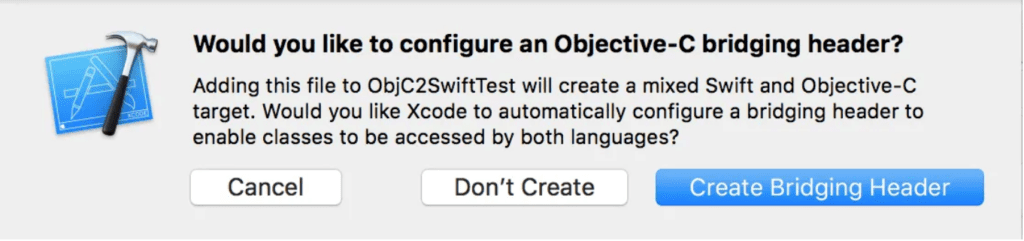
Click Create Bridging Header.
If you did not see the prompt, or accidentally deleted your bridging header, add a new .h file to your project and name it [MyProject]-Bridging-Header.h, then make sure you link its path in your target’s project settings.
Bridging header sample:
// YourProject-Bridging-Header.h
#import “YourObjectiveCClass.h”
You can also use Swift code in Objective-C by importing the auto-generated Swift header (YourModuleName-Swift.h).
2. Migrate Utility and Helper Classes
Next, your focus should be on utility and helper classes, which are often used throughout your project.
Objective-C:
@interface MathUtility : NSObject
+ (NSInteger)addNumber:(NSInteger)a toNumber:(NSInteger)b;
@end
@implementation MathUtility
+ (NSInteger)addNumber:(NSInteger)a toNumber:(NSInteger)b {
return a + b;
}
@end
Swift:
class MathUtility {
static func add(_ a: Int, to b: Int) -> Int {
return a + b
}
}
3. Convert Model Classes
Start by converting simple, self-contained classes like models. These are usually less dependent on other parts of your codebase.
Objective-C:
@interface Person : NSObject
@property (nonatomic, strong) NSString *name;
@property (nonatomic, assign) NSInteger age;
@end
@implementation Person
@end
Swift:
class Person {
var name: String
var age: Int
init(name: String, age: Int) {
self.name = name
self.age = age
}
}
4. Migrate View Controllers
You can move on to more complex components like view controllers once you’ve gained confidence with smaller classes.
Objective-C:
@interface MyViewController : UIViewController
@property (nonatomic, strong) UILabel *label;
@end
@implementation MyViewController
– (void)viewDidLoad {
[super viewDidLoad];
self.label = [[UILabel alloc] initWithFrame:CGRectMake(0, 0, 100, 50)];
self.label.text = @”Hello, World!”;
[self.view addSubview:self.label];
}
@end
Swift:
class MyViewController: UIViewController {
var label: UILabel!
override func viewDidLoad() {
super.viewDidLoad()
label = UILabel(frame: CGRect(x: 0, y: 0, width: 100, height: 50))
label.text = “Hello, World!”
view.addSubview(label)
}
}
5. Handling Objective-C Macros in Swift
Objective-C often uses macros for convenience. When migrating to Swift, you need to replace these macros with appropriate Swift code. Here’s an example of how to handle common macros.
Objective-C:
#define Device [UIDevice currentDevice]
#define CanMakePhoto() [UIImagePickerController isSourceTypeAvailable:UIImagePickerControllerSourceTypeCamera]
#define isIPhone() (isDev(@”iPhone”) || isDev(@”iPod”))
– (BOOL)isDev:(NSString *)device {
return [Device.model containsString:device];
}
Swift:
class Device {
static var current: UIDevice { UIDevice.current }
static var canMakePhoto: Bool {
UIImagePickerController.isSourceTypeAvailable(.camera)
}
static func isDevice(_ device: String) -> Bool {
UIDevice.current.model.contains(device)
}
static var isIPhone: Bool {
isDevice(“iPhone”) || isDevice(“iPod”)
Best practice for Objective-C to Swift migration
Follow these best practices to translate Objective-C to Swift with perfection.
1. Refactor and Clean Up
Use the migration as an opportunity to refactor and clean up your code. Remove unused code and improve the design. This will make your codebase more maintainable and easier to work with in the future.
2. Leverage Swift Features
Converting Objective-C to Swift becomes easier if you take advantage of Swift’s powerful features like optionals, generics, and closures to write more expressive and safer code. These features can help you write code that is both more concise and less error-prone.
3. Test Thoroughly
Ensure your migrated code is thoroughly tested. Use unit tests, UI tests, and manual testing to verify correctness. Automated tests are especially important for catching regressions and ensuring that your changes do not introduce new bugs.
4. Documentation
Update your documentation to reflect the changes in your codebase. This helps your team understand the new Swift code and ensures that future developers can easily navigate and maintain the code. Teams can also explore how LLMs can help in the modernization of legacy code, especially when refactoring large Objective-C projects into Swift.
Challenges while converting Objective-C to Swift
Objective-C to Swift migration is not without its challenges. Despite the interoperability between the two languages, if you write a bit of Swift code in a chunk of Objective-C code, the Swift part often becomes spaghetti code.
Here are some other challenges like these that developers find annoying and how to solve them.
1. Complex Dependencies
Migrating classes with complex dependencies can be challenging. Break down the dependencies and migrate incrementally. This approach helps manage the complexity and reduces the risk of introducing errors.
2. Memory Management
Swift uses Automatic Reference Counting (ARC) like Objective-C, but subtle differences exist. Pay attention to retain cycles and memory leaks. Use Swift’s weak and unowned references to manage object lifetimes correctly and avoid memory issues.
3. Performance Tuning
While Swift is generally performant, some parts of your code may require optimization. Use instruments and profiling tools to identify and address performance bottlenecks.
Regular performance testing ensures that your app remains responsive and efficient after the migration.
4. Regularly Merge Changes
During the migration process, it’s crucial to regularly merge changes from your main branch into your migration branch. This practice helps prevent large merger conflicts and keeps your migration efforts in sync with ongoing development.
5. Use Swift Playgrounds
Swift Playgrounds can be an excellent tool for experimenting with Swift code and testing small parts of your migration before integrating them into your main project. This approach can help you understand Swift’s syntax and behavior without disrupting your main codebase.
6. Engage Your Team
Migration is a team effort. Engage your team members in the process, share knowledge about Swift, and collaborate on solving migration challenges. Regular code reviews and pair programming sessions can help ensure consistency and quality across the migrated code.
7. Maintain Interoperability During Migration
When migrating from Objective-C to Swift, keep in mind that Swift classes can’t be subclassed in Objective-C, and you’ll need to remove the old .m file to avoid duplicate errors. To expose Swift classes back to Objective-C, make them inherit from an Objective-C class. Additionally, use Xcode’s shortcuts to simplify the process.
Using Objective-C to Swift Converter
There is always a smarter way of doing things. Several Objective-C to Swift converter tools are available online or as stand-alone software. You can just paste your Objective-C code in these tools, and they will automatically convert it into Swift language.
While it is the convenient and faster option, it’s not always the safer or best option. There are a lot of semantics in a code written by a programmer that these automatic tools don’t understand. So, your Objective-C code can get lost in translation literally.
Therefore, we recommend using Objective-C to Swift converter tools as part of your migration strategy, but don’t rely on them for the full migration process.
Conclusion
Migrating from Objective-C to Swift is a significant investment, but it can pay off in terms of code maintainability, safety, and performance. It’s best to follow a systematic approach, leverage Swift’s features, and thoroughly test your code when performing the migration.
This will ensure a smooth and successful transition.
Are you ready to shift your iOS apps to the latest and most efficient programming language? Drop us a line at [email protected] to learn more about how Xavor’s mobile app development services can help you achieve your business goals.